


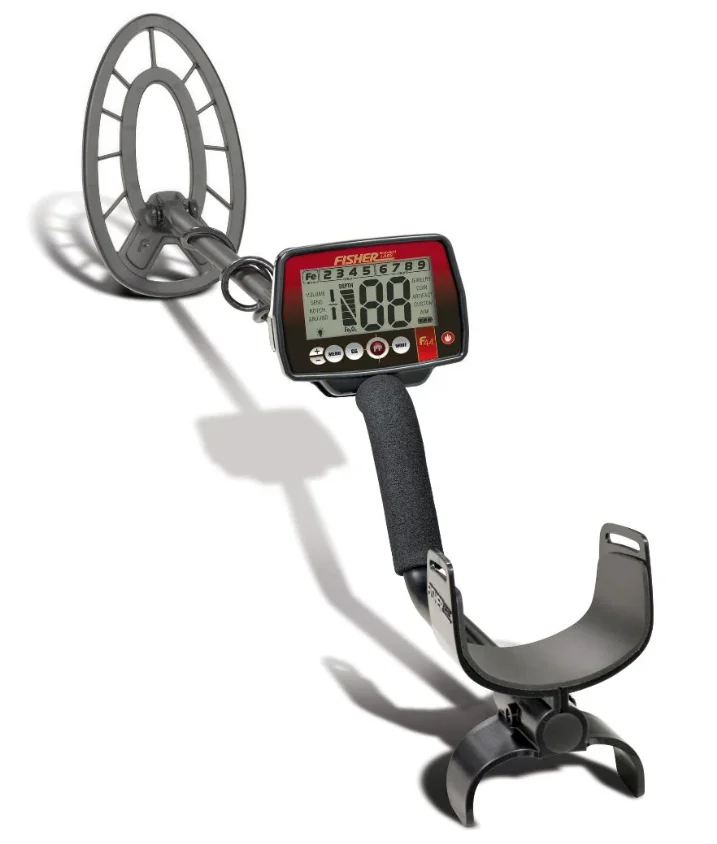
Fisher F44 Weatherproof Metal Detector
TERMINOLOGY
The following terms are used throughout the manual and are standard terminology among detectorists.
- RELIC
A relic is an object of interest by reason of its age or its association with the past. Many relics are made of iron, but can also be made of bronze or precious metals. - IRON
Iron is a common, low-grade metal that is an undesirable target in certain metal detecting applications. Examples of undesirable iron objects are old cans, pipes, bolts and nails. Sometimes the desired target is made of iron. Property markers, for instance, contain iron. Valuable relics can also be composed of iron; cannon balls, old armaments and parts of old structures and vehicles can also be composed of iron. - FERROUS
Metals that are made of, or contain, iron. - ELIMINATION
Reference to a metal being “eliminated” means the detector will not emit a tone, nor display a Target-ID, when a metal object passes through the searchcoil’s detection field. - DISCRIMINATION
When the detector emits different tones for different types of metals, and when the detector “eliminates” certain metals, we refer to this as the detector “discriminating” among different types of metals.
Discrimination is an important feature of professional metal detectors. Discrimination allows the user to ignore trash and otherwise undesirable objects. - PINPOINTING
Pinpointing is the process of finding the exact location of a buried object. Long-buried metals can appear exactly like the surrounding soil and can therefore be very hard to isolate from the soil. - V.C.O.
Meaning “voltage controlled oscillator,” the V.C.O. audio method raises both the audio pitch and the volume as signal strength increases. V.C.O. improves the user’s ability to interpret a target’s size and depth. Very weak signals (for small or very deeply buried objects) have the faintest volume and the lowest pitch. Larger objects, and those closer to the searchcoil, will induce a higher volume and higher pitch sound. - GROUND CANCELATION
Ground Cancellation is the detector’s ability to ignore, or “see through,” the earth’s naturally occurring minerals and sound only when a metal object is detected. This detector incorporates proprietary circuitry to eliminate false signals from many mineralized soils.
CONTENTS OF BOX
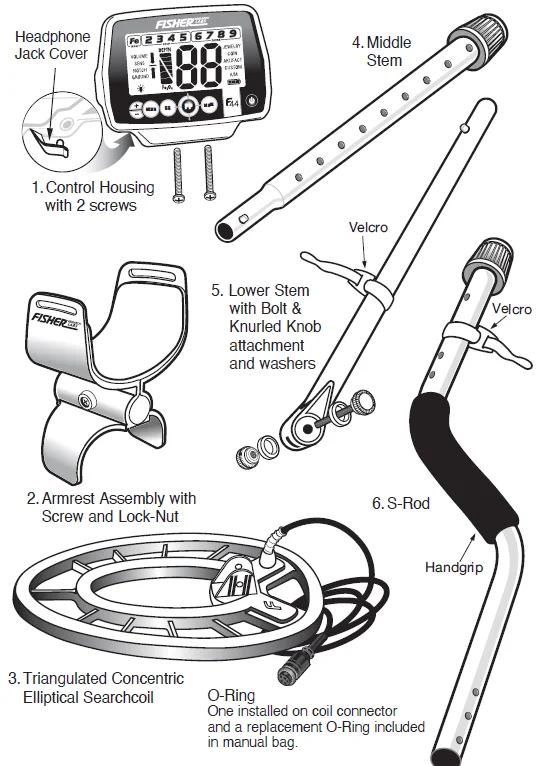
The following detector components are in the box:
ASSEMBLY
Tool Required: #1 Phillips Screwdriver
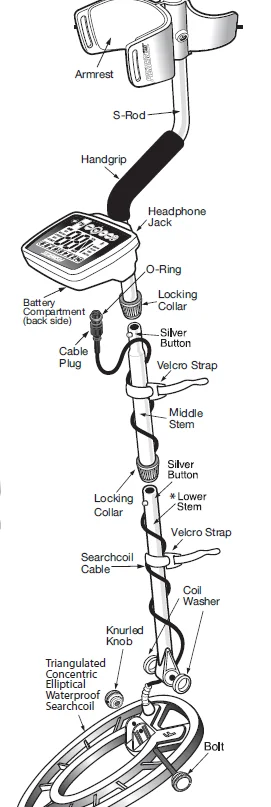
- Remove the Screw from the Armrest.
- Slide the Armrest over the end of the S-Rod.
- Attach with Screw and the lock nut.
- Attach the Control Housing with Screws; install the back screw first.
NOTE:- The Handgrip fits under the Control Housing. The handgrip may partially cover one mounting hole. Peel back the Handgrip to expose the front hole.
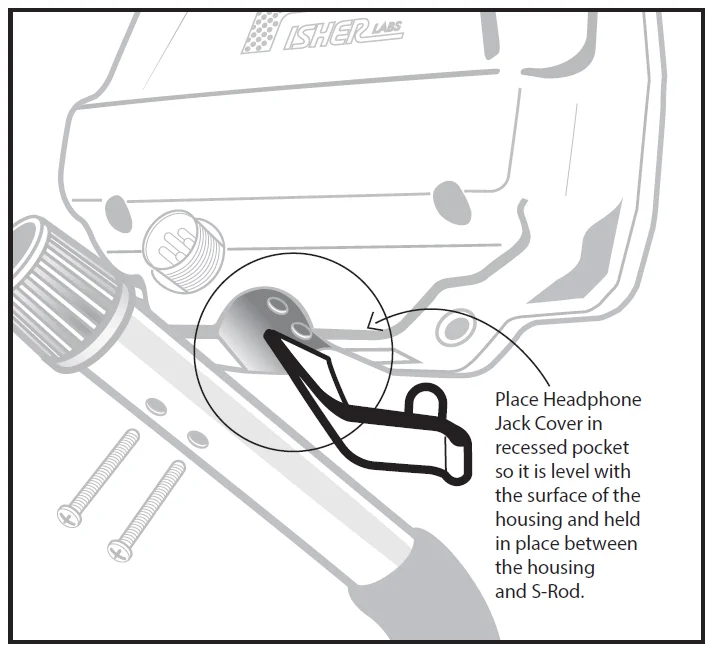
- Ensure the headphone jack cover is properly seated before attaching the control housing.

- Position S-Rod upright.
- Rotate the LOCKING COLLAR fully in the counterclockwise direction.
- Insert your finger inside the tube and make sure the INTERNAL CAM LOCK is flush with the inside of the tube.
- Insert the MIDDLE STEM into the S-ROD, with the SILVER BUTTON pointed upward.
- Rotate the MIDDLE STEM until the SILVER BUTTON is located in the hole.
- Twist the LOCKING COLLAR fully in the clockwise direction until it locks.
- Repeat this process on the LOWER STEM.
- Using the BOLT and KNURLED KNOB, attach the SEARCHCOIL to the LOWER STEM.
- Adjust the LOWER STEM to a length that lets you maintain a comfortable upright posture with your arm relaxed at your side, and the SEARCHCOIL parallel to the ground in front of you.
- Wind the CABLE securely around the STEMS, leaving slack at the bottom.
- Connect the CABLE PLUG to the housing.
Do not twist the Cable or Plug. Turn Locking Ring only. Use minimal finger pressure to start the threads. Do not cross-thread. When the Locking Ring is fully engaged over the threaded connector, give it a firm turn to make sure it is very tight. When the Locking Ring is fully engaged over the threaded connector, it may not cover all of the threads.
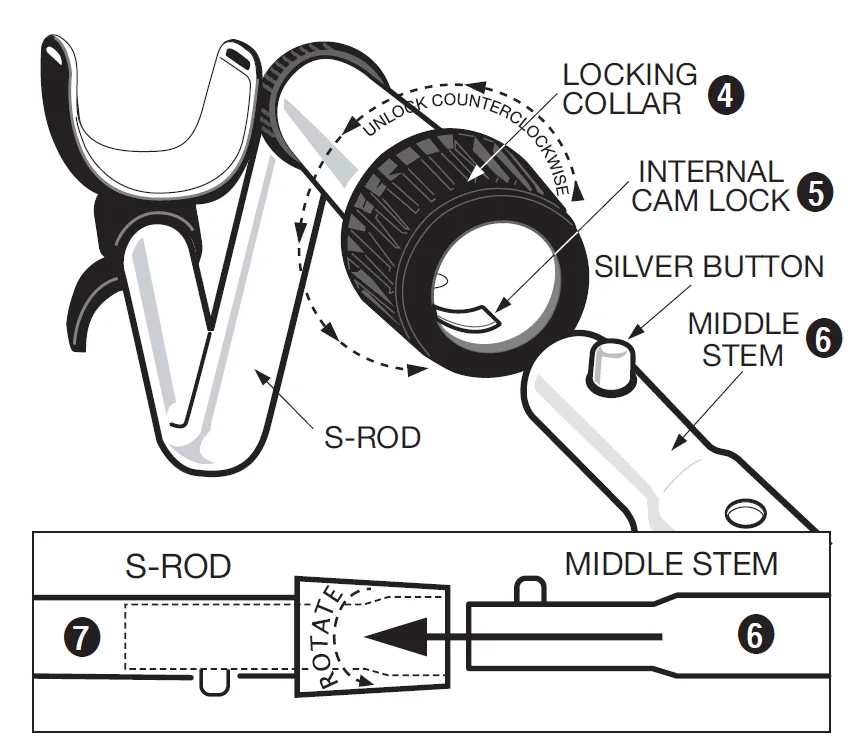
Caution: Forcing in the MIDDLE STEM with the CAM LOCK raised may form a burr on the cam lock. If this happens, remove the burr with a knife to allow insertion.
* Note: Very tall users can purchase the optional Extended Lower Stem (TUBE5X), for extended reach.
BATTERIES
The detector requires two AA batteries. We recommend ALKALINE batteries (not included).
- Do not use ordinary “Zinc Carbon” batteries.
- Do not use “Heavy Duty” batteries.
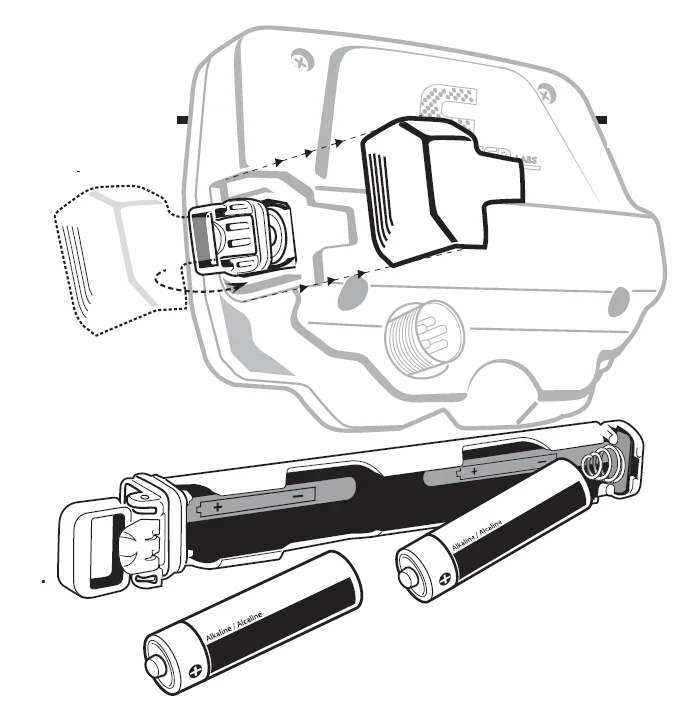
- Rechargeable batteries can also be used. If you use rechargeables, we recommend using a “Nickel Metal Hydride” rechargeable battery. The battery compartment is located on the right side of the Control Housing. Both batteries should be installed with the negative terminal down.
Remove battery tube:
- Slide the battery door off.
- Extend the handle on the battery tube (with your finger or by using the tab on the battery door to pry the handle into the extended position)
- Pull on the handle to remove (do not use the battery door tab to pull the tube out of the control housing, as this may cause damage to the battery door)
To install the battery tube:
- Position the handle on the battery tube in the lowered position.
- Firmly push down on the battery tube until the battery tube handle is flushed with the housing. (The battery tube will only insert one way, with the brass contacts facing towards the display and the hinged side of the handle towards the back.)
BATTERY LIFE
Expect 25 to 30 hours of life from 2 AA Alkaline batteries. Rechargeable batteries provide about 15 hours of usage per charge. Backlight increases power consumption and decreases battery life, with significant power drain at maximum brightness.
BATTERY INDICATOR
The battery icon has three segments plus an outline segment. The amount of battery voltage for two ALKALINE batteries is indicated as follows:
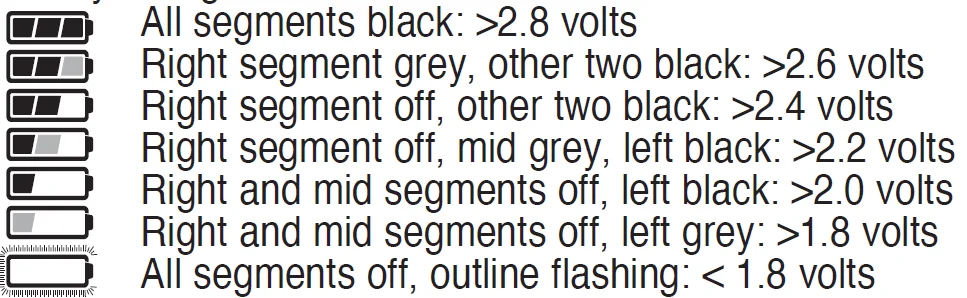
It is recommended to change the batteries when you see one black segment.
SPEAKER VOLUME AND BATTERY CHARGE
You may notice the speaker volume drop while one battery segment is illuminated. With the outline flashing, low speaker volume will be very apparent.
BATTERY DISPOSAL & RECYCLING
Alkaline batteries may be disposed of in a normal waste receptacle or recycled. Other battery chemistries should be recycled.
QUICK-START DEMONSTRATION
- Supplies Needed
- Nail (made of iron)
- U.S. Quarter (or silver coin)
- U.S. Nickel
- Gold Ring
- U.S. Dime
- U.S. Penny, dated after 1982 (post-1982 pennies are made of Zinc) (Most newer non-U.S. coinage also contains mostly Zinc)
- Position the Detector
- Place the detector on a table with the searchcoil hanging over the edge (or have a friend hold the detector with the searchcoil off the ground).
- Keep the searchcoil away from walls, floors, and metal objects.
- Remove watches, rings, and jewelry.
- Turn off lights or appliances whose electromagnetic emissions may cause interference.
- Pivot the searchcoil back.
- Press to
 power on. A series of 10 numbers will sequence across the screen; this is the serial number.
 - Press
 twice. All target categories are now illuminated.
- Demonstrate DISCRIMINATION Feature:
- Pass all objects over the searchcoil and notice the different tones. Notice the target icon indicators and the large two digit target ID number displayed for each item.
- Nail: low tone
- Nickel: medium tone
- Zinc Penny: medium tone
- Gold Ring: Most gold rings will register with a medium tone
- Dime: high tone
- Quarter: high tone
- Press thebutton twice to enter Jewelry Mode. Notice Fe graphic is now removed.
- Wave nail over searchcoil. It will not be detected because it has been “discriminated out.”
- Pass all objects over the searchcoil and notice the different tones. Notice the target icon indicators and the large two digit target ID number displayed for each item.
- Demonstrate NOTCH Feature:
- Press MANU until “NOTCH” is illuminated.
- Press
 until the icon “3” is flashing, then wait until the icon stops flashing (approximately 5 seconds). The icon will be blanked out.
 - Pass a nickel over the searchcoil. It will not be detected. The nickel has been “notched” out.
- Press4 times, target icon 3 is now flashing, then wait until the icon stops flashing (approximately 5 seconds). The icon will now be notched back in. Only one target category can be notched at a time. Repeat the process to notch additional categories.
- Demonstrate DEPTH Indicator:
- Pass theNickel close to the searchcoil (about 1” away).
- Notice the depth bar graph indicating a shallow target.
- Wave the Nickel farther away from the searchcoil and notice additional bar graph segments illuminating, indicating a deeper target.
- Demonstrate the PINPOINT feature:
- Press and hold “
 ” momentarily appears on the screen.
 - Hold a coin motionless over the searchcoil.
- Lower the coin toward searchcoil and then raise coin away from searchcoil.
- Notice the sound changes as the coin distance varies.
- Notice the depth indicator changes as the coin moves up and down.
- Press and hold “
 power on. A series of 10 numbers will sequence across the screen; this is the serial number.
 twice. All target categories are now illuminated.
 until the icon “3” is flashing, then wait until the icon stops flashing (approximately 5 seconds). The icon will be blanked out.
 ” momentarily appears on the screen.
THE BASICS OF METAL DETECTING
This metal detector is intended for locating buried metal objects. When searching for metals, underground or on the surface, you have the following challenges and objectives:
- Ignoring signals caused by ground minerals.
- Ignoring signals caused by metal objects you do not want to find, like nails.
- Identifying a buried metal object before you dig it up.
- Estimating the size and depth of objects to facilitate digging them up.
- Eliminating the effects of electromagnetic interference from other electronic devices.
Your metal detector is designed with these things in mind.
- Ground Minerals
All soils contain minerals. Signals from ground minerals can interfere with the signals from metal objects you want to find. All soils differ, and can differ greatly, in the type and amount of ground minerals present. This detector has proprietary circuitry to automatically eliminate interfering signals from minerals that occur naturally in the ground.
NOTE: This detector will not eliminate interference from all types of minerals.
For example, the detector IS NOT designed for use on wet sand saltwater beaches. Another example of soil this detector will not eliminate is any soil containing large concentrations of iron oxides, which are usually red in color. - Trash
If searching for coins, you want to ignore items like aluminum foil and nails. You can see the Target-ID of the buried objects, listen to the sounds, and then decide what you want to dig up. Or, you can eliminate unwanted metals from detection by using the different Modes or the NOTCH feature, or use the Custom mode to create your own discrimination settings. - Identifying Buried Objects
Metal objects are identified along the 9-segment Conductivity graphic symbols and with a large 2-digit target ID number in the center of the screen. Both are indicators of the relative electrical conductivity of different objects. Segments to the right indicate more conductive targets. Iron objects will be illuminated with the Fe symbol. The Fe (iron) category will display target ID numbers from 1 to 19.
- Gold, nickel and brass objects will be illuminated in the “Gold” group .

- Silver and copper objects will be illuminated in the “Silver” group.
- Gold, nickel and brass objects will be illuminated in the “Gold” group .
- Size and Depth of Buried Objects
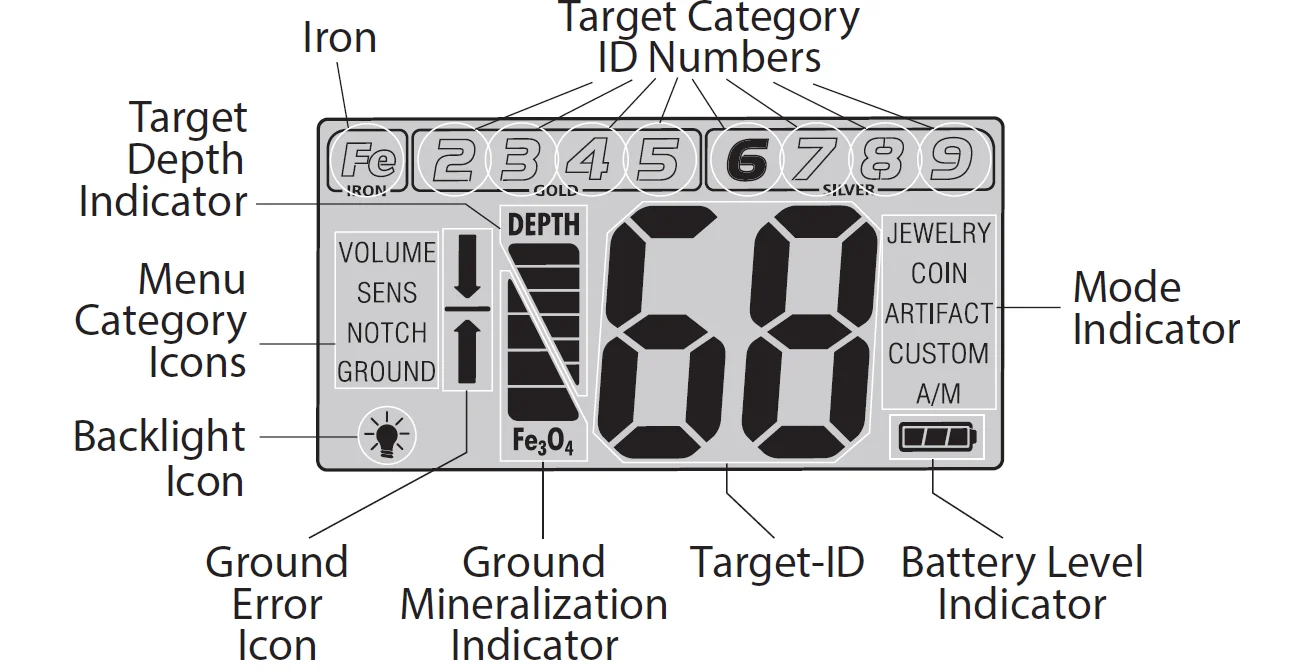
The 6-segment graphic indicates the relative depth of a buried metal object. This graphic can indicate the relative size of different objects or their distance from the search coil. For a given object, the greater the distance between it and the searchcoil, the more segment lines illuminated. - EMI (Electromagnetic Interference)
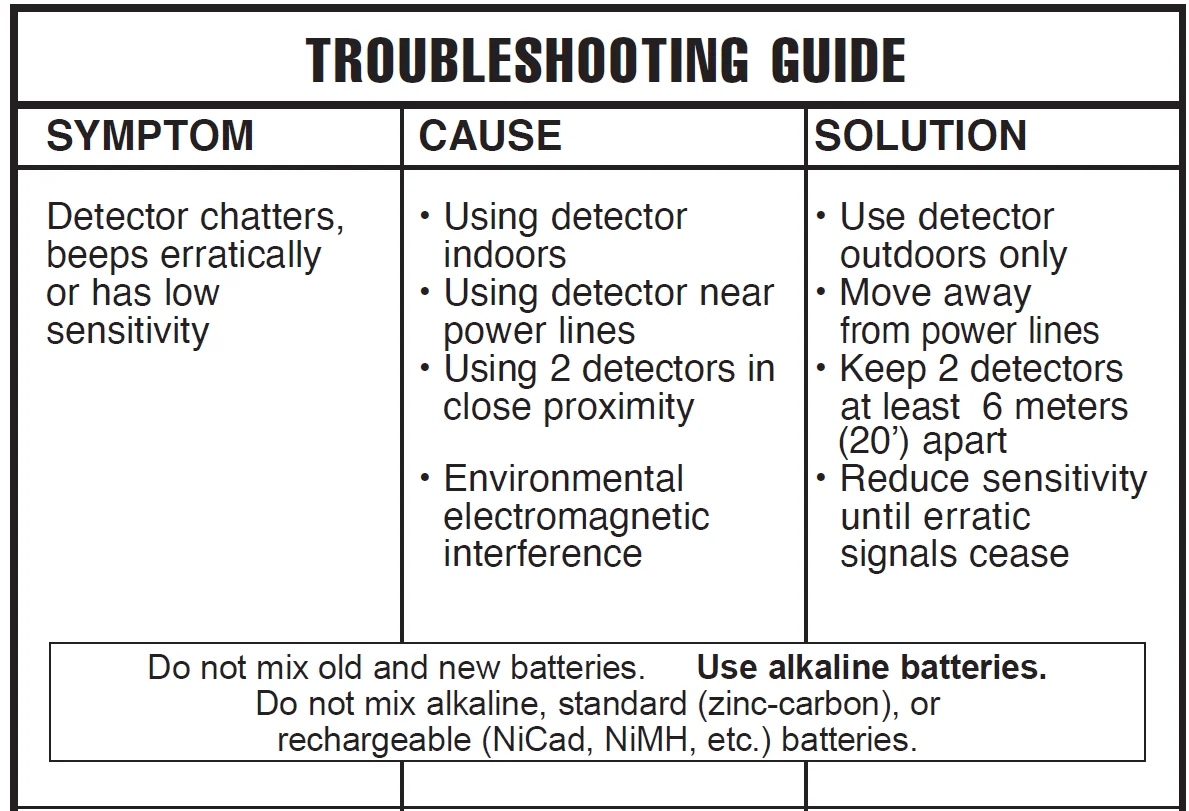
The searchcoil produces a magnetic field and then detects changes in that magnetic field caused by the presence of metal objects. This magnetic field the detector creates, is also susceptible to the electromagnetic energy produced by other electronic devices. Electric fences, cell phones, cell phone towers, power lines, microwave ovens, lighting fixtures, TVs, computers, motors, etc., all produce EMI which can interfere with the detector and cause it to beep erratically. The SENSITIVITY control lets you reduce the strength of this magnetic field and therefore lessen its susceptibility to EMI. You may want to operate at maximum strength, but the presence of EMI may make this impossible. If you experience erratic behavior or “false” signals, reduce the sensitivity.


USING THE DETECTOR
Sweep Method
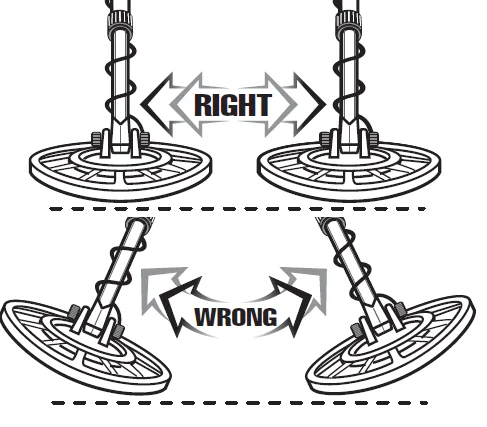
Sweep the detector side-to-side over the ground. Keep the searchcoil parallel to the ground as you sweep; do not lift the searchcoil at the ends of your sweeps. Searchcoil motion is required for target detection.
OPERATION and CONTROLS
HOW TO WORK THE CONTROLS?
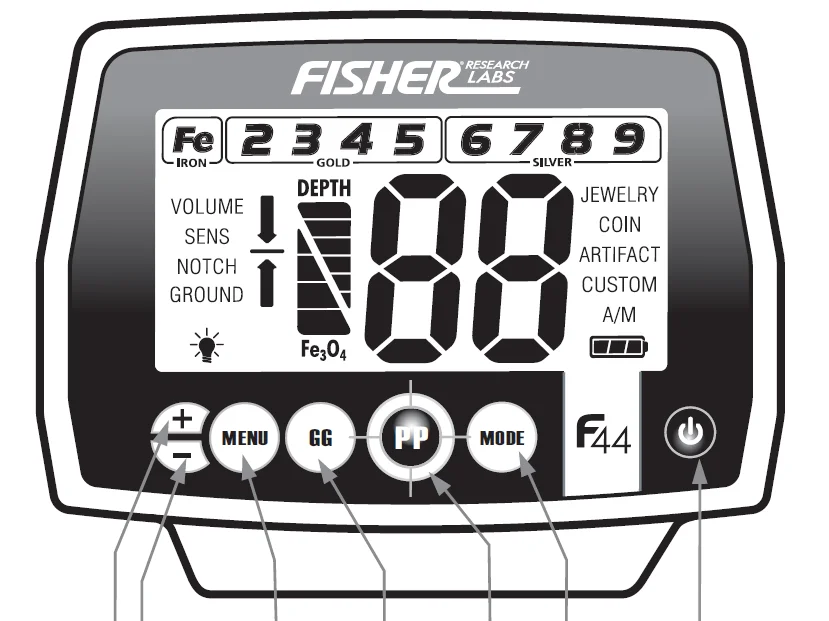
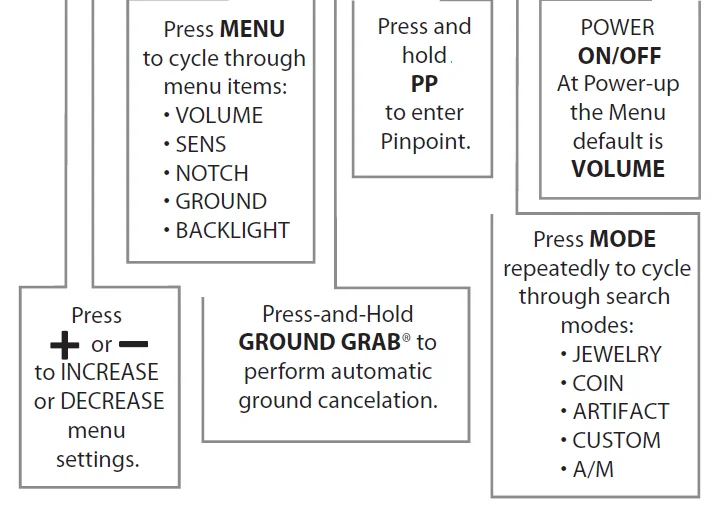
THE DISPLAY
Target Category Icons
Icons will turn from outlined to solid, indicating a detected target. A “blank” position indicates a Notched-out target category.
DEPTH INDICATOR
Coin-sized objects will be detected up to 10” deep. The 6-segment graphic indicator is calibrated to coin-sized objects.
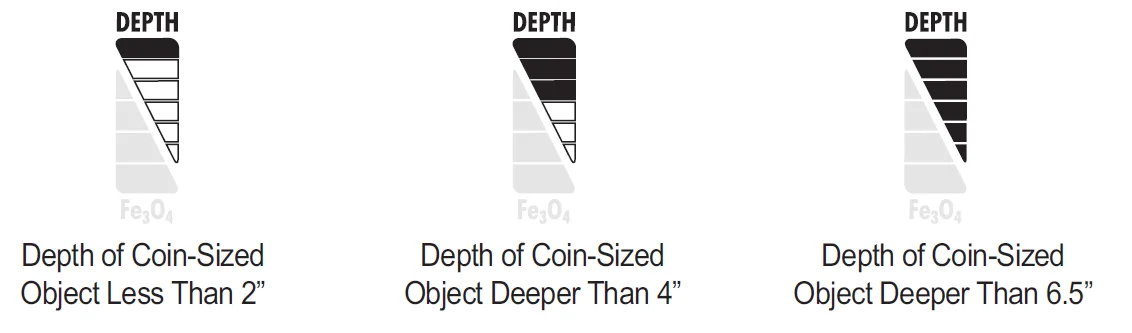
Objects other than coins will still register on the 6-segment depth scale, but the depth indication will be relative. For example, all 6 segments illuminated could indicate a coin buried 10” deep, but could also be a very large object several feet deep. Use the Depth Indicator in conjunction with the Target Category Icons and the aid of Pinpoint to gain more information about the buried target.
OVERLOAD WARNING
If a metal object or highly magnetic soil are too close to the searchcoil, the detector will overload and a “–” will appear on the screen. The detector will make a rapid, repeating mid-tone warning sound. Overload will not harm the detector, but the detector will not function under these conditions. If overload occurs, raise the searchcoil to detect the target from a greater distance, or move to a different location.
OPERATING MODES
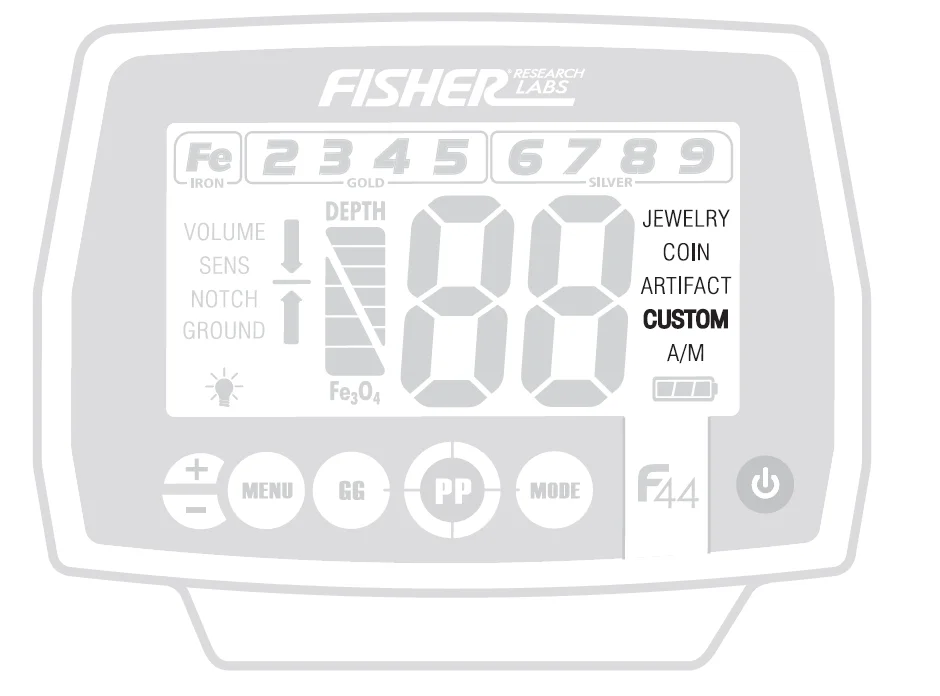
There are four discrimination modes: JEWELRY, COIN, ARTIFACT and CUSTOM, and ALL METAL (A/M) mode. JEWELRY and COIN modes have preset notch settings. You can change all 9 target category notch settings in all four discrimination modes, and these changes will be saved on shutdown. Pressing the MODE button will cycle through the modes. The active Mode will have bold text. Use NOTCH to change discrimination settings in each mode. The NOTCH function does not work in All Metal mode.
- JEWELRY Mode preset NOTCH: Fe (Iron) category notched out.
- COIN Mode preset NOTCH: Fe (Iron) and Target Category groups 2 (Foil) and 4 (Aluminum) notched out.
- ARTIFACT Mode: All Target Categories enabled.
- CUSTOM Mode: User-definable.
TARGET IDENTIFICATION
Target-ID
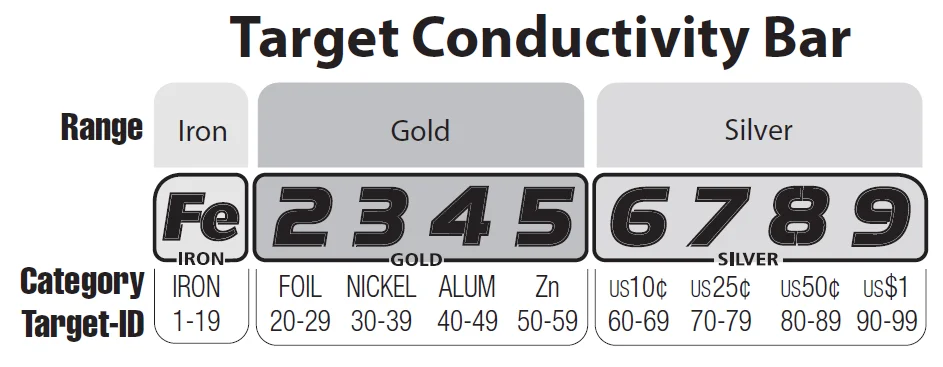
This is a motion detector. The coil must be moving for the detector to sense metal, except when in Pinpoint. If you stop the coil over a metal object, it will null out and go silent. When metal objects are detected, the detector will emit a sound, a Target ID Category icon will illuminate, and a 2-digit Target-ID number will appear on the screen. Possible Target-ID numbers range from 1 to 99. This number represents the electrical conductivity of the target; higher numbers indicate more highly conductive targets. Target indicators on the screen only represent the last object detected. This detector has a fast target response and is able to detect different objects in very close proximity. Therefore, the Target-ID displayed may change rapidly as you sweep the searchcoil. Three seconds after a target is detected, the ID numbers will time out and disappear and the Target Category Icon will change to the non-illuminated state. Solid illumination of a singular target category indicates the detector is confident of the target identification. If target-ID confidence is low, the detector will assign several possible categories, with the most likely target category solid black and less likely target categories shaded gray.

Iron, Gold, and Silver Indicators
The group border momentarily flashes when an object in that group is present. The border flashes independently of the notch settings. Relic hunters will frequently seek out iron-laden sites as good prospective treasure-hunting sites. The iron indicator alerts the user to the presence of iron, even if iron has been discriminated out. Relic hunters can search free of iron-target audio, yet still be alerted to the presence of ferrous objects or search with no discrimination and use the FeTone™ feature to decrease the Audio Volume of ferrous targets.
4-Tone Target Identification
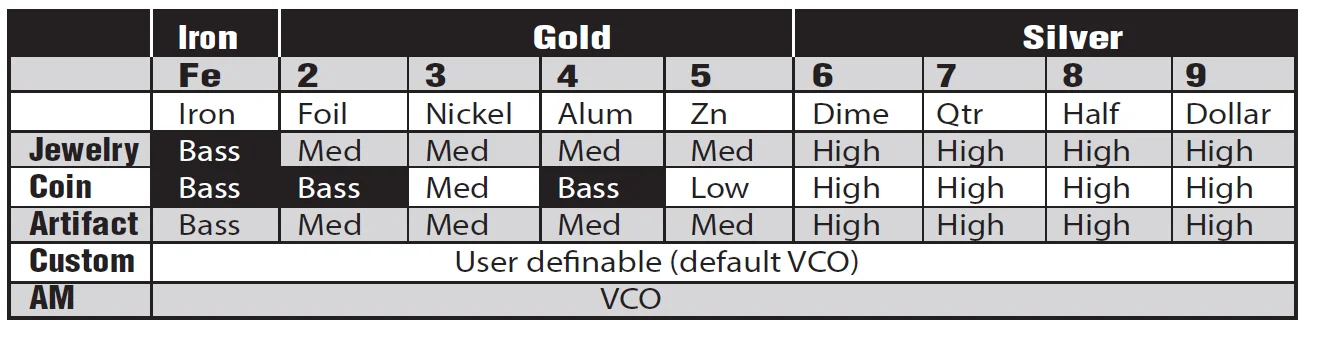
The detector will provide 1 of 4 sounds for any metal object detected: a bass, low, medium or high tone. This audio feedback system is useful in conjunction with the visual Category Icon system described above.
See chart below for description of tones induced by different metals in different modes:
Ferrous, gold, and silver targets will generally register within their corresponding category icon ranges. Targets that are not gold or silver register within the same range according to their electrical conductivity.
Note that the electrical conductivity of a target depends on both its composition and size. Silver is more conductive than gold so it registers farther to the right, and the larger the silver object, the farther it registers to the right. There is a wide variety of metals, and no target can be identified for certain until unearthed. See the coin reference table below.
GROUND CANCELATION
WHAT IS GROUND CANCELLATION?
Why do I need to cancel out the ground?
All soils contain minerals. Signals from ground minerals are often tens or hundreds of times as strong as the signal from a buried metal object. The magnetism of iron minerals, found in nearly all soils, causes one type of interfering signal. Dissolved mineral salts, found in some soils, are electrically conductive, causing another type of interfering signal. Ground Cancelation is the process by which the metal detector cancels the unwanted signals coming from the ground minerals while still detecting the signals from buried metal objects. This is accomplished by matching the detector’s Ground setting to the Phase of the ground signal. When the detector is calibrated to the soil, the result will be deeper target detection, quieter operation, and more accurate target identification. The most accurate GROUND value is the value displayed when “pumping” the searchcoil over the ground in an area free of metal.
CHARACTERISTICS & LIMITATIONS
- This detector comes with a waterproof searchcoil. The searchcoil can be completely submerged in water. The control housing is weatherproofbut cannot be submerged in water.
- BURIED UTILITY LINES. This hobby metal detector is not designedto locate buried pipes or cables. First Texas Products manufactures acomplete line of pipe and cable locators for this application. These aresophisticated instruments with functionality different from your hobby metal detector.
- SEVERE SOIL CONDITIONS. While this detector has proprietary circuitry to cancel out minerals naturally occurring in most soil types, it cannotpenetrate the most severe soils, and it is not intended for use on wet sand saltwater beaches. However, it is well-suited for detecting on drysand. Saltwater is highly conductive and requires a more sophisticatedtype of detector. First Texas Products offers such types of detectors. Otherhighly mineralized soils, such as those found in some gold prospecting sites, may also limit this detector’s capability. If the detector tends tooverload, it could indicate you are in an area containing such severe soils.
- ARGET-ID. The detector’s Target-ID system calculates and displaysthe most probable identification. Target-ID is affected by soil conditions, the searchcoil’s distance from the target, the length of time the targethas been buried, and the target’s proximity to other dissimilar targets. Very large metal objects can overload the detector and may be classifiedinaccurately.
- REDUCE SENSITIVITY. The primary purpose of the Sensitivity controlis to allow the operator to reduce the sensitivity of the detector. Alldetectorists desire to find objects at maximum depth. However, in today’senvironment there is a never-ending variety of devices emitting EMI(Electromagnetic Interference) that can interfere with this detector. There will be environments where the detector cannot operate at maximumsensitivity. This is not a defect. If you find yourself in such an environment,reduce the sensitivity of the detector. Some environments may have so much EMI it is impossible to detect. Both overhead power lines and buriedpower lines can interfere with this detector. Power line capacity may bequite different during certain times of the day. For instance, peak hours of electrical use that can occur around 6 p.m. can lead to a lot of EMI. Ifyou experience power line interference, try returning to a given area at adifferent time of day.
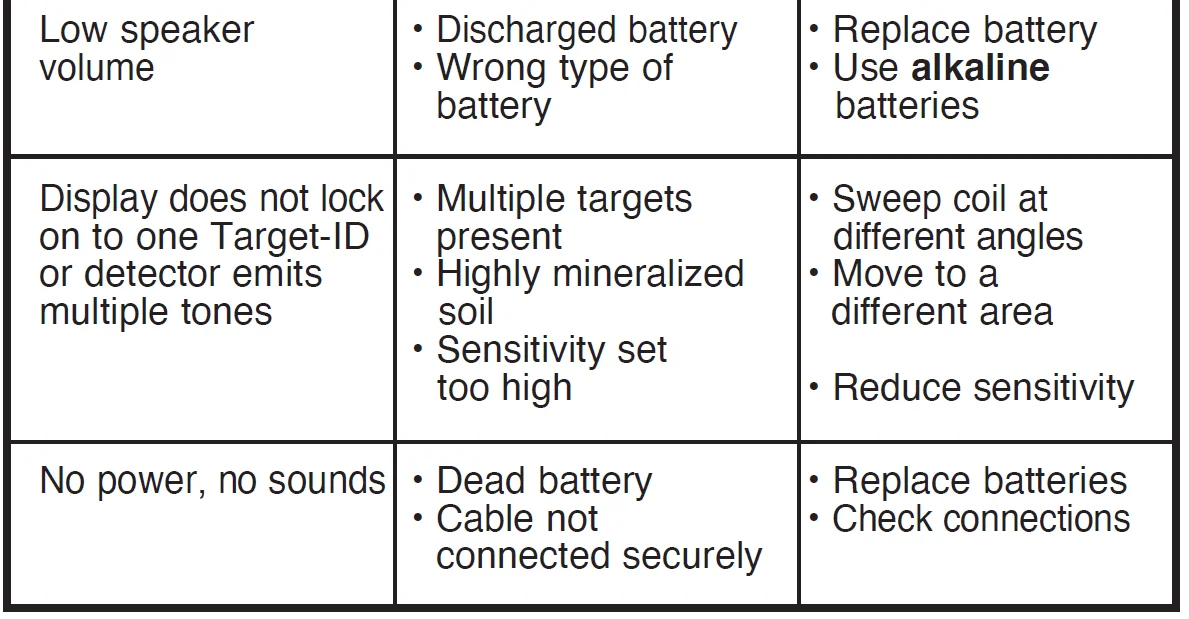
TROUBLESHOOTING GUIDE
For more manuals by Fisher Labs, visit ManualsLibraryy
Fisher F44 Weatherproof Metal Detector-FAQs
How do I use the Fisher F44 metal detector as a beginner?
Start by choosing a clean area with minimal trash. Turn on the detector, select a preset mode like Coins or Jewelry, and keep the coil close to the ground while sweeping slowly. Listen carefully to audio tones and dig only when you get a clear, repeatable signal.
What settings should beginners use on the Fisher F44?
Beginners should start with a preset search mode, mid-level sensitivity, and moderate discrimination. This setup helps reduce false signals while still detecting common targets like coins and jewelry.
How do I know if my Fisher F44 is working properly?
You can perform a simple ground test by placing metal objects on the soil and sweeping over them. If the detector produces consistent audio and target ID readings, it’s working correctly.
What are common mistakes beginners make when using a metal detector?
Common mistakes include swinging too fast, keeping the coil too high, ignoring ground noise, and using incorrect settings for the environment.
How deep can the Fisher F44 detect metal?
Depth depends on target size, soil conditions, and settings. Coins are typically detected up to 8–10 inches, while larger objects can be detected deeper.
How can I make my Fisher F44 detect deeper targets?
Use headphones, keep the coil close to the ground, sweep slowly, ensure fresh batteries, and adjust sensitivity based on ground conditions.
What do the beeping tones mean on the Fisher F44?
Low tones usually indicate iron or junk, mid tones suggest aluminum or small gold items, and high tones often signal coins, silver, or copper.
Why is my metal detector not picking up gold?
This usually happens due to mineralized soil, incorrect sensitivity, or poor ground balance. Lowering sensitivity slightly and sweeping slowly can improve gold detection.
What number does gold usually show on the Fisher F44?
Gold often appears in the mid-range Target ID, typically between 40 and 70, depending on size, purity, and soil conditions.