

Tovala Smart Oven Air Fryer
Important Safety Instructions
When using your Electric Oven, basic safety precautions should always be observed, including the following:
- Read all instructions.
- Do not touch hot surfaces. Always use handles or knobs.
- Close supervision is necessary when any appliance is used by or near children.
- To protect against electric shock, do not immerse the cord, plug or any parts of the oven in water or any other liquids.
- Do not let the cord hang over the edge of the table or counter, or touch hot surfaces.
- Do not operate an appliance with a damaged cord or plug or after the appliance malfunctions or has been damaged in any manner. Return the appliance to the nearest authorized service facility for examination, repair or adjustment.
- The use of accessory attachments not recommended by the appliance manufacturer may cause hazard or injury.
- Do not place on or near a hot gas or electric burner.
- When operating the oven, keep at least three inches of free space around the sides and back of the oven and six inches of free space from the top of the oven to allow for adequate air circulation.
- Unplug from the outlet when not in use and before cleaning. Allow to cool before putting on or taking off parts and before cleaning.
- To disconnect, press the Stop button on the oven control panel, then remove the plug. Always hold the plug, and never pull the cord.
- Extreme caution must be used when moving a drip pan or sheet tray containing hot oil or other hot liquids.
- Do not cover any part of the oven with metal foil. This may cause the oven to overheat.
- Use extreme caution when removing the tray, racks, basket, or disposing of hot grease or other hot liquids.
- Do not clean the inside of the oven with metal scouring pads. Pieces can break off the pad and touch electrical parts, creating a risk of electric shock.
- Oversized foods or metal utensils must not be inserted in a toaster oven as they may create a fire or an electric shock.
- A fire may occur if the oven is covered or touches flammable material, including the curtains, draperies, walls, and the like, when in operation. Do not store any item on top of the appliance when in operation.
- Extreme caution should be exercised when using cooking or baking containers constructed of anything other than metal or ovenproof glass.
- Be sure that nothing touches the top or bottom elements of the oven.
- Do not place any of the following materials in the oven: cardboard, plastic, paper or anything similar.
Power Supply Cord Set Instructions
A short power-supply cord is provided to reduce the risk resulting from becoming entangled in or tripping over a longer cord.
- Longer detachable power-supply cords or extension cords are available and may be used if care is exercised in their use.
- If a longer detachable power-supply cord or extension cord is used:
- The marked electrical rating of the cord set or extension cord should be at least as great as the electrical rating of the appliance;
- The cord should be arranged so that it will not drape over the countertop or tabletop where it can be pulled on by children or tripped over unintentionally; and
- The cord set or extension cord should be a grounding-type 3-wire cord.
Setting up your Tovala Oven
In the box
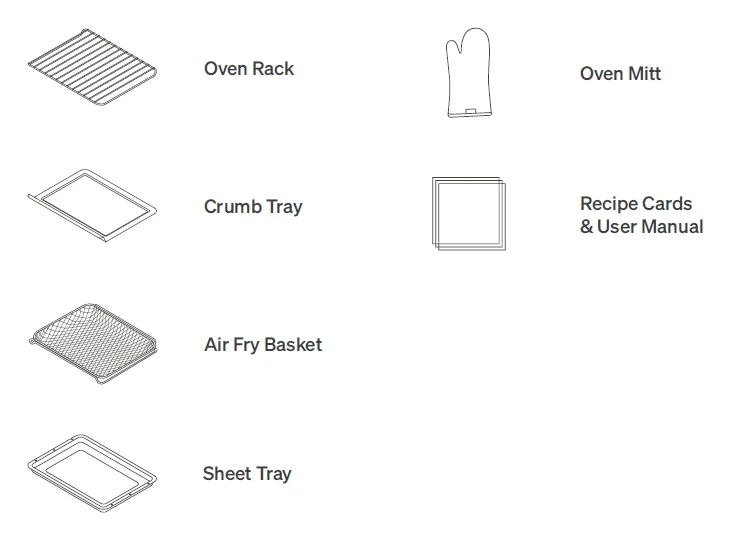
Before first use of your oven, you need to know these important safeguards.
General usage safeguards
- Do not place paper, cardboard, plastic, or any other materials not suitable for an oven inside this appliance. Extreme caution should be used when using a container made from anything other than metal or glass.
- Your oven will become very hot during and after cooking. Do not touch hot surfaces. Use only the handles and buttons.
- Take care when opening your oven’s door, as cooking causes superheated steam to be released from your oven’s inner chamber.
- Do not put cooking utensils or cooking dishes on your open oven door.
- Do not operate your oven with sealed or airtight containers inside.
- Do not place oversized foods, metal foil packages, or utensils in your oven, as they may cause a risk of fire or electric shock.
- Do not operate your oven if the power cord is damaged in any way. Email Tovala Customer Support at [email protected] or live chat with Customer Support at tovala.com/contact.
- Do not let the power cord touch hot surrounding surfaces.
- Do not try to to adjust or repair your oven yourself.
- Do not remove any screws from your oven for cleaning or repairs.
- Do not insert any objects in the vents on the sides of your oven.
- Do not place or use your oven anywhere water may accidentally splash or come in contact with your oven.
- Do not place any items on top of your oven. A fire may occur if your oven is covered or touching flammable material, such as walls, cabinets, curtains, and the like, when in operation. Do not hang any item on the oven door handle.
- Do not use your oven outdoors.
- If you hear your oven’s fan running after cooking with it, do not be alarmed. The fan will continue to run after cooking until your oven has sufficiently cooled.
- Place your oven 1 to 3 inches from your countertop’s edge, or set back from your countertop’s edge at least 8 inches to avoid damage when opening the door.
Cleaning safeguards
- Unplug your oven when not in use and before cleaning. For cleaning guidelines, see page 21.
- During cleaning, make sure your oven is cool before touching it or removing its parts.
How do I unpack and set up my Tovala Oven?
Follow these setup steps
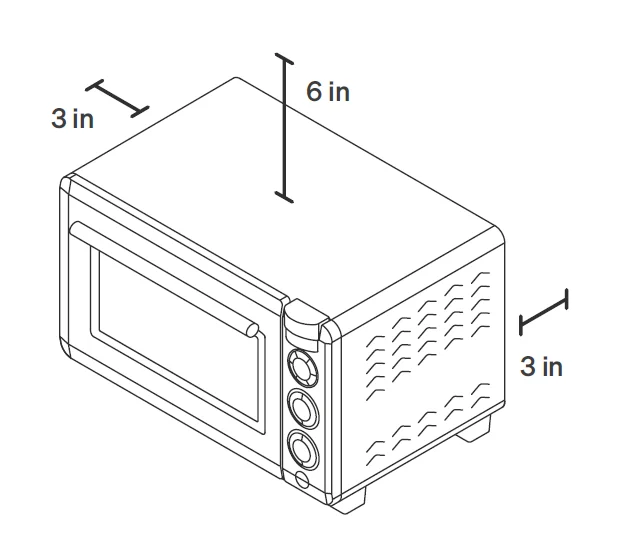
- Place your oven on a level and sturdy surface near a dedicated GFCI outlet. Leave open space between your oven and any surface: 3 inches around the back and sides, and 6 inches from the top.
- Remove all plastic and packaging. Throw out the silica packs found inside your oven.

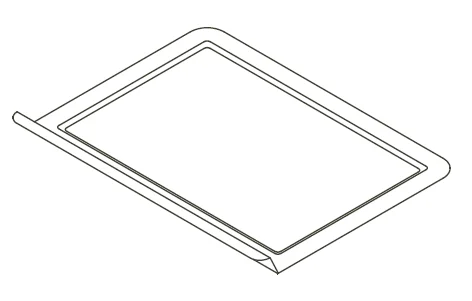
- Be sure to remove the plastic from the crumb tray (found on the bottom of your oven’s interior). Then, slide the crumb tray back into place under the heating elements.

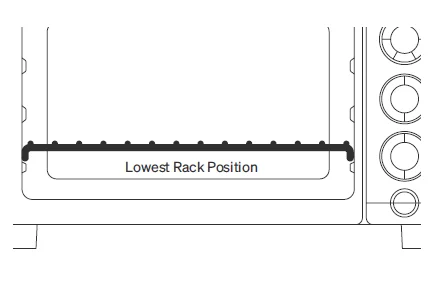
- Slide the oven rack into the lowest rack position, curved edges facing down. Unless otherwise stated, keep your rack in this position.
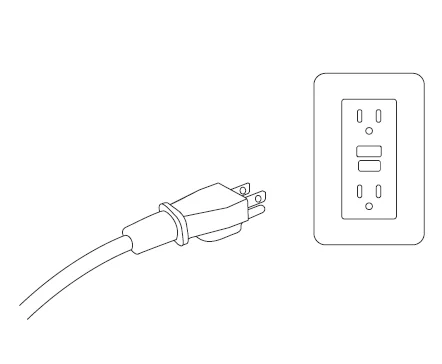
- Plug your oven into a GFCI outlet. Be sure that nothing else is plugged into that outlet. Do not plug your oven into an extension cord or power strip.
- Download the Tovala App and connect your oven to WiFi in the Settings tab. Without WiFi, your oven won’t be able to scan or communicate with the app.

- Before cooking anything, wash the air fry basket and sheet tray with warm, soapy water. Rinse and dry thoroughly then place in the oven with the sheet tray on the oven rack and air fry basket in the middle rack position. Set your oven to Bake at 450°F for 20:00. During this cleaning, you may detect smoke or smell burning. This is normal during your oven’s first use.
You’re all set.
Wondering what to make first? Try a recipe card or any recipe in the app.
Warning: Do not place or use your oven anywhere water may accidentally splash or come in contact with it. Do not place any items on top of your oven. A fire may occur if your oven is covered or touching flammable material, such as walls, cabinets, curtains, and the like, when in operation.
Connecting your Tovala Oven to WiFi
Your oven requires WiFi to scan, cook Tovala Meals, and communicate with the Tovala App. To connect your oven to WiFi:
- Download the Tovala App from the Apple App Store or Google Play Store on a compatible phone.
- App Store is a service mark of Apple Inc., registered in the US and other countries. Google Play is a trademark of Google LLC.
- Log in to your Tovala account or create an account.
- Go to the Settings tab of the app to connect to WiFi.
WiFi troubleshooting
Having trouble connecting your oven to WiFi? Check and try the following:
- Make sure the WiFi network you’re trying to connect to is working properly. Connect your phone to the WiFi network you’re trying to connect your oven to, then open up a webpage in your phone’s web browser. If the webpage does not successfully load, there may be an issue with the WiFi network itself.
- Make sure you select your WiFi network and type in your WiFi network’s password correctly. Typos happen to the best of us!
- Make sure the WiFi network you’re trying to connect your oven to is 2.4 GHz, NOT 5 GHz. Your oven cannot connect to 5 GHz networks and will not be available to connect to them in the app.
- Don’t see your WiFi network but pretty sure it’s 2.4 GHz? Some networks are hidden and won’t automatically display in the app. In this case, carefully type in your WiFi network name and password to connect.
What can I do with the Tovala App?
Set custom cook cycles with Automated Multi-Mode Cooking
- Your oven can air fry, bake, and broil separately and in cook cycles that switch between multiple of these cooking modes automatically.
- We utilize Automated Multi-Mode Cooking in our Toast and Reheat modes, when cooking Tovala Meals, and in Chef’s Recipes (recipes found in the Tovala App you make from scratch). For more on Automated Multi-Mode Cooking, see page 20.
Cook from a library of Chef’s Recipes
- When you want to cook from scratch, make a Chef’s Recipe. Use the app to follow our chef’s instructions and then cook these recipes perfectly without the guesswork.
Order Tovala Meals
- When you don’t have time to cook, get Tovala Meals delivered to your door. We do the prep work so they cook with the scan of a barcode!
Scan grocery store foods
- Scan hundreds of refrigerated and frozen grocery store foods. No preheating required. See the Tovala App for more details.
Cooking with your Tovala Oven
Oven Controls
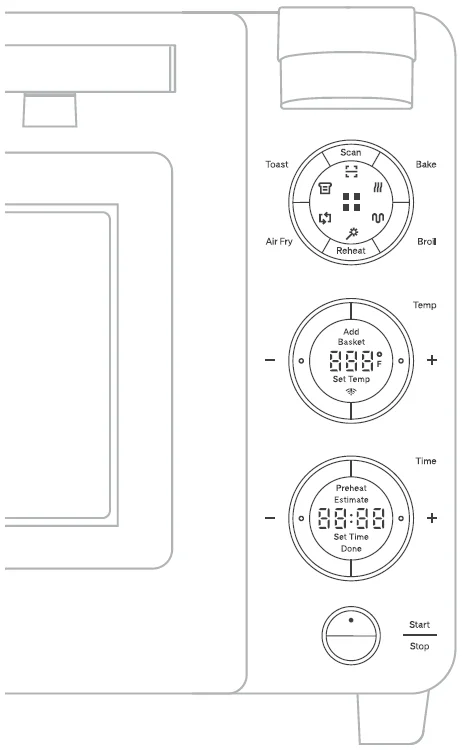
You can operate your oven with its control panel (pictured here). The control panel has 4 sections.
- Select the Mode
- Set a Temp
- Set a Time (if not preheating)
- Press Start
You can also set your oven from the Tovala App.
- Use Air Fry, Bake, and Broil modes separately.
- Or use them together for Automated Multi-Mode Cooking. See page 20.
Mode
Scan
Pressing this button activates your oven’s scanner. Your oven uses this to scan QR codes/barcodes found on Tovala Meals, recipe cards, and select scannable, Tovala-compatible grocery store foods. Each unique meal QR code communicates a cook cycle to your oven, so it understands how to automatically switch between cooking modes (a sequence of air frying, baking, and/or broiling).
- How do I scan a QR code or barcode?
- Press this button to activate your oven’s scanner. A red light will appear and indicate where to line up the QR code or barcode.
- Hold the QR code or barcode you’re trying to scan steady, approximately 3 to 4 inches below the scanner.
- When your oven successfully scans, it will beep and display a cook time.
Bake
Pressing this button selects your oven’s Bake mode. This cooking mode provides a gentle, even bake without using the convection fan.
Note: You may still hear your oven’s cooling fan running while using this mode.
- To bake with convection, you can use the Air Fry button on your oven (high-speed fan), or go to the app to create your own cook cycle and access Convection Bake mode (low-speed fan).
- How do I preheat my oven?
- Set your desired Bake mode Temperature and press Start. The message “Preheat Estimate” will appear in the Time display and begin an estimated countdown to when the Temperature you’ve set will be reached. Your oven will beep accordingly when the desired Temperature has been reached.
- Once your oven reaches the desired Temperature, set a Time and press Start.
- Your oven will hold the desired Temperature for 10 minutes after preheat is complete and then automatically shut off if you never set a Time or press Start.
- How do I use my oven without preheating?
- Set a Time after setting a Temperature, then press Start.
Broil
Pressing this button selects your oven’s Broil mode, which can be set to “Hi” broil or “Lo” broil. This cooking mode uses radiant heat from your oven’s broiler to brown the top of your food.
- Keep in mind that this Broil mode is powerful. When using Broil, do not leave your oven unattended.
- Do not use Broil mode with the oven rack in the highest rack position. Food should never touch the top heating element, as it could burn easily.
- Your oven does NOT need to preheat when using Broil mode. Simply set to “Hi” or “Lo”, set Time, and press Start.
Reheat
Pressing this button selects your oven’s Reheat mode, a cook cycle of baking and broiling calibrated to reheat food and return it to its original, freshly cooked glory.
- Cookware for reheating: Only cookware marked “oven safe” can be safely used in your oven. Do not place paper, cardboard, plastic, or any other materials not suitable for an oven inside this appliance. Extreme caution should be used when using a container made from anything other than metal or glass.
- Pro tip: When heating up messier foods like pastas and stews, reuse a clean aluminum tray from a Tovala Meal.
- For other foods, use the included sheet tray. Cover it in aluminum foil for easy cleanup.
- How long should I reheat my food?
- See the Reheating Guidelines card included with your oven, or check out the Support section of the app.
Air Fry
Pressing this button selects your oven’s Air Fry mode. This cooking mode uses a high-speed fan to circulate air in your oven for crispier food. Because of the high-speed fan, you may hear your oven’s fan more when using this mode, compared to when using others.
- When cooking select scannable, Tovala-compatible grocery store foods, some may cook best in the air fry basket to take advantage of your oven’s ability to air fry. See the app for more details.
- To air fry in your oven, use the air fry basket.
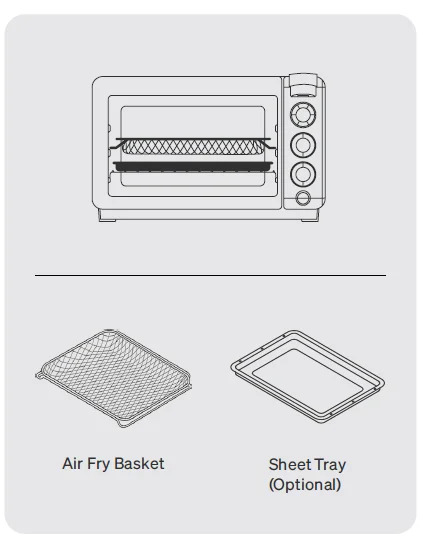
- For best results, preheat before air frying. Remove the air fry basket. Press Air Fry, set the temperature, then press Start. Once preheating is complete, your oven will beep. Promptly begin air frying (see below).
- How do I air fry in my oven?
- (Step 1) Place food in the air fry basket. For best results, place food in a single layer leaving space between pieces. Then insert the air fry basket in the middle rack position above the oven rack (see diagram).
- Do not overfill the air fry basket or food may not cook correctly.
- (Optional) If you’re air frying food that is likely to drip, place the sheet tray on the oven rack under the air fry basket for easy cleanup. Make sure the oven rack is in the lowest rack position with the curved edges facing down. If you’re not using the sheet tray, clean the crumb tray at the bottom of your oven after air frying (see page 21).
- Do not line the bottom of your oven with metal foil or any other material (even if it’s deemed “oven safe”).
- (Step 2) Press Air Fry on your oven, set your desired Temperature and Time, then press Start.
- (Step 3) Remove food promptly when cooking is complete.
- Do not remove the air fry basket with bare, unprotected hands. After cooking, the air fry basket will be hot. Always use an oven mitt or other heat protective device.
- If using the sheet tray, wait until the tray is completely cool before removing and cleaning it.
- Do you have any recommended cook times or temperatures for air frying certain foods?
- See the Air Frying Guidelines card included with your oven, or check out the Support section of the app.
- Note: While air frying, you may see moisture on the inside of the oven door or steam escaping from the oven. This is normal and related to how air frying drives off moisture during cooking.
Temp
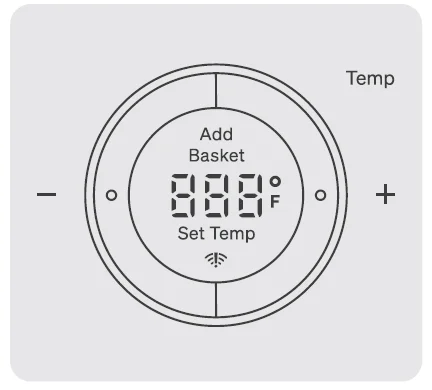
After selecting Air Fry or Bake mode, set the Temperature you’d like by adjusting up or down with
the “+” and “-” buttons.
- Broil mode can only be set to “Hi” or “Lo”— rather than a specific temperature.
- Because Reheat mode is a cook cycle consisting of Bake, and Broil, you do not need to set a Temperature. You only need to set a Time.
- Select the Toast Level you’d like here. Level 1 is the lightest toast, while Level 5 is the darkest toast.
This screen also displays messages, including:
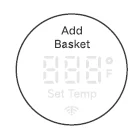
- This displays as a reminder to insert the air fry basket in your oven before air frying. Press Start to begin cooking and dismiss this message.

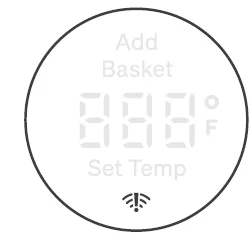
- This displays when your oven is not connected to WiFi.

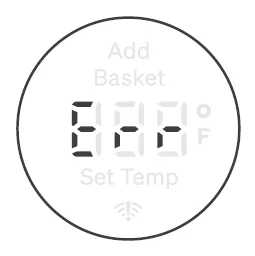
- This displays when your oven is unable to perform a function. If you see this message, please email Tovala Customer Support at [email protected] or live chat with Customer Support at tovala.com/contact.
Time
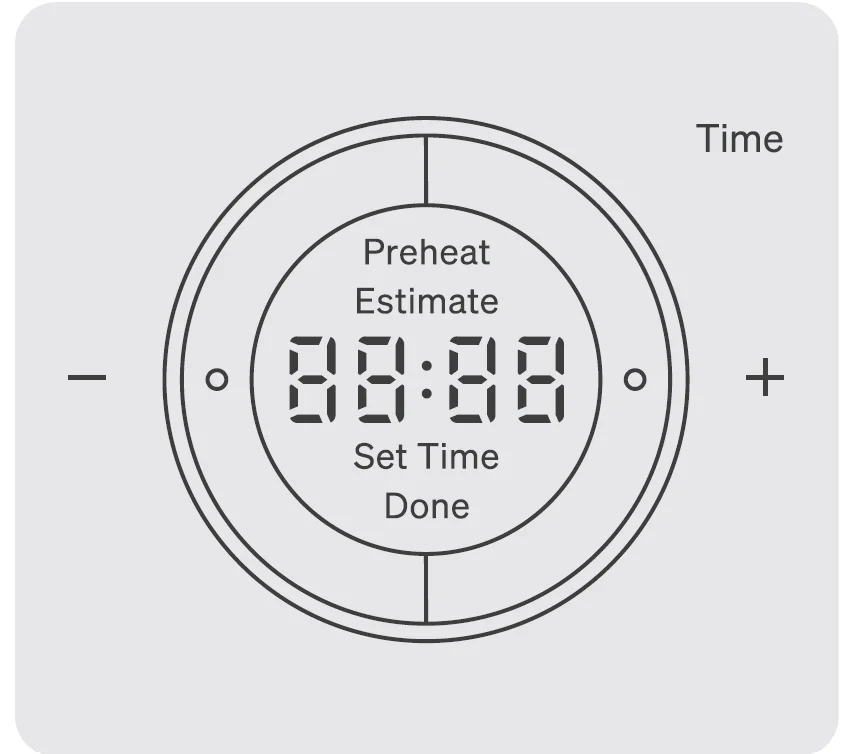
Finally, set the Time you’d like by adjusting up or down with the “+” and “-” buttons. The display will prompt you to “Set Time”.
- Pressing and holding the “+” and “-” buttons will cause the Temperature to jump up or down in higher increments.
- For safety reasons, Broil mode cannot be set for longer than 15 minutes.
- Preheat Estimate message on display
- When you select a Temperature for Air Fry or Bake mode, a Preheat Estimate will display. Learn more about preheating for Bake mode on page 13 and preheating for Air Fry mode on page 15.
This screen also displays messages, including:
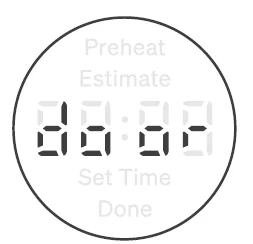
- This displays when your oven door is not completely shut when trying to perform a cooking function.
Cleaning and maintaining your Tovala Oven
How do I keep my oven clean?
- After every use, we recommend cleaning the interior and exterior of your oven.
- DO NOT use oven cleaner to clean your oven. Oven cleaner may degrade your oven’s finishes.
- DO NOT clean your oven with metal scouring pads. See cleaning instructions below for further details.
Before you start cleaning, make sure your oven is unplugged and cooled completely and safe to touch. Use the following instructions for more complete cleaning:
- Cleaning the exterior
- The outside body of your oven can be cleaned with a soft, damp cloth. We recommend using a solution of mild soap and water to dampen the cloth.
- Running several cook cycles without cleaning your oven may result in permanent blemishes or discoloration to the exterior.
- The outside body of your oven can be cleaned with a soft, damp cloth. We recommend using a solution of mild soap and water to dampen the cloth.
- Cleaning the interior
- The interior walls of your oven can be cleaned with a soft, damp cloth. We recommend using a solution of mild soap and water to dampen the cloth.
- DO NOT use abrasive cleaners, metal scouring pads, or metal utensils on your oven’s interior walls. This will damage the interior walls.
- Running several cook cycles without cleaning your oven may result in permanent blemishes to the interior.
FCC Warnings
WARNING: Changes or modifications to this unit not expressly approved by the party responsible for compliance could void the user’s authority to operate the equipment.
NOTE: This equipment has been tested and found to comply with the limits for a Class B digital device, pursuant to Part 15 of the FCC Rules. These limits are designed to provide reasonable protection against harmful interference in a residential installation. This equipment generates, uses, and can radiate radio frequency energy and, if not installed and used in accordance with the instructions, may cause harmful interference to radio communications. However, there is no guarantee that interference will not occur in a particular installation. If this equipment does cause harmful interference to radio or television reception, which can be determined by turning the equipment off and on, the user is encouraged to try to correct the interference by one or more of the following measures:
- Reorient or relocate the receiving antenna.
- Increase the separation between the equipment and receiver.
- Connect the equipment into an outlet on a circuit different from that to which the receiver is connected.
- Consult the dealer or an experienced radio/TV technician for help.
For more manuals by Tovala, visit ManualsLibraryy
Tovala Smart Oven Air Fryer-FAQs
Can the Tovala Smart Oven Air Fryer be used for air frying?
Yes, the Tovala Smart Oven Air Fryer includes a dedicated air fry function. It circulates hot air around the food to create crispy textures with less oil. You can use it for fries, chicken wings, vegetables, frozen snacks, and many other foods.
How do you air fry food in the Tovala oven?
To air fry, place the food in the air fry basket in a single layer for even cooking. Select the air fry or bake setting, adjust the temperature and cooking time, then start the oven. Remove the food carefully once cooking is complete for the best crispy results.
Does the Tovala Smart Oven need preheating?
In many cases, the oven preheats automatically when required. Some preset cooking cycles and scan-to-cook meals handle this process for you, making cooking faster and easier without manual setup.
What cooking functions does the Tovala Smart Oven Air Fryer offer?
The oven supports multiple cooking modes including air frying, baking, broiling, toasting, reheating, and convection cooking. Some models also include steam cooking for better moisture and flavor retention.
Is the Tovala Smart Oven worth buying?
Many users like the oven because of its smart features, quick cooking, and easy meal preparation. It is especially useful for busy households that want convenient cooking options with app control and automatic cooking programs.
Can aluminum foil be used inside the Tovala oven?
Yes, aluminum foil can generally be used on the tray to reduce cleanup. However, it should not block airflow or heating elements because this may affect cooking performance and safety.
Does the Tovala oven require Wi-Fi?
Yes, Wi-Fi is needed for app connectivity, software updates, scan-to-cook features, and access to smart controls. Basic cooking functions may still work manually without internet access.
Can you cook foods other than Tovala meals in the oven?
Absolutely. The oven can cook frozen foods, vegetables, meat, pizza, toast, baked items, and leftovers. It works similarly to a countertop convection oven with additional smart features.
How long do Tovala meals stay fresh?
Tovala meals usually stay fresh for several days after delivery. Each meal package includes a recommended “Enjoy Before” date to help maintain freshness and food quality.