
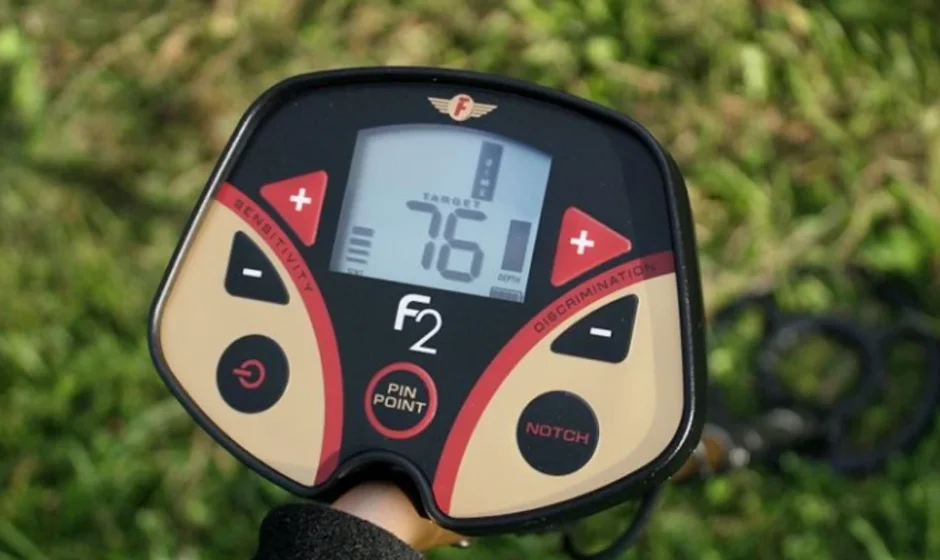

Fisher F2 Metal Detector
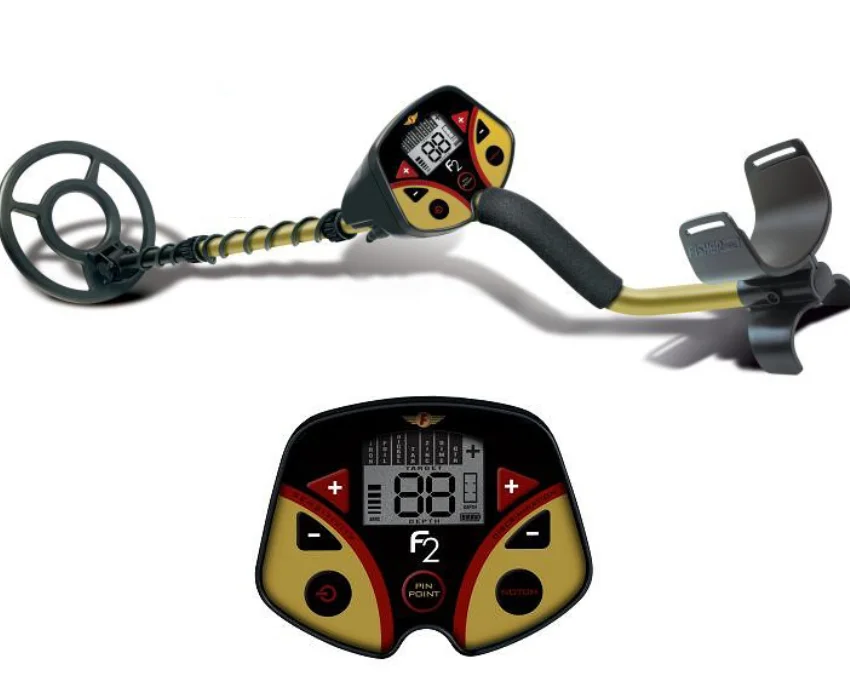
ASSEMBLY
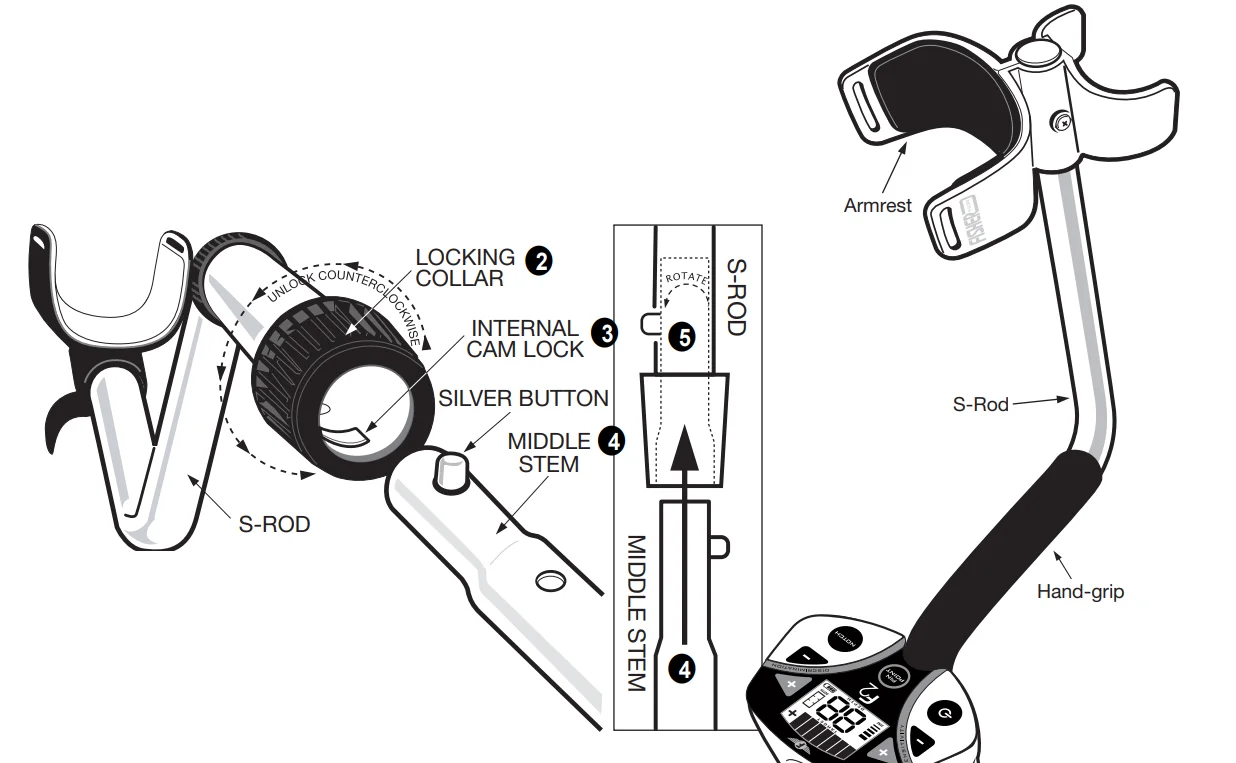
- Position the detector upright.
- Rotate the LOCKING COLLAR fully in the counterclockwise direction.
- Insert your finger inside the tube and make sure the INTERNAL CAM LOCK is flush with the inside of the tube.


- Insert the MIDDLE STEM into the S-ROD, with the SILVER BUTTON pointed upward
- Rotate the MIDDLE STEM until the SILVER BUTTON locates in the hole.
- Twist the LOCKING COLLAR fully in the clockwise direction until it locks.
- Repeat this process on the LOWER STEM.
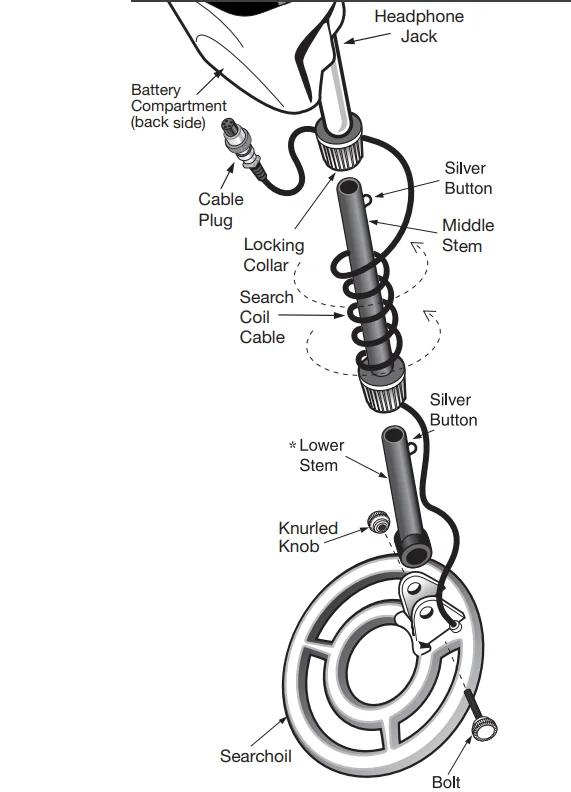
- Using the BOLT and KNURLED KNOB, attach the SEARCHCOIL to the LOWER STEM.
- Adjust the LOWER STEM to a length that lets you maintain a comfortable upright posture, with your arm relaxed at your side, and the SEARCHCOIL parallel to the ground in front of you.
- Wind the CABLE securely around the STEMS, leaving slack at the bottom.
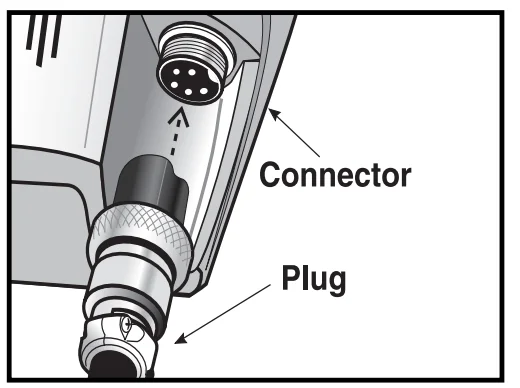
- Connect the CABLE PLUG to the housing. Do not twist the Cable or Plug. Turn Locking Ring only. Use minimal finger pressure to start the threads. Do not crossthread. When the Locking Ring is fully engaged over the threaded connector, give it a firm turn to make sure that it is very tight. When the Locking Ring is fully engaged over the threaded connector, it may not cover all of the threads.
- Tighten both LOCKING COLLARS.
Armrest Adjustment
If you wish to change the position of the armrest, remove the screw and move the armrest to one of the alternate hole locations.
*Note: Very tall users can purchase the optional Extended Lower Stem (TUBE5X), for extended reach.
BATTERIES
Two 9-Volt batteries are supplied with the F2.
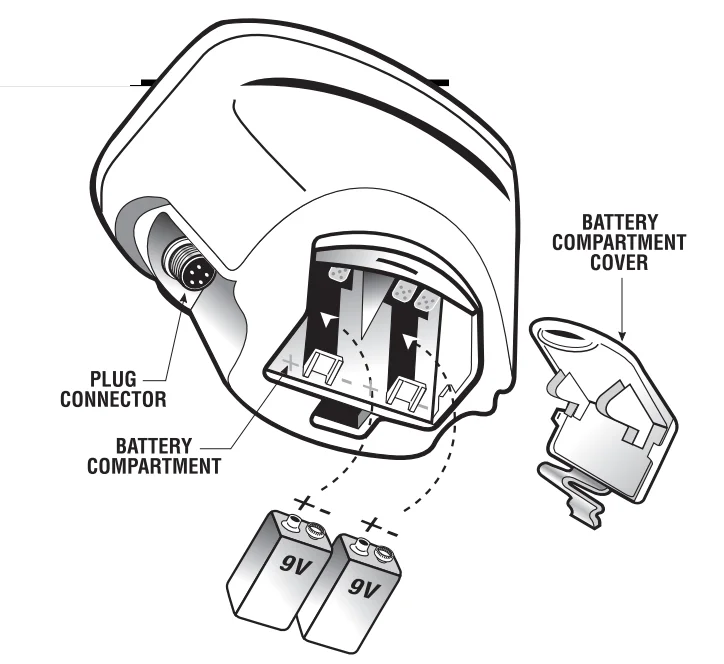
The batteries have been inserted backwards in the compartment for storage during transportation. Please remove batteries, turn them around, and install them correctly. Use ALKALINE batteries only. DO NOT MIX OLD AND NEW BATTERIES.
To install the batteries:
- Remove the battery cover by disengaging the clip at the back. Do not hinge the door upward; pull straight back
- Align the polarity of the batteries correctly, with the positive “+” toward the coil plug connection, as indicated by the + indicator on the housing.
- Insert (2) 9-Volt ALKALINE batteries, with the contacts pointed inward, and press down on the back of the batteries to snap them into place. Some brands of batteries will require moderate force to clear the
retaining tabs. - Replace the battery door. Most metal detector problems are due to improperly installed batteries or the use of non-alkaline or discharged batteries. If the detector does not turn on, please check the batteries.
BATTERY DISPOSAL & RECYCLING
Alkaline batteries may be disposed of in a normal waste receptacle or recycled. Non-Alkaline batteries should be recycled. In the state of California, all battery types must be recycled. Please refer to local municipalities for detailed disposal and recycling requirements.
USING HEADPHONES
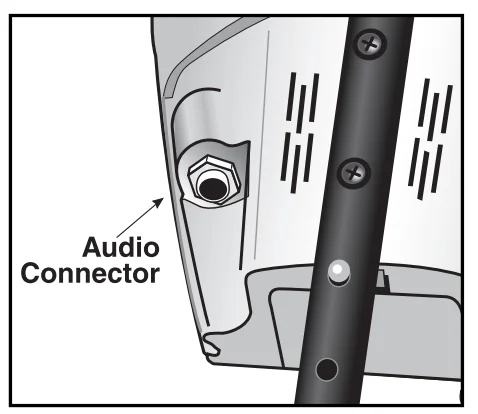
Using headphones (not included) improves battery life, and prevents the sounds from annoying bystanders. It also allows you to hear subtle changes in the sound more clearly, particularly if searching in a noisy location. For safety reasons, do not use headphones near traffic or where other dangers are present. This device is to be used with interconnecting cables/headphone cables shorter than three meters.
QUICK-START DEMONSTRATION
- Supplies Needed
- A Nail
- A Quarter
- A Zinc Penny (dated after 1982)
- A Nickel

- Position the Detector
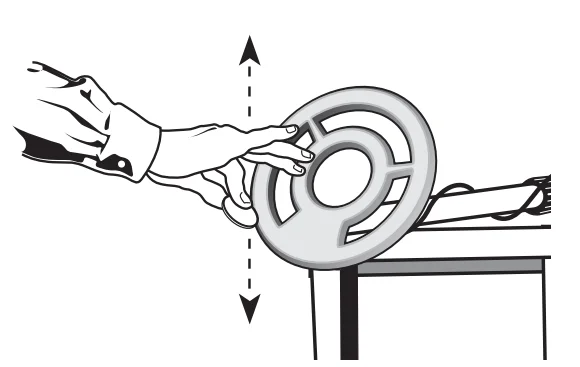
- Place the detector on a table, with the searchcoil hanging over the edge. (or better, have a friend hold the detector, with the coil off the ground).
- Keep the searchcoil away from walls, floors, and metal objects.
- Remove watches, rings, and other jewelry or metal objects from hands and wrists.
- Turn off appliances or lights that cause electromagnetic interference.
- Pivot the searchcoil back toward the detector body.
- Power Up

Press .
.
NOTE: Immediately after powering on, your detector’s unique 10-digit serial number is displayed once on the LCD. Two digits are displayed at a time; five 2-digit numbers are displayed in sequence. This 10-digit serial number is the same serial number imprinted on the label inside the battery compartment. - Wave each Object over the Search Coil
- Notice a different tone for each object.
- Low Tone: Nail
- Low Mid Tone: Nickel
- Medi
- um Tone: Zinc Penny
- High Tone: Quarter
- Motion is required. Objects must be in motion over the searchcoil to be detected.
- Notice a different tone for each object.
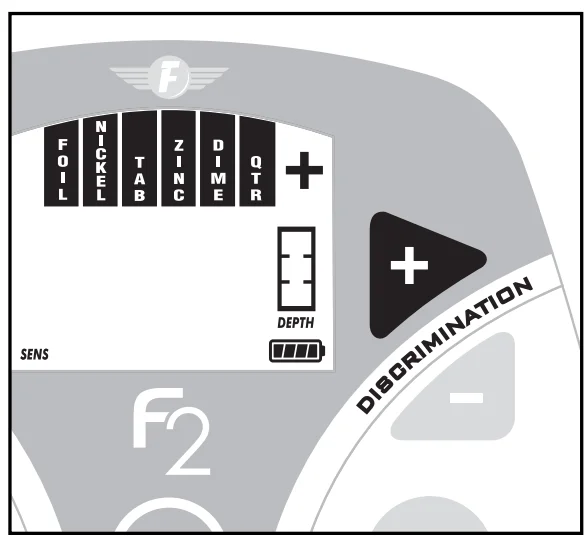
- Press DISCRIMINATION + Twice

- The first press illuminates all target icons.
- The second press turns off the “IRON” icon.
- Wave the Nail over the Search Coil
- The Nail will not be detected.
- The Nail has been “Discriminated Out.”
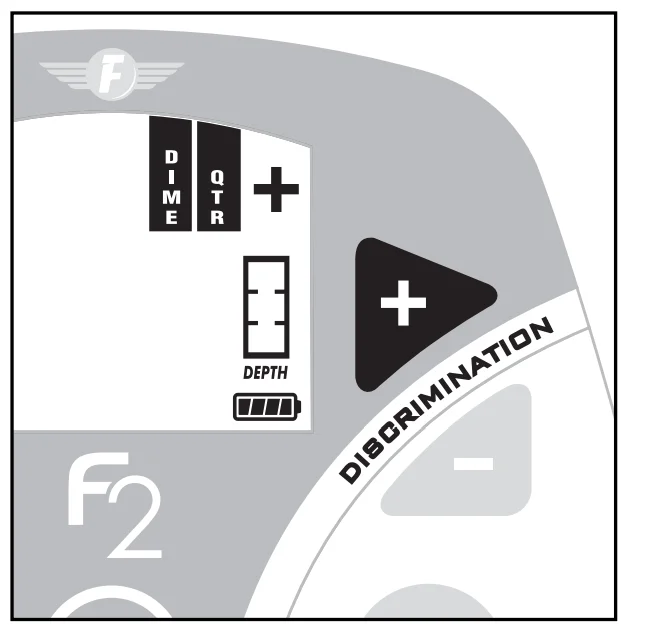
- Press DISCRIMINATION + 5 times.

Only the Dime, Quarter, and + icons will remain illuminated. - Wave all objects over the Search Coil
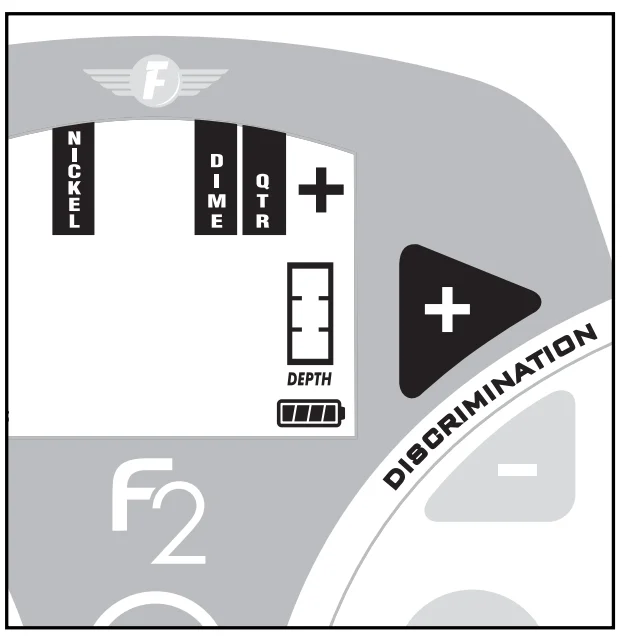
The Nail and Penny will not be detected. The quarter will be detected with a high tone. - Press NOTCH
- Immediately press DISCRIMINATION +
- Press NOTCH again
- The “Nickel” icon is again illuminated.
- You have “Notched In” the nickel
- Wave the nickel over the searchcoil. The nickel is detected.

- Press and hold PINPOINT.
Hold a coin motionless over the searchcoil.- All Metal objects are now detected.
- One monotone sound indicates the presence of any type of metal.
- Depth is indicated in inches. Move a coin toward & away from the search coin. Watch the depth indicator change.
 .
.
CONTROL PANEL
The operating controls are as follows:
SENSITIVITY + AND –
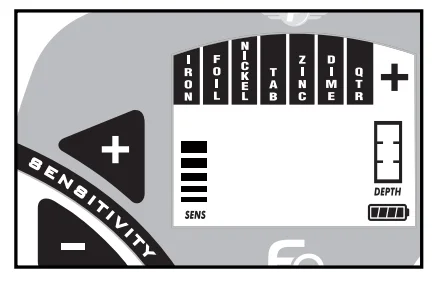
These controls change the detector’s sensitivity; higher settings enable detection of deeper targets. At power-up, the detector is pre-set to 75% of maximum sensitivity. At a minimum, the sensitivity is 35% of the maximum. With each press of the + or – touch pads, the sensitivity level is displayed on the bar graph on the left of the display. Upon reaching the minimum or maximum sensitivity setting, the detector will beep twice. While higher levels of sensitivity enable detection of deeper targets, operation at high levels of sensitivity makes the detector more susceptible to electromagnetic interference. Higher sensitivity settings can also lead to false signals in difficult ground conditions. Use lower sensitivity settings to suppress interference or false signals from soil minerals when necessary. If the detector “Chatters”, reduce sensitivity.
DISCRIMINATION + AND –
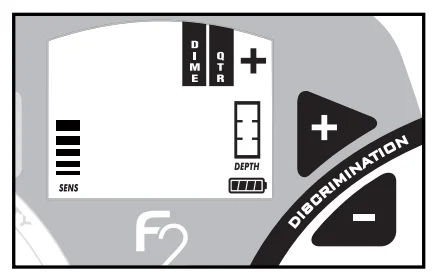
Press DISCRIMINATION or at any time (other than immediately after pressing NOTCH) to adjust the target discrimination level. + and – will increase or decrease the level of discrimination. Each press of the pads will cause a target icon to appear or disappear on the display. When an icon is not illuminated, the corresponding target category will be eliminated from detection. No audible tone nor target-icon will appear when the searchcoil passes by an object in a category that is not illuminated. The Dime, Qtr, and + target categories cannot be eliminated from detection. While searching, the only target category icons visible are those indicating detected targets; no more than one is visible at a time while searching. In order to display the discrimination status, press either the DISC + or – key. The first press of either DISC+ or – displays the current discrimination status (eliminated target categories are not displayed — all accepted target categories are illuminated). This first key press does not change the discrimination status; each subsequent DISC + or – will change the discrimination setting, with icons either disappearing or reappearing.
PINPOINT
Press and hold PIN POINT to activate this feature. This is a static detection mode; no coil motion over the target is required to detect metal while the pinpoint is depressed. This feature is most effective for pinpointing the exact location of small buried objects. Reduced sensitivity, and thus a smaller search field, can be achieved by pressing the PIN POINT pad while an object is in the coil’s detection field. The greatest sensitivity to large, deeply-buried objects is achieved with this mode.
NOTCH
This control allows you to selectively include or exclude target categories from detection. To use the NOTCH feature.

- First press NOTCH.
- Then immediately press DISCRIMINATION + or -. Each press of DISC + will change the status of a target category (starting with iron, from left to right). If an icon was previously illuminated, indicating inclusion, then it will disappear, indicating that it is now eliminated from detection. If an icon was previously turned off, then it will reappear, indicating inclusion.
- Press a NOTCH second time to save your notch setting.
TIME-OUT: If you do not press NOTCH after several seconds, the detector will beep twice and return to normal operation, without changing the notch setting.
Only one category can be notched at a time. To program multiple notches, press again and change another target category. You may program any combination of detected and eliminated target categories using the DISCRIMINATION and NOTCH functions. Practice by pressing the pad in conjunction with the Discrimination + and – pads; their function will quickly become obvious.
4-TONE AUDIO SYSTEM
While the LCD (Liquid Crystal Display) is very accurate in identifying buried objects, the user in the field does not always maintain the display screen in his field of vision. Therefore, we have incorporated an audio feedback mechanism to alert the user to the nature of buried objects. This audio feedback system first alerts the user to the presence and classification of objects, whose nature and location can be confirmed using the LCD. The 4-tone audio target identification system functions only in the motion modes of operation. The detector must be in the DISCRIMINATION Mode, as indicated on the display. In PINPOINT Mode, the detector will emit only a monotone sound.
The detector can sound four different tones, depending on the object detected.
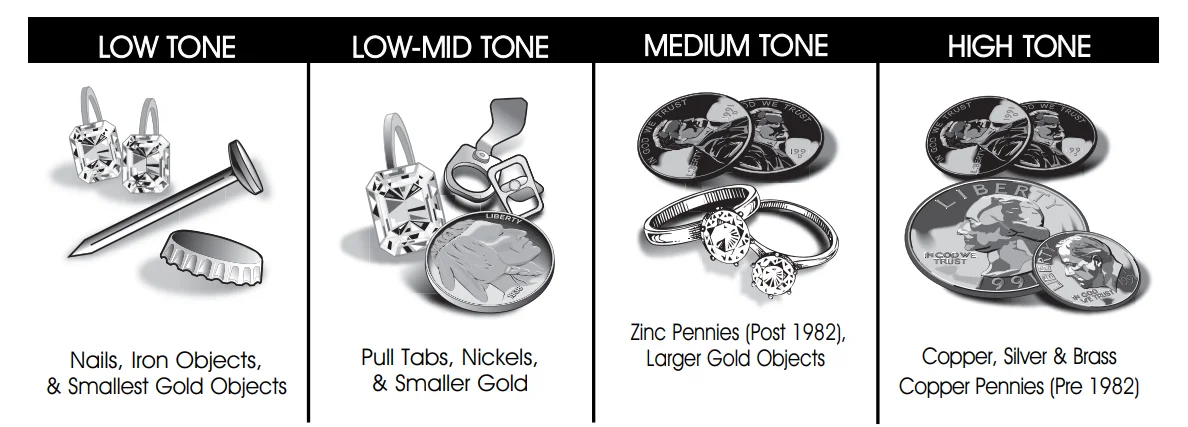
- LOW TONE
Ferrous objects, such as iron and steel, will induce a low tone. The smallest gold objects can also induce a low tone. - LOW-MID
Pull-Tabs, nickels & smaller gold - MEDIUM TONE
Newer pennies (post-1982), larger gold objects, zinc, and small brass objects will induce medium tones. Many recent vintage non-U.S. currencies will induce medium tones. - HIGH TONE
Silver and copper coins, larger brass objects, and older pennies (pre- 1982), will induce high tones. Quarters, dimes, and other precious coins fall into this category.
DEPTH AND TARGET DISPLAY READING THE DISPLAY
The Liquid Crystal Display (LCD) shows the PROBABLE identification of the targeted metal, as well as the PROBABLE depth of the target, in inches. The target category will illuminate where an object is best classified, and stay illuminated until another target is identified. The detector will normally register a repeating, unchanging target identification when a buried target has been located and identified. If, upon repeated passes over the same spot, the target identification reads inconsistently, the target is probably a trash item, oxidized metal, or too deep to be classified accurately. With practice, you will learn to unearth only the more repeatable signals. The segment identifications are highly accurate when detecting the objects described on the label. However, if you register in a given category for an unknown buried object, you could be detecting a metallic object other than the object described on the label, but with the same metallic signature. Also, the greater the distance between the target and the coil, the less accurate the target
identification.
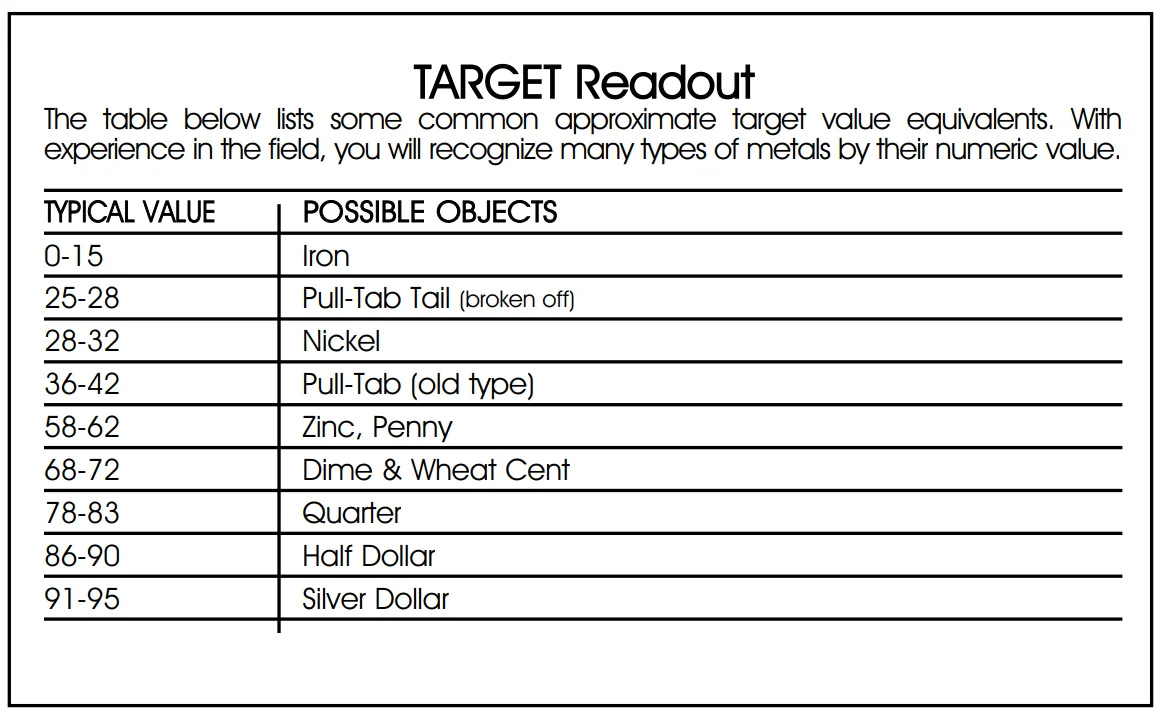
- GOLD TARGETS Gold objects will register on the left side of the LCD scale. Gold will register depending on its size. The smaller the gold object, the further to the left it will register. Gold flakes will register as Iron. Small gold items will register under Iron or Foil. Medium-sized gold items will register under Nickel or Tab. Large gold items will register under Tab or Zinc.
- SILVER TARGETS: Silver objects will normally register to the right of the scale, under Dime, Qtr, or +, depending on the size of the object. The larger the object, the farther to the right it will register.
- IRON: Ferrous objects will register on the far-left side of the target identification scale. Objects in this category could be worthless scrap or a more valuable iron relic.
- FOIL: Small pieces of aluminum foil, like gum wrappers, will register here.
- NICKEL: Nickels and most newer pulltabs( those that stay attached to the can) will register here.
- TAB: Pull-tabs from older beverage cans will register here. Few newer pull-tabs will also register here. Many gold rings will also register here.
- ZINC: Newer pennies (post-1982) will register here. Many non-U.S. coins of recent vintage may also register here.
SENSITIVITY ADJUSTMENT
ELECTROMAGNETIC INTERFERENCE

Use the Sensitivity Control is to eliminate Electromagnetic Interference (EMI). The F2 metal detector is an extremely sensitive device; the searchcoil creates its own magnetic field and acts like an antenna. If your detector beeps erratically when the searchcoil is motionless, the unit is probably detecting another electromagnetic field. Common sources of EMI are electric power lines, both suspended and buried, motors, and household appliances like computers and microwave ovens. Some indoor electronic devices, such as dimmer switches used on household lighting, produce severe EMI and can cause the detector to beep erratically. Other metal detectors also produce their own electromagnetic fields; so if detecting with a friend, keep two metal detectors at least 20 feet apart. If the detector beeps erratically, REDUCE THE SENSITIVITY by pressing the Sensitivity – Pad on the left of the control panel. In most urban environments, you should be able to search without chatter from interference at the default sensitivity setting (default setting is the sensitivity level at power-up, 4 bars), or at one level reduced from default. At maximum sensitivity, the F2 will “chatter” in proximity to underground or overhead power lines, or to indoor or outdoor electrical devices. In fact, if you notice rapid chatter with the searchcoil near the ground, you may be able to trace the approximate location of the underground power lines by following the chatter. To manage chatter, which is most likely from electrical interference:
- REDUCE the SENSITIVITY until the chatter stops.
- Try sweeping it over the ground. If the F2 chatters while held still, or held up in the air, it may be much quieter when sweeping over the ground.
SEVERE GROUND CONDITIONS
A secondary use for the Sensitivity Control is to reduce false detection signals caused by severe ground conditions. While the detector contains circuitry to eliminate the signals caused by most naturally occurring ground minerals, 100% of all ground conditions cannot be anticipated. Highly magnetic soils found in mountainous and gold-prospecting locations can cause the detector to emit tones when metal objects
are not present. High saline content soils and sands can sometimes cause the detector to beep when no metal target is present. If the detector emits false, non-repeatable signals, REDUCE THE SENSITIVITY.
SEARCH TECHNIQUES (in DISC Mode)
Target Verification
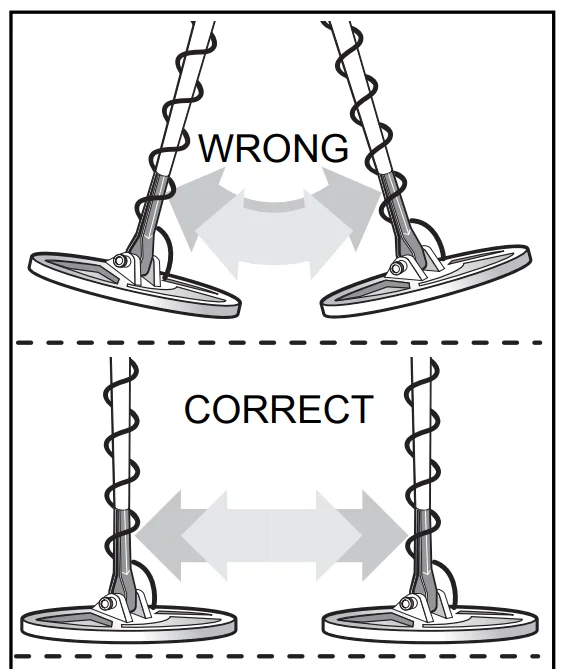
After detecting a target, do the following:
- Walk around the target in a circle.
- While circling the target, continue sweeping the searchcoil across the target.
- Sweep once every 30° or 40° of the circle. If the tone does not change and the target ID value is consistent as you circle the target, you can be highly confident of the target’s identification. If the tone or target ID changes as you circle the target, you may have multiple targets or an irregularly shaped object. If the tone completely disappears at different angles, the target may be trash or a low-value metal. If you are new to the hobby, dig all targets. With practice in the field, you will soon identify audible and visual target feedback with certain types of metal objects.
Pinpointing in motion (not pinpoint) mode:
- Sweep over the target in a narrowing side-to-side pattern
- Take a visual note of the spot on the ground where “beep” occurs.
- Step 90° to the side of the target
- Sweep coil over the same area, at 90° to 1st sweep pattern.
- This pinpoints the target location with an “X.”
TARGET PINPOINTING (no-motion PINPOINT Mode)
After you have identified a target using a motion mode of detection, press PINPOINT to identify the target’s exact location. This technique can yield more information about the target’s shape and size and also find its exact location to facilitate excavation.
Using PINPOINT:
- Position the searchcoil just barely off the ground, and to the side of the target.
- Press and hold and raise the searchcoil about 2 inches. Lifting the searchcoil away from the ground makes the ground signal go negative, so the machine is silent.
- Now move the searchcoil slowly across the target, and you can locate it by the sound. The target is located directly under where the sound is loudest.
Narrow It Down:
- To narrow the response further, position the center of the searchcoil near the center of the response pattern, but not directly over the center.
- Release, then press and hold again PINPOINT again.
- Repeat this narrowing procedure to narrow the field of detection further.
Note: Depth indication is less accurate after narrowing.
COIL DRIFT
If you keep PINPOINT depressed for continuous searching, realize that drift will occur over time, causing the detector to gain or lose sensitivity. Periodic retuning of the detector is required to minimize drift; release and press PINPOINT to retune.
5-YEAR LIMITED WARRANTY
Register your warranty online for a chance to win a FREE DETECTOR. For details, visit www.fisherlab.com The F2 metal detector is warranted against defects in materials and workmanship under normal use for five years from the date of purchase to the original owner. Damage due to neglect, accidental damage or misuse of this product is not covered under this warranty. Decisions regarding abuse or misuse of the detector are made solely at the discretion of the manufacturer. Proof of Purchase is required to make a claim under this warranty. Liability under this Warranty is limited to replacing or repairing, at our option, the metal detector returned, shipping cost prepaid to Fisher Labs. Shipping cost to Fisher Labs is the responsibility of the consumer. To return your detector for service, please first contact Fisher Labs for a Return Authorization (RA) Number. Reference the RA number on your package and return the detector within 15 days of calling to: Fisher Labs 1465 Henry Brennan Dr. El Paso, TX 79936 Phone: 915-225-0333 ext.118
TREASURE HUNTER’S CODE OF ETHICS:
- Always check Federal, State, County, and local laws before searching.
- Respect private property and do not enter private property without the owner’s permission.
- Take care to refill all holes and leave no damage.
- Remove and dispose of any trash and litter found.
- Appreciate and protect our inheritance of natural resources, wildlife and private property.
- Act as an ambassador for the hobby, use thoughtfulness, consideration, and courtesy at all times.
- Never destroy historical or archaeological treasures.
- All treasure hunters may be judged by the example you set; always conduct yourself with courtesy and consideration of others
For more manuals by Fisher Labs, visit ManualsLibraryy
Fisher F2 Metal Detector-FAQs
Is the Fisher F2 a good metal detector for beginners?
Yes, the Fisher F2 is widely considered a great entry-level metal detector. It offers simple controls, fast target response, and reliable performance for coin, jewelry, and relic hunting.
What type of metal detector is the Fisher F2?
The Fisher F2 is a VLF (Very Low Frequency) metal detector. VLF detectors are ideal for general-purpose detecting, including coins, relics, and small jewelry.
Can the Fisher F2 detect gold?
Yes, it can detect gold, including small gold jewelry and larger gold items. However, it is not specifically designed for fine gold prospecting in highly mineralized soil.
How deep can the Fisher F2 detect metal?
The Fisher F2 can typically detect coin-sized objects at depths of 6–8 inches, depending on soil conditions and target size. Larger objects may be detected deeper.
What metals are difficult for metal detectors to detect?
Metals like stainless steel, titanium, and lead can be harder to detect due to their low conductivity or weak magnetic response.
Can aluminum foil set off the Fisher F2?
Yes, aluminum foil can trigger the detector because it is conductive. Adjusting discrimination settings can help reduce unwanted foil signals.
What frequency is best for detecting gold?
Higher frequencies (above 15 kHz) are better for small gold. The Fisher F2 operates at a lower frequency, making it better suited for coins and general treasure hunting.
Can I use the Fisher F2 on the beach?
Yes, it works well on dry sand. However, wet saltwater sand may cause interference since the F2 is not specifically designed for saltwater environments.
Do cheap metal detectors really work?
Yes, affordable detectors like the Fisher F2 can effectively find coins, jewelry, and relics. They may lack advanced features but perform well for beginners.