
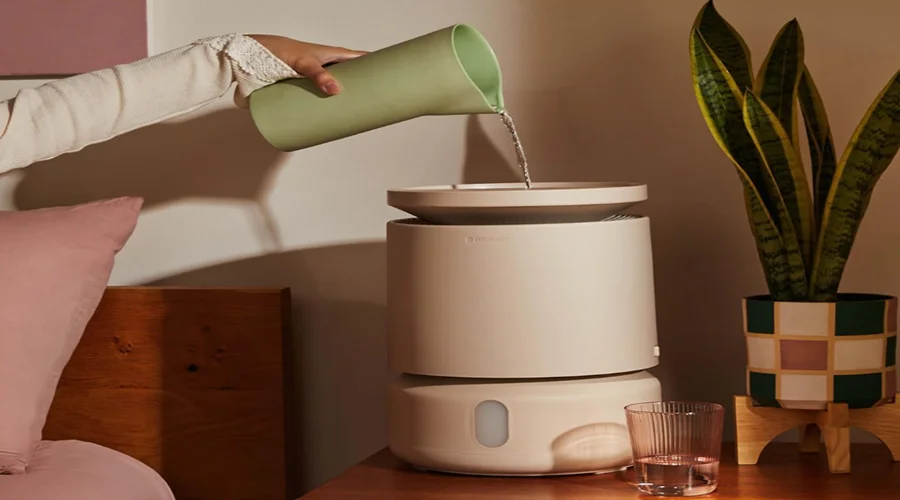

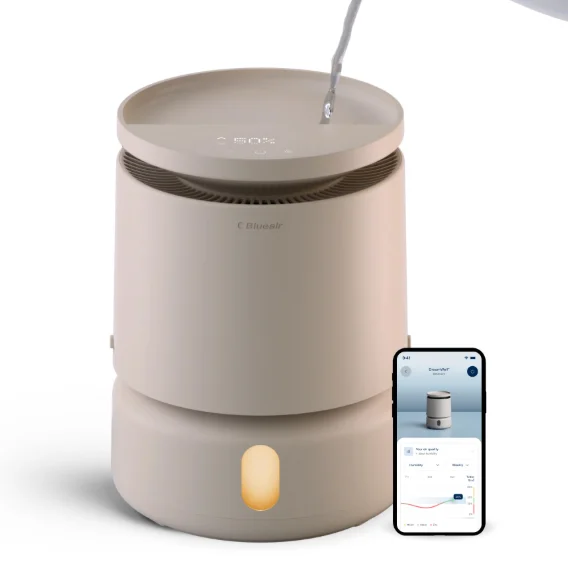
Blueair DreamWell Humidifier H38i
READ AND SAVE THESE INSTRUCTIONS
Blueair Humidifier is an electrical appliance for indoor use only – do not expose to liquid, vapor or rain. Do not use this product for any purpose other than what is described in this manual.
Safety Information
- Always disconnect the appliance from the power supply before maintenance.
- Overfilling or cleaning the product without unplugging it may cause electric shock.
- Do not run the cord under carpeting, furniture, or appliances, or cover it with rugs. Keep the cord away from traffic areas to prevent tripping.
- Do not place parts in the dishwasher, except for the dishwasher-safe water tank.
- Do not use a washing machine to clean any parts except the machine-washable wick filter.
- Do not use the included adapter for anything else but the appliance.
- Never clean with gasoline, chemical solvents, or corrosive materials as these agents may damage the humidifier.
- Only fill the water tank with water; do not use any other liquids.
Regulatory Information
WARNING: Changes or modifications to this unit not expressly approved by the party responsible for compliance could void the user’s authority to operate the equipment.
NOTE: This equipment has been tested and found to comply with the limits for a Class B digital device, pursuant to Part 15 of the FCC Rules. These limits are designed to provide reasonable protection against harmful interference in a residential installation. This equipment generates, uses, and can radiate radio frequency energy and, if not installed and used in accordance with the instructions, may cause harmful interference to radio communications.
However, there is no guarantee that interference will not occur in a particular installation If this equipment does cause harmful interference to radio or television reception, which can be determined by turning the equipment off and on, the user is encouraged to try to correct the interference by one or more of the following measures:
- Reorient or relocate the receiving antenna.
- Increase the separation between the equipment and receiver.
- Connect the equipment into an outlet on a circuit different from that to which the receiver is connected.
- Consult the dealer or an experienced radio/TV technician for help.
This device complies with Part 15 of the FCC Rules. Operation is subject to the following two conditions:
- This device may not cause harmful interference.
- This device must accept any interference received, including interference that may cause undesired operation.
This Class B digital apparatus complies with Canadian ICES-003.
This device contains licence-exempt transmitter(s)/receiver(s) that comply with Innovation, Science and Economic Development Canada’s licence-exempt RSS(s). Operation is subject to the following two conditions: (1) This device may not cause interference, and (2) This device must accept any interference, including interference that may cause undesired operation of the device.
FCC/ISED RF Exposure Information: This equipment should be installed and operated with a minimum distance of 20 centimeters between the radiator and your body.
Product Map
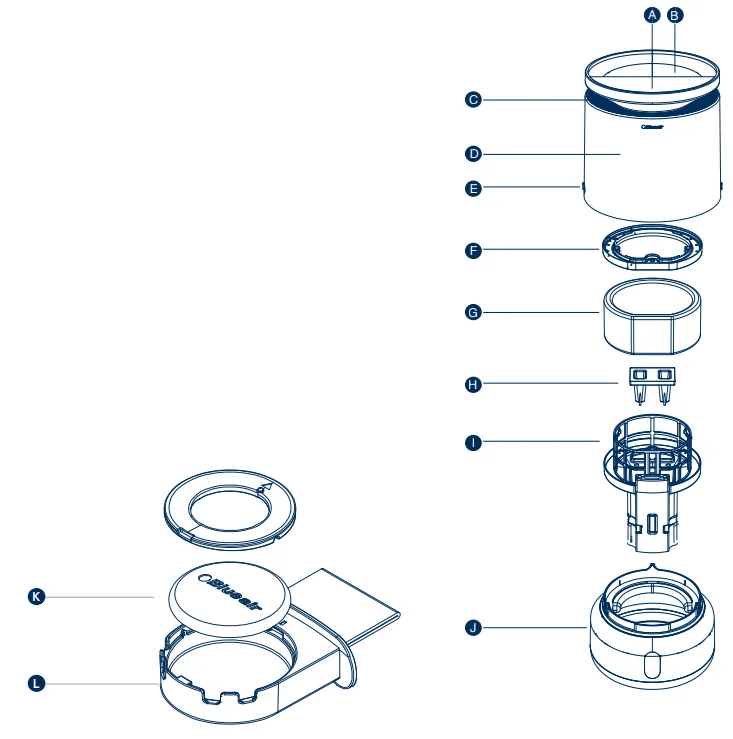
- A. Device Control
- B. Water Top Fill Area
- C. Evaporative Outlet
- D. Top Enclosure
- E. Locking Sliders
- F. Wick Filter Cover
- G. Wick Filter (Machine Washable)
- H. Water Refresher Cover (Water Refresher sold separately)
- I. Wick Frame and Pump Assembly
- J. Water Tank
- K. Scent Pod
- L. Scent Pod Holder
Device Control
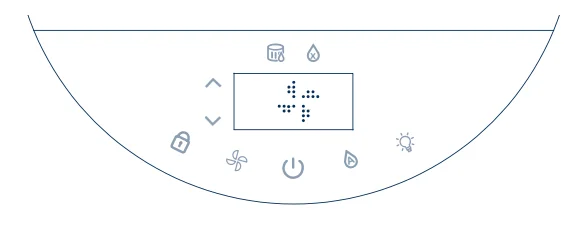
- On/Standby Button
Press to turn the humidifier on/Standby. - Fan Speed
Tap to select fan speed: Night, 1, 2, or 3. The display shows the current level. Night mode uses the lowest speed and dims the display. - Auto Humidity Control
Tap to turn on Auto Humidification Mode. Your humidifier will automatically adjust fan speed to meet your target humidity level. Use the up and down toggles (when flashing) to set the target humidity between 30% and 60%, then wait for 3 seconds to confirm. If no selection is made, it will default to the recommended 50%. For more customized settings, please go to the Blueair app. - Display lock
Turns on when Display Lock is activated. Locks all buttons on the interface. To activate/deactivate, press and hold for 2 seconds until the interface flashes. The interface will blink when any other button is tapped to indicate that the display lock is on. - Mood Lighting
Turns on/off the Mood lighting inside the water tank. Choose among three levels of brightness: Soft, Medium, Warm.
Display
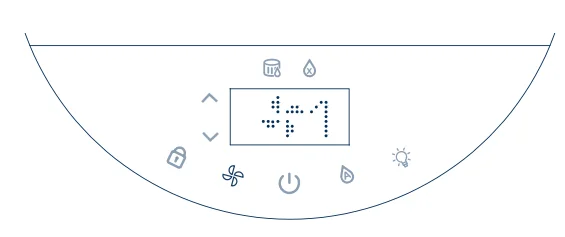
- Night Mode and Fan Speed
Display shows a moon (Night mode) – Fan 1 – Fan 2 – Fan 3.

- Water Level Indicator
- Red: Tank needs to be refilled.
- Orange: Tank’s almost full. Be careful not to overfill the tank.
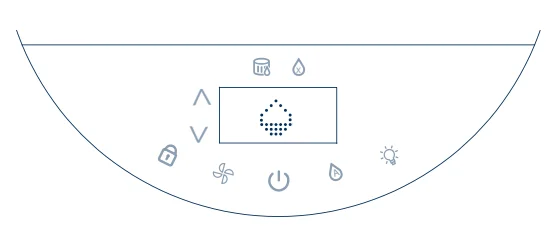
- Filling Water
The display shows a refilling, water droplet, and senses the water level in real-time, enabling you to monitor the tank’s fill level.
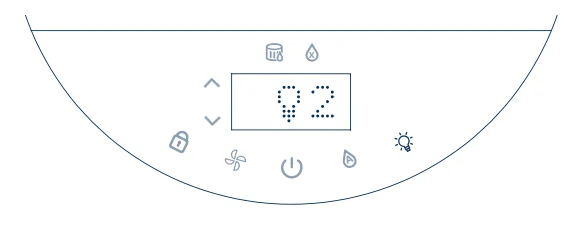
- Mood Lighting
The display shows a lighting icon and 3 levels of brightness from soft to warm when the function is enabled.
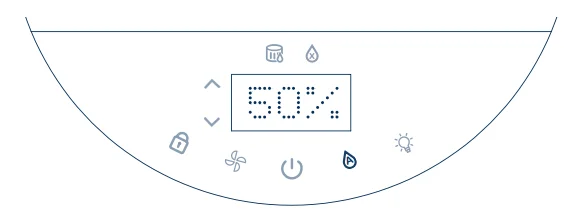
- Auto Humidity
The display shows 50% as defaulted target and flashes together with toggle buttons. Tune toggles up or down, wait 3 seconds to confirm lock in until t switched back to the current room humidity.
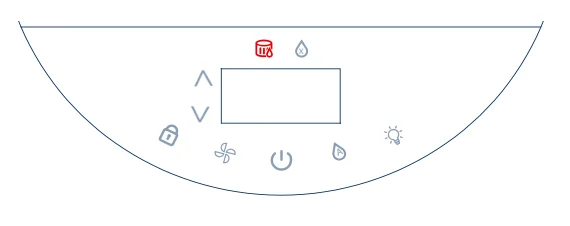
- Wick Replacement Reminder
Our machine-washable wick has a lifetime of up to 12 months and is recommended to be cleaned every 1-2 weeks. Even with regular washing, the wick should be replaced every 12 months for optimal performance. When the wick replacement indicator turns red its time to replace the wick After replacing the wick. Press and hold the Fan Speed button for 15 seconds to reset the indicator.
- Wick Dry
Wick Dry can be enabled in the Blueair app to expedite drying the wick after each use to maintain a clean environment.
Connect to the Blueair app
Connecting to the Blueair app allows you to control the humidifier remotely and monitor humidity levels. The app offers enhanced functions and features.
- Step 1
Download the Blueair app from the App Store or Google Play. - Step 2
- Open the app. Create or sign in to your Blueair account.
- Step 3
- Click on + Add device and follow the instructions in the app.
First-time connection tips

- Make sure to turn on your humidifier. Press and hold the Auto humidity button for 5 seconds to prepare the humidifier for pairing. Once the Wi-Fi indicator is visible on the display and blinking, it is ready to be paired with your app.

- Bluetooth is required for first-time pairing. Turn your phone’s Bluetooth on and keep your phone within 3ft (1m) of the humidifier for initial pairing.

- Keep your humidifier within 15 feet (4,5 meters) of your Wi-Fi router when connecting the product for the first time.

- Make sure you are using a visible Wi-Fi network. VPN (Virtual Private Network) should be deactivated while using the Blueair app.

- This humidifier can only connect to 2.4 GHz Wi-Fi. If you are using a dual-band Wi-Fi router, make sure to select 2.4GHz.




How to Use Tips

- Enable/Disable Wi-Fi Pairing
- Enable Wi-Fi:
Hold the Auto Humidity Control button for about 5 seconds until the Wi-Fi LED starts blinking. Then follow the instructions in the “Connect to the Blueair app” section. - Disable Wi-Fi:
Hold the Auto Humidity Control button for about 15 seconds and then release it.
- Enable Wi-Fi:

- Adjust Interface Brightness
Press the Fan Speed button and On/Standby button simultaneously. Keep holding the On/Standby button and tap the Fan Speed button to adjust brightness. If the brightness is at the lowest level, it will increase by one level. If it’s at the highest level, it will decrease by one level. You can also adjust the brightness using the Blueair app.

- Filter Reset
Extra long press the Fan Speed Button for about 15 seconds until the LEDs on the interface light up, then release.
Reminder! After replacing the wick filter, it is required to reset the status on the device. If done correctly, the wick filter replacement indicator will blink three times and then disappear.

- Factory Reset
Extra long press the On/Standby button for about 15 seconds until all the LEDs of the interface light up and blink four times. Then release. After a factory reset, the humidifier restarts with the default configuration and will go into Standby mode.
Scent Pod
Introducing the Blueair Scent Pod: The Blueair humidifier comes with a premium scent pod that diffuses your favorite aroma into the
air.
How to use tips
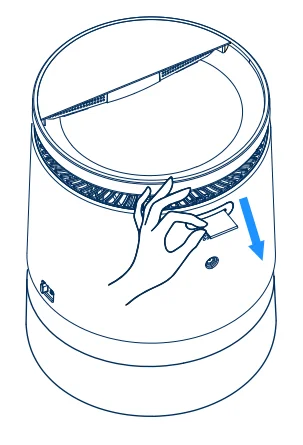
Pull the Blueair tag to take out the holder.

For optimal performance, it is recommended to add 3 – 6 drops
of your preferred essential oil to the pod when the tank is full.
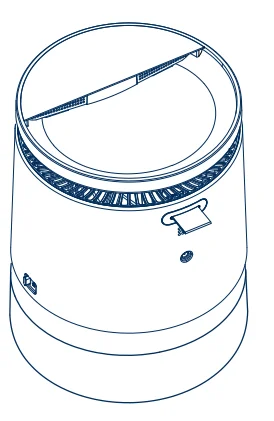
Put back the holder and turn on the humidifier. Adjust the fan speed to control the intensity of the scent released by the device.
How to clean
Remove the scent pod from the device and wipe off any visible residue or oil from its surface with a dry cloth. If the pod is still dirty, you can rinse it with lukewarm water and a small amount of mild dish soap. Let the scent pod air dry completely before putting it back into the device.
Maintenance Information
Important! Turn the humidifier off and disconnect from the power supply before maintenance.
Changing your wick filter
The humidifier comes with an advanced machine-washable wick filter, so you can simply put it in your washing machine (below 104°F/40°C in a gentle/delicate cycle) for effortless cleaning. For the best performance, it is recommended to replace the wick every 12 months.
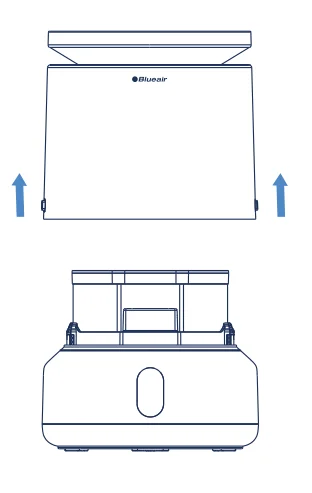
- Step 1
Turn off and unplug the device. Turn the sliding button counterclockwise to unlock the device. Lift the top enclosure away from the base.
- Step 2
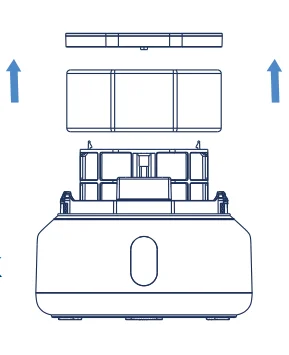
Locate and release the snaps on the filter cover to remove it from the wick frame. Pull on the tags on the wick filter to remove it from the frame.
- Step 3
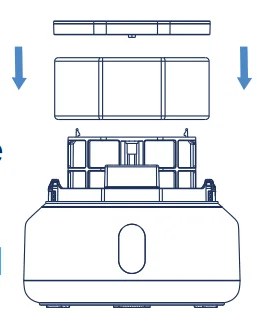
Put the new wick filter back onto the frame. Align the snaps on the wick cover and install it back onto the frame. A clicking sound
indicates that it is installed in the right place.
Important: After replacing the wick, ensure the wick, wick cover, and wick frame are all securely reinstalled in the device.
- Step 4
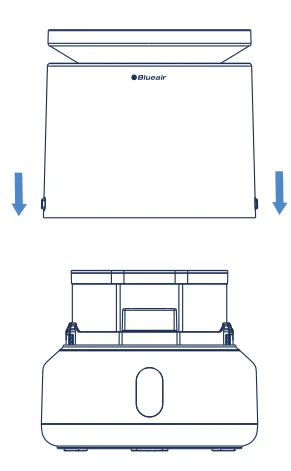
Place the top enclosure back onto the base. It will click when it is properly connected to the base. Turn the sliding button clockwise to lock the device.
- Step 5
Important! To reset the filter indicator, turn the device back on and long-press the Fan Speed button for about 15 seconds until the LEDs light up. Then release.

Filling and Refilling
Your Blueair humidifier is safe to use with clean tap water. It is recommended that the water tank and pump be cleaned weekly to ensure proper operation.
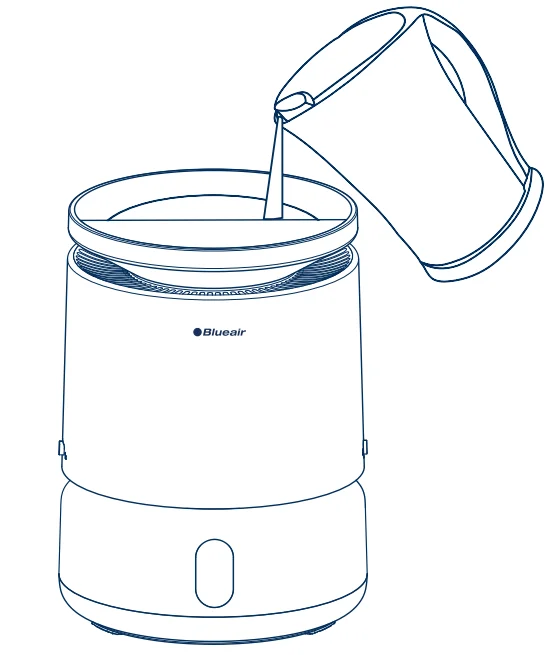
- Option 1: Top Pour
Turn the device standby/off. Carefully pour water straight down through the water top fill area.
Note: Do not fill water after the water level reaches the top of the water tank window.
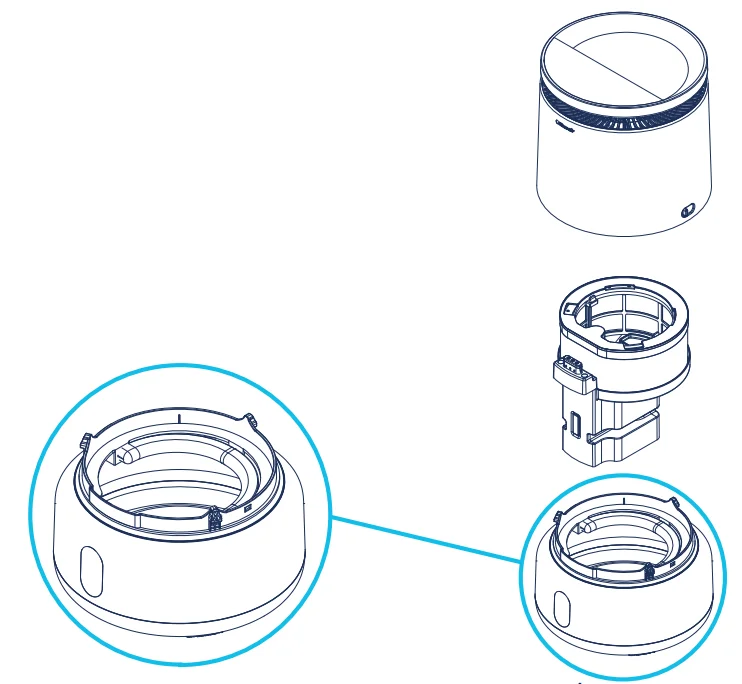
- Option 2: Tank Fill
Remove the top enclosure, wick & pump assembly to access the water tank.
Note: Do not fill water after the water level reaches the top of the water tank window.
Cleaning Instructions:
To ensure optimal performance, clean your device weekly. Always disconnect the device from power prior.
- Water Tank: Clean the water tank using a mild detergent. The water tank is dishwasher safe*, but do not put any other parts in the dishwasher. Wipe the water tank dry before reassembling. *(Based on life test of 50-90 minute cycles at min. 158°F (70°C) or using a leading detergent.
- Wick filter: Clean the filter every one to two weeks. Place it in a washing machine and run a gentle/delicate washing cycle at a low temperature setting (below 104°F/40°C), use only mild household detergent. After washing, let the filter air dry or dry it in a clothes dryer on low heat setting (below 140°F/60°C).
Important!: Do not use bleach, fabric softeners or other harsh chemicals. - Do not bleach or iron the wick filter.
- Top Enclosure: Wipe the body with a soft, dry or damp cloth to remove dust. Do not submerge in water.
- Water Pump: Disassemble the device components and fill the water tank with a cleaning solution consisting of 40g of citric acid for 2L of water. Insert the pump back into the water tank so that the bottom half of the pump assembly is fully submerged in the cleaning solution, and allow it to soak. After 30 minutes, remove the pump from the water tank and dispose of the cleaning solution. Rinse the tank and pump well under running tap water, making sure to allow water to flow into the pump water inlet. Remove the pump sponge and rinse with water.
Accessories – Sold Separately
ACCESSORIES ARE PURCHASED SEPARATELY.
Available options:
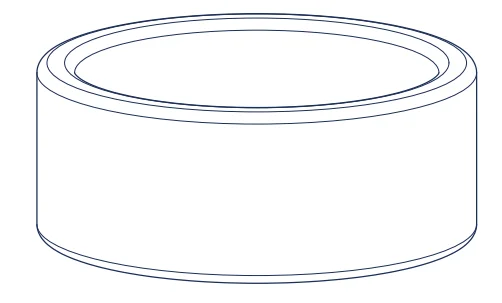
- Replacement

- Scent Pod
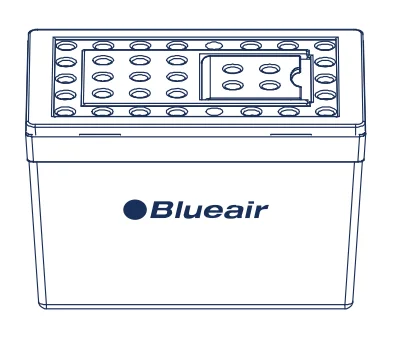
- Wick Water Refresher
Water Refresher keeps water fresh in the tank, reduces mineral build-up, and cuts cleaning time thanks to the embedded active carbon that effectively absorbs mineral substances. For best performance, replace the Water Refresher every 3-6 months.
Move the Device
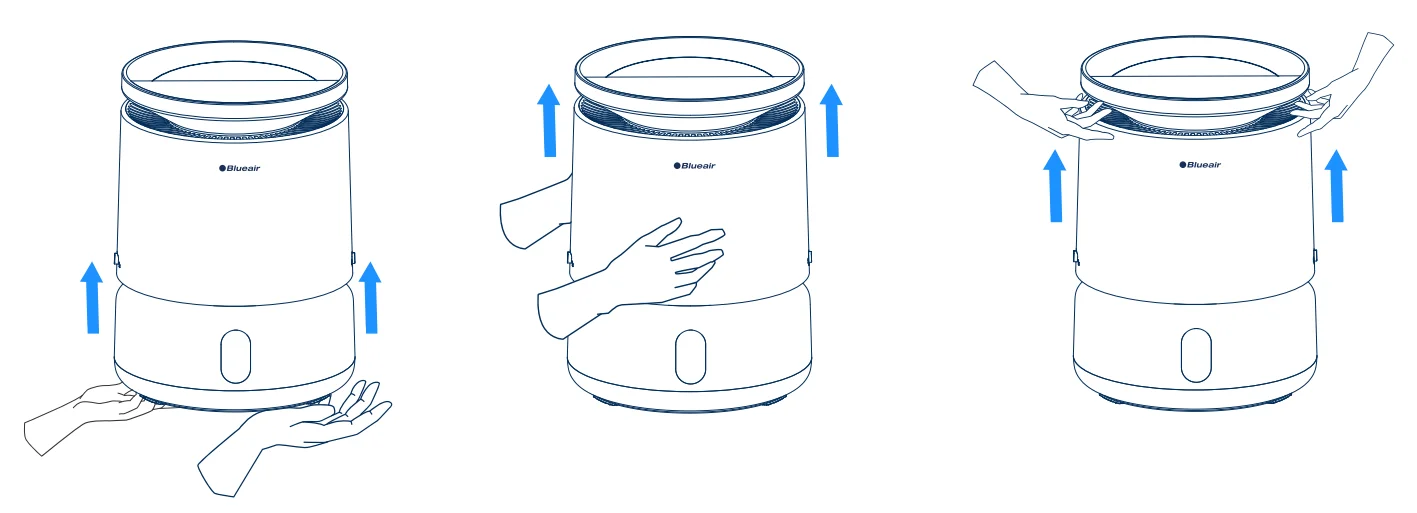
Once the device is fully locked, it can be lifted from top, middle and bottom.
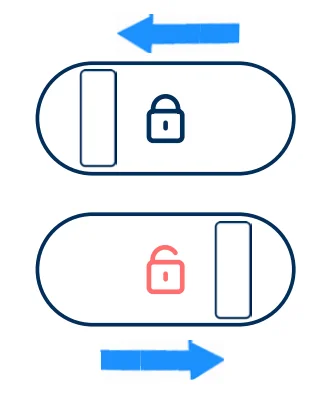
- Use 2 sliding buttons on each side.
Lock: clockwise
Unlock: counter-clockwise
Disposal, support, and warranty
Disposal and recycling
The humidifier should be disposed or recycled as electrical waste and the wick filter should be disposed as regular waste. If you have questions regarding the disposal and recycling of your device, please contact your local recycling facility.
Help and support
If you have questions about your product, please visit www.blueair.com or contact your local Blueair retailer.
Limited warranty information
The humidifier has a limited warranty of 3 years (1 year standard warranty and 2 extra years upon registration).

Troubleshooting
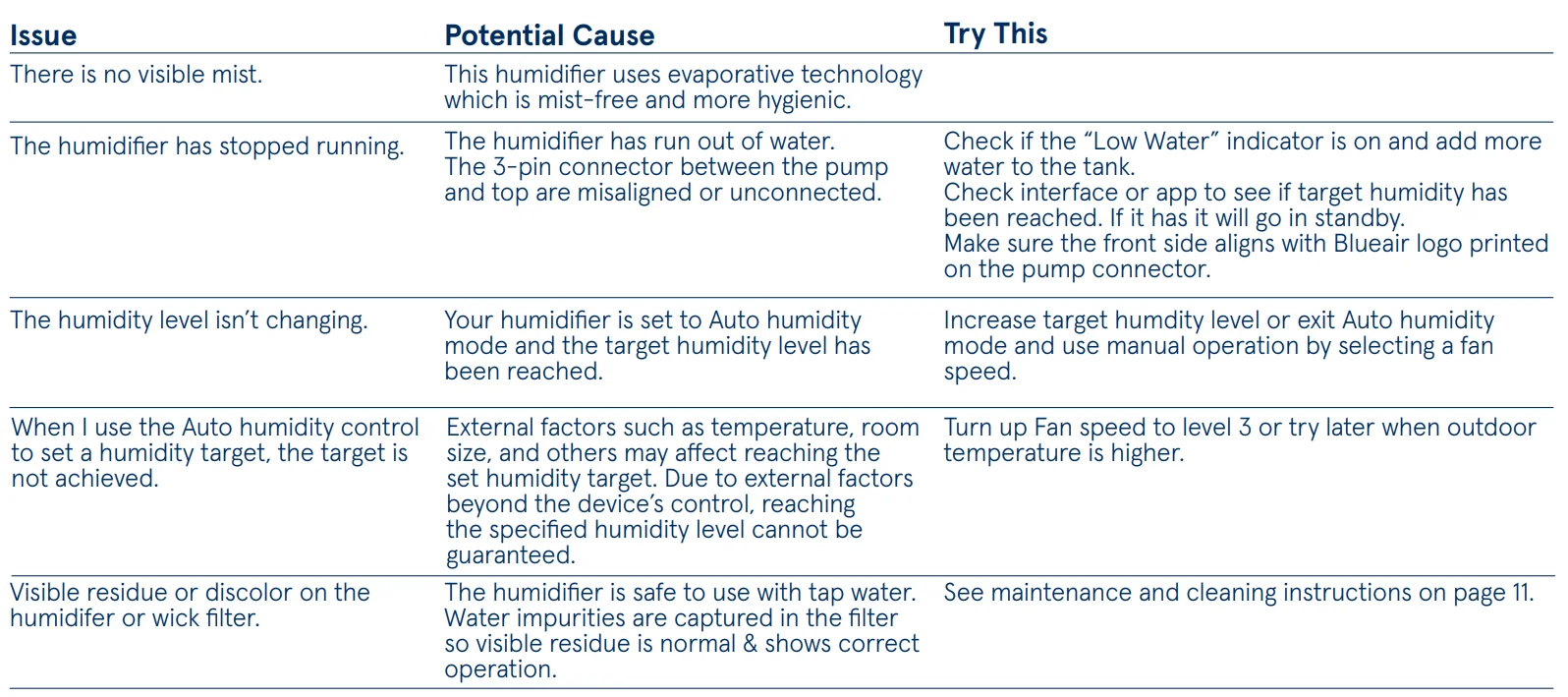
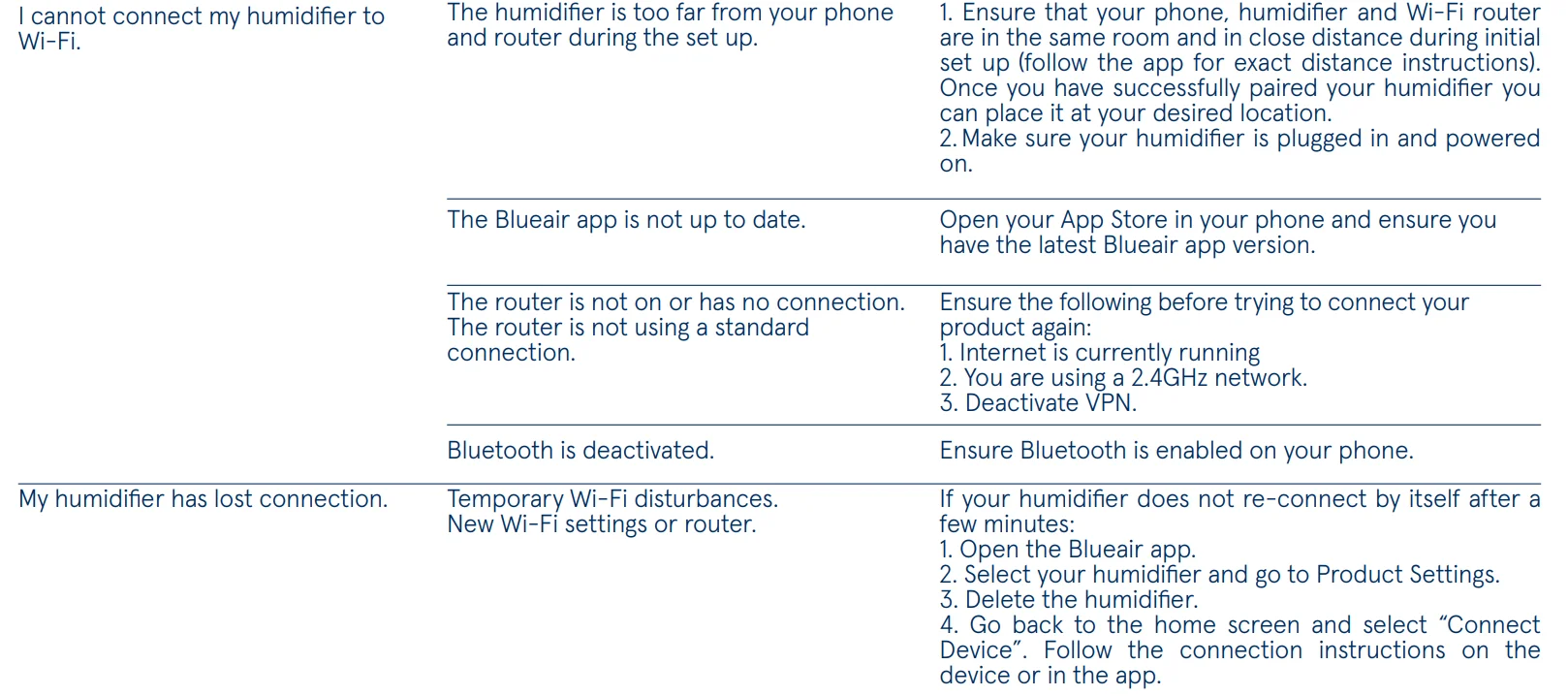
For more information and troubleshooting tips, please check the Support page on www.blueair.com/support.
For more manuals by Blueair, visit ManualsLibraryy
Blueair DreamWell Humidifier H38i-FAQs
How often should I clean the Blueair DreamWell Humidifier H38i?
It is recommended to clean the humidifier once a week and descale it monthly. Regular cleaning helps prevent mineral buildup, keeps the mist fresh, and improves the overall performance of the unit.
What type of water should I use in the humidifier?
Using distilled or filtered water is the best option. It helps reduce white dust, mineral deposits, and unwanted particles that can build up inside the humidifier over time.
Can I use tap water in the Blueair DreamWell H38i?
Yes, tap water can be used, but it may leave mineral residue and create more frequent cleaning needs. Filtered or distilled water is usually recommended for better efficiency and cleaner mist output.
Can the humidifier help with dry skin and cough?
Yes, adding moisture to dry indoor air may help relieve dry skin, irritated throat, nasal dryness, and mild cough symptoms caused by low humidity.
How can I tell if the humidifier is working properly?
You should notice gentle mist output, stable humidity levels, and water gradually decreasing in the tank. Some models may also display humidity readings or status indicators.
Where should I place the humidifier in a room?
Place the humidifier on a raised, flat surface with enough open space around it. Avoid placing it directly near beds, walls, wooden furniture, or electronic devices.
Is it safe to sleep with the humidifier on overnight?
Yes, the Blueair DreamWell H38i is designed for safe overnight use. Keeping indoor humidity between 30% and 50% can help improve sleeping comfort and reduce dryness.
How many hours should I run the humidifier each day?
The humidifier can run for several hours daily depending on room dryness and weather conditions. Many users operate it overnight or during dry seasons to maintain comfortable humidity levels.