
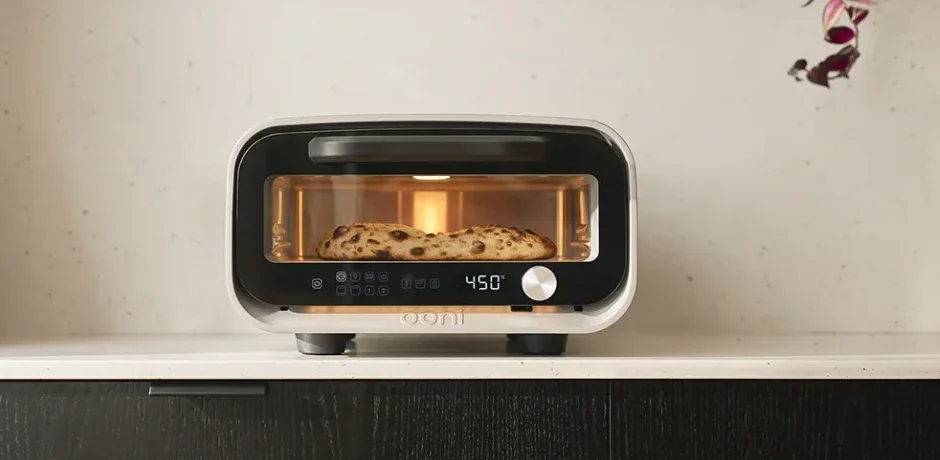

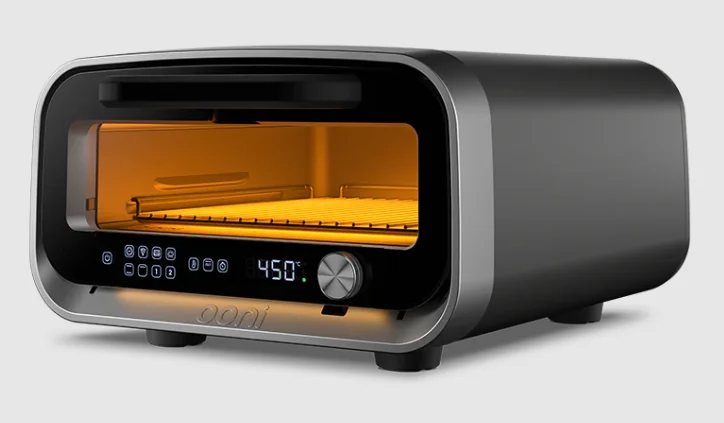
Ooni Volt 2 Indoor Electric Pizza Oven
Extend your 1-year warranty to 3 years*, for free when you register your product at ooni.com/warranty within 60 days of purchase.*
*Terms and conditions apply

IMPORTANT SAFEGUARDS
Read all instructions.
- This appliance generates heat during use. Do not touch hot surfaces. Use buttons, the door handle, the control dial, or the power switch. Always protect your hands with non-slip oven mitts or similar.
- To protect against electrical shock, do not immerse the oven, cord or plug in water or other liquid.
- The appliance can be used by children aged 8 years and above, and persons with reduced physical, sensory, or mental capabilities, or lack of experience and knowledge, under supervision, or if they have been instructed using the appliance in a safe way and understand the hazards involved. Children shall not play with the appliance. Cleaning and user maintenance shall not be made by children unless they are older than 8 and supervised.
- Keep the appliance and its cord out of reach of children less than 8 years old and pets, when in use as well as when in storage.
- Unplug from the outlet when not in use and before cleaning.
- Do not clean with metal scouring pads.
Pieces can break off the pad and touch electrical parts, creating a risk of electric shock. - The supply cord should be regularly examined for signs of damage.
- Do not operate the appliance with a damaged cord or plug, or after the appliance malfunctions or has been damaged in any manner.
- If the supply cord is damaged, it must be replaced by a special cord or assembly available from Ooni or our service agent. Return appliance to the nearest authorised service facility for examination, repair or adjustment.
- Do not use outdoors.
- Do not use accessory attachments not recommended by Ooni, as these may cause injury or damage.
- Do not let the cord hang over the edge of the table or counter, or touch hot surfaces.
- Do not place on or near a hot gas or electric burner, or in a heated oven.
- Extreme caution must be used when moving an appliance containing hot oil or other hot liquids.
- Do not attempt to lift or move the oven during use.
- Use extreme caution when removing stone or disposing of hot grease.
- Always attach the plug to the appliance first, then plug the cord into the wall outlet. To disconnect, turn any control to “off”, then remove the plug from the wall outlet.
- The appliance is intended to be used in household applications only.
- The appliance is not intended to be operated by means of an external timer or separate remote-control system.
- Do not use the appliance for anything other than its intended use.
- Use only on properly grounded / earthed outlets.
WARNING: The product can get hot during use. Make sure to place the oven on a heat-resistant surface or use a trivet or heat-resistant pad. If in doubt, check with the manufacturer of the surface for advice before use. - Maintain the oven cavity cleanliness and do not operate when internal surfaces are contaminated with excessive grease build-up.
WARNING! Do not cook meat or fatty foods above 480 °F / 250 °C. Grease can spontaneously ignite at high temperatures.
- Do not open the door if food or flour debris spontaneously ignites. Set Volt 2 to standby mode until the oven is completely cool.
- Small flamelets from excess flour or semolina are normal during pizza cooking.
- Oversized food and metal utensils must not be inserted in the oven as they may cause fire or risk of electric shock.
- In the event of a power cut or abrupt shutdown, do not touch the oven until completely cool.
- Always wear gloves when cleaning the oven. Take care when cleaning inside the oven because sharp edges may be present.
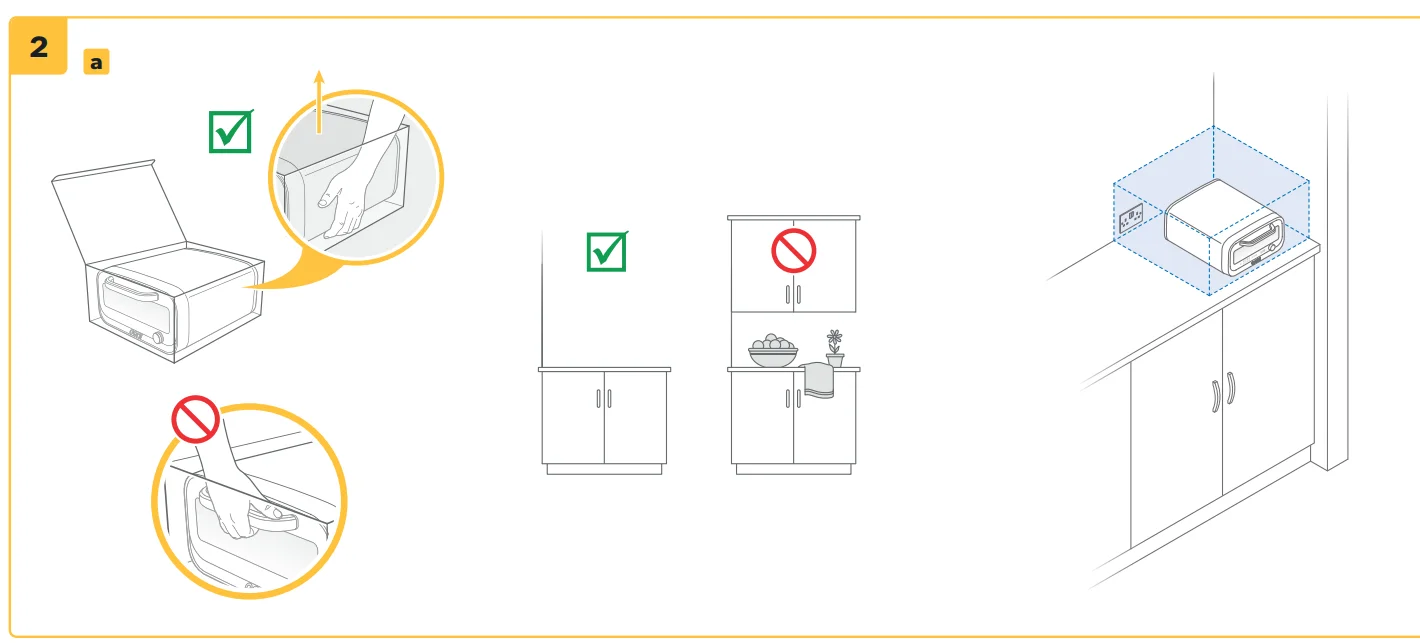
- When operating the oven, keep a minimum distance of 10cm / 4in of space on all sides of the appliance and 15cm / 6in above.
- Use extreme caution when removing or inserting food items or utensils in the oven cavity,as they might be very hot.
- Allow the oven to cool completely and unplug it before attempting to clean or move it. This may take several hours.
- Do not use coated or non-stick pans in the oven above their rated temperature.
- Do not place oil or baking paper directly on the pizza stone.
- Do not rest anything on the door once open.
- Do not lean or set items on top of the oven.
- Avoid cold items of food dropping onto the inside of the door.
- Do not store any materials, other than Ooni’s recommended accessories, in this oven when not in use.
- Do not use the appliance without the pizza stone in place.
- Only use with compatible Ooni Pizza Stones (10mm / 0.4”). These are recommended and supplied by Ooni.
- Before turning off the power switch or disconnecting from the outlet, let the oven cool down in Standby mode for a minimum of 30 minutes.
A short power supply cord (or detachable power supply cord) is provided to reduce the risk resulting from becoming entangled in or tripping over a longer cord. Longer detachable power-supply cords or extension cords are available and may be used with care. If an extension cord is used:
- The marked electrical rating of the extension cord should be at least as great as the electrical rating of the appliance.
- The cord should be arranged so that it will not drape over the countertop or tabletop where it can be pulled on by children or tripped over unintentionally; and
- The appliance is of the grounded type; the extension cord should be a grounded type 3-wire cord.
Please keep this manual for future reference.
SAVE THESE INSTRUCTIONS
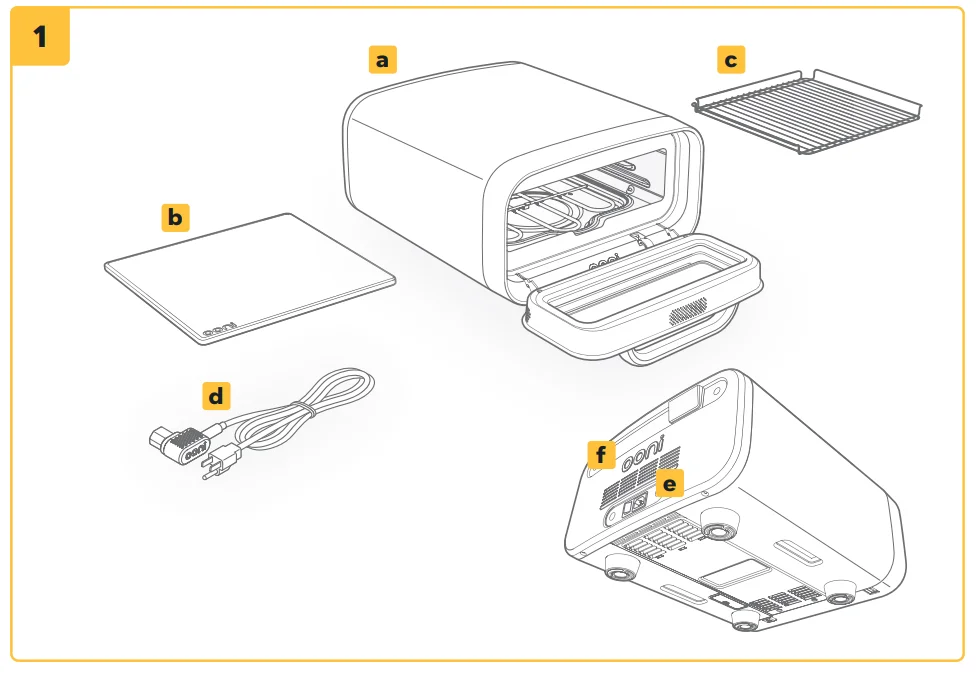
What’s in the box:
- a Ooni Volt 2
- b Pizza stone
- c Oven shelf
- d Power cable (region dependent)
- e Power switch
- f Serial number
Setup and assembly
WARNING
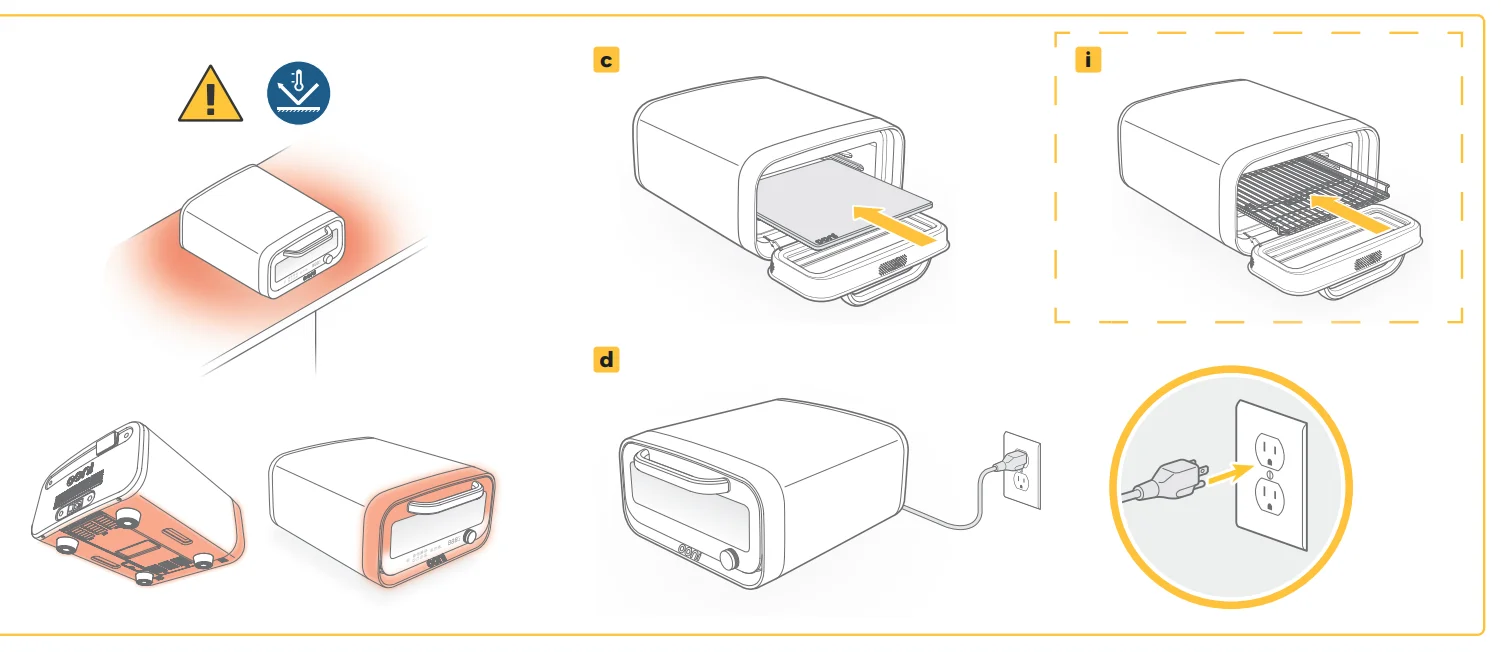
This product can get hot during use. Place your Ooni Volt 2 on an Ooni Table, or an alternative level, stable, heat-resistant surface with plenty of space around it, and make sure to remove any flammable items nearby. We recommend using a heat-resistant trivet or pad for added protection. Always contact the manufacturer of the surface for advice when in doubt. Never set it on top of glass or plastic. Ooni Volt 2 is designed for indoor use only. Ensure that the cord is undamaged before use. DO NOT lift the oven with the pizza stone in place. Ooni Volt 2 must not be left unattended while cooking.
Warning: DO NOT lift using the door handle.
- a. Lift the oven using the side handholds and place it on a suitable surface.
- b. Remove outer packaging and parts from inside the oven.
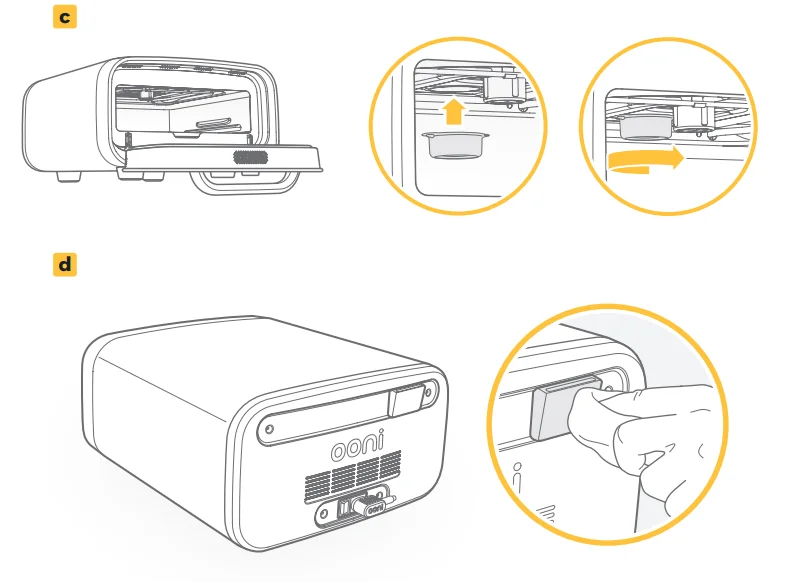
- c. Using two hands, carefully insert the pizza stone.
- i. Optional: Insert oven shelf.
- d. Plug in the power cord to the rear of the oven and then to your wall outlet.
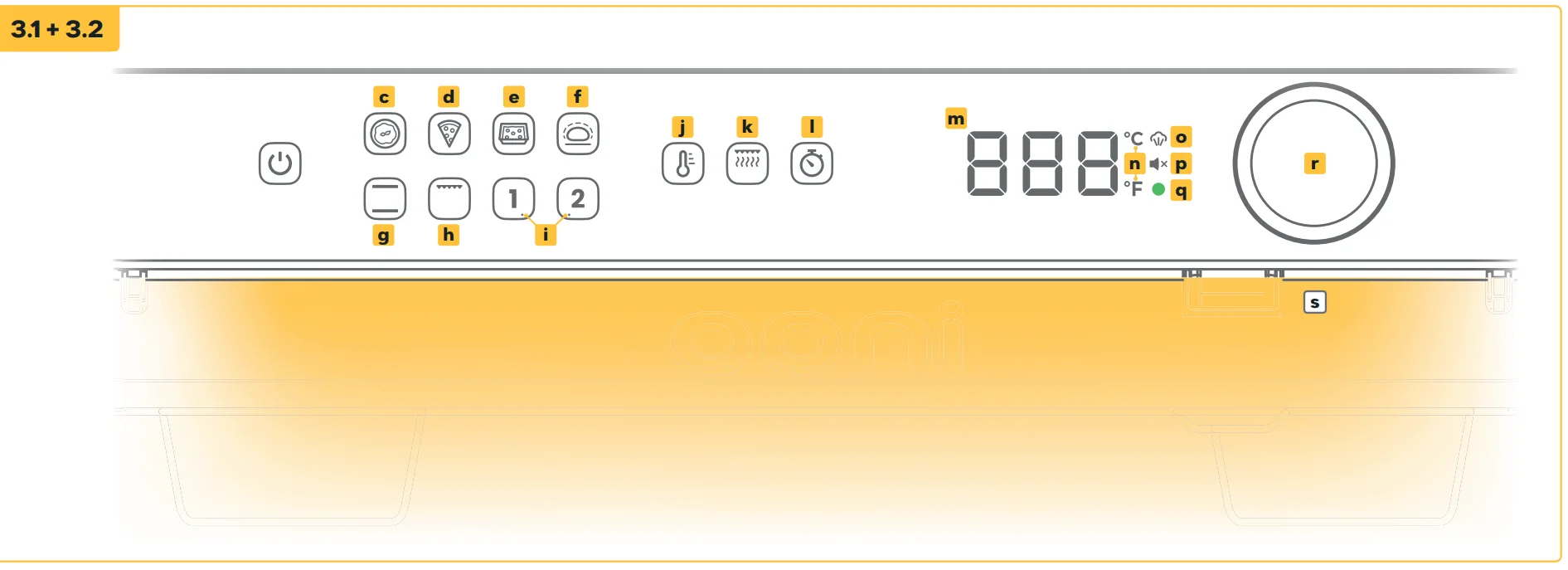
Display and inputs
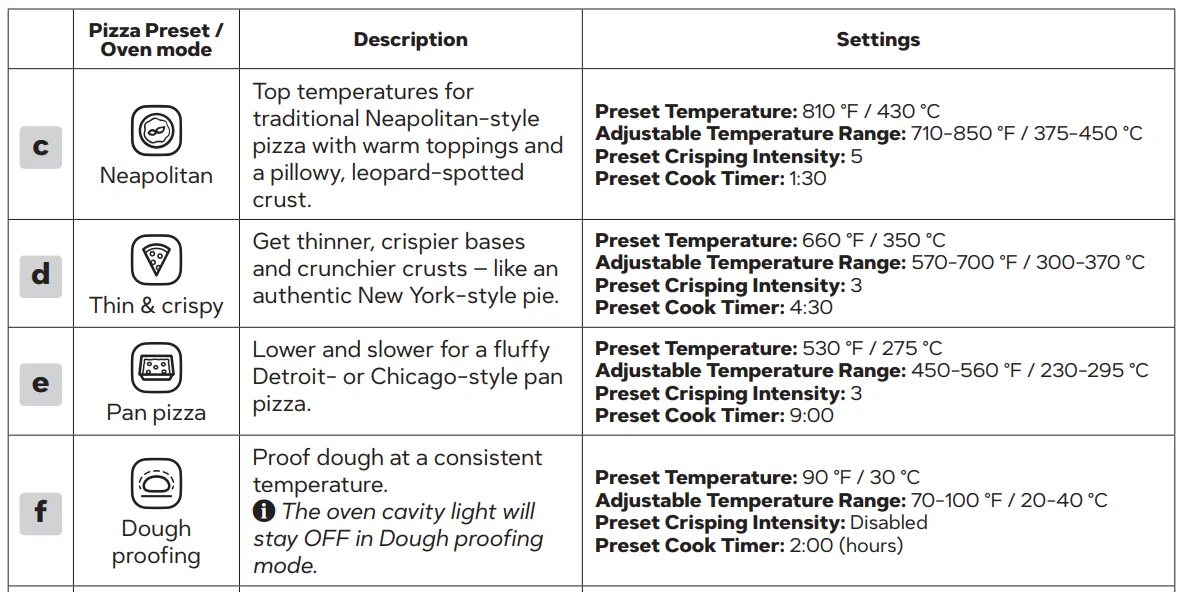
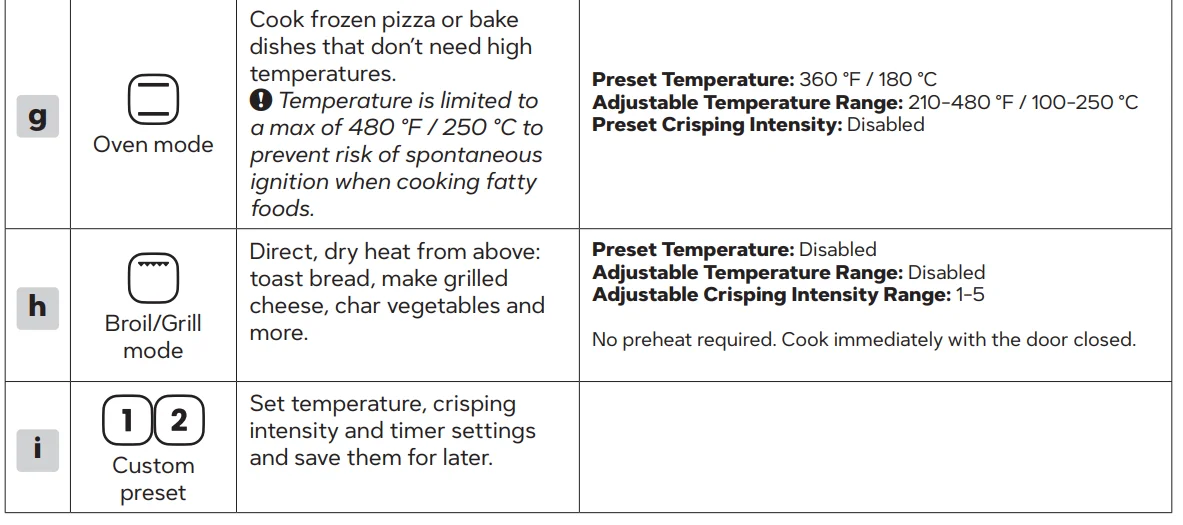
Pizza presets/Oven modes
Explore presets and modes baked into Volt 2 – proof dough, cook fluffy deep-dish pan pizzas, crispy New York-style pies, and even authentic, Neapolitan-style pizzas.
Other inputs and displays
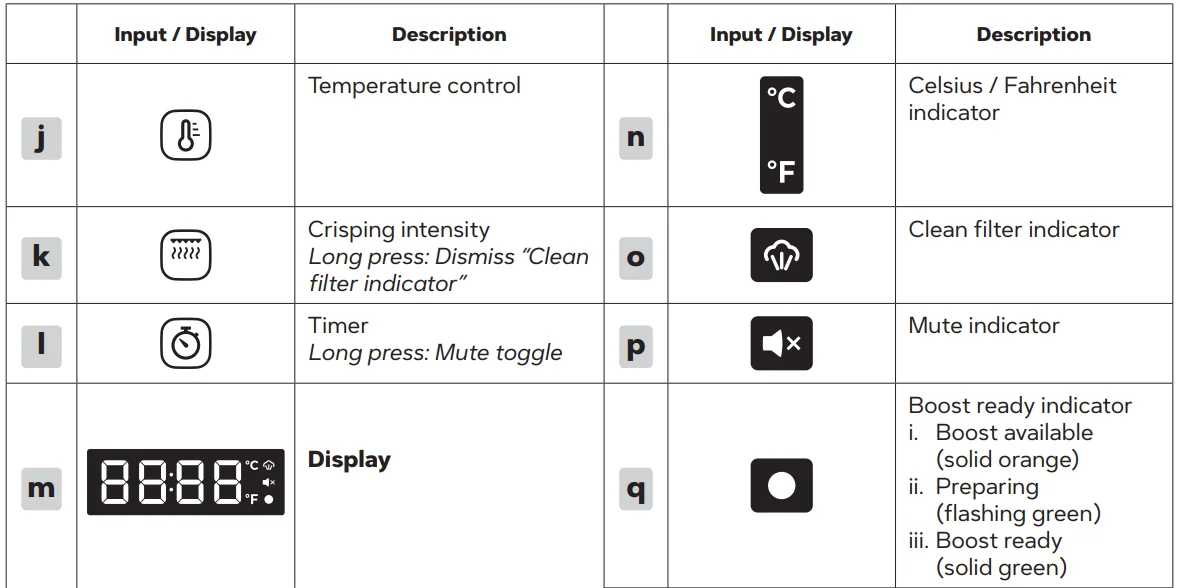
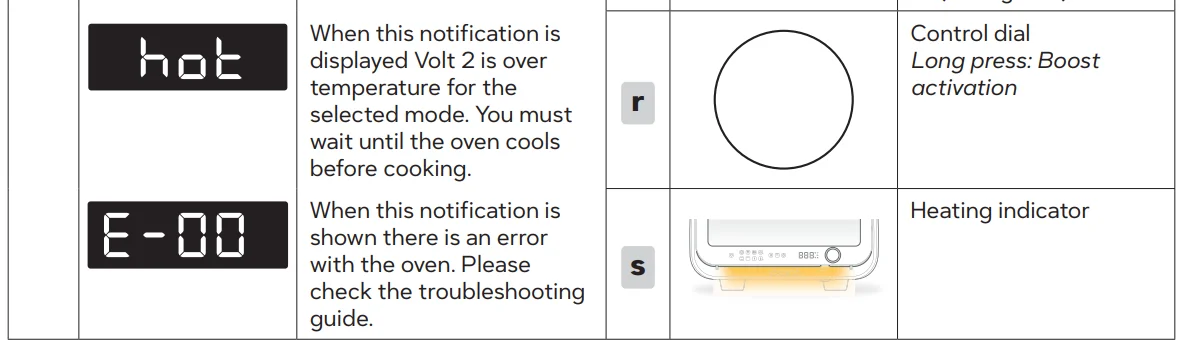
Instructions for use
WARNINGS: In the event of a power cut or abrupt shutdown, do not touch the oven until completely cool.
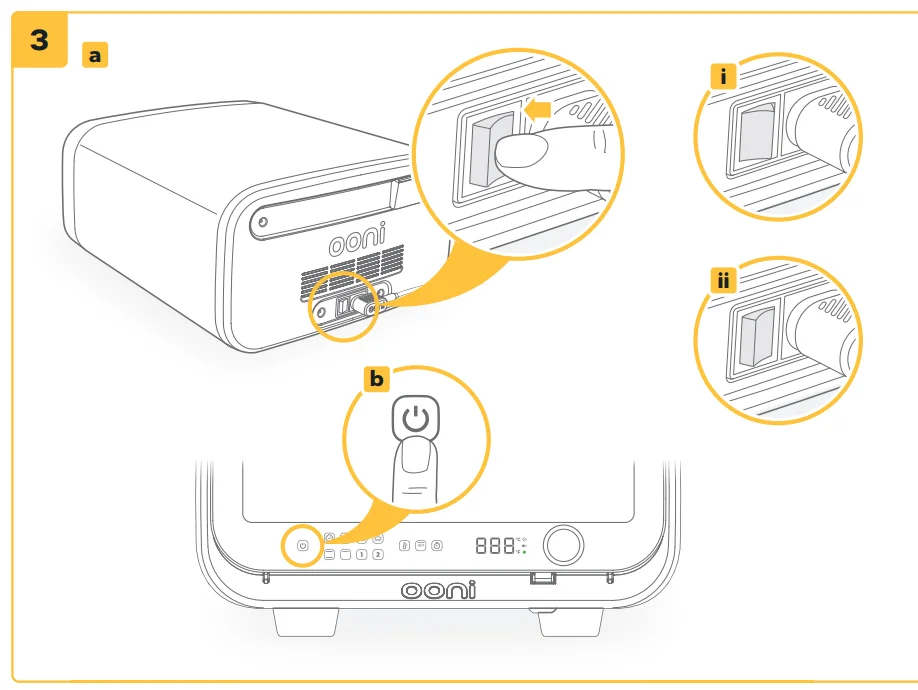
Switch on
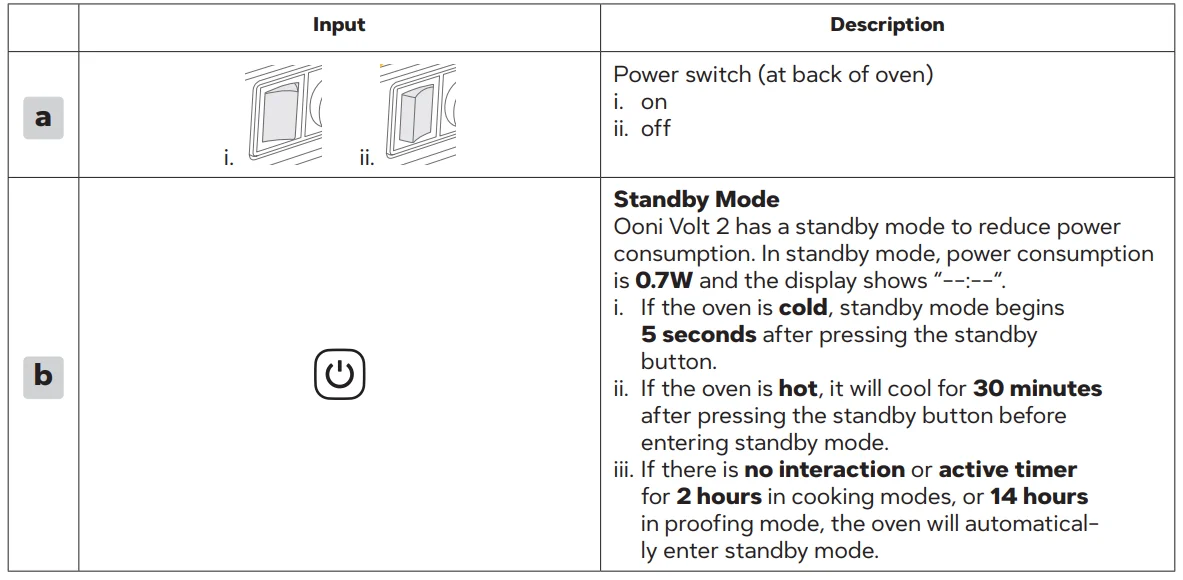
- a. Set the power switch at the back of Volt 2 to “on”.
- b. Tap the Standby button
 .
.
 .
.Switch off
- a. Tap the Standby button.
- b. Wait 30 minutes for the oven to cool before setting the power switch to “off” or disconnecting power.
- c. Switch off and disconnect Ooni Volt 2 when not in use.
Display
By default, the display will show live temperature readings. After selecting a preset, the display will show the target temperature for 3 seconds before returning to a live temperature reading.
- The countdown timer display will be active once started. Tapping the Temperature button
 shows the target temperature before returning to the live reading.
 - If using Broil/Grill mode, the display will show the target crisping
intensity setting.
 shows the target temperature before returning to the live reading.
Seasoning your oven
Warning: You must season your oven before cooking for the first time. Always wear gloves when putting your hand inside the oven.
- a. Select Neapolitan
 preset and adjust temperature to 850 °F / 450 °C.
 - b. Run for 30 minutes.
- c. Tap the Standby button, allow the oven to cool completely, and then disconnect from power.
- d. Wipe down the inside with dry paper towels.
 preset and adjust temperature to 850 °F / 450 °C.
Cooking
WARNINGS
Some presets are limited to a max of 480 °F / 250 °C to prevent the risk of spontaneous ignition when cooking fatty foods. Only cook dry, bread-based dishes like pizza at 480 °F / 250 °C and above. Do not open the door in the event of food or flour debris spontaneously igniting. Set Volt 2 to standby mode until the oven is completely cool. Small flamelets from excess flour or semolina are normal during pizza cooking. Only cook pizza and other dry, bread-based dishes directly on the pizza stone. To cook meat, vegetables, or other dishes, use the oven shelf, Ooni Pans, or other Ooni-approved cooking accessories.
Using a preset
- a. Tap your chosen preset. The target temperature will flash for 3 seconds and then begin heating. Press the control dial to start immediately.
- b. Volt 2 will preheat to the set temperature and crisping intensity. Presets c – f have a recommended cook timer. In Broil/Grill mode, set the target crisping intensity to begin preheating. The target crisping intensity will flash for 3 seconds. Press the control dial to start immediately.
- c. The heating indicator will pulsate until the target temperature or crisping intensity is reached. Do not cook until the heating indicator is constant.
Volt 2 will display when the oven is over-temperature for the selected preset/mode. You must wait until the oven cools before cooking. Use an Ooni Digital Infrared Thermometer to accurately measure the pizza stone temperature. Use presets and timers as a guide. Always monitor your food as it cooks. Remember: you’re in control. Make adjustments or remove food from the oven as necessary.
Check and adjust target temperature, crisping intensity or timer
- a. Tap the Temperature, Crisping intensity
 or Timer
 button.
Adjust Crisping intensityfrom levels 0 to 5 to fine-tune the top heating element and precisely control how well your toppings cook. - b. Rotate the control dial to adjust temperature, crisping intensity or the timer.
The new target will flash for 3 seconds and then confirm. Press the control dial to immediately confirm.
Timer adjustment: Press the control dial to start. If you don’t press the control dial, the adjusted timer will return to the preset.
 or Timer
 button.
You can only adjust the temperature within the preset range.
Save custom preset
- a. Select existing preset ( c – f ).
- b. Make desired adjustments to temperature, crisping intensity, and timer settings.
- c. Tap and hold the Custom preset
 for 3 seconds to save.
 for 3 seconds to save.
Timer settings
- Start preset timer: Presets c to f have a recommended cook timer.
- Tap the Timer button.
- Press the control dial to start the preset timer.
- Tap the Timer button
- Set / adjust a custom timer:
- Tap the Timer button.
- Rotate the control dial to adjust the duration.
- Press the control dial to start the timer.
- Tap the Timer button
- Pause/restart the timer:
- Tap the Timer button.
- Press the control dial to pause/restart.
- Tap the Timer button
- d. Stop alert:
- Press the control dial.
Boost
Supercharge your top element to emulate a wood-fired oven’s rolling flame, delivering Neapolitan-style pizza in 90 seconds. Ooni Volt 2 must be in the Neapolitan preset to use this feature. The Boost
ready indicator will glow orange when Boost is available.
- a. Press and hold the control dial for 3 seconds.
- b. The Boost ready indicator light will flash for 30 seconds.
- c. When the Boost ready indicator turns solid green, the boost is complete and you can launch your pizza.
Boost will be unavailable for 3 minutes after use to prevent overheating.
Other
- a. Turning off the Clean filter indicator:
The Clean filter indicator button will illuminate as a reminder to clean the filter. See step 7.6 for more details.- After cleaning the filter, tap and hold the Crisping intensitybutton for 3 seconds to dismiss the indicator.
- After cleaning the filter, tap and hold the Crisping intensity
- b. Toggle Mute:
Tap and hold the Timer buttonfor 3 seconds. - c. Turn on cavity light in Dough proofing mode:
The oven cavity light is OFF by default in Dough proofing mode. Turn the control dial to illuminate the oven cavity for 30 seconds.
Care and maintenance
WARNING
- Never attempt cleaning or maintenance while the oven is hot, in use or connected to power.
- Always wear gloves when cleaning the oven. Take care when cleaning inside the oven because sharp edges may be present.
- Do not immerse in water.
- Do not use chemical cleaners on painted surfaces.
- Do not use abrasive cleaners or scouring pads to clean any part of the oven.
- Ensure Ooni Volt 2 is completely dry before switching it on.
Heating indicator
- a. Pulsing and oven cavity light is on:
The oven is preheating. - b. Constant with the oven cavity light on:
The oven has reached its target temperature and is ready to cook. - c. Pulsing and oven cavity light is off:
- The oven is in Dough proofing mode OR
- The oven is cooling.
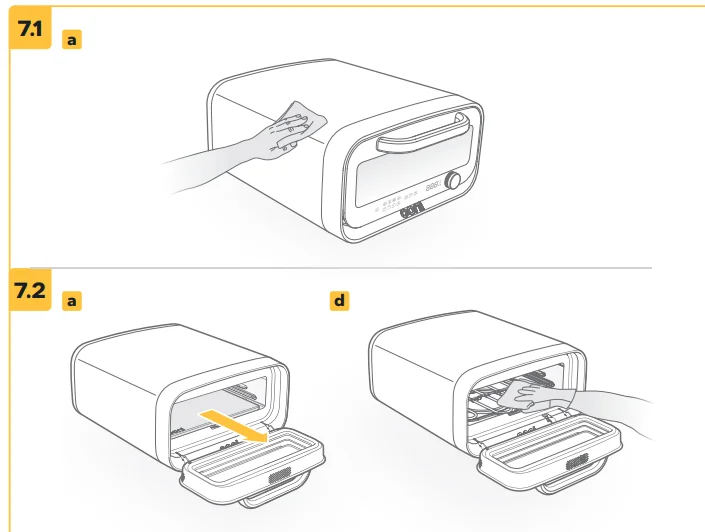
Cleaning the exterior
Ensure the oven is completely cool and disconnected from power.
- a. Wipe down with a damp cloth and dry immediately.
Cleaning the interior
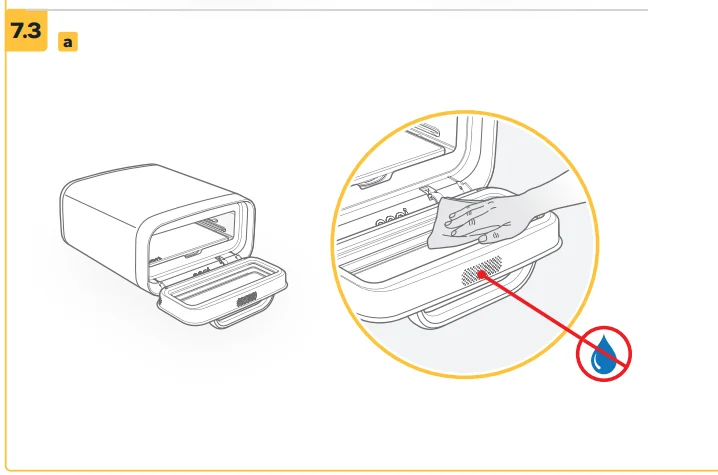
Clean the appliance after use. Note that preparing high-fat foods, such as meats, may cause splatter and deposits. Do not operate when internal surfaces are excessively contaminated with grease build-up. Grease can spontaneously ignite at high temperatures. Ensure the oven is completely cool and disconnected from power. Do not spray any kitchen cleaner inside the oven, or allow water to enter the vents on the oven door housing.
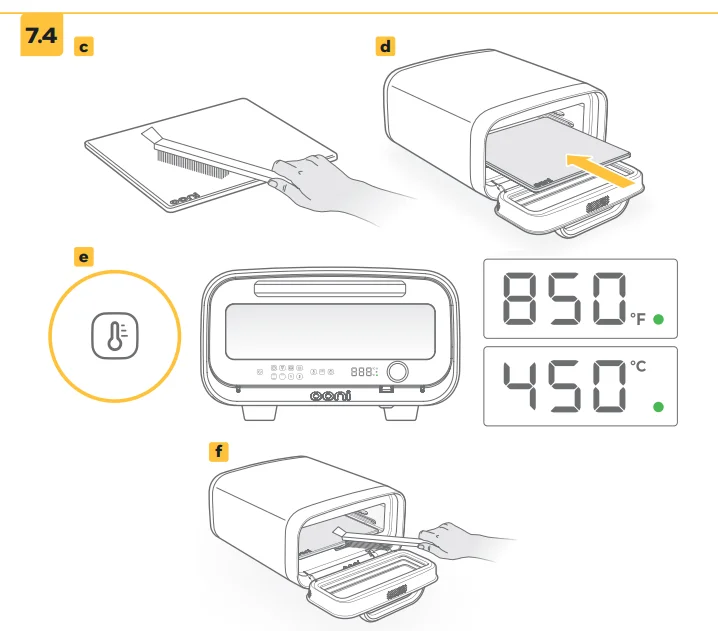
- a. Using both hands, carefully remove the pizza stone. See step 7.4 for stone cleaning instructions.
- b. Remove any dry debris using a cloth, brush or handheld vacuum.
- c. Use a damp cloth to wipe debris forward along the sides of the oven. Try not to push any toward the lower cooking element. Vacuum any residue that falls into the centre of the oven.
- Use a damp cloth to wipe down the oven shelf, walls and inside of the oven door.
If necessary, soak the oven shelf in hot, soapy water and scrub gently to remove grease deposits, or place it in the dishwasher on a ‘normal’ cycle. - e. Dry immediately.
Cleaning the glass door
Ensure the oven is completely cool and disconnected from power. Do not allow water or excess moisture to enter the door vent.
- a. Remove grease using dry paper towels or a dry cloth.
- b. For more thorough cleaning, use a damp cloth. Dry immediately.
Cleaning the pizza stone
Ensure the oven is completely cool and disconnected from power. Never use chemical cleaners or soaps on the pizza stone. Never expose your pizza stone to water. There is no need to wash the pizza stone. Its appearance will change over time.
- a. Follow step 7.2 for cleaning the interior.
- b. Check the stone for damage. Do not use if broken; contact Ooni or visit ooni.com for a replacement.
- c. Remove excess food debris from the stone using an Ooni Pizza Oven Brush.
- d. Place the pizza stone back into the oven.
- e. Turn the oven on at full power for 45 minutes without cooking. At high temperatures, the pizza stone will self-clean, and any food residue or debris will turn to ash.
Very high temperatures can sometimes cause food to burn, which can produce smoke and/or steam, which will vent from the rear. - f. Allow the oven to cool completely, then brush the ash away with an Ooni Pizza Oven Brush.
You can use both sides of your pizza stone. Turn it over between uses (once cool) and burn off any stubborn residue from underneath the next time you cook.
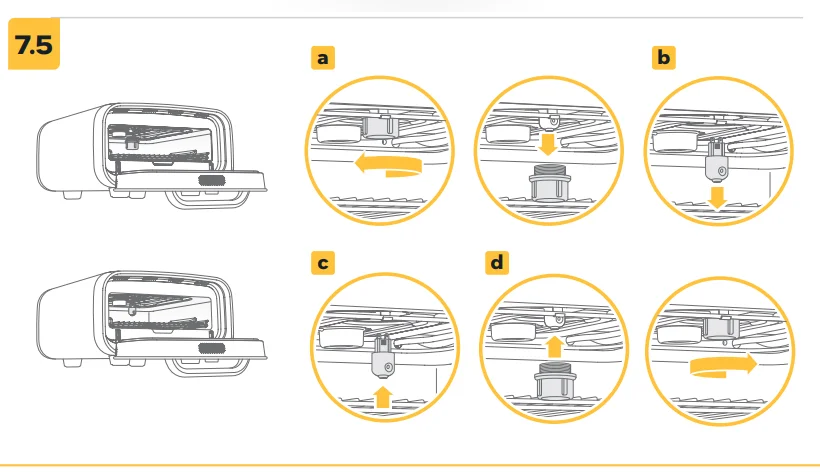
Changing the light bulb
Ensure the oven is completely cool and disconnected from power. Never change the light bulb while the oven is connected to the mains.
- a. Remove the lamp cover by turning it clockwise.
- b. Remove the bulb by pulling directly down.
- c. Insert the new bulb by aligning it with the contacts and pushing directly up.
- d. Replace the lamp cover by turning it counterclockwise until hand-tight.
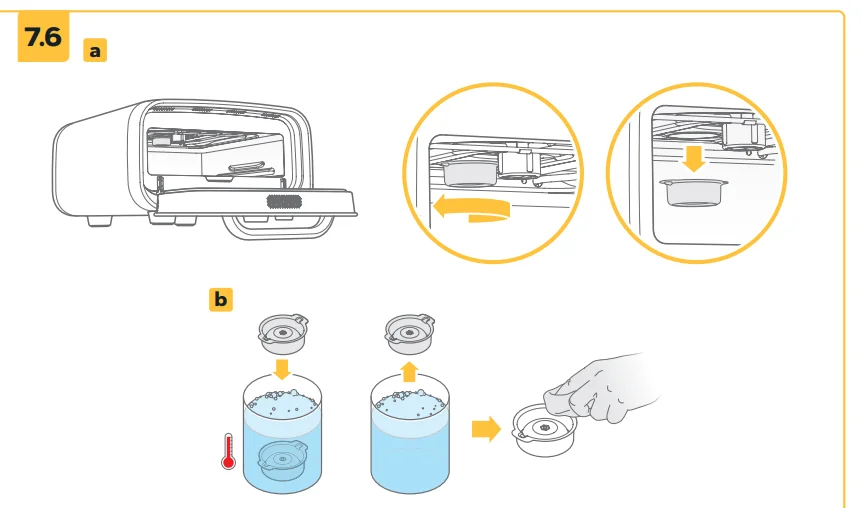
Filter removal and cleaning
When the Clean filter indicator illuminates, it’s time to clean the filter. Ensure the oven is completely cool and disconnected from power.
- a. Twist the filter housing clockwise a quarter turn to release and remove.
- b. Soak the filter in hot, soapy water and scrub gently to remove grease deposits, or place it in the dishwasher on a ‘normal’ cycle.
Make sure the filter is completely dry before replacing it inside the oven. - Position the filter inside the oven and twist counterclockwise a quarter turn to lock it into place. You’ll feel when it’s in the correct position.
- Check the steam vent at the rear of the oven. Ensure there is no condensation build-up on the vent or the rear panel. If necessary, wipe with a damp cloth and dry with a paper towel.
- e. Dismiss the Clean filter indicator
 by tapping and holding the Crisping intensitybutton for 3 seconds.
Troubleshooting

Scan to download the Ooni app for pizza tips, recipes and troubleshooting. You can also contact Ooni customer support at support.ooni.com
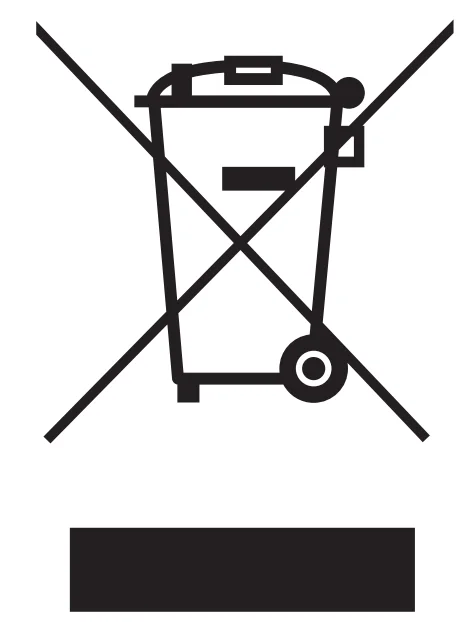
This symbol indicates this product must not be disposed of as unsorted municipal waste, and instead, in the EU and UK, should be disposed in separate collection schemes applicable to Large Household Appliances. Recycle it responsibly to prevent possible harm to the environment or human health from uncontrolled waste disposal, as well as to promote the sustainable reuse of material sources. Contact your local authority for the applicable collection or disposal schemes.
For more manuals by Ooni, visit ManualsLibraryy
Ooni Volt 2 Indoor Electric Pizza Oven-FAQs
Is the Ooni Volt 2 worth buying?
Yes, the Ooni Volt 2 Indoor Electric Pizza Oven is highly rated for making restaurant-style pizza at home. It heats up quickly, maintains steady temperatures, and delivers consistent results. Its compact design and simple controls make it suitable for both beginners and experienced users.
How do I clean the Ooni Volt 2?
Allow the oven to cool completely, then wipe the interior and exterior with a dry or slightly damp cloth. The stone can be cleaned by brushing off excess flour or residue after use.
Can I cook foods other than pizza?
Absolutely. You can cook items like bread, vegetables, meat, and desserts, making it a versatile indoor oven.
Is it beginner-friendly?
Yes, it includes easy temperature controls and preset cooking modes, making it ideal for beginners learning to make pizza at home.
How heavy is the Ooni Volt 2?
It weighs around 17–18 kg, making it portable enough for countertop use but still sturdy and durable.
Can I use the Ooni Volt 2 outdoors?
No, it is recommended for indoor use only. Using it outside may affect performance and safety.
What is the difference between Ooni Volt and Volt 2?
The main difference is that the Volt 2 is designed strictly for indoor use, while the earlier model had indoor/outdoor flexibility. The newer version also features improved controls and efficiency.
What maximum temperature can it reach?
The Volt 2 can reach temperatures up to around 450°C (about 800°F), allowing you to cook Neapolitan-style pizzas with crispy crusts in just minutes.
How fast does the Ooni Volt 2 heat up?
The oven heats up in about 12–20 minutes depending on the temperature setting. It can reach very high heat levels suitable for authentic pizza cooking.
Can the Ooni Volt 2 be used indoors?
Yes, this oven is specifically designed for indoor use. It runs on electricity, so there’s no need for gas or wood, making it convenient and safe for home kitchens.