
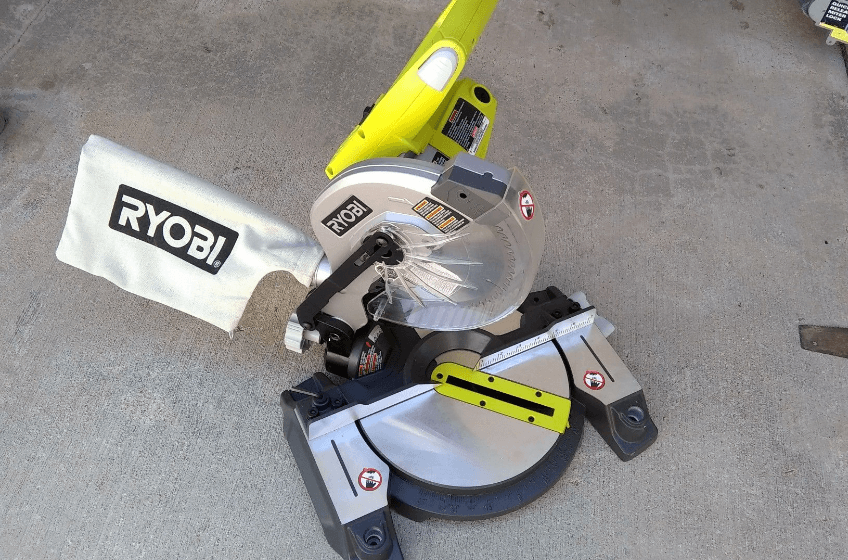

Ryobi TS1300 Miter Saw
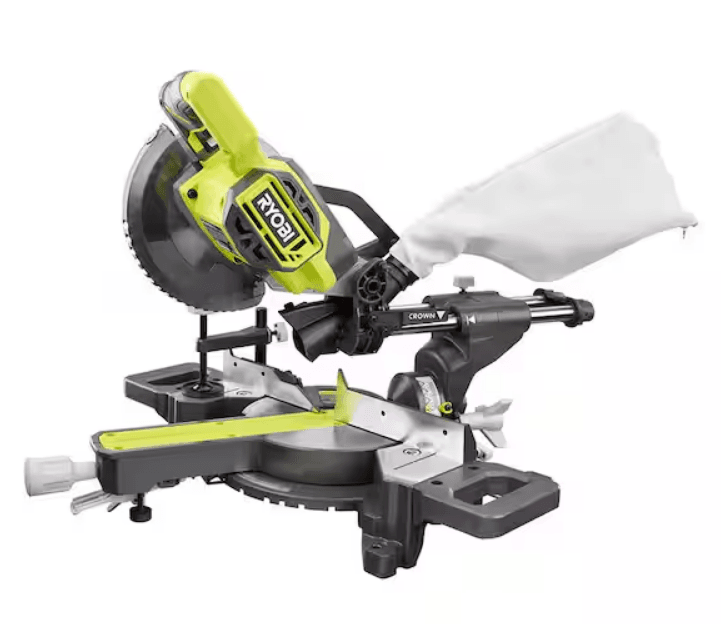
RULES FOR SAFE OPERATION
Safe operation of this power tool requires that you read and understand this operator’s manual and all labels affixed to the tool. Safety is a combination of common sense, staying alert, and knowing how your miter saw works.
READ ALL INSTRUCTIONS
- KNOW YOUR POWER TOOL. Read the operator’s manual carefully. Learn the saw’s applications and limitations as well as the specific potential hazards related to this tool.
- GUARD AGAINST ELECTRICAL SHOCK BY PREVENTING BODY CONTACT WITH GROUNDED SURFACES. For example, pipes, radiators, ranges, refrigerator enclosures.
- KEEP GUARDS IN PLACE and in good working order.
- KEEP THE WORK AREA CLEAN. Cluttered work areas and workbenches invite accidents. DO NOT leave tools or pieces of wood on the saw while it is in operation.
- DO NOT USE IN DANGEROUS ENVIRONMENTS. Do not use power tools near gasoline or other flammable liquids, in damp or wet locations, or expose them to rain. Keep the work area well lit.
- KEEP CHILDREN AND VISITORS AWAY. All visitors should wear safety glasses and keep a safe distance from the work area. Do not let visitors contact the tool or extension cord while operating.
- MAKE the WORKSHOP CHILD-PROOF with padlocks and master switches, or by removing starter keys.
- DO NOT FORCE THE TOOL. It will do the job better and safer at the rate for which it was designed.
- USE THE RIGHT TOOL. Do not force the tool or attachment to do a job it was not designed for. Don’t use it for a purpose not intended.
- DRESS PROPERLY. Do not wear loose clothing, gloves, neckties, rings, bracelets, or other jewelry. They can get caught and draw you into moving parts. Rubber gloves and nonslip footwear are recommended when working outdoors. Also, wear protective hair covering to contain long hair.
- ALWAYS WEAR SAFETY GLASSES WITH SIDE SHIELDS. Every day, eyeglasses have only impact-resistant lenses; they are NOT safety glasses.
- PROTECT YOUR LUNGS. Wear a face or dust mask if the cutting operation is dusty.
- PROTECT YOUR HEARING. Wear hearing protection during extended periods of operation.
- DO NOT ABUSE THE CORD. Never yank the cord to disconnect it from the receptacle. Keep cord from heat, oil, and sharp edges.
- DO NOT OVERREACH. Keep proper footing and balance at all times.
- MAINTAIN TOOLS WITH CARE. Keep tools sharp and clean for better and safer performance. Follow instructions for lubricating and changing accessories.
- DISCONNECT ALL TOOLS. When not in use, before servicing, or when changing attachments, blades, bits, cutters, etc., all tools should be disconnected.
- REMOVE ADJUSTING KEYS AND WRENCHES. Get in the habit of checking to see that hex keys and adjusting wrenches are removed from the tool before turning it on.
- AVOID ACCIDENTAL STARTING. Be sure the switch is off when plugging in.
- USE THE PROPER EXTENSION CORD. Make sure your extension cord is in good condition. When using an extension cord, be sure to use one heavy enough to carry the current your product will draw. An undersized cord will cause a drop in line voltage, resulting in loss of power and overheating. A wire gauge size (A.W.G.) of at least 14 is recommended for an extension cord 25 feet or less in length. If in doubt, use the next heavier gauge. The smaller the gauge number, the heavier the cord.
- USE OUTDOOR EXTENSION CORDS. When the tool is used outdoors, use only extension cords with approved ground connections that are intended for use outdoors and so marked.
- KEEP BLADES CLEAN AND SHARP. Sharp blades minimize stalling and kickback.
- KEEP HANDS AWAY FROM THE CUTTING AREA. Keep your hands away from blades. Do not reach underneath the work or around or under the blade while the blade is rotating. Do not attempt to remove cut material when the blade is moving.
WARNING: Blades coast after turning off. - NEVER USE IN AN EXPLOSIVE ATMOSPHERE. Normal sparking of the motor could ignite fumes.
- INSPECT TOOL CORDS PERIODICALLY and if damaged, have them repaired at your nearest AUTHORIZED SERVICE CENTER. Stay constantly aware of the cord location and keep it well away from the rotating blade.
- INSPECT EXTENSION CORDS PERIODICALLY and replace if damaged.
- KEEP TOOL DRY, CLEAN, AND FREE FROM OIL AND GREASE. Always use a clean cloth when cleaning. Never use brake fluids, gasoline, petroleum-based products, or any solvents to clean the tool.
- STAY ALERT AND EXERCISE CONTROL. Watch what you are doing and use common sense. Do not operate the tool when you are tired. Do not rush.
PRODUCT SPECIFICATIONS
- Blade Diameter ………………………………………………………………………………………………………………….10 in. (254 mm)
- Blade Arbor ……………………………………………………………………………………………………………………….5/8 in. (16 mm)
- No Load Speed ………………………………………………………………………………………………………………………. 5,000 RPM
- Rating ………………………………………………………………………………………………………………..120 Volts, 60 Hz-AC Only
- Input …………………………………………………………………………………………………………………………………….. 14 Amperes
Cutting Capacity
For Both Flat And Vertical Cuts On Dimensional Lumber - 90° Crosscut ……………………………………………………………………………………………………………….. 2 x 4 and 4 x 4 2 x 6 (Flat only)
- 45° Miter ……………………………………………………………………………………………………………………………………. 2 x 4
- Net Weight ……………………………………………………………………………………………………………………… 29 lbs. (13.2 kg.)
UNPACKING AND CHECKING CONTENTS
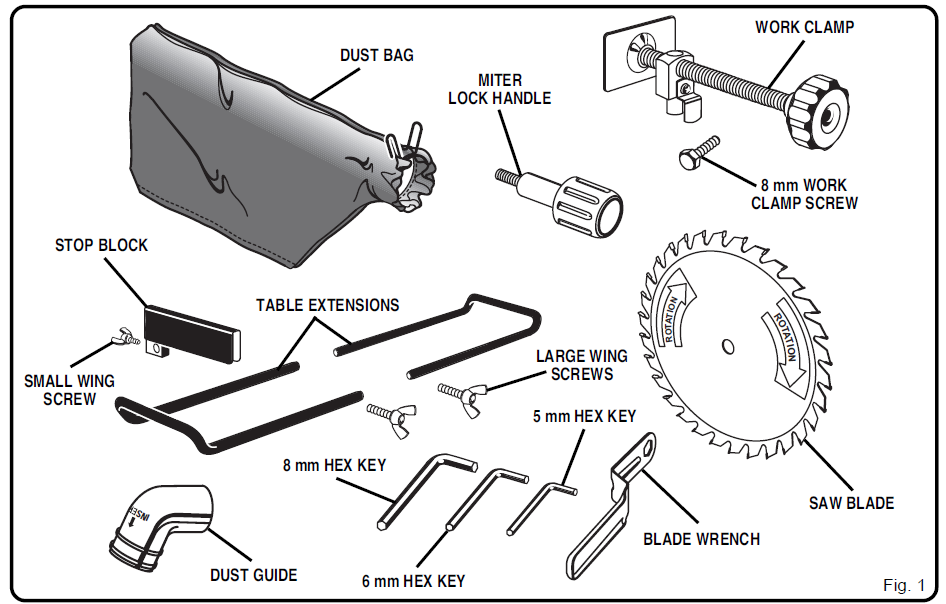
Your Miter Saw has been shipped completely assembled except for the blade, miter lock handle, dust guide or dust bag, work clamp, table extensions, and stop block.
- Remove all loose parts from the carton. Separate and check with the list of Loose Parts. See Figure 1.
- Remove the packing materials from around your saw.
- Carefully lift the saw from the carton and place it on a level work surface. Although small, this saw is heavy. To avoid back injury, get help when needed.
- Do not discard the packing materials until you have carefully inspected the saw, identified all loose parts, and satisfactorily operated your new saw.
- Your saw has been shipped with the saw arm locked in the down position. To release the saw arm, push down on the top of the saw arm and pull out the lock pin. See Figure 3.
- Lift the saw arm by the handle. Hand pressure should remain on the saw arm to prevent a sudden rise upon release of the lock pin.
- Examine all parts to make sure no breakage or damage has occurred during shipping.
If any parts are damaged or missing, do not attempt to plug in the power cord and turn the switch on until the damaged or missing parts are obtained and are installed correctly. Contact your nearest Ryobi dealer or call 1-800-525-2579 in the United States or 1-800-265-6778 in Canada for assistance if any parts are missing or damaged.
WARNING: If any parts are missing, do not operate your saw until the missing parts are replaced. Failure to do so could result in possible serious injury.
LOOSE PARTS LIST
The following items are included with your Miter Saw:
- 10 in. (254 mm) Carbide Tipped Blade
- Miter Lock Handle
- Dust Guide
- Blade Wrench
- 5 mm Hex Key
- 6 mm Hex Key
- 8 mm Hex Key
- Operator’s Manual
- Warranty Registration
Some models may include one or more of the following accessories:
- Work Clamp
- 8 mm Work Clamp Screw
- Dust Bag
- Stop Block
- Table Extensions (2)
- Small Wing Screw (for use with stop block)
- Large Wing Screws (2), for use with table extensions)

FEATURES
KNOW YOUR MITER SAW
See Figure 2.
Before attempting to use your saw, familiarize yourself with all operating features and safety requirements.
WARNING: Do not allow familiarity with your miter saw to make you careless. Remember that a careless fraction of a second is sufficient to inflict severe injury.
14 AMP MOTOR
Your saw has a powerful 14-amp motor with sufficient power to handle tough cutting jobs. It is made with all ball bearings and has externally accessible brushes for ease of servicing.
10 in. (254 mm) CARBIDE TIPPED BLADE
A 10 in. (254 mm) carbide-tipped saw blade is included with your miter saw. It is fine for most wood-cutting operations, but for fine joinery cuts or cutting plastic, use one of the accessory blades available from your nearest Ryobi dealer.
CUTTING CAPACITIES
When the miter angle (miter table) is set at 0°: Your saw will cut dimensional lumber up to a 2 x 6. It will cut dimensional lumber up to the thickness of a 4 x 4.
When the miter angle (miter table) is set at 45°: Your saw will cut dimensional lumber up to a 2 x 4.
CARRYING HANDLE
See Figure 3.
For convenience when carrying or transporting your miter saw from one place to another, a carrying handle has been provided on top of the saw arm as shown in Figure 3. To transport, turn off and unplug your saw, then lower the saw arm and lock it in the down position. Lock the saw arm by depressing the lock pin. Tighten the miter lock handle. Remove the saw from the workbench or workstand. It is now ready to transport.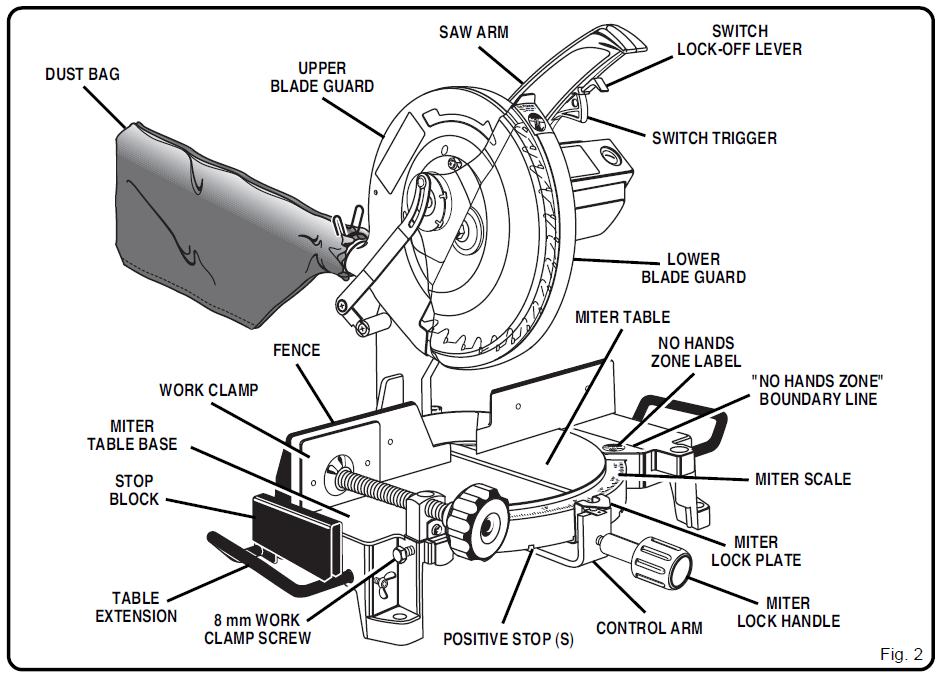
MITER LOCK HANDLE
See Figure 3.
The miter lock handle securely locks your saw at the desired miter angles.
LOCK-OFF LEVER
See Figure 4.
The switch trigger is equipped with a lock-off lever to reduce the possibility of accidental starting. The lock-off lever must be slid back away from the switch trigger in order to turn the saw on. Once the saw is on, the lock-off lever can be released. The spring-loaded lever will spring back into the lock-off position when the switch trigger is released.
SPINDLE LOCK BUTTON
See Figure 4.
A spindle lock button has been provided for locking the spindle of your saw in a stationary position. Depress and hold the lock button while installing, changing, or removing the blade.
TRIGGER LOCK
See Figure 5.
To prevent unauthorized use of your miter saw, we suggest that you disconnect it from the power supply and lock the switch in the off position. To lock the switch, install a padlock through the hole in the switch trigger. A lock with a shackle up to 13/64 in. (5 mm) diameter may be used. When the lock is installed and locked, the switch is inoperable. Store the padlock key in another location.
POSITIVE STOPS ON MITER TABLE
Positive stops have been provided at 0°, 15°, 22-1/2°, 30°, and 45°. The 15°, 22-1/2°, 30°, and 45° positive stops have been provided on both the left and right sides
of the miter table.
ELECTRIC BRAKE
An electric brake has been provided to quickly stop blade rotation after the switch is released.
FENCE
The fence on your miter saw has been provided as a support to hold your workpiece securely when making all cuts.
SELF-RETRACTING LOWER BLADE GUARD
The lower blade guard is made of shock-resistant, see-through plastic that protects each side of the blade. It retracts over the upper blade guard as the saw is lowered into the workpiece.
WORK CLAMP (Optional)
An optional work clamp has been provided with your saw. It provides one means of clamping the workpiece to the fence. Clamping secures the work and prevents the workpiece from creeping toward the saw blade. This is very helpful when cutting miters.
ASSEMBLY
WARNING: To prevent accidental starting that could cause possible serious personal injury, assemble all parts, make sure all adjustments are complete, and make sure all fasteners are secure before connecting the saw to the power supply. The saw should never be connected to a power supply when you are assembling parts, making adjustments, installing or removing blades, or when not in use. As mentioned previously, your saw has been factory assembled and adjusted. The miter lock handle, work clamp, dust guide or dust bag, table extensions, stop block, and blade are the only parts that have to be installed.
MITER LOCK HANDLE
See Figure 7.
To install the miter lock handle, place the threaded stud on the end of the miter lock handle into the threaded hole in the control arm under the miter table. Turn clockwise to tighten.
WORK CLAMP (Optional)
See Figure 8.
To install the optional work clamp, part number 982021-001, place the shaft of the clamp in either hole in front of the miter table base. Thread the 8 mm work clamp screw provided into the side of the base and tighten it to secure the clamp in position. Rotate the knob on the clamp to move it in or out as needed.
WARNING: When using the work clamp with the stop block, install the clamp on the stop block side of the blade. This will eliminate the possibility of the saw catching the loose end and kicking up. Failure to heed this warning can result in serious personal injury.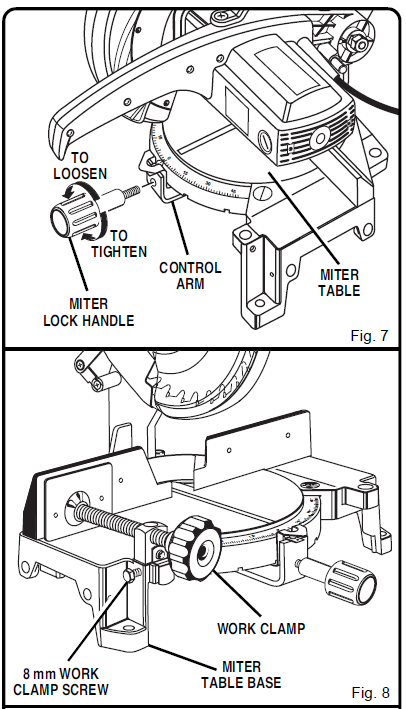
DUST GUIDE
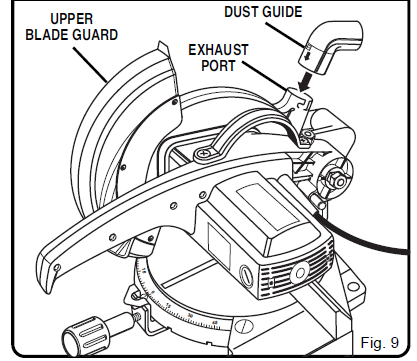
See Figure 9.
To install the dust guide, place the end marked INSERT over the exhaust port in the upper blade guard. Turn the guide so that the open end is facing down.
TO INSTALL BLADE
See Figures 10, 11, and 12.
WARNING: A 10 in. (254 mm) blade is the maximum blade capacity of your saw. Never use a blade that is too thick to allow the outer blade washer to engage with the flats on the spindle. Larger blades will come in contact with the blade guards, while thicker blades will prevent the blade bolt from securing the blade on the spindle. Either of these situations could result in a serious accident and could cause serious personal injury.
ADJUSTMENTS
Your Ryobi miter saw has been adjusted at the factory for making very accurate cuts. However, some of the components might have been jarred out of alignment during shipping. Also, over a period of time, readjustment will probably become necessary due to wear. After unpacking your saw, check the following adjustments before you begin using the saw. Make any readjustments that are necessary and periodically check the parts alignment to make sure that your saw is cutting accurately.
WARNING: Your saw should never be connected to a power supply when you are assembling parts, making adjustments, installing or removing blades, or when not in use. Disconnecting your saw will prevent accidental starting that could cause serious injury.
NOTE: Many of the illustrations in this manual show only portions of your miter saw. This is intentional so that we can clearly show points being made in the illustrations. Never operate your saw without all guards securely in place and in good operating condition.
SQUARING THE MITER TABLE TO THE FENCE
See Figures 13 – 16.
- Unplug your saw.
WARNING:
Failure to unplug your saw could result in accidental starting, causing possible serious personal injury. - Push down on the saw arm and pull out the lock pin to release the saw arm. See Figure 3.
- Raise saw arm to its full raised position.
- Loosen the miter lock handle approximately one-half turn.
- Depress the miter lock plate and rotate the miter table until the pointer on the control arm is positioned in the positive stop at 0°.
- Release the miter lock plate and securely tighten the miter lock handle.
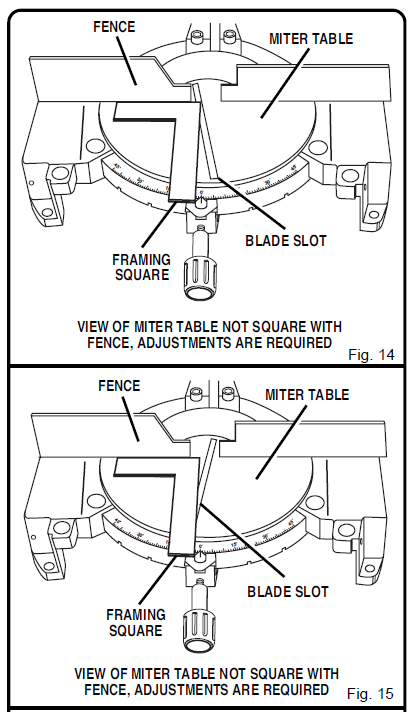
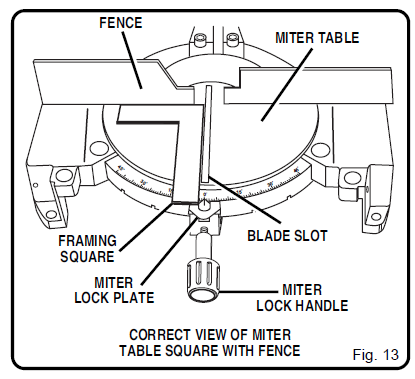
- Lay a framing square flat on the miter table. Place one leg of the square against the fence. Place the other leg of the square beside the blade slot in the miter table. The edge of the square and the blade slot in the miter table should be parallel as shown in Figure 13.
- If the edge of the framing square and the blade slot in the miter table are not parallel as shown in Figures 14 and 15, adjustments are needed.
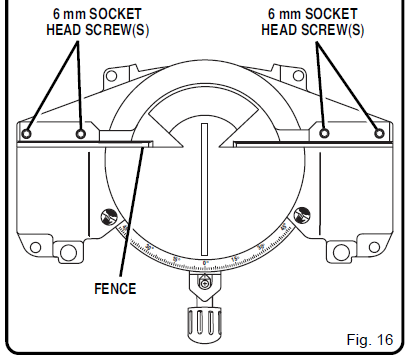
- Using a 6 mm hex key provided, loosen the socket head screws securing the fence. See Figure 16. Adjust the fence left or right until the framing square and blade slot are parallel.
- Retighten the screws securely and recheck the fenceto- table alignment.


ADJUSTMENTS
SQUARING THE SAW BLADE TO THE FENCE
See Figures 17 – 20.
- Unplug your saw.
WARNING: Failure to unplug your saw could result in accidental starting, causing possible serious personal injury. - Pull the saw arm down and engage the lock pin to hold the saw arm in transport position.
- Loosen the miter lock handle approximately one-half turn.
- Depress the miter lock plate and rotate the miter table until the pointer on the control arm is positioned in the positive stop at 0°.
- Release the miter lock plate and securely tighten the miter lock handle.
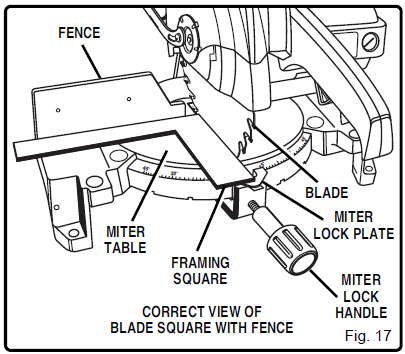
- Lay a framing square flat on the miter table. Place one leg of the square against the fence. Slide the other leg of the square against the flat part of the saw blade.
NOTE: Make sure that the square contacts the flat part of the saw blade, not the blade teeth. - The edge of the square and the saw blade should be parallel as shown in Figure 17.
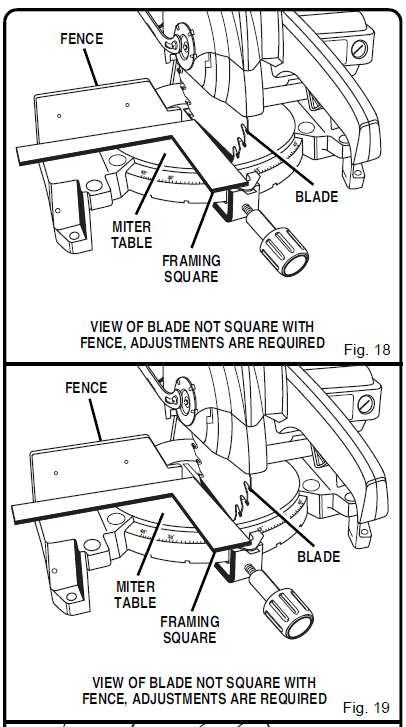
- If the front or back edge of the saw blade angles away from the square as shown in Figures 18 and 19, adjustments are needed.
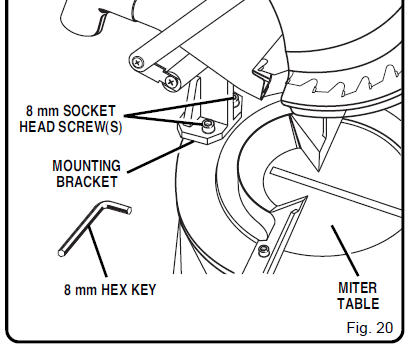
- Using the 8 mm hex key provided, loosen the socket head screws that secure the mounting bracket to the miter table. See Figure 20.
- Rotate the mounting bracket left or right until the saw blade is parallel with the square.
- Retighten the screws securely and recheck the bladetofence alignment.
After squaring adjustments have been made, it may be necessary to loosen the scale indicator screw and reset the indicator to zero.


OPERATION
WARNING: Before starting any cutting operation, clamp or bolt your miter saw to a workbench. Never operate your miter saw on the floor or in a crouched position. Failure to heed this warning can result in serious personal injury
CUTTING WITH YOUR MITER SAW
WARNING: When using a work clamp or C-clamp to secure your workpiece against the fence, clamp the workpiece on one side of the blade only. The workpiece must remain free on one side of the blade to prevent the blade from binding in the workpiece. The workpiece binding the blade will cause motor stalling and kickback. This situation could cause an accident resulting in possible serious personal injury.
CROSSCUTTING
See Figure 22.
A crosscut is made by cutting across the grain of the workpiece. A straight crosscut is made with the miter table set at the zero-degree position. Miter crosscuts are made with the miter table set at some angle other than zero.
TO CROSSCUT WITH YOUR MITER SAW:
- Pull out the lock pin and lift the saw arm to its full height.
- Loosen the miter lock handle. Rotate the miter lock handle approximately one-half turn to the left to loosen.
- Press the miter lock plate down with your thumb and hold.
- Rotate the control arm until the pointer aligns with the desired angle on the miter scale.
- Release the miter lock plate.
NOTE: You can quickly locate 0°, 15°, 22-1/2°, 30°, and 45° left or right by releasing the miter lock plate as you rotate the control arm. The miter lock plate will seat itself in one of the positive stop notches, located in the miter table frame. - Tighten the miter lock handle securely.
WARNING: To avoid serious personal injury, always tighten the miter lock handle securely before cutting. Failure to do so could result in movement of the control arm or miter table while making a cut. - Place the workpiece flat on the miter table with one edge securely against the fence. If the board is warped, place the convex side against the fence. If the concave edge of a board is placed against the fence, the board could collapse on the blade at the end of the cut, jamming the blade. See Figures 24 and 25.
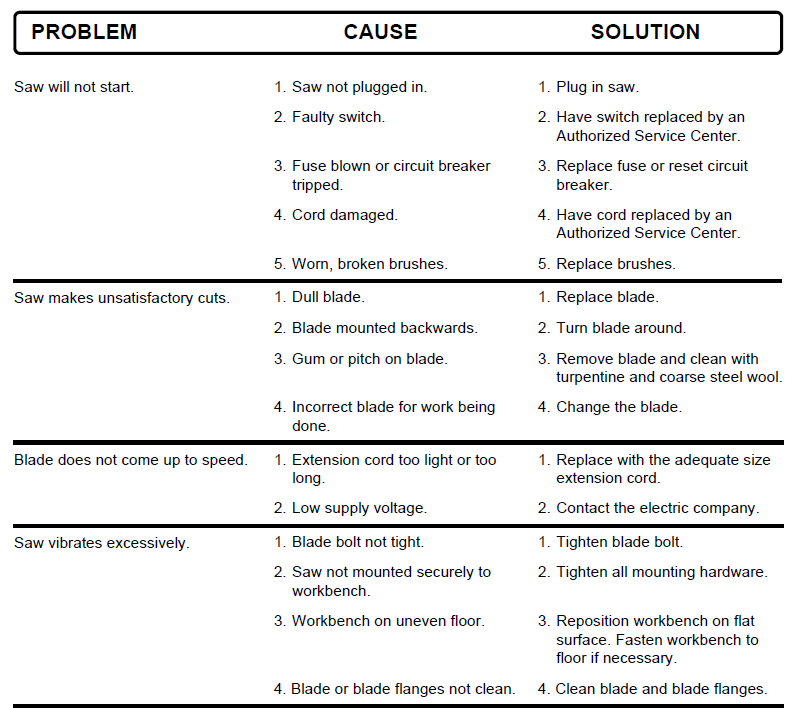
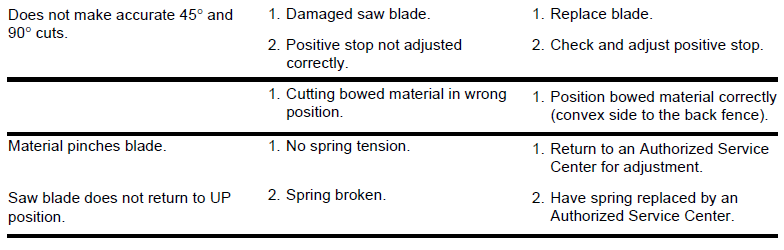
TROUBLESHOOTING
For more manuals by Ryobi, visit ManualsLibraryy
Ryobi TS1300 Miter Saw-FAQs
What is the biggest safety risk when using a miter saw?
The main hazard is that your hands can slip into the blade, especially when cutting small pieces or placing hands too close. This can result in serious injuries or amputations. Always use clamps and keep hands away from the cutting area.
Is a miter saw easy to use?
Yes, once you get familiar with it. While the fast-spinning blade might seem intimidating, miter saws are beginner-friendly with a bit of guidance and practice.
Can a miter saw cut a 2×4?
Absolutely. A 10-inch miter saw can cut a 2×4 at a 45° angle and a 2×6 at 90°. Larger blades, like 12-inch ones, can handle wider and deeper cuts.
How does a compound miter saw work?
A compound miter saw can pivot left and right for angled cuts and also tilt for beveled cuts. This allows it to make complex compound angles for tasks like crown molding.
How do I unlock the Ryobi TS1300 saw?
Press the handle down slightly and pull out the locking pin located on the right side. Then, slowly raise the handle and ensure it moves freely before starting.
What makes a miter saw a great tool?
Miter saws offer high precision and clean, accurate cuts. You can make fine adjustments to get the perfect fit, and many models include built-in safety features for added protection.
What materials should I avoid cutting with a miter saw?
Never cut wood with nails, screws, or large knots. Also avoid cutting pieces that are too small to safely hold. Always use clamps when possible and never make freehand cuts.
Can a miter saw cut angles other than 45°?
Yes! Miter saws are designed for adjustable angles—you can cut virtually any angle based on your project needs, not just 45° or 90°.