
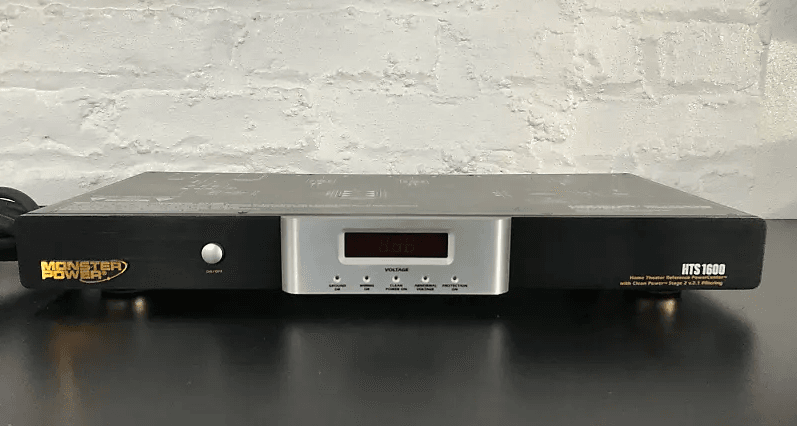

Monster Power HTS-1600 PowerCenter Home Theater System
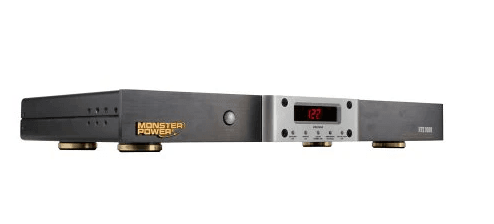
IMPORTANT SAFETY INFORMATION
Please read and observe the following safety points at all times.
 WARNING – Power Sources
Do not plug this PowerCenter™ into a power outlet that differs from the source indicated for safe use on the PowerCenter. If you don’t know the type of electrical power that is supplied to your home, consult your local power company or a qualified electrician.
WARNING – Grounding and Polarization
- Do not force your PowerCenter™ plug into an outlet that is not designed to accept a three-wire grounded-type AC plug (a three-prong plug). This plug is designed to be inserted into a grounded-type outlet only. If this plug doesn’t fit directly inside your outlet, do not attempt to force it into the outlet. Never attempt to dismantle the plug in any way (or to alter the power cord). Do not attempt to defeat the grounding feature by using a 3-to-2 prong adapter. If you have questions about grounding, consult your local power company or a qualified electrician.
- If you use rooftop devices such as satellite dishes, antennas, or any other component with wire that connects to your PowerCenter™, be sure the wire(s) are properly grounded. This protects against voltage surges and static charges.
- Do not place any antenna near overhead power lines or any other power circuit. Do not touch any power line or power circuit. Doing so may cause severe physical injury or possibly death.
WARNING – Liquid: Avoiding Electrical Shocks
- Do not operate your Monster PowerCenter if liquid of any kind is spilled onto or inside the unit.
- Do not operate your Monster PowerCenter near rain or water that’s spilled or contained (e.g., bathtub, kitchen, or sink).
WARNING – Power Cord Safety
- When routing your PowerCenter’s AC power cord, do not place it near heavy foot traffic areas (e.g., hallways, doorways, and floors). Do not create a trip hazard with the power cord.
- If your power cord’s protective jacket begins to rip or fray, exposing the internal wiring, shielding, etc., disconnect it from the power source and discontinue use of the Monster PowerCenter immediately. See the Warranty Information section of this owner’s manual for important details.
WARNING – Storm Precautions
In the event of a lightning storm, it’s always a good idea to disconnect your Monster PowerCenter; there is no need to disconnect your separate components. Make sure that ALL of your components and PC products are protected with Monster Power.
WARNING – No User Serviceable Parts Inside
If, for any reason, your PowerCenter is not operating properly, do not remove any part of the unit (cover, etc.) for repair. Unplug the unit and consult the Warranty Information section of this owner’s manual for important details.
CAUTION – Exposure To Heat
Do not expose your PowerCenter to direct sunlight or place it near wall heaters, space heaters, or any enclosed space prone to temperature increase.
CAUTION – Proper Cleaning
In general, the only cleaning necessary for your Monster PowerCenter is a light dusting. Unplug your component from the wall before cleaning it. Do not use any type of liquid or aerosol cleaners.
PROPER GROUNDING AND INSTALLATION
WARNING – Proper Grounding
Monster PowerCenters require a properly grounded outlet for safety and to protect connected equipment. If you’re not sure if your home’s electrical wiring is properly grounded, have it checked by a qualified electrician.
Important Note – Proper Power and Protection
To completely protect your equipment against electrical surges, every AC power cable, coaxial cable, and phone line in the system must be connected to an appropriate PowerCenter.
Important Note – Proper Protection and the Limited Connected Equipment Warranty
The U.S. $350,000 Limited Connected Equipment Warranty becomes invalid if any wire (AC, coax, phone, or network) or audio or video interconnect leading into the equipment comes from a component that is not properly protected by the PowerCenter. See the Warranty Information section of this owner’s manual for important details.
MONSTER’S EXCLUSIVE T2™ TECHNOLOGY
The Monster Power HTS 1600 PowerCenter features exclusive Monster T2 technology. T2 is an active electronic microprocessor-controlled circuit that sits in front of the surge protection circuitry in select Monster Power products. T2 monitors the line, neutral, and ground lines and automatically disconnects the PowerCenter from the AC power line when long-duration low-voltage sag or high-voltage swell occurs (continuous voltage below 80Vrms or above 132Vrms).
When the voltage sags or swells to these potentially damaging levels, ultra-fast T2 auto-disconnect protection circuitry shuts down the Monster PowerCenter for 15 seconds. When the under-voltage or over-voltage condition returns to normal, T2 reconnects the PowerCenter to full operation after 15 seconds. If the fault condition is not cleared, the T2 comparator circuit keeps the unit shut down.
Unlike ordinary power management devices, T2 will shut down your PowerCenter before the MOVs (Metal Oxide Varistors) and thermal fuses sense an overload condition and sacrifice themselves to protect your connected components. This will extend the PowerCenter’s life while providing the system protection you need.
MONSTER’S PATENTED CLEAN POWER™ STAGES
Monster Clean Power performs two tasks that are vital to maintaining optimum home theater performance:
1) noise filtration and 2) noise isolation. The higher the Clean Power stage number (1-5), the more sophisticated and advanced the filters are that reject noise generated on the AC powerline. In addition, the higher the Clean Power stage number, the more isolation that exists between connected equipment for maximum rejection of component-generated noise.
Monster PowerCenters featuring Clean Power circuitry are each designated with a Clean Power Stage. The HTS 1600 incorporates Monster Clean Power Stage 2 v.2.1 circuit,,y which filters both AC powerline noise and reduces noise generated by your connected equipment. Clean Power Stage 2 features two ultra-advanced, isolated filters that include analog audio and digital, plus an ultra-high current audio filter to provide for the best possible AC powerline noise rejection and inter-component isolation for improved component-generated noise rejection. All of these features make the HTS 1600 ideal for your home theater system. To learn more about patented Monster Clean Power and the complete product family of PowerCenters, voltage stabilizers, and amplifiers
MONSTER HTS 1 600 POWERCENTER FEATURES
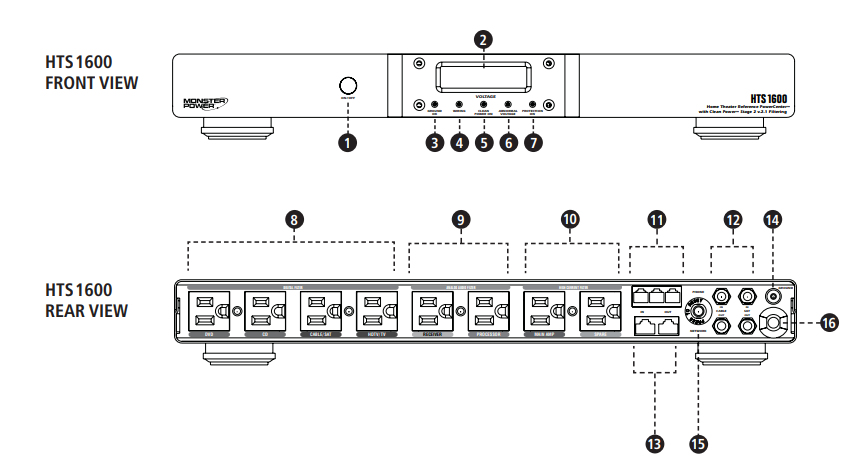
HTS 1 600 POWERCENTER FEATURES
- Power ON/OFF Switch: Turns the PowerCenter on and off.
- Digital Display for Voltage: Indicates input voltage.
- “Ground OK” Indicator: Indicates the PowerCenter is plugged into a properly grounded 120V AV outlet.
- “Wiring OK” Indicator: Indicates if the Line and Neutral wires from the wall outlet to the PowerCenter are reversed. Please consult your electrician to correct this immediately.
- “Clean Power On” Indicator: Indicates Monster Clean Power circuitry is functioning properly.
- Abnormal Voltage Indicator: Indicates that input voltage is above or below the acceptable range.
- “Protection On” Indicator: Indicates that the PowerCenter’s surge protection is turned on.
- Digital Filter (unswitched outlets): These outlets have a specially designed filter circuit that reduces interference to your digital components.
- Analog Audio Filter (Switched Outlets): These outlets have a specifically designed filter circuit that reduces interference to your audio components.
- Ultra-High Current Audio Filter (Switched/Timed Outlets): These outlets have a specifically designed filter circuit for high-power audio components like amplifiers and pre-amplifiers.
- Phone Line Surge Suppression: Provides surge protection against damaging voltage surges and spikes from the phone line.
- Cable and Satellite Protection: Provides surge protection for a Cable and satellite connection. The input connects the coaxial cable from your antenna or your satellite dish. The output connects the coaxial cable to your TV or cable box input or your satellite receiver input.
- Network Line Surge Suppression: Provides surge protection against damaging voltage surges and spikes from the network line.
- Ground Screw: Provides a ground reference point for any ungrounded components.
- Input AC Circuit Breaker: Protects against prolonged or excessive overloading.
- Ultra-High Current PowerLine™ 100 AC Power Cable: High-density double shielded AC power cord specially designed to maximize power transfer.
HOOK-UP GUIDE
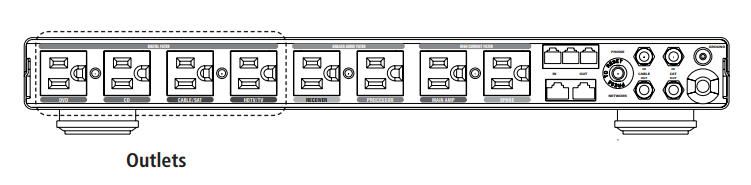
Digital Outlet Hook-Up
These outlets have a special filter circuit that is optimized to reduce interference to your digital components.
- Attach a Monster Power identification label to each component’s power cord before you plug it into the appropriate color-coded PowerCenter outlet.
- Plug each component’s power cord (TV/Monitor, VCR) into the PowerCenter’s corresponding outlet. For components not listed, determine if they are audio, video, digital, or ultra-high current audio components, and use a corresponding outlet for best performance.
IMPORTANT NOTE
It does not harm analog audio, video, or high-current audio components to be connected to the digital outlets. However, for best performance, we recommend plugging in only digital components to the digital outlets.
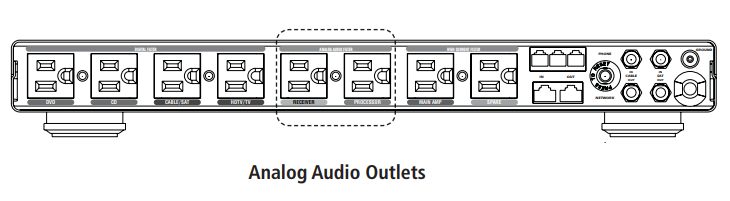
Analog Audio Outlet Hook-Up
These outlets have a special filter circuit that is optimized to reduce interference to your audio components.
- Attach a Monster Power identification label to each component’s power cord before you plug it into the appropriate color-coded PowerCenter outlet.
- Plug each component’s power cord (Receiver, Processor, etc.) into the PowerCenter’s corresponding outlet. For components not listed, determine if they are audio, video, digital, or ultra-high current audio, and use a corresponding outlet for best performance.
IMPORTANT NOTE
It does not harm video, digital, or high-current audio components to be connected to the analog audio outlets. However, for best performance, we recommend plugging in only analog audio components to the analog audio outlets.
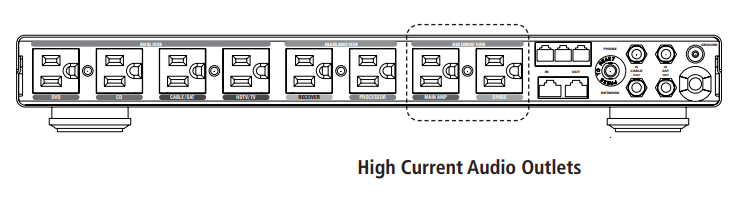
Ultra-High Current Audio Outlet Hook-Up
These outlets are designed to deliver maximum current to power-hungry components like amplifiers and pre-amplifiers.
- Attach a Monster Power® identification label to each component’s power cord before you plug it into the appropriate color-coded PowerCenter outlet.
- Plug each component’s power cord (Amplifier, etc.) into the PowerCenter’s corresponding outlet. For components not listed, determine if they are audio, video, digital, or ultra-high current audio, and use a corresponding outlet for best performance.
IMPORTANT NOTE
It does not harm analog audio, video, or digital components to be connected to the ultra-high current audio outlets. However, for best performance, we recommend plugging in only high-current audio components to the ultra-high current audio outlets.
Coaxial Connections Hook-Up
Coaxial Connections provide surge protection against damaging voltage surges and spikes on the incoming coax cable.
Protect TV/Cable and Satellite Connections as follows.
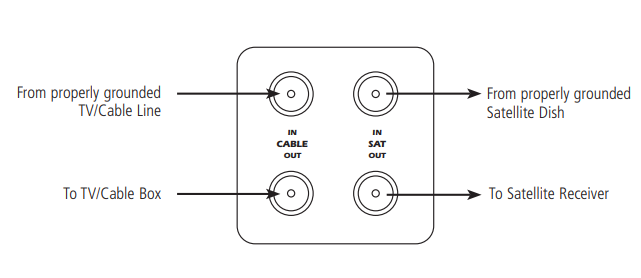
NOTE: You may need additional coaxial cables to connect the HTS 1600 to your components.
Phone and Network Connections Hook-Up
Phone connections provide surge protection against damaging voltage surges and spikes coming from the phone line. This PowerCenter also incorporates a phone splitter for convenience.
Protect Phone and Network Connections as follows.s
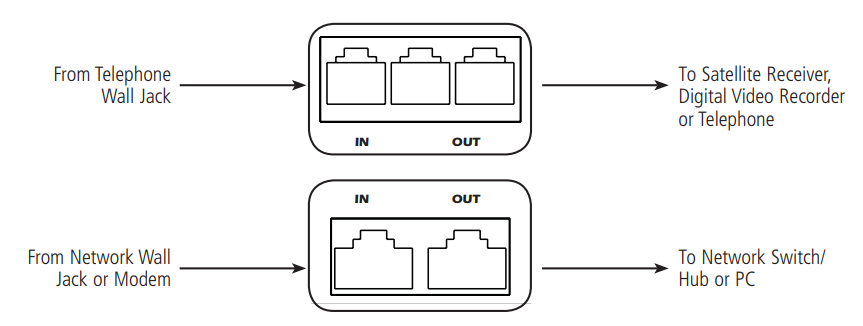
NOTE: The HTS 1600 is not intended for hook-up of any phone that carries two separate phone lines on a single 4-pin RJ11 jack.
TROUBLESHOOTING
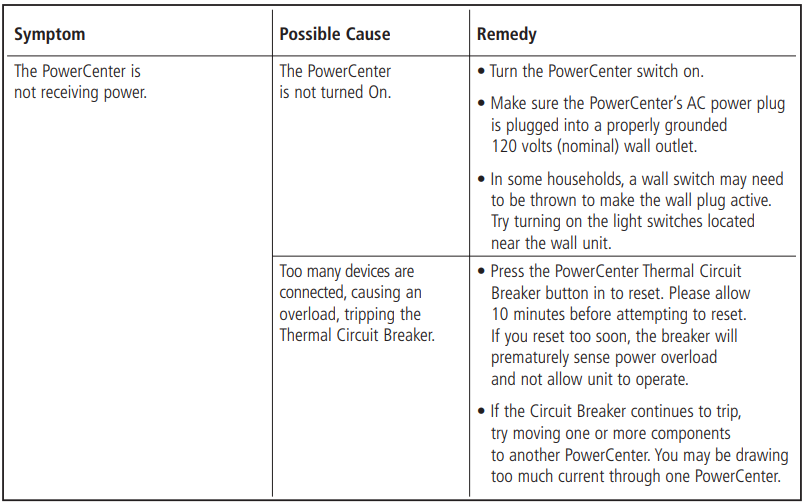
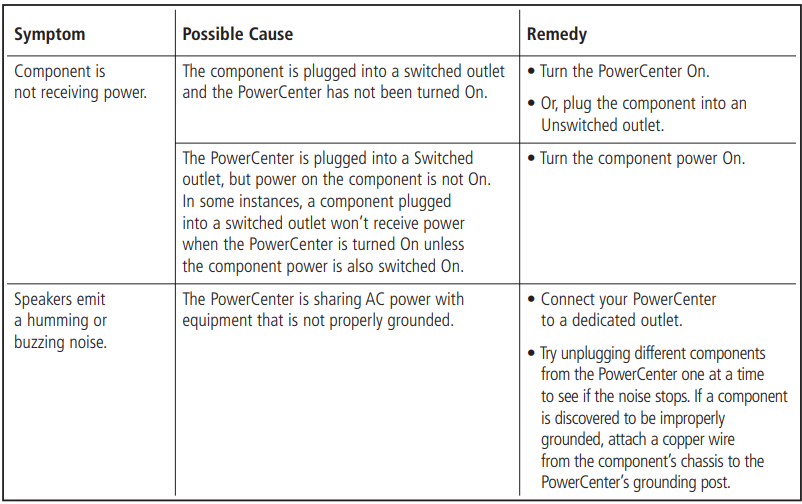
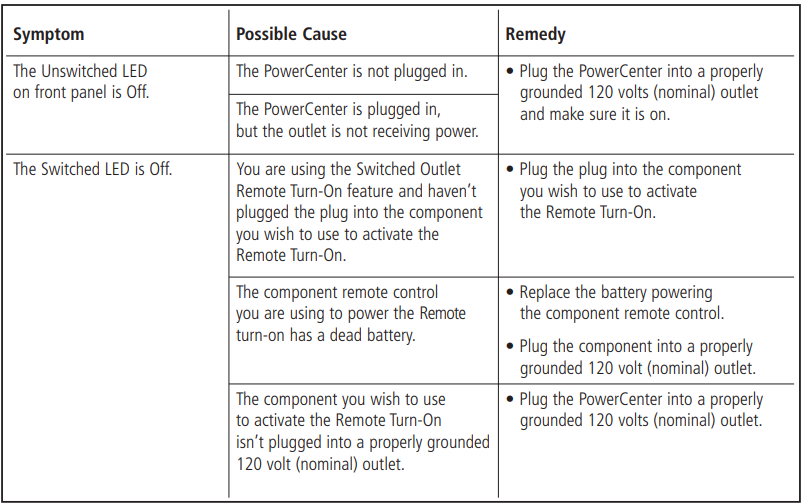
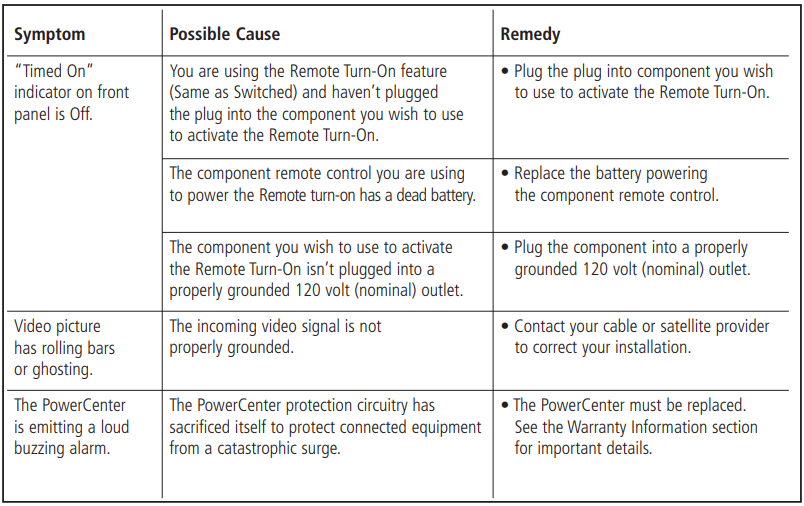
SPECIFICATIONS
HTS 1600 POWERCENTER
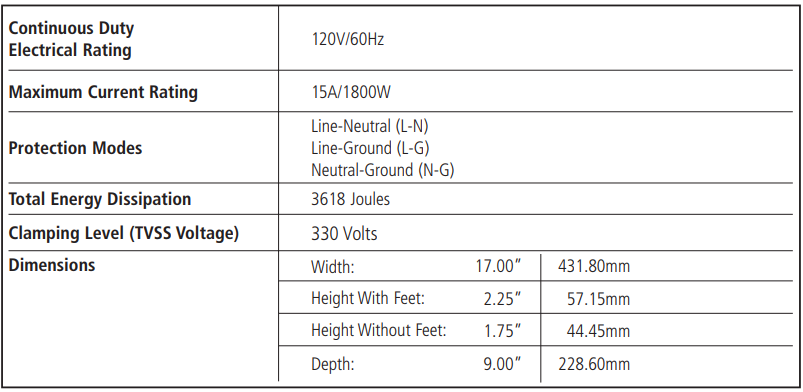
For more manuals by Monster, visit ManualsLibraryy
Monster Power HTS-1600 PowerCenter Home Theater System- FAQs
What are the dimensions of the HTS-1600?
Width: 17 inches
Height: 2.25 inches
Depth: 8.25 inches
Weight: 2.5 lbs
Does the HTS-1600 improve audio/video quality?
Yes! Its power conditioning reduces electrical noise, ensuring cleaner power for better sound and picture performance.
Can I plug my gaming console into the HTS-1600?
Absolutely! It’s designed for gaming consoles, TVs, and audio systems, offering surge protection and stable power.
How does surge protection work in the HTS-1600?
Absorbs excess voltage (up to 3,618 joules).
Prevents damage from lightning strikes, power surges, and electrical fluctuations.
Is the HTS-1600 a power conditioner?
Yes! It regulates voltage and filters out interference, making it ideal for sensitive electronics like home theaters.
How many joules do I need for a home theater?
1,000–2,000 joules for basic protection.
3,000+ joules (like the HTS-1600) for high-end systems.
Can I use the HTS-1600 for my computer?
Yes, but it’s optimized for home theaters. For PCs, consider a dedicated computer surge protector.
How long do surge protectors last?
Typically 3–5 years (or after a major surge).
Replace if the protection indicator light turns off.
Can I daisy-chain surge protectors?
No! This overloads circuits and voids protection. Use one high-quality unit like the HTS-1600.
What’s the difference between a surge protector and a power conditioner?
Surge protector: Blocks voltage spikes.
Power conditioner (HTS-1600): Also stabilizes voltage & reduces noise.