
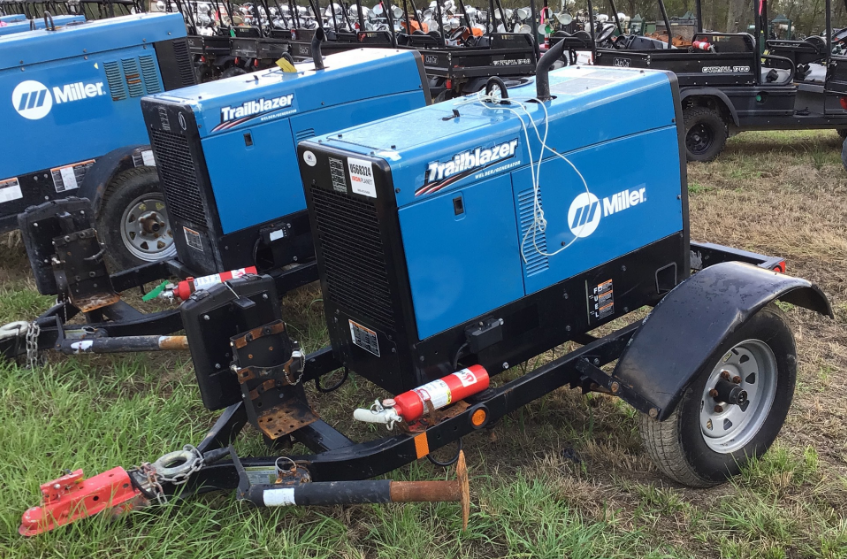

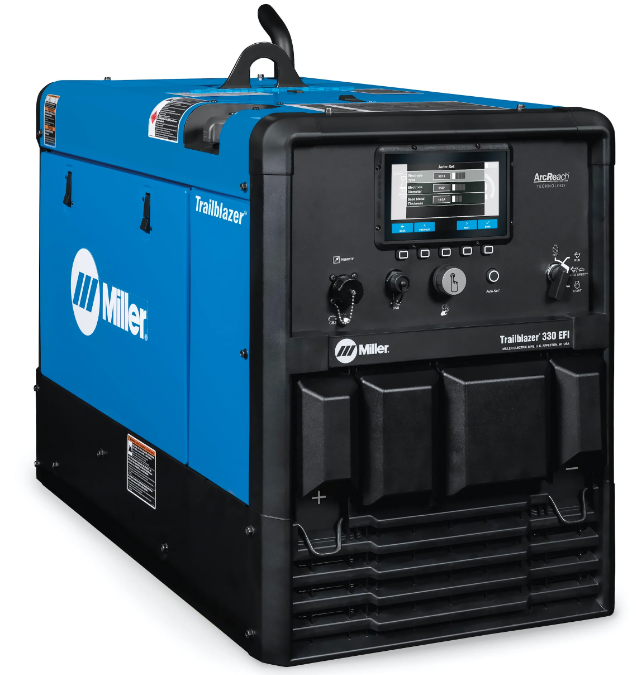
Miller TrailBlazer 325 Welder-Diesel Generator
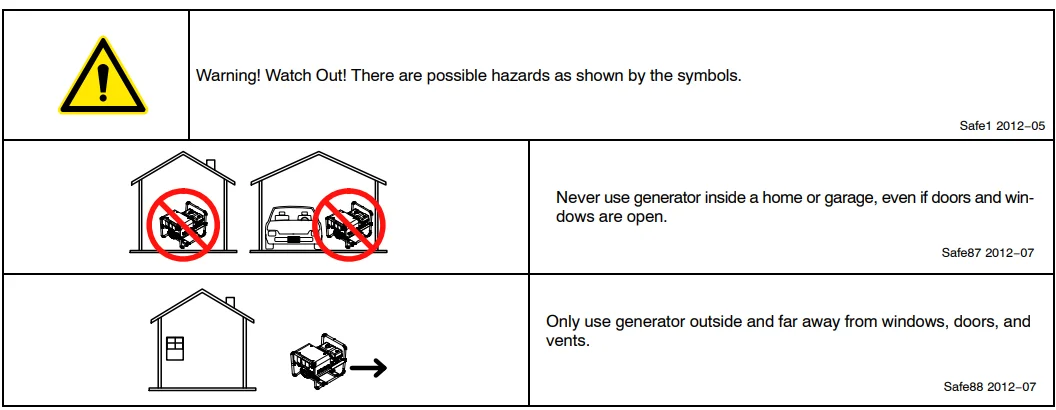
DEFINITIONS
Additional Safety Symbols And Definitions
Some symbols are found only on CE products.
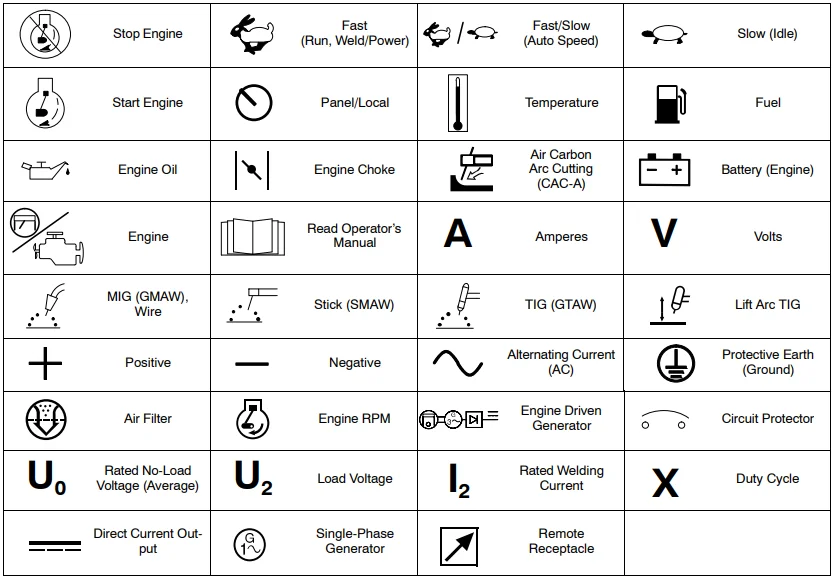
Miscellaneous Symbol Definitions
SPECIFICATIONS
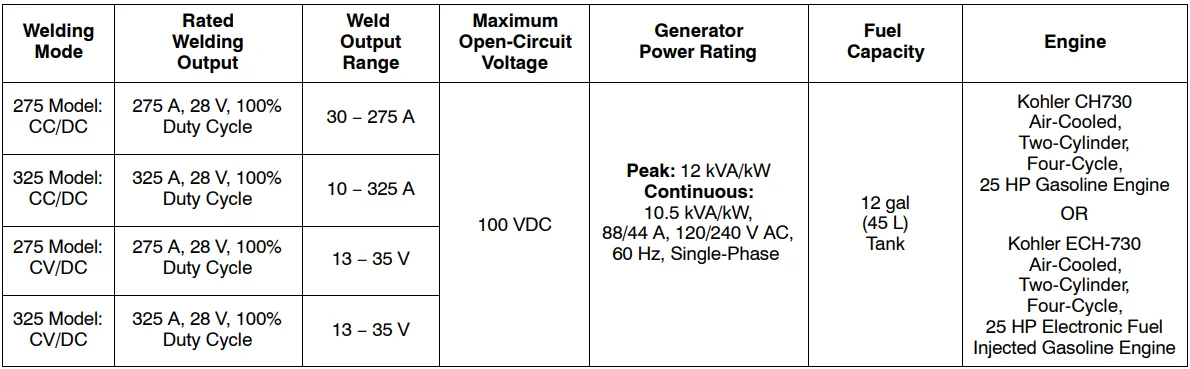
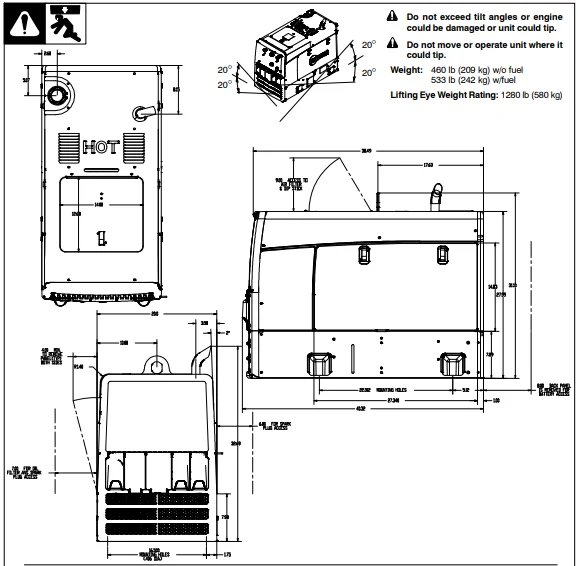
Dimensions, Weights, And Operating Angles
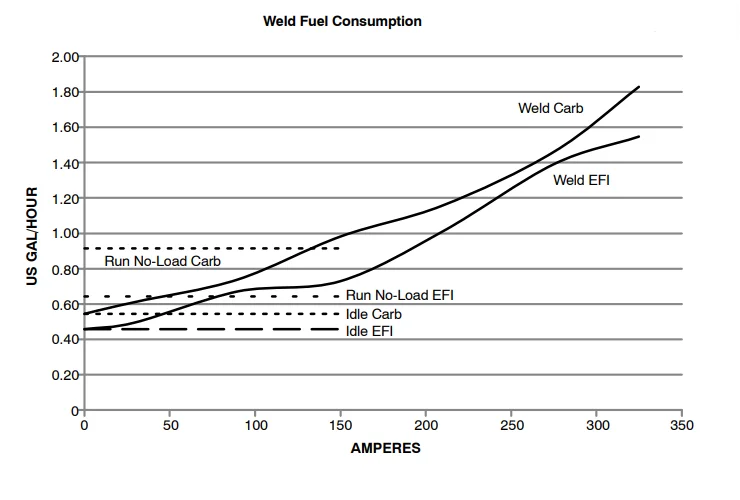
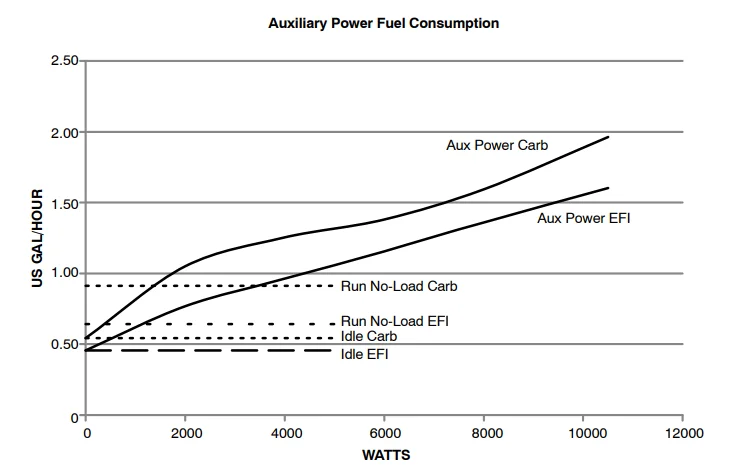
Fuel Consumption Curve
On a typical job using 1/8 in. 7018 electrodes (125 amps, 20% duty cycle), expect about 20 hours of operation with a carbureted engine (24 hours with EFI engine).
Welding at 150 amps at 40% duty cycle uses about 3/4 gallon of fuel per hour. Expect about 16 hours of operation with a carbureted engine (19 hours with an EFI engine).
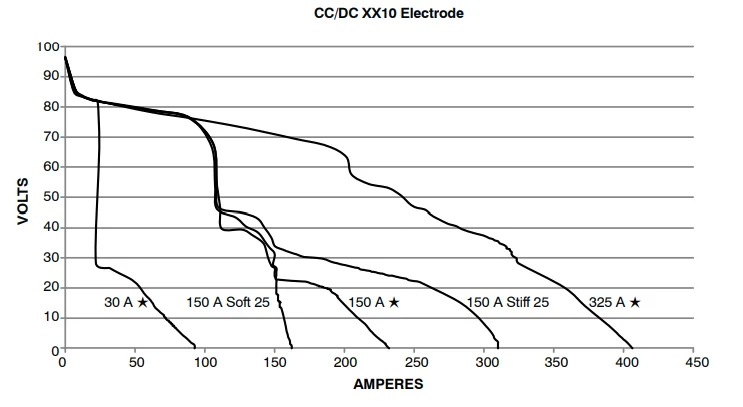
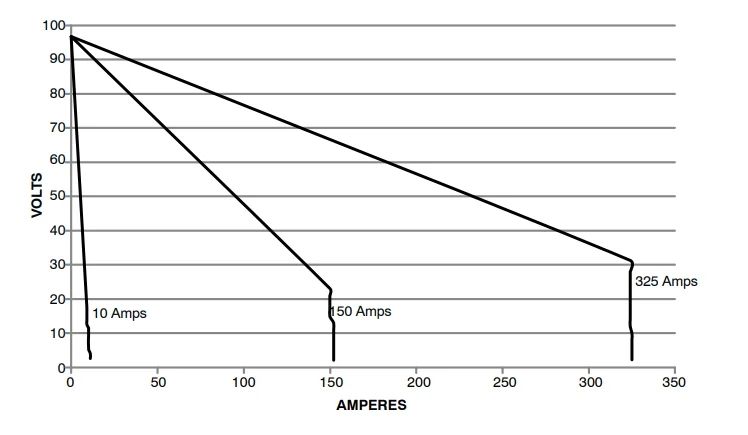
Stick Volt-Ampere Curves
The volt-ampere curves show the minimum and maximum voltage and amperage output capabilities of the welding generator.
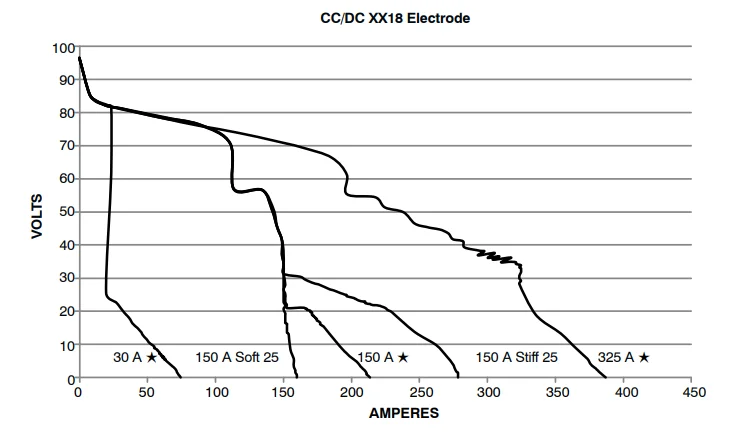
MIG Volt-Ampere Curves
The volt-ampere curves show the minimum and maximum voltage and amperage output capabilities of the welding generator.
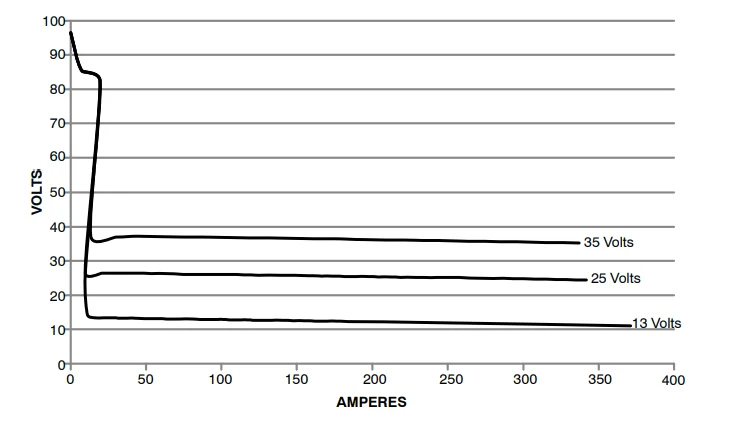
TIG Volt-Ampere Curves
The volt-ampere curves show the minimum and maximum voltage and amperage output capabilities of the welding generator.
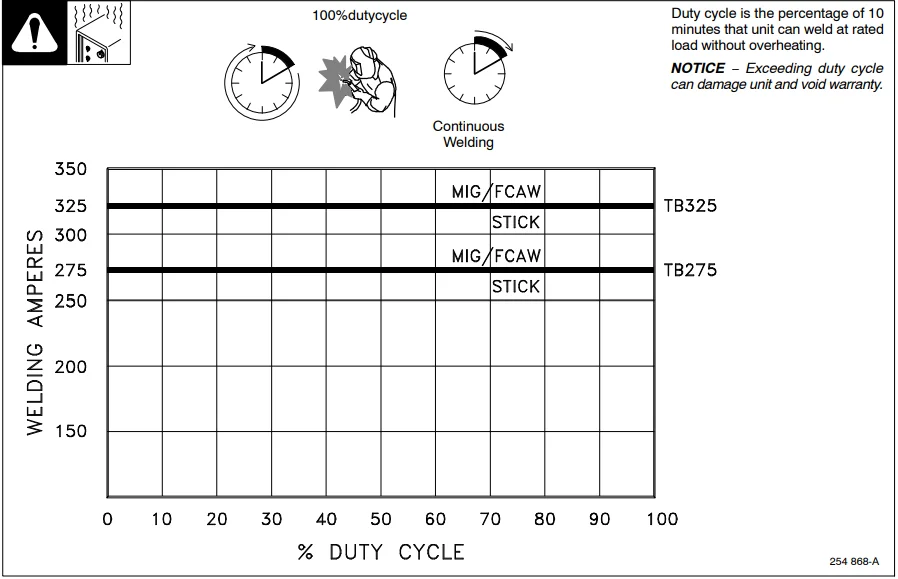
Duty Cycle
Duty cycle is the percentage of 10 minutes that a unit can weld at the rated load without overheating.
NOTICE − Exceeding the duty cycle can damage the unit and void the warranty.
INSTALLATION
Serial Number And Rating Label Location
The serial number for this product is located on the front. The rating information for this product is located on the back. Use the rating label to determine the rated output. For future reference, write the serial number in the space provided on the back cover of this manual.
Installing Welding Generator
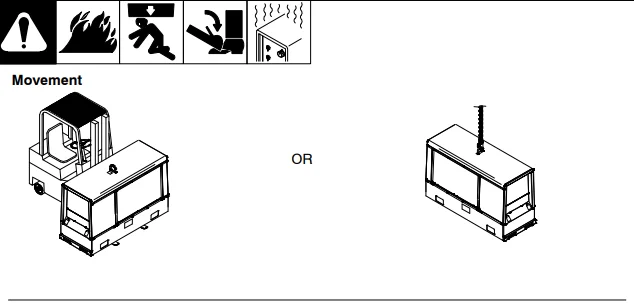
 Do not move or operate the unit where it could tip.
Do not lift the unit from the end.
Do not weld on the base. Welding on the base can cause a fuel tank fire or explosion. Bolthe the unit down using the holes provided in the base.
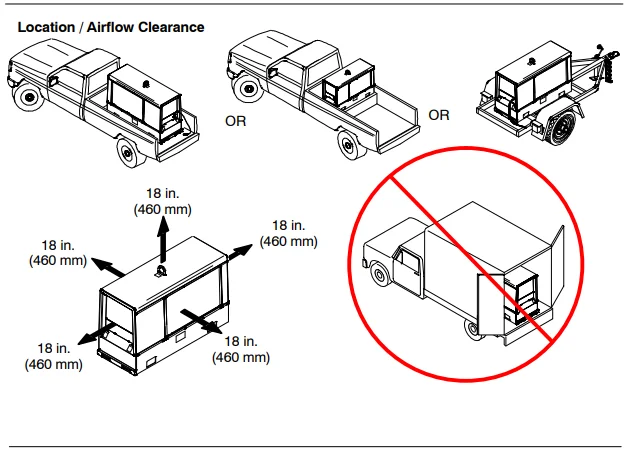
Always securely fasten the welding generator onto the transport vehicle or trailer and comply with all DOT and other applicable codes.
NOTICE − Do not install the unit where air flow is restricted, or the engine may overheat.
See Section 4-2 for lifting eye rating.
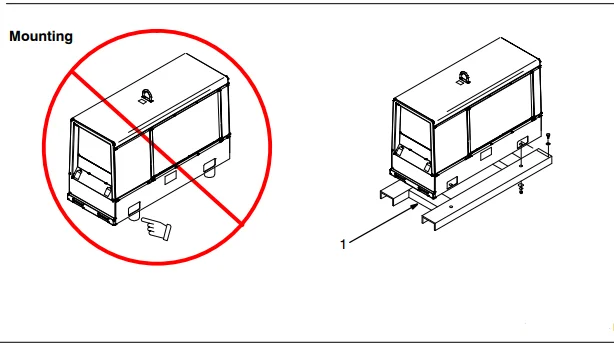
Mounting
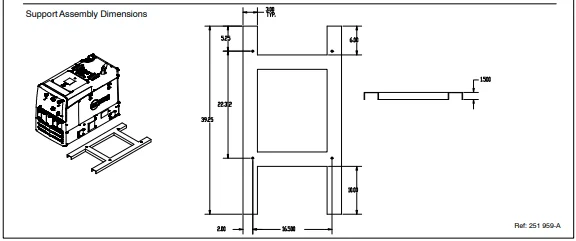
Do not mount the unit by supporting the base only at the four mounting holes. Do not use flexible mounts. Use cross supports to adequately support the unit and prevent damage to the base.
Cross-Supports
Mount the unit on a flat surface or use cross-supports to support the base, see Section 4-2.
Grounding Generator To Truck Or Trailer Frame
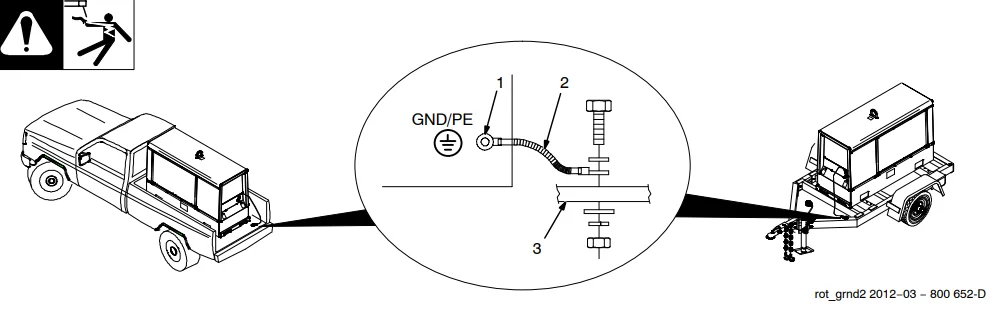
Always ground the generator frame to the vehicle frame to prevent electric shock and static electricity hazards.
Also see AWS Safety & Health Fact Sheet No. 29, Grounding of Portable and Vehicle-Mounted Welding Generators.
Bed liners, shipping skids, and some running gear insulate the welding generator from the vehicle frame. Always connect a ground wire from the generator equipment grounding terminal to bare metal on the vehicle frame, as shown.
Use GFCI protection when operating auxiliary equipment. If the unit does not have GFCI receptacles, use a GFCI-protected extension cord. Do not use GFCI receptacles to power life support equipment.
- Equipment Grounding Terminal (On Front Panel)
- Grounding Cable (Not Supplied)
- Metal Vehicle Frame
Connect the cable from the equipment ground terminal to the metal vehicle frame. Use #8 AWG or larger insulated copper wire.
Electrically bond the generator frame to the vehicle frame by metal-to-metal contact.
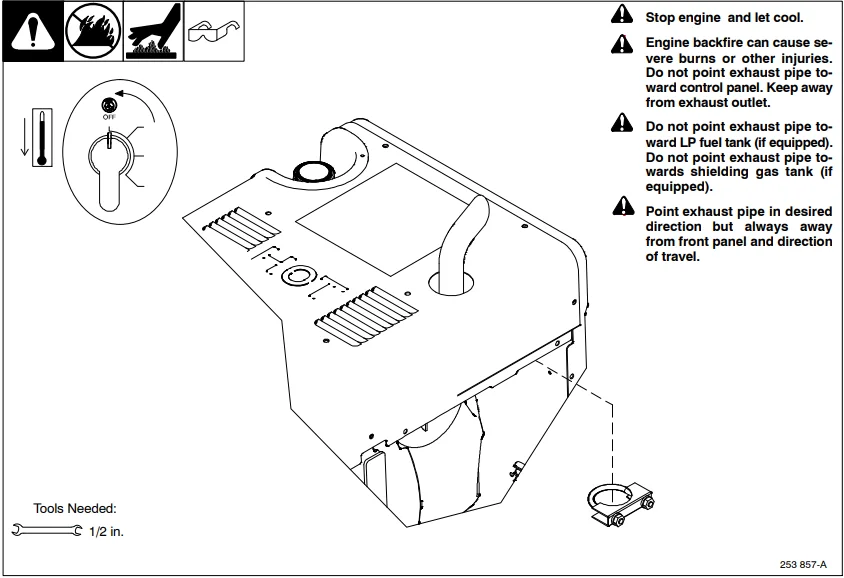
Installing the Exhaust Pipe
Engine Prestart Checks
Check all fluids daily. The engine must be cold and on a level surface. The unit is shipped with 10W30 engine oil.
Follow the run-in procedure in the engine manual.
This unit has a low oil pressure shutdown switch. However, some conditions may cause engine damage before the engine shuts down. Check the oil level often, and do not use the oil pressure shutdown system to monitor the oil level.
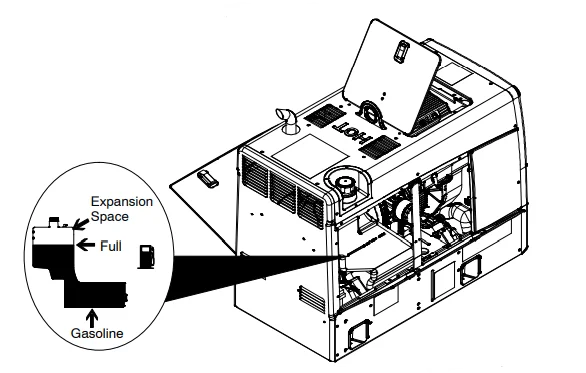
Fuel
Open the left side access door.
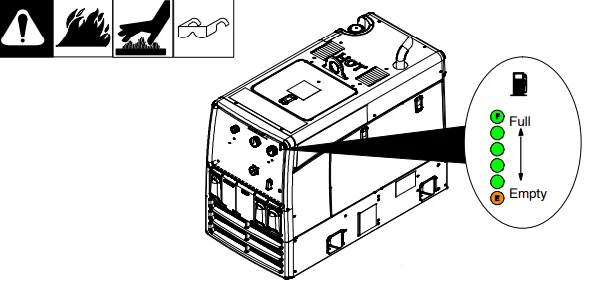
Add fresh fuel before starting the engine for the first time (see maintenance label for specifications). Stop fueling when the fuel level reaches the Max Fill Level on the tank. Do not top off the tank. Always leave room for expansion. Check the fuel level on a cold engine before use. Check the engine fuel level, and turn the Engine Control switch to the Auto Speed position. LEDs indicate fuel level in the tank. Close the left side access door. Open the top service door.
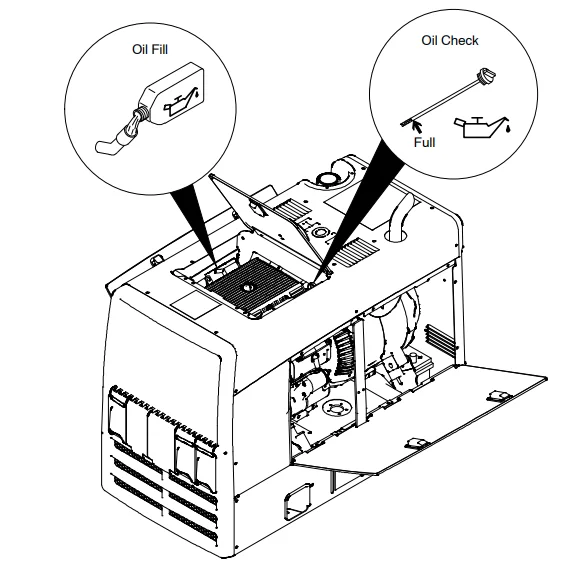
Oil
Do not exceed the ”Full” mark on the oil level dipstick. The fuel pump may operate erratically if the crankcase is overfilled.
Check oil with the unit on a level surface. If oil is not up to the full mark on the dipstick, add oil (see maintenance label). Use front panel meters to determine hours until next recommended oil change (see Section 6-1).
To improve cold-weather starting:
- Keep the battery in good condition.
- Store the battery in a warm area.
- Use the correct grade oil for cold weather.
Close the top service door.
Connecting Or Replacing The Battery
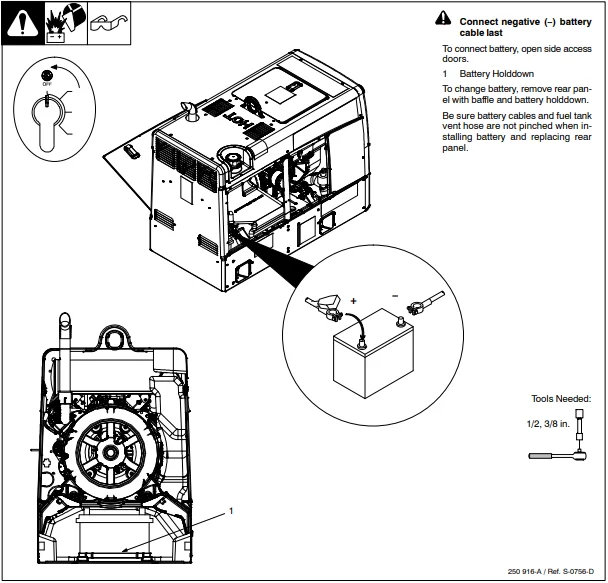
Connect the negative (−) battery cable last
To connect the battery, open the side access doors.
Battery Holddown
To change the battery, remove the rear panel with the baffle and battery hold-down. Be sure battery cables and fuel tank vent hose are not pinched when installing the battery and replacing the rear panel.
Electronic Fuel Injection (EFI) System And Battery Information
NOTICE − EFI system components can be damaged if these precautions are not followed:
- Do not allow the battery cables to touch opposing terminals. When connecting the battery cables, attach the positive (+) cable to the positive (+) battery terminal first, followed by the negative (−) cable to the negative (−) battery terminal.
- Never start the engine when the cables are loose or poorly connected to the battery terminals.
- Never disconnect the battery while the engine is running.
- Never use a quick battery charger to start the engine.
- Do not charge the battery with the Engine Control switch On.
- Always disconnect the negative (−) battery cable before charging the battery.
Weld Output Terminals
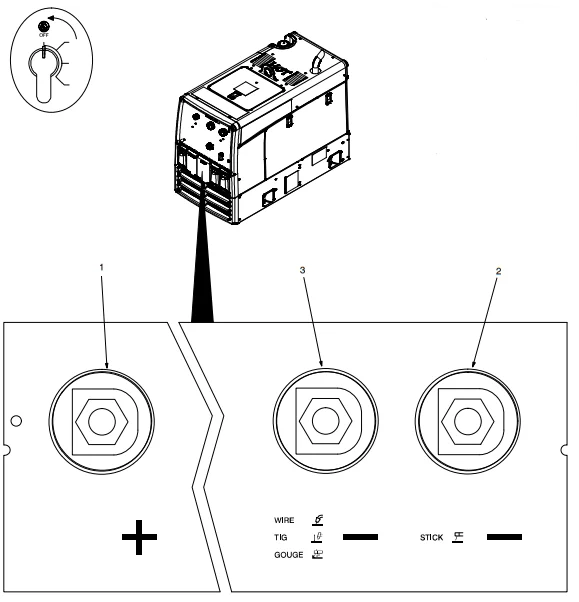
Stop the engine.
- Positive (+) Weld Output Terminal
- Stick Negative (−) Weld Output Terminal
- Wire/TIG/Gouge Negative (−)
Weld Output Terminal
For MIG welding, connect the work cable to the Negative (−) terminal and the wire feeder cable to the Positive (+) terminal.
For Stick welding, connect the work cable to the Negative (−) terminal and the electrode holder cable to the Positive (+) terminal.
For TIG welding, connect the work cable to the Positive (+) terminal and the electrode holder cable to the Negative (−) terminal.
Connecting To Weld Output Terminals
Stop the engine.
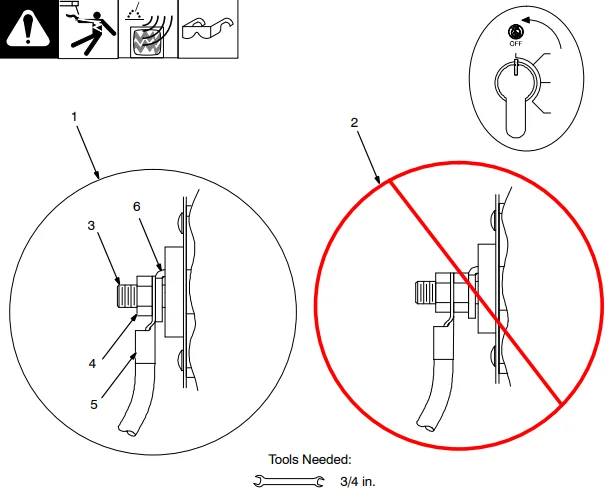
Failure to properly connect weld cables may cause excessive heat and start a fire, or damage your machine.
Do not place anything between the weld cable terminal and the copper bar. Make sure that the surfaces of the weld cable terminal and copper bar are clean.
- Correct Weld Cable Connection
- Incorrect Weld Cable Connection
- Weld Output Terminal
- Supplied Weld Output Terminal Nut
- Weld Cable Terminal
- Copper Bar
Remove the supplied nut from the weld output terminal. Slide the weld cable terminal onto the weld output terminal and secure it with a nut so that the weld cable terminal is tight against the copper bar.
Selecting Weld Cable Sizes*
NOTICE − The Total Cable Length in Weld Circuit (see table below) is the combined length of both weld cables. For example, if the power source is 100 ft (30 m) from the workpiece, the total cable length in the weld circuit is 200 ft (2 cables x 100 ft). Use the 200 ft (60 m) column to determine cable size.
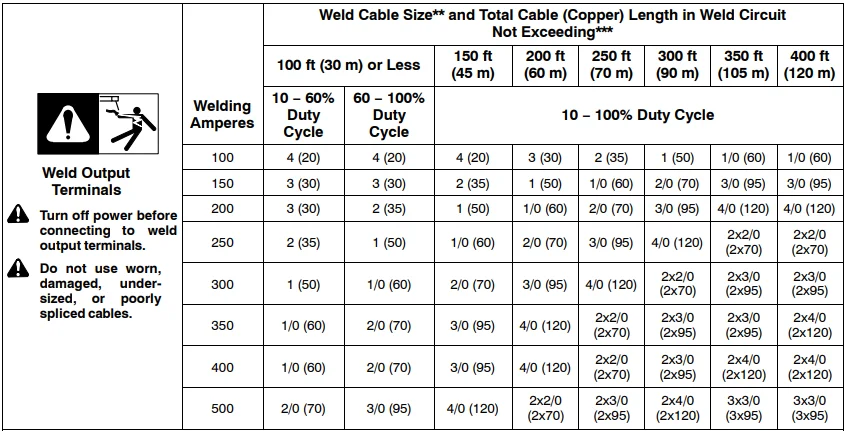
* This chart is a general guideline and may not suit all applications. If the cable overheats, use the next size larger cable.
**Weld cable size (AWG) is based on either a 4 volts or less drop or a current density of at least 300 circular mils per ampere.
( ) = mm2 for metric use
***For distances longer than those shown in this guide, call a factory applications rep. at 920-735-4505 (Miller) or 1-800-332-3281 (Hobart).
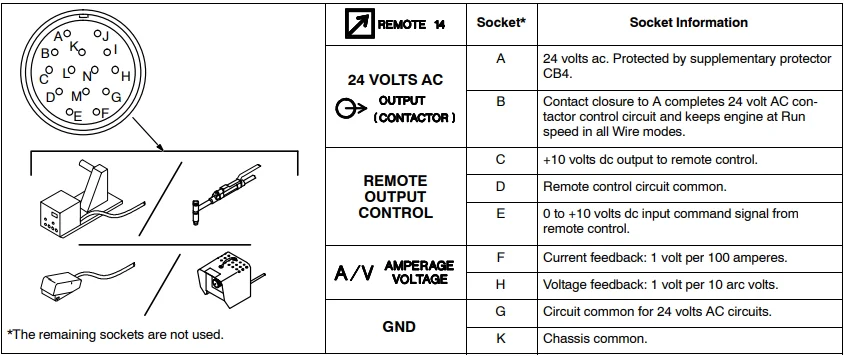
Remote Receptacle Information
MAINTENANCE & TROUBLESHOOTING
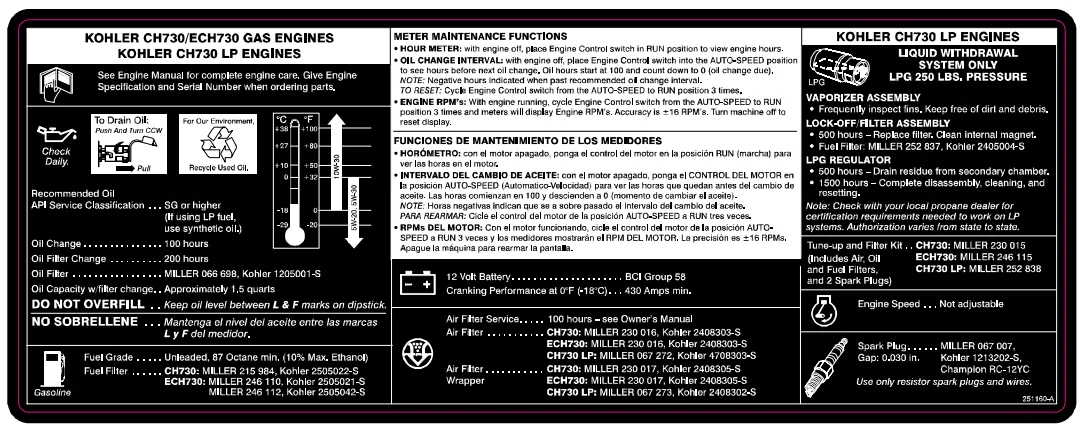
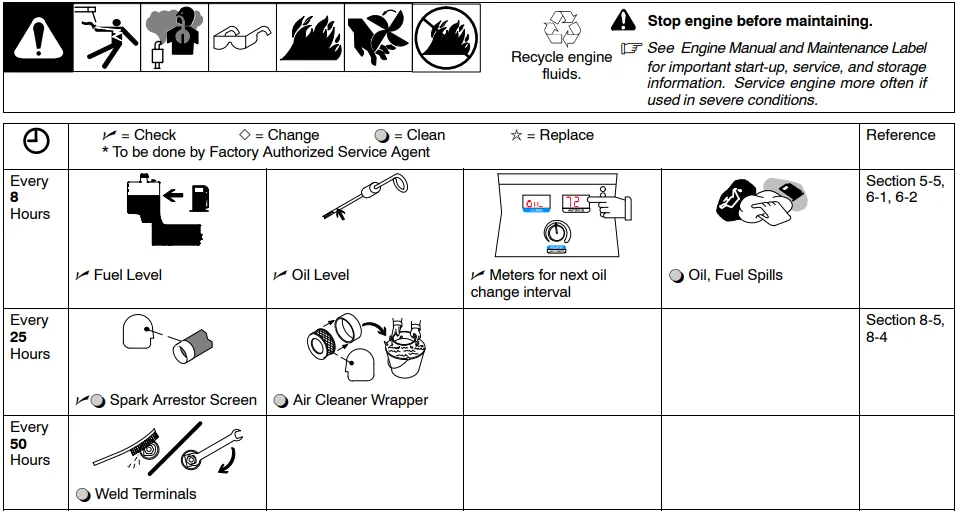
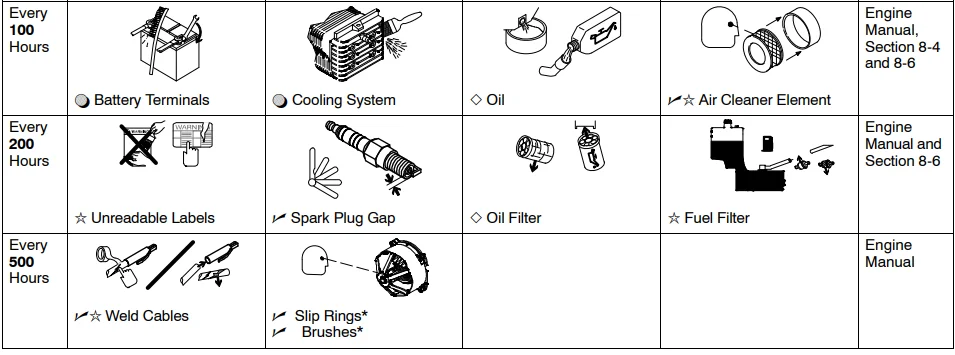
Maintenance Label
Routine Maintenance
Also see Voltmeter/Ammeter displays to assist in scheduling maintenance (see Section 6-1). The Voltmeter and Ammeter display total engine operating hours at start-up.
Follow the storage procedure in the engine owner’s manual if the unit will not be used for an extended period.
NOTICE − This equipment meets US EPA Evaporative Standards. Be sure fuel system replacement parts meet EPA Evaporative Standards.
EFI System And Servicing Information
NOTICE − EFI system components can be damaged if this information is not followed:
- Do not disconnect or reconnect the wiring harness connector to the control unit or any individual components with the Engine Control switch On.
- Never attempt to service any fuel system component while the engine is running or the Engine Control switch is On.
- Clean any joint or fitting with an approved cleaning solvent before opening to prevent dirt from entering the system.
- Cleanliness is essential and must be maintained at all times when servicing or working on the EFI system. Dirt can cause significant problems.
- Always depressurize the fuel system through the test valve in the fuel rail before disconnecting or servicing any fuel system components.
- Do not use compressed air if the system is open.
- Avoid direct water or spray contact with system components.
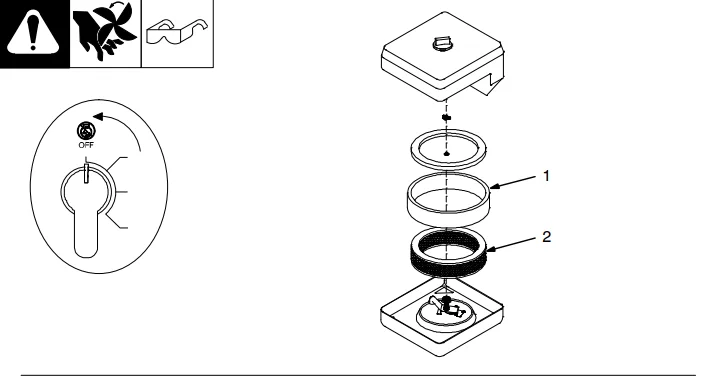
Servicing Air Cleaner
Stop the engine.
NOTICE − Do not run the engine without an air cleaner or with a dirty element.
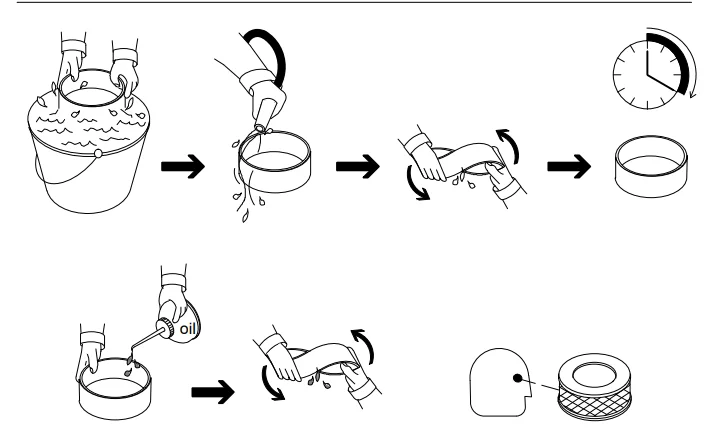
- Precleaner
Wash the precleaner with a soap and water solution. Allow the precleaner to air dry completely. Spread 1 tablespoon SAE 30 oil evenly into the precleaner. Squeeze out excess oil. - Element
Replace the element if damaged, dirty, or oily.
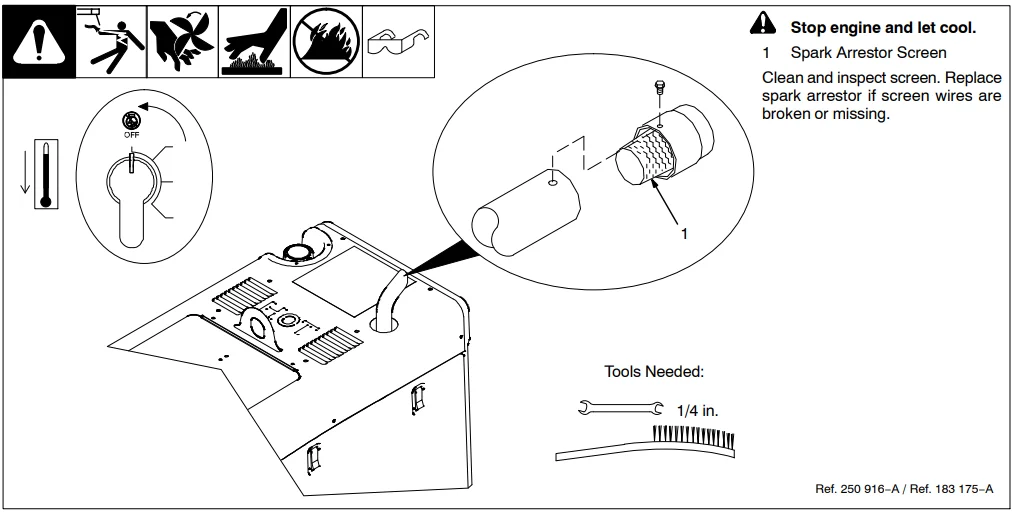
Servicing Optional Spark Arrestor
Stop the engine and let it cool.
- Spark Arrestor Screen
Clean and inspect the screen. Replace the spark arrestor if the screen wires are broken or missing.
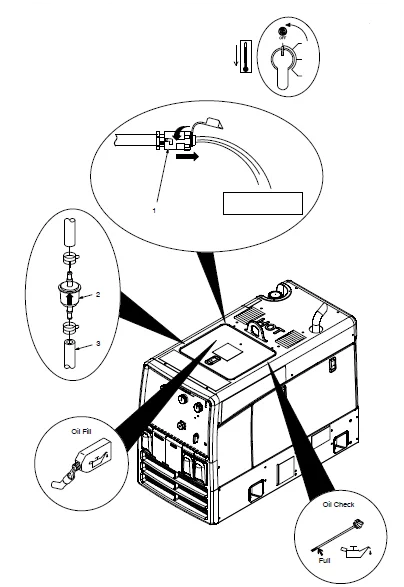
Changing Engine Oil, Oil Filter, and Fuel Filter
Stop the engine and let it cool.
- Oil Drain Valve
Change engine oil and filter according to the engine owner’s manual.
NOTICE − Close valve and valve cap before adding oil and running engine.
Fill crankcase with new oil to the full mark on the dipstick (see Section 8-1). - Fuel Filter
- Fuel Line
Replace the line if cracked or worn. Install a new filter with the arrow pointing in the direction of fuel flow. Wipe up any spilled fuel.
Start the engine, and check for fuel leaks.
 Stop engine, tighten connections as necessary, and wipe up fuel.
Reset oil maintenance countdown by leaving the engine off and flipping the Engine Control switch from Auto Speed to Run three times.
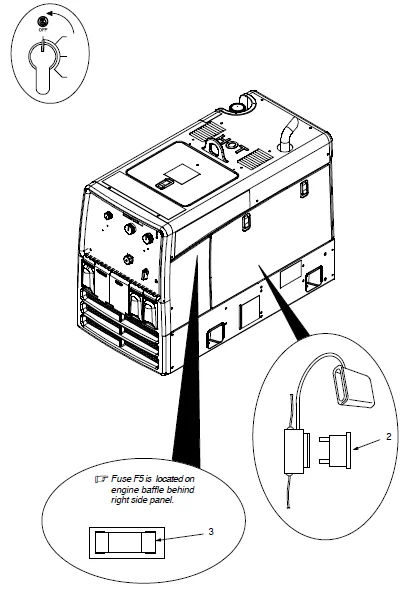
Overload Protection
Stop the engine.
Open the left side door.
When a supplementary protector or fuse opens, it usually indicates that a more serious problem exists. Contact a Factory
Authorized Service Agent.
Supplementary Protector CB4 and Circuit Breaker CB5 are located on the engine baffle behind the left side panel.
- Supplementary Protector CB4 (Not Shown)
CB4 protects the stator winding supplying 24 volt AC output to the Remote receptacle RC4. If CB4 opens, the 24-volt AC output to. RC4 sPressPress the
Prthe reset button to reset. - Circuit Breaker CB5 (Not Shown)
CB5 protects the optional Excel power windings from overload. If CB5 opens, Excel power is not available at receptacle RC3. Place the switch in the On position to reset. - Fuse F6 (See Parts List)
F6 protects the engine wiring system from overload; otherwise, the engine will not crank. - Fuse F5
F5 protects the weld excitation winding from overload and excessive open-circuit voltage. If F5 opens, the weld and auxiliary outlets stop. If F5 opens right after replacement, contact Factory Authorized
Service Agent.
The fuse is open.
Close the left side door.
Engine Speed Adjustment
Engine speed is controlled by an electronic governor. Engine speed adjustments must be made by an engine Factory Authorized Service Agent. Tampering with adjustments may affect the engine warranty.
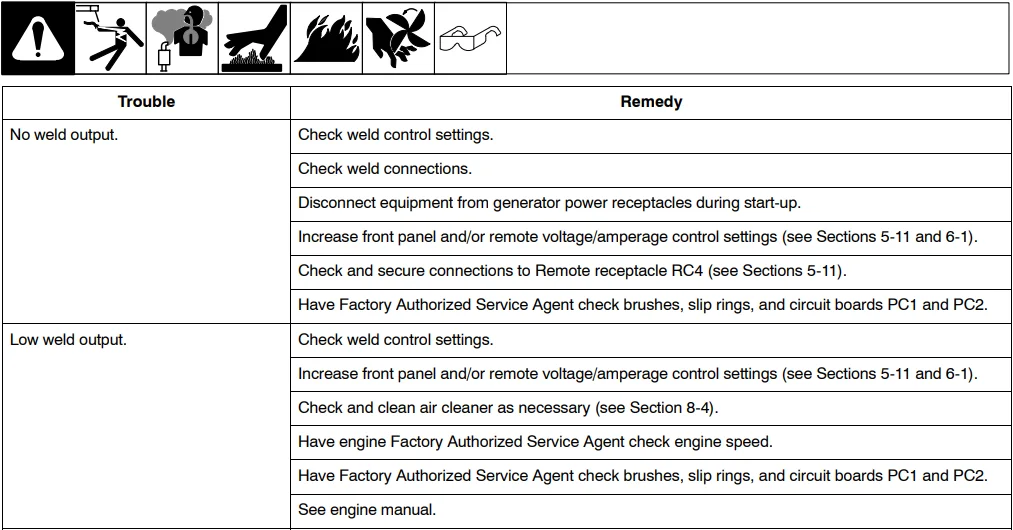
Welding Troubleshooting
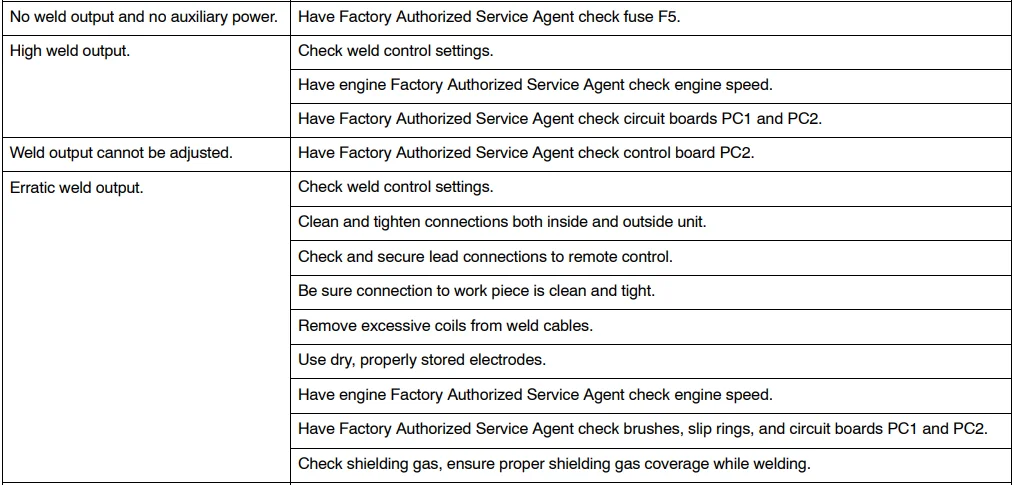
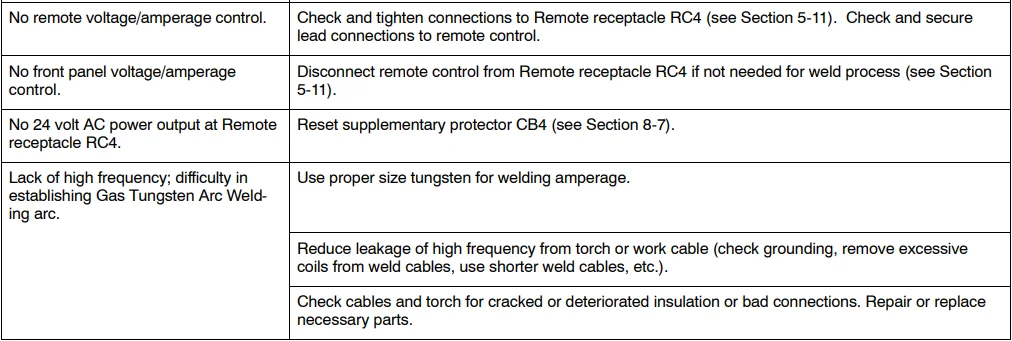
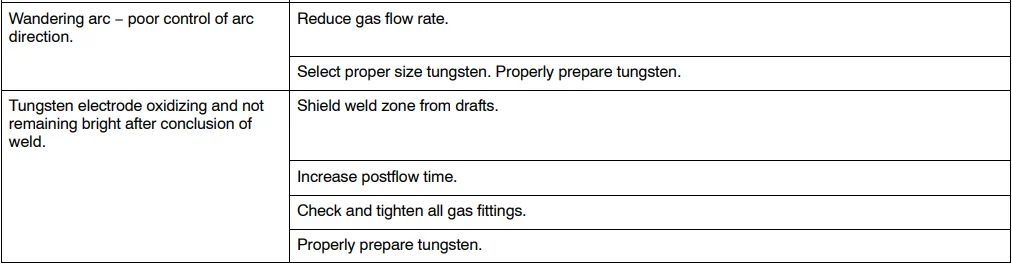
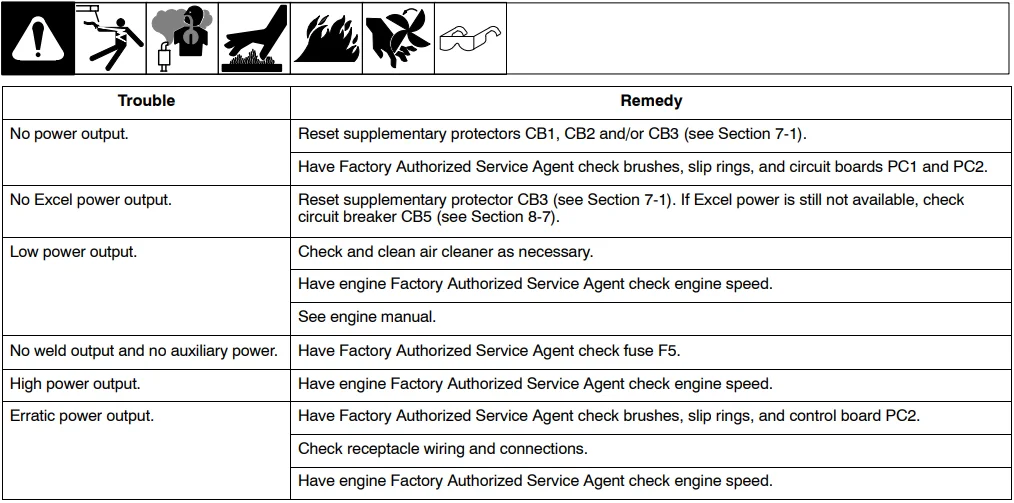
Generator Power Troubleshooting
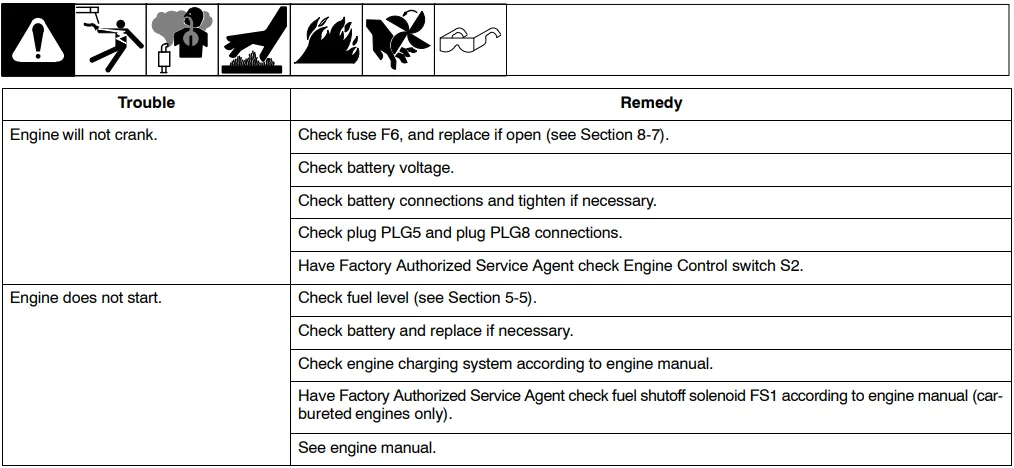
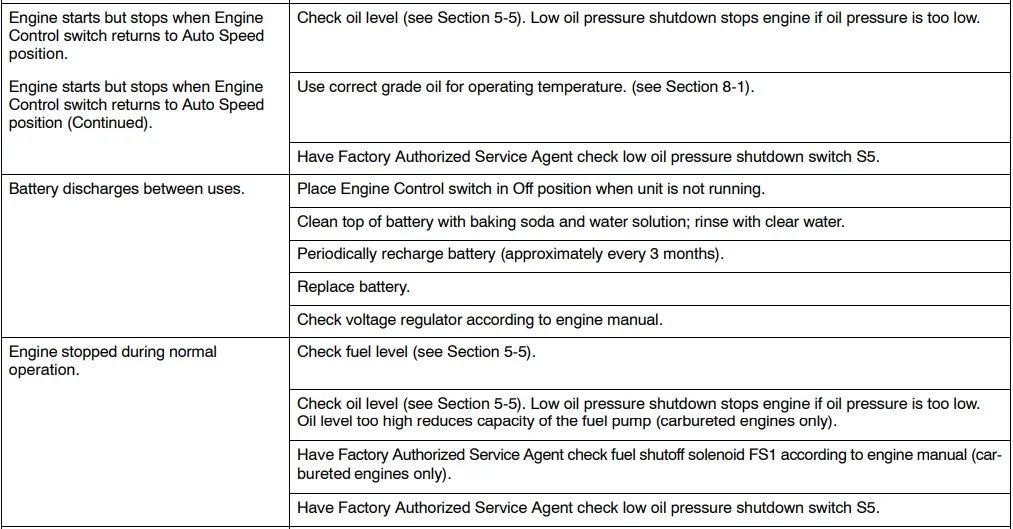
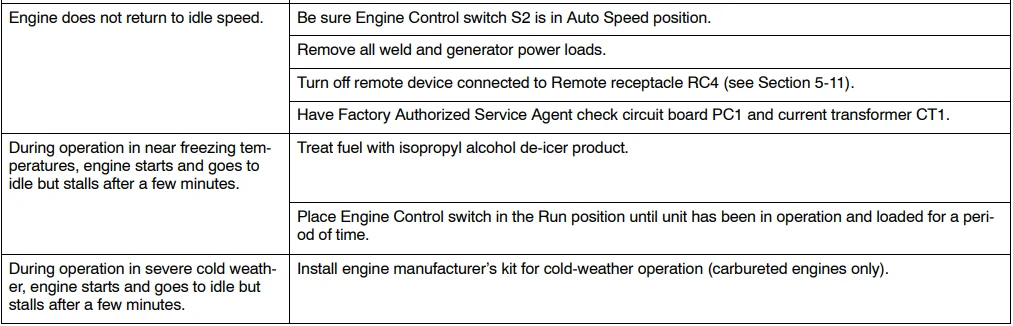
Engine Troubleshooting
For more manuals by Miller, visit ManualsLibraryy
Miller TrailBlazer 325 Welder-Diesel Generator- FAQs
What are the different welding modes available on the Trailblazer 325?
The Trailblazer 325 offers three Stick modes—EXX18, EXX10, and Gouge. It also features three Lift-Arc™ TIG modes—Auto-Stop™, Auto-Crater™, and Pulse—for smooth starts and finishes. The Gouge mode provides maximum power for Air Carbon Arc Cutting and Gouging.
What engine does the Miller Trailblazer 325 use?
The Trailblazer 325 Diesel model is powered by a Kubota diesel engine with 24.8 horsepower, while the gasoline version uses a Kohler CH730 twin-cylinder, air-cooled engine producing 23.5 HP at 3,600 RPM.
What type of fuel does the Trailblazer 325 use?
The Trailblazer 325 runs on diesel fuel for the diesel model and gasoline for the gas model. Always use clean, fresh fuel to maintain optimal performance.
What is the fuel and oil capacity of the Trailblazer 325?
Fuel capacity: 12 gallons
Oil capacity: 3.9 quarts (approximately 3.7 liters)
How do I maintain my Trailblazer 325 welder generator?
Regular maintenance keeps your unit running smoothly:
Every 8 hours: Check fuel level.
Every 25 hours: Inspect the spark arrestor screen.
Every 100 hours: Clean battery terminals.
Every 200 hours: Replace unreadable labels.
Every 500 hours: Inspect weld cables and connections.
How often should the oil be changed in the Trailblazer 325?
Change the oil approximately every 100 hours of operation or sooner if the oil appears dirty. Always follow the manufacturer’s recommendations for your specific engine type.
What kind of oil should I use for the Miller Trailblazer 325?
Use high-quality SAE 10W-30 or 15W-40 engine oil, depending on the operating temperature and environment. Always check the manual for the recommended oil grade for diesel or gasoline models.
How can I reset the oil life on the Miller Trailblazer 325?
To reset the oil life indicator, turn the ignition on (engine off), press and hold the reset or menu button on the display until the oil indicator clears. Refer to the user manual for model-specific steps.
Is the Miller Trailblazer 325 a good welder?
Yes. The Trailblazer 325 is known for its exceptional arc quality, fuel efficiency, and durability, making it a top choice for professional welders and heavy-duty applications.
What materials can the Trailblazer 325 weld?
It can weld steel, stainless steel, and other metals, supporting Stick, TIG, MIG, and Flux-Cored welding processes.