
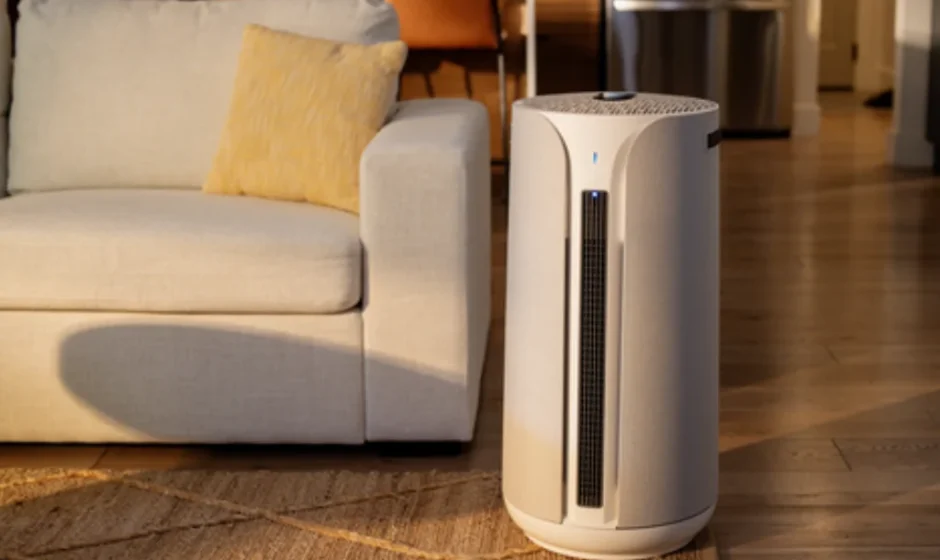

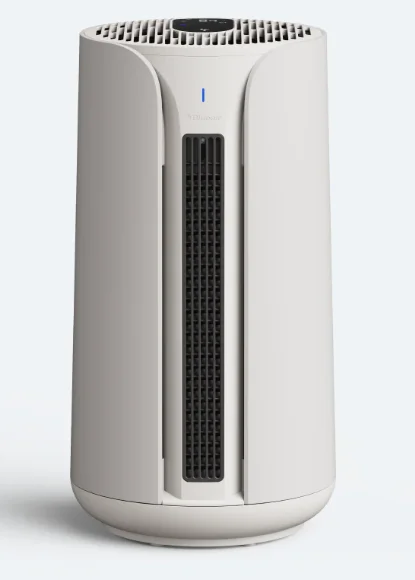
Blueair ComfortPure 3-in-1 T10i Air Purifier Fan Heater
Safety information
IMPORTANT INSTRUCTIONS
3-in-1 air purifier is a multifunctional air purifier with built-in heating and a cooling fan function. Due to the heat source, some specific instructions related to the heat will follow.
HEATING SAFETY INSTRUCTION
- Read all instructions before using this heater.
- This heater is hot when in use. To avoid burns, do not let bare skin touch hot surfaces such as heating outlets or exhaust vents. Use the handles when moving this heater. Keep combustible materials, such as furniture, pillows, bedding, papers, clothes, and curtains at least 3 feet (0.9 m) from the heater.
- Extreme caution is necessary when any heater is used by or near children or individuals with reduced mental capacity or whenever the heater is left operating and unattended.
- Do not operate the heater if it has a damaged cord or plug, after a heater malfunctions, or if it has been dropped or damaged in any manner.
- The heater will turn off automatically after 24 hours in use. Allow the device to cool down to room temperature before using the heating function again.
- Do not use outdoors.
- This heater is not intended for use in bathrooms, laundry areas and similar locations with high humidity and/or standing water. Never locate the heater where it may fall into a bathtub or other water containers.
- Do not run the cord under carpeting. Do not cover the cord with throw rugs, runners, or similar coverings. Do not route the cord under furniture or appliances. Arrange the cord away from the traffic area and where it will not be tripped over.
- To disconnect the heater, turn the device off, then remove the plug from the outlet. Do not insert or allow foreign objects to enter any ventilation or exhaust opening as this may cause an electric shock or fire, or damage the heater.
- To prevent a possible fire, do not block the air intakes or exhaust in any manner. Do not use on soft surfaces, like a bed, where openings may become blocked.
- This heater has hot parts inside, which may if collected with dust or similar substance cause arcing or sparking. Do not use the heater in areas where gasoline, paint, or flammable liquids are used or stored.
- Use this heater only as described in this manual. Any other use not recommended by the manufacturer may cause fire, electric shock, or injury to persons.
- Always plug heaters directly into a wall outlet/receptacle. Never use with an extension cord or relocatable power tap (outlet/power strip).
- Hyperthermia can result in death. Symptoms of hyperthermia include high body temperature, headache, nausea, vomiting, tiredness, dizziness, fainting, and rapid pulse. If you begin to experience symptoms related to hyperthermia, turn off the heater and seek medical attention.
- Appliance should be placed only on the floor when in use.
- SAVE THESE INSTRUCTIONS.
Remote Battery Safety Instructions
- Remove and immediately recycle or dispose of used batteries according to local regulations and keep away from children. Do NOT dispose of batteries in household trash or incinerate.
- Even used batteries may cause severe injury or death.
- Call a local poison control center for treatment information.
- CR2025 button cell battery is compatible for this remote.
- Nominal battery voltage is 3V.
- Non-rechargeable batteries are not to be recharged.
- Do not force discharge, recharge, disassemble, heat above the manufacturer’s specified temperature rating or incinerate. Doing so may result in injury due to venting, leakage or explosion, resulting in chemical burns.
- Ensure the batteries are installed correctly according to polarity (+ and -).
- Remove and immediately recycle or dispose of batteries from equipment not used for an extended period of time according to local regulations.
- Always completely secure the battery compartment. If the battery compartment does not close securely, stop using the product, remove the batteries, and keep them away from children.
WARNING
- INGESTION HAZARD: This product contains a button cell or coin battery.
- DEATH or serious injury can occur if ingested.
- A swallowed button cell or coin battery can cause Inte rnal Chemical Burns in as little a.s 2 hours
- KEEP new and used batteries OUT OF REACH of CHILDREN
- Seek immediate medical attention if a battery is suspected to be swallowed or inserted inside any part of the body.
General safety instructions
3-in-1 air purifier is an electrical appliance for indoor use only. Take the necessary precautions to reduce the risk of fire, electric shock or injury.
- This appliance is not intended for use by persons (including children) with reduced physical, sensory, or mental capabilities or lack of experience and knowledge, unless they have been given instructions concerning its use or are under supervision by a person responsible for their safety.
- Supervise children to ensure that they do not play with the appliance.
- Cleaning and product maintenance should not be conducted by children.
- Always disconnect the appliance from the power supply and allow it to cool to room temperature before maintenance.
- If your Blueair appliance is found to be defective, we will replace it with the same or a similar model at no cost, per the warranty terms. Please use caution when attempting repairs yourself, as this presents the danger of electrical shock or injury.
- Ensure that the power cable and the power plug are not at risk of getting damaged.
- If the appliance is damaged or malfunctions, turn it off, disconnect it from the power supply, and contact Blueair.
- The power plug must be firmly inserted in the power socket.
- When disconnecting the unit from the power supply, do not pull on the power cord; pull on the power plug.
- Use the power cable provided with your Blueair air purifier to plug directly and firmly into an appropriate electrical outlet.
- To reduce the risk of fire, electric shock or injury to persons, do not use replacement parts that have not been recommended by the manufacturer (e.g. parts made at home using a 3D printer).
- Do not use an extension cord or a power strip. Refer to the rating label on your appliance.
- Do not alter the power plug in any way. If the plug does not fit into the outlet, contact qualified personnel to install the proper outlet.
- To avoid risk of fire or electric shock, the appliance should only be used with the correct input voltage that it is rated for, refer to your rating label on the device.
- Do not use the included power cord for anything else but the appliance.
- Do not allow objects to enter or block the air inlets and air outlets as this can cause electric shock or damage the appliance.
- Do not place any objects on top of or directly against the appliance.
- Do not sit on, stand, climb onto or hang from the appliance.
- Keep the appliance, including the power cable, at a safe distance from heated surfaces and open fire.
- Keep the appliance and power plug away from water and other liquids.
- Keep the appliance and power plug away from chemicals such as pesticides and deodorants.
- Always turn off and disconnect the appliance from the power supply before moving the unit, changing filters, cleaning, or carrying out maintenance procedures.
- Never clean with gasoline, chemical solvents, or corrosive materials as these agents may damage the air purifier.
- This appliance has a polarized plug (one blade is wider than the other). To reduce the risk of electric shock, this plug is intended to fit in a polarized outlet only one way. If the plug does not fit fully in the outlet, reverse the plug. If it still does not fit, contact a qualified electrician. Do not attempt to defeat this safety feature.
- Do not operate the device with a damaged cord or plug.
WARNING: RISK OF ELECTRIC SHOCK.
3-in-1 air purifier
Product introduction
3-in-1 air purifier is a multifunctional air purifier with built-in heating and a cooling fan function. This product comes with integrated controls, built-in sensors, a digital display showing indoor pollution level (PM 2.5) and room temperature. To adjust the settings of your product, you can either use the control panel on top of the device, the remote control or the Blueair app. The Blueair app grants access to additional features and functions.
Recommendations for best performance
- Ensure that the size of the room where the air purifier is placed does not exceed the recommended capacity.
- Position the air purifier in an area where air can freely flow in and out, ensuring proper circulation.
- Maintain a distance of at least 4 inches (10 cm) between the air purifier and any other object to ensure proper air circulation.
- Keep the doors and windows closed while the air purifier is in operation.
- Clean the air quality sensor monthly to remove dust and other debris.
- Replace the filter when the Filter replacement indicator turns red on the control panel.
- To ensure smooth oscillation, do not manually adjust the angle. Oscillation is automatically set and can reach 350 degrees.
- Refer to the maintenance instructions in this user manual for proper care.
The purpose of this device is to enhance your indoor air comfort by eliminating pollutants from the air while offering heating and cooling fan features.
Product map
- Product name: 3-in-1 air purifier,3-in-1 air purifier
- Model number: T10i, T20i
- Regulatory number: 4132411000, 4232412000
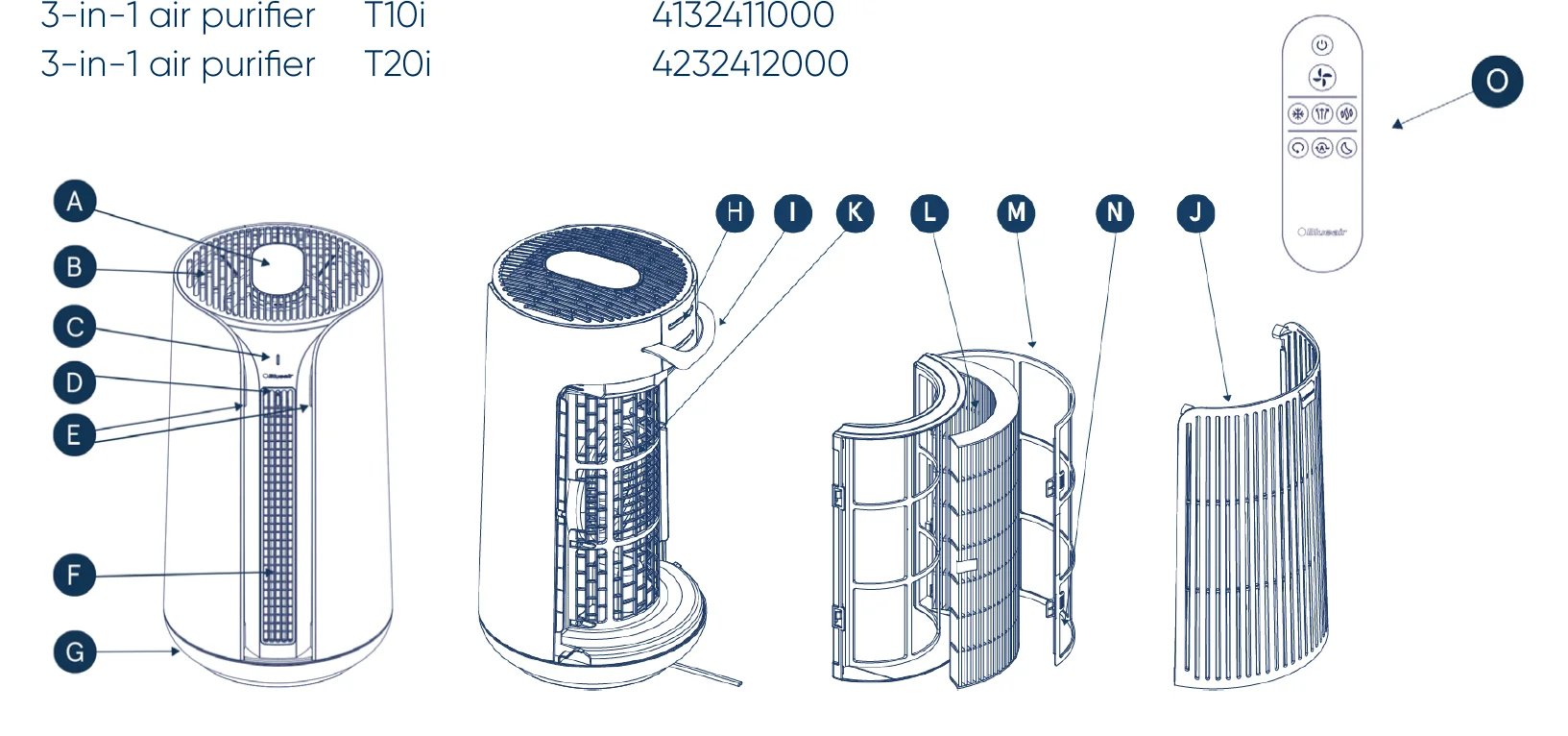
- A Control panel & interface
- B Boosted purification air outlet
- C Air quality indicator (AQI)
- D Mode indicator
- E Cooling fan air outlets
- F Heating air outlet
- G Oscillation base
- H Sensor module
- I Handle (located on sides for T20i)
- J Filter door
- K Air inlets
- L Filter
- M Filter frame
- N Pre-filter
- O Remote
Not pictured: Power cable, User manual, Remote holder (T20i only)
Getting started
- Step 1
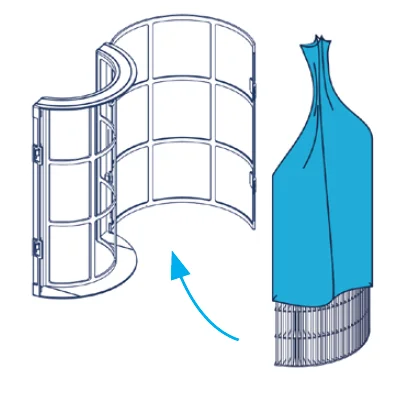
Open the filter door and take out the filter frame. Remove the plastic from the filter. - Step 2
Place the filter in the filter frame and put it back in the air purifier. Close the filter door. - Step 3
Plug the power cable into a grounded wall outlet. - Step 4
Press the On/Standby button to turn the air purifier on.
See section “Filter replacement information” for more information.
Connect to the Blueair app
Connecting to the Blueair app allows you to control the air purifier remotely and monitor filter usage. The app offers additional features to the device.
- Download the Blueair app from the App Store or Google Play.
- Create or sign in to your Blueair account.
- Click on Connect Product+.
- Follow the instructions to complete app pairing.
First-time connecting tips

- Turn on your air purifier. Press and hold the Auto button for 5 seconds to prepare the air purifier for pairing. Once the Wi-Fi indicator is blinking, it is ready to be paired with your app. Make sure you are using a visible Wi-Fi network. VPN (Virtual Private Network) should be deactivated while using the Blueair app.

- Bluetooth is required for first-time pairing. Turn your phone’s Bluetooth on and keep your phone within 3 feet (1 meter) of the air purifier for initial pairing.

- This air purifier can only connect to 2.4 GHz Wi-Fi. If you are using a dual-band Wi-Fi router, make sure to select 2.4GHz.

- Keep your air purifier within 15 feet (4,5 meters) of your Wi-Fi router when connecting the product for the first time.

Device controls
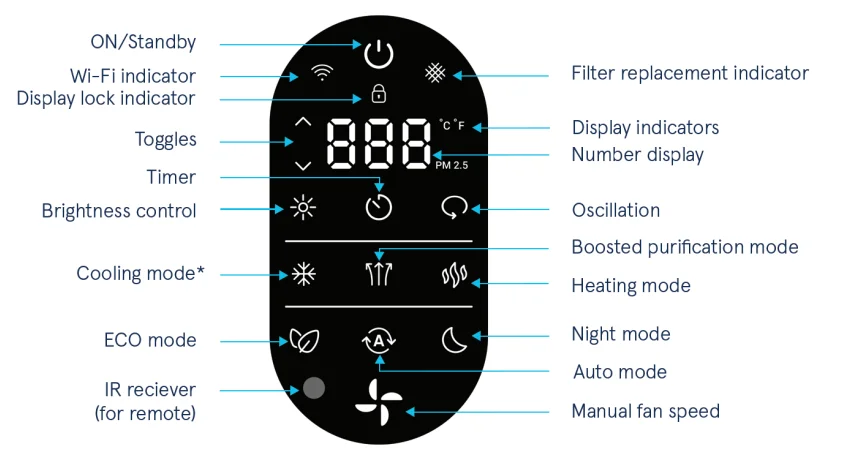
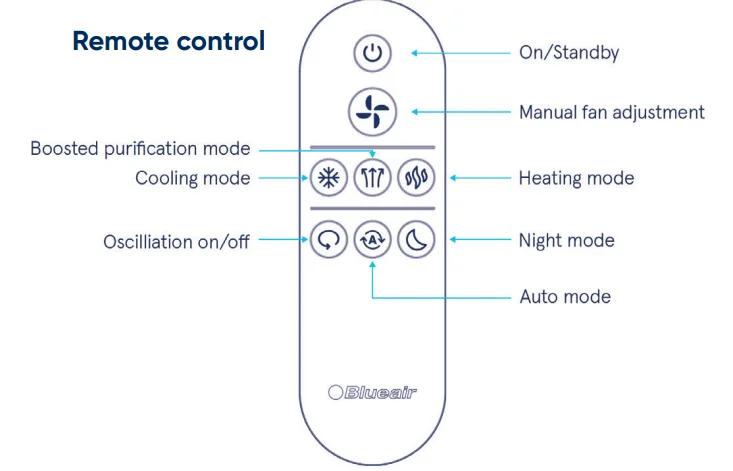
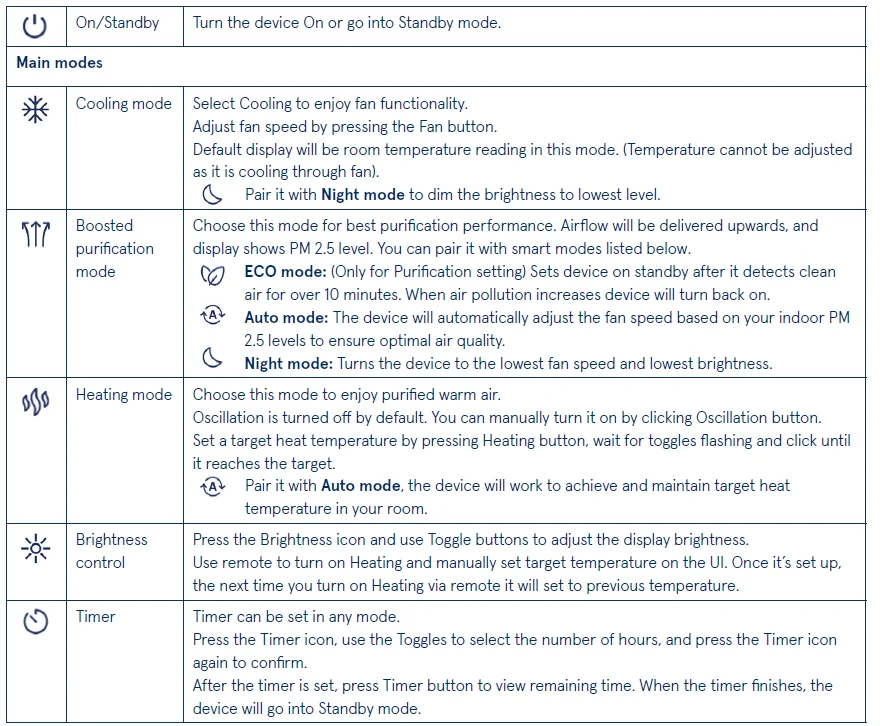
Note! The 3-in-1 air purifier can be controlled via the control panel, Blueair app**, and remote control.
- * Temperature cannot be adjusted in Cooling mode. Cools through the fan, not air conditioning.
- ** Heating mode cannot be activated through the app due to safety regulations.
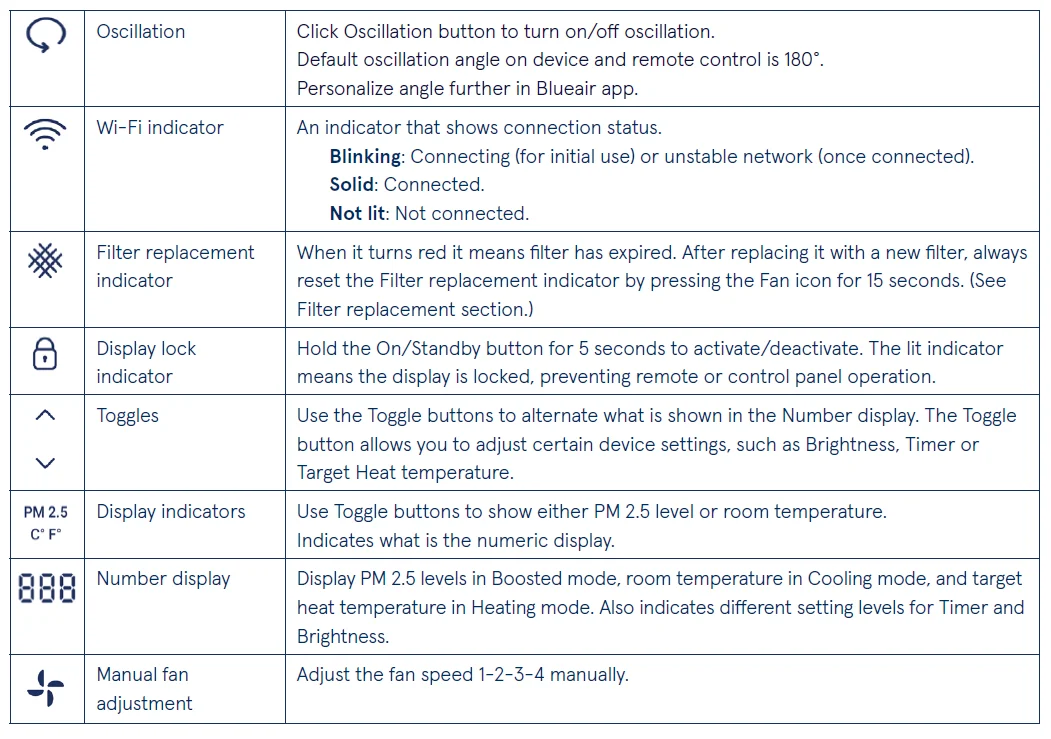
Icon functionality
Additional features on the control panel
Factory reset
Reset the device to the factory settings by pushing the On/Standby button for 15 seconds.
Switch between Fahrenheit and Celsius
3-in-1 air purifier can display degrees in both Fahrenheit and Celsius. The factory setting is adapted to the market in which the product is purchased. Change between the scales by pushing the Heating and Toggle buttons at the same time.
Quick option to turn off the Timer and Wi-Fi
Press the Timer button for 5 seconds to turn the Timer off. Press the Auto button for 5 seconds to turn the Wi-Fi off.
AQI indicator
The 3-in-1 air purifier has a particle sensor to measure the fine particle levels (PM 2.5) in the room. The AQI indicator displays the air quality status in five colors, from excellent (blue) to very polluted (red).
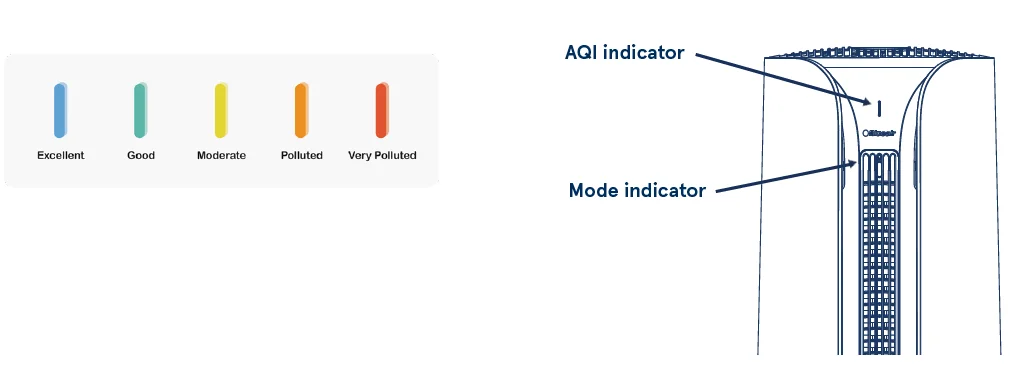
Mode indicator
The Mode indicator shows which main mode the device is currently in. The Mode indicator blinks when the remote is used to indicate that the device has received the command.
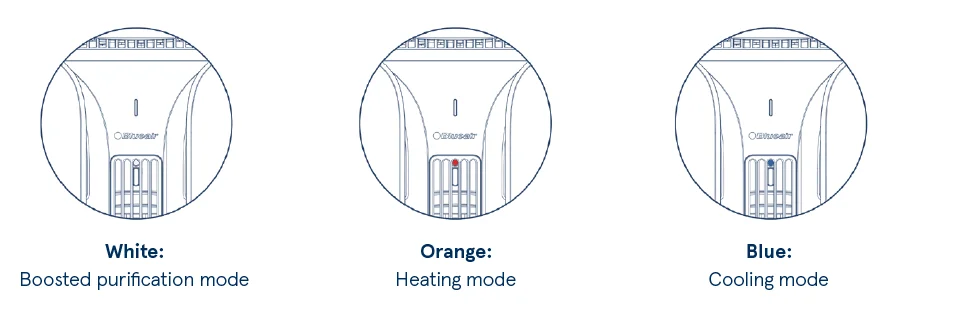
Note! The Orange light for the Heating mode is a regulatory requirement and will not turn off even if the display brightness is set to 0% or if the device is in Night mode.
Air quality sensor
Important! Do not use your fingers or any other objects to clean inside the sensor inlets.
The inlets for the Air quality sensor are located at the back of the air purifier. Clean the inlets and the sensor when changing the filter.
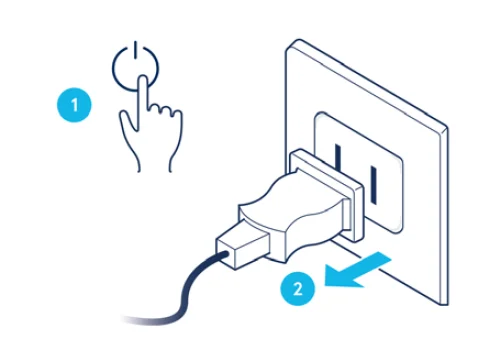
- Step 1
Turn the device off and unplug the cord.
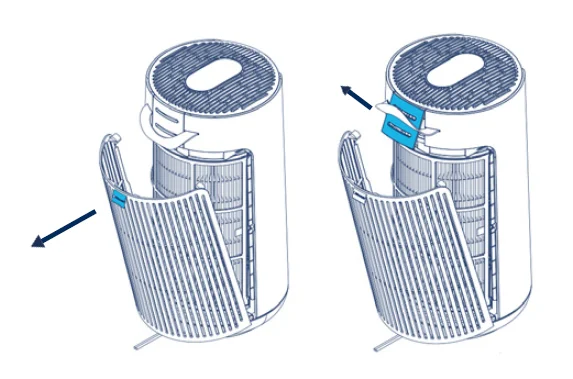
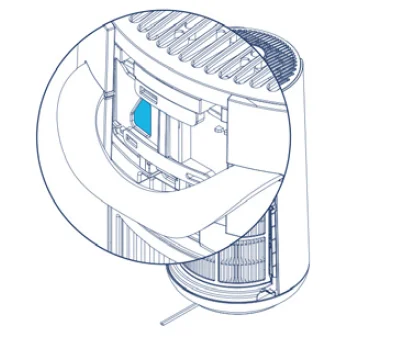
- Step 2
Remove the filter door and open the sensor hatch to the Air quality sensor.
- Step 3
Gently vacuum the inlets with a soft brush and clean the sensor with a cotton swab.
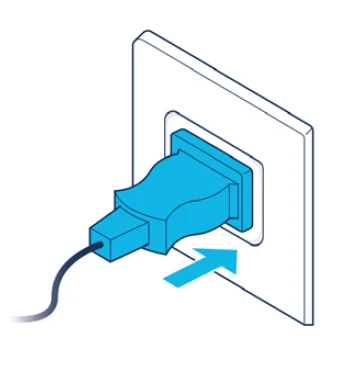
- Step 4
Place the hatch back, close the filter door, and plug in the cord.
Filter Replacement Information
Changing the filter
Important! Always turn off and disconnect the appliance from the power supply and allow the device to cool to room temperature before changing filters, cleaning, or carrying out maintenance procedures.
The 3-in-1 air purifier calculates the remaining lifetime of the filter based on actual usage and indoor pollution levels. When it is time to change the filter, the filter replacement indicator will appear red on the control panel on top of the device. The recommended time for filter change is 6—9 months. Using only original Blueair filters compatible with your device is recommended to ensure optimal performance. The serial number and model name can be found at the bottom of the device. Easily order from www.blueair.com or sign up to Blueair filter subscription.
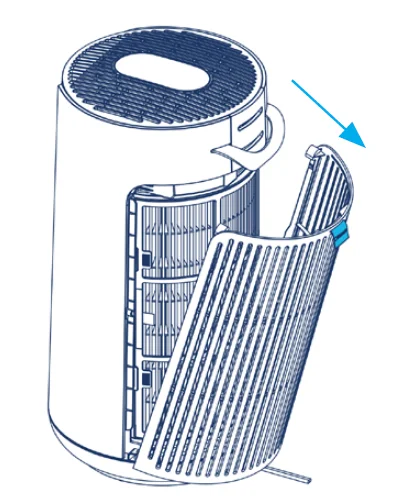
- Step 1
Open the filter door by pulling the flap at the top.
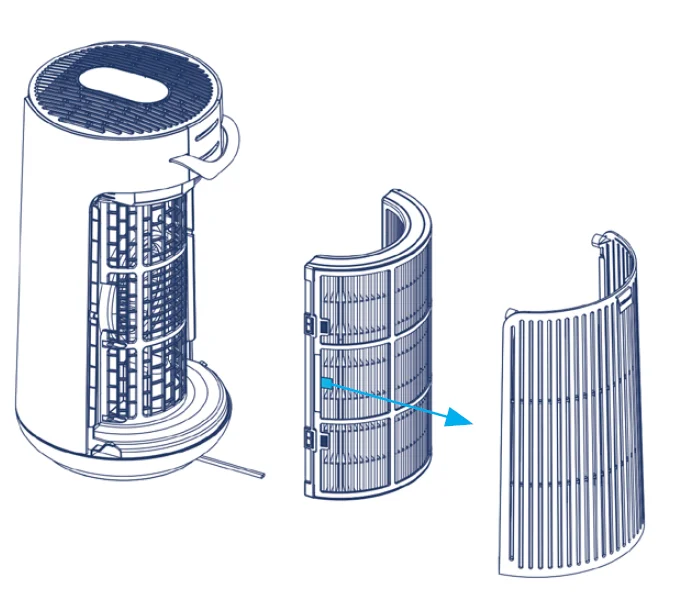
- Step 2
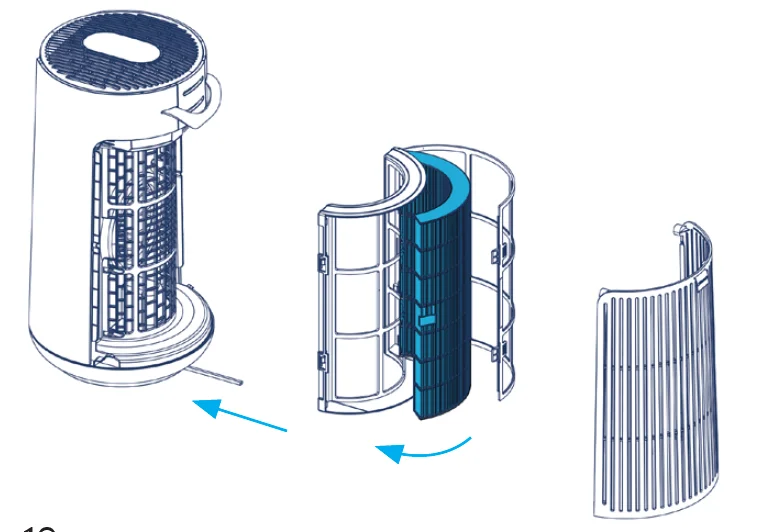
Pull the filter frame straight out using the pull tab.
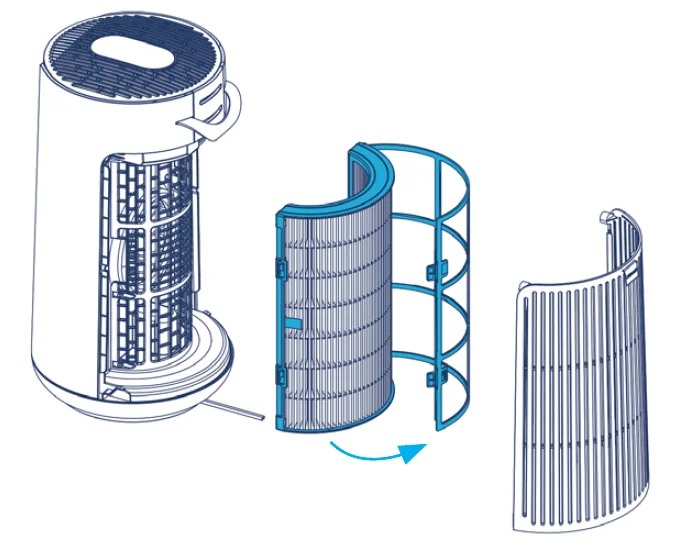
- Step 3
Remove the old filter by pulling the two filter tabs.
Important! Make sure to remove the filter from the filter frame before discarding it. The filter frame should not be thrown away.
- Step 4
Place the new filter inside the filter frame.
Important! Remove the plastic around the new filter.
- Step 5
Close the filter frame with the clasps. Put the filter frame back in the device and close the filter door.
- Step 6
To reset the Filter replacement indicator after changing the filter, push the Manual fan adjustment button for 15 seconds.

Maintenance information
To keep your air purifier in top condition, regular maintenance is essential. Please follow these recommendations when cleaning your device.
General
- Disconnect the air purifier from the power supply and allow the device to cool to room temperature before maintenance.
- Do not allow foreign objects to enter the air inlets or air outlets. This may cause an electric shock or damage the air purifier.
- Never clean with gasoline, chemical solvents, or corrosive materials, as these agents may damage the air purifier.
- Make sure the air purifier is completely dry before connecting it to a power supply.
- Do not wash the filter; it’s not washable or reusable.
Cleaning
- Wipe the exterior of the air purifier with a soft, clean cloth.
- Open the filter door and clean the inside of the door with a soft, clean cloth.
- Vacuum the air inlets with a soft brush (not included).
- Vacuum the inside of the air purifier with a soft brush (not included).
- Clean and check the power cable and power plug for wear or damage.
- Clean the pre-filters with a soft cloth or vacuum on low setting with a soft brush (not included) once a week.
- Clean the Air quality sensor when changing the filter.
Moving the device
Important! Unplug the air purifier and allow it to cool to room temperature before moving it.
The 3-in-1 air purifier has a handle/handles that make it easier to move. Follow the instructions when moving your device. Make sure that the filter door is securely closed.
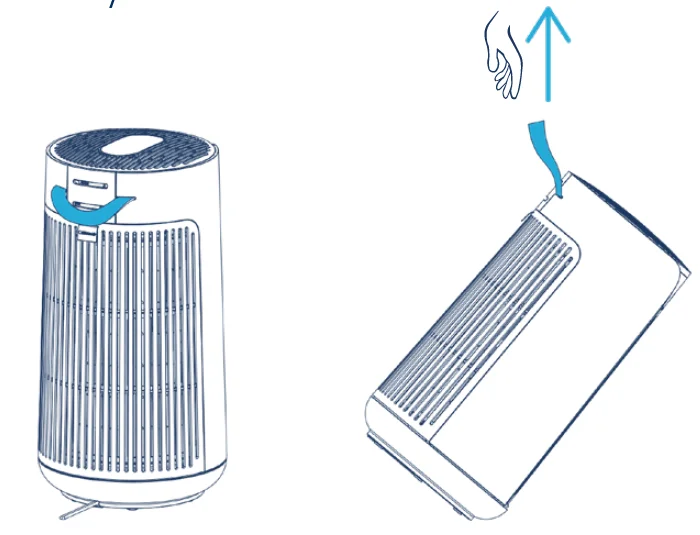
3-in-1 air purifier model T10i
- Step 1
Place your hand inside the handle at the back of the device and hold firmly. - Step 2
Lift the purifier straight up.
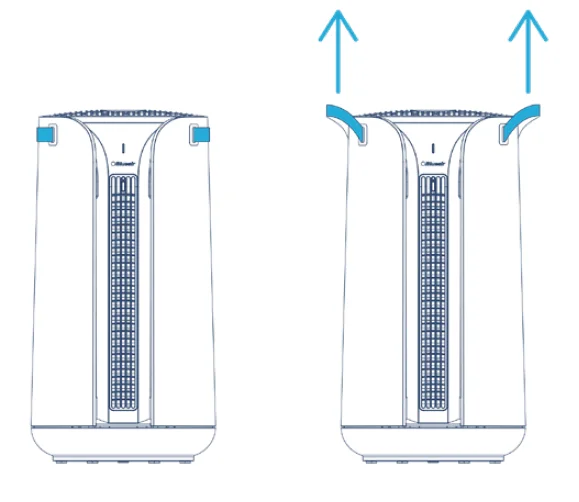
3-in-1 air purifier model T20i
- Step 1
Grab the handles firmly and pull them out. - Step 2
Lift the device straight up using both hands.
Troubleshooting
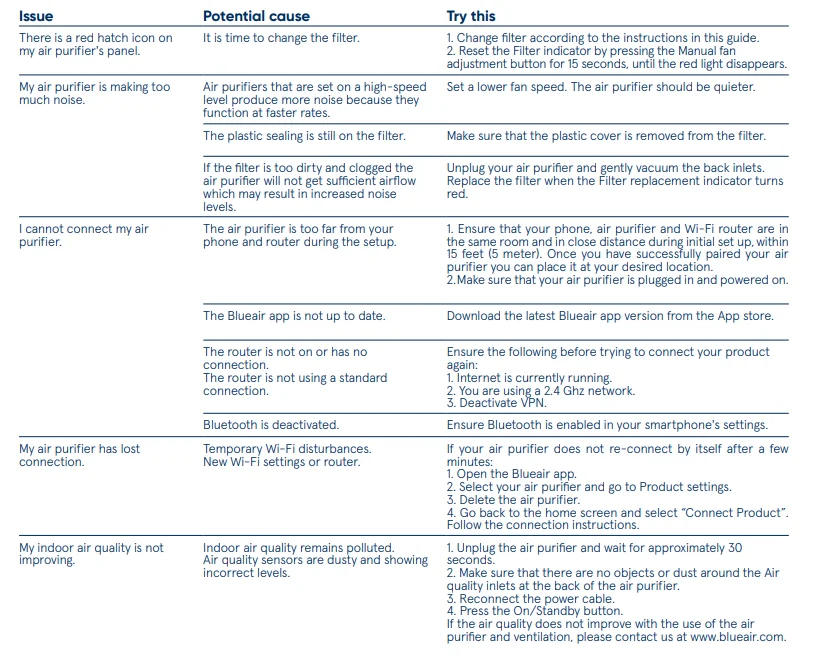
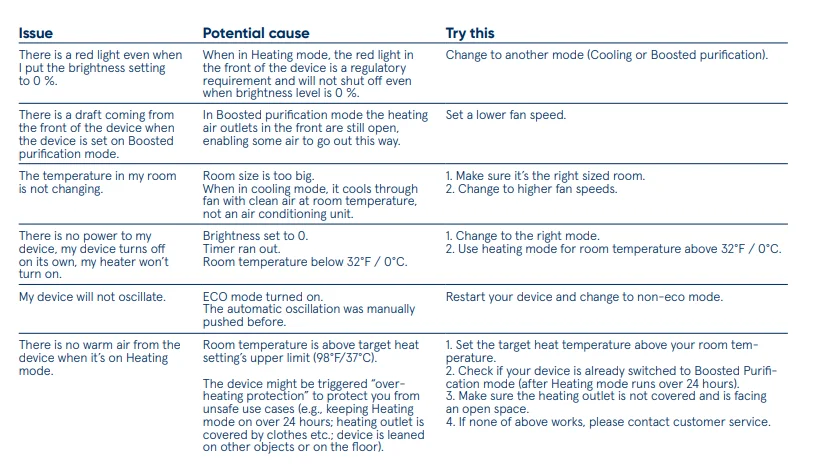
For more information and troubleshooting tips, please check the support page on www.blueair.com
Disposal, support, and warranty
Disposal and recycling
The 3-in-1 air purifier should be disposed of or recycled as electrical waste, and the filter should be disposed of as regular waste. If you have questions regarding the disposal and recycling of your device, please contact your local recycling facility or your Blueair retailer.
Help and support
If you have questions about your product, please visit www.blueair.com or contact your local Blueair retailer.
Limited warranty information
The 3-in-1 air purifier has a limited warranty of 3 years.
Regulatory information
Note! This equipment has been tested and found to comply with the limits for a Class B digital device, pursuant to Part 15 of the FCC Rules. These limits are designed to provide reasonable protection against harmful interference in a residential installation. This equipment generates, uses, and can radiate radio frequency energy and, if not installed and used in accordance with the instructions, may cause harmful interference to radio communications. However, there is no guarantee that interference will not occur in a particular installation. If this equipment does cause harmful interference to radio or television reception, which can be determined by turning the equipment off and on, the user is encouraged to try to correct the interference by one or more of the following measures:
- Reorient or relocate the receiving antenna.
- Increase the separation between the equipment and receiver.
- Connect the equipment into an outlet on a circuit different from that to which the receiver is connected.
- Consult the dealer or an experienced radio/TV technician for help.
This device complies with Part 15 of the FCC Rules. Operation is subject to the following two conditions:
- This device may not cause harmful interference.
- This device must accept any interference received, including interference that may cause undesired operation.
This Class B digital apparatus complies with Canadian ICES-003.
This device contains licence-exempt transmitter(s)/receiver(s) that comply with Innovation, Science and Economic Development Canada’s license-exempt RSS(s). Operation is subject to the following two conditions: (1) This device may not cause interference, and (2) This device must accept any interference, including interference that may cause undesired operation of the device.
FCC/ISED RF Exposure Information: This equipment should be installed and operated with a minimum distance of 4 inches (10 cm) between the radiator and your body.
For more manuals by Blueair, visit ManualsLibraryy
Blueair ComfortPure 3-in-1 T10i Air Purifier Fan Heater-FAQs
How many hours should I run the Blueair ComfortPure T10i?
For best air quality, it is recommended to keep the purifier running throughout the day. The auto mode can adjust fan speed automatically based on indoor air conditions while helping save energy.
Can I leave the Blueair purifier on all the time?
Yes, the unit is designed for continuous use. Running it 24/7 helps maintain cleaner air and stable indoor comfort levels.
What do the indicator lights mean on the purifier?
The lights usually show air quality status, operating mode, or filter replacement reminders. A red or warning light may indicate poor air quality or that the filter needs changing.
How can I tell if the air purifier is working properly?
You should notice airflow from the unit, changing fan speeds in auto mode, and improved air freshness. The control panel indicators also confirm that the device is operating correctly.
Is it safe to sleep with the purifier running overnight?
Yes, the purifier is safe for overnight use. Night Mode lowers fan speed and dims the display lights for quieter operation during sleep.
What is Night Mode on the Blueair T10i?
Night Mode reduces noise and brightness while still cleaning the air efficiently. It is ideal for bedrooms and nighttime use.
How often should the filter be replaced?
Filter life depends on air quality and usage, but most filters typically last between 9 and 12 months under normal conditions.
Does the fan speed increase automatically?
Yes, in Auto Mode the purifier can increase fan speed when it detects smoke, odors, dust, or VOCs in the room.
Why is my air purifier not cleaning the air effectively?
A clogged or old filter is the most common reason for reduced performance. Cleaning the exterior vents and replacing the filter can help restore airflow.