
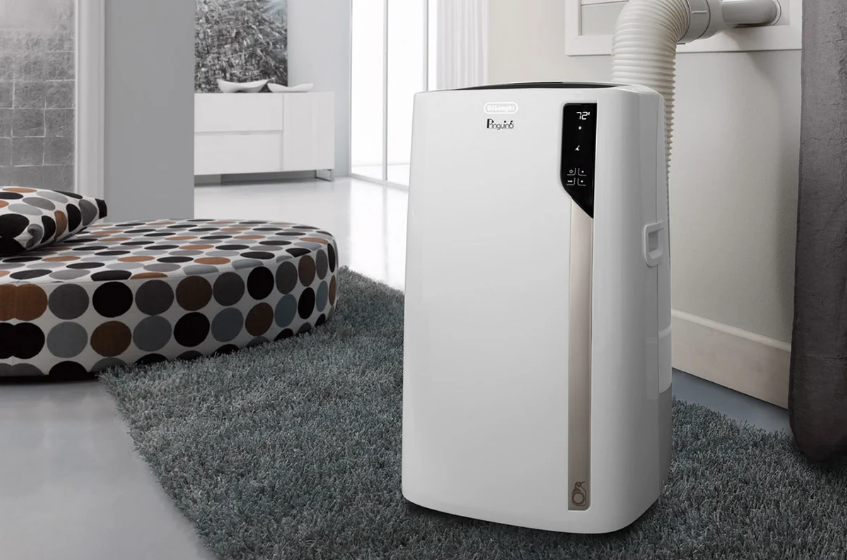

Delonghi EL275 Series Air Conditioner
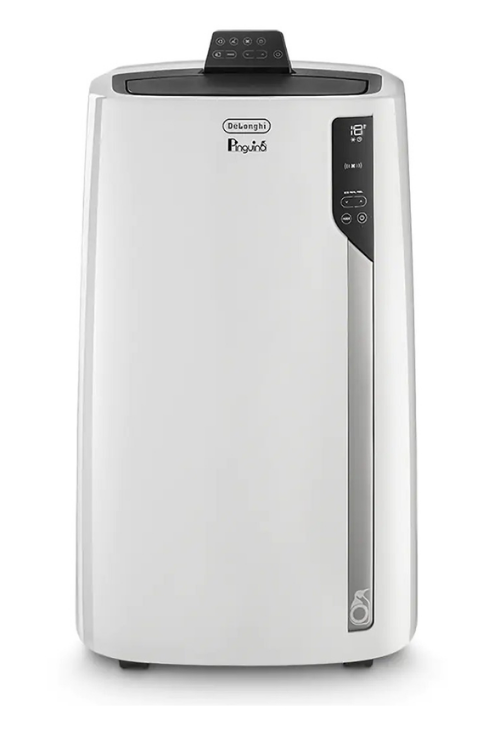
AIR CONDITIONING WITHOUT INSTALLATION
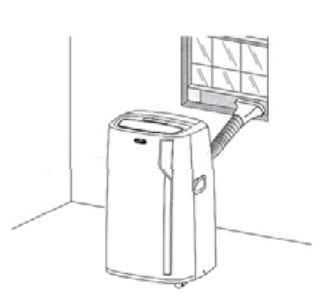
You can set up a double-hung window:
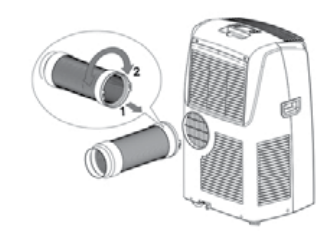
- Fit the assembled air exhaust hose in the housing at the base of the appliance. Insert it as shown in Figure 1.

- Place the window bracket in the window sill, extend the bracket fully within the window frame. fix lhe bracket by using the pin then lower the window onto the bracket.
- Connect the window outlet to the other end of the exhaust hose.
- Insert the window outlet of the exhaust hose into the slot of the window bracket (fig.2).

Other setup methods:
- Thanks to the locking pins, it’s possible to use the window bracket also for sliding windows. Position the hole of the bracket so as to allow a correct installation of the exhaust hose see figure 33).

- If you have a casement window (figure 4), proceed as follows:
- Fit the assembled air exhaust hose in the relevant housing located on the rear side of the appliance (fig. 1), then apply the window outlet to the air exhaust hose and place it outside the window to exhaust the hot air.

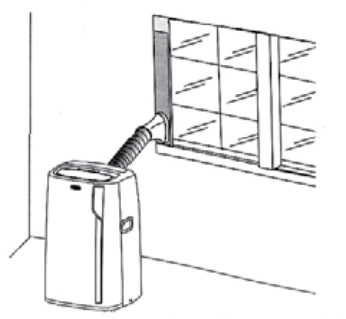
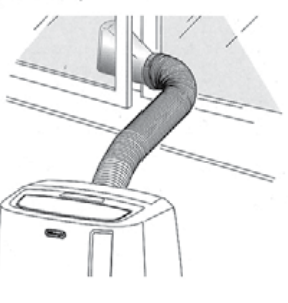
FOAM STRIPPING INSTRUCTIONS
- Extend the window bracket to the desired width
- Remove the protection from the tape and apply it to the window bracket as shown in the figure.
DESCRIPTION
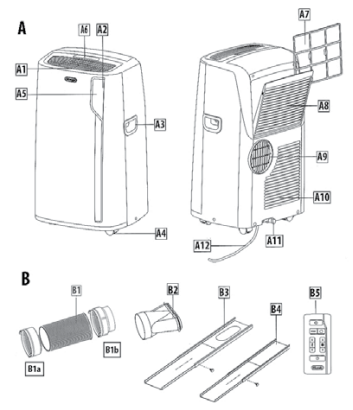
Description of the appliance
- A 1 Air outlet grid
- A2 Control panel
- A3 Handles
- A4 Wheels
- AS a Remote control signal receiver
- A6 Remote control storage
- A7 Filter
- As the air intake grille
- A9 Air intake hose housing
- A 1 O Air intake gnlle
- A 11 Drainage hose with cap
- At 2 Power supply cable
Description of accessories
- 81 air exhaust nose
- Bla hose adapter to the unit
- Bib hoseadap1er
- 82 Window outlet
- B3 Window bracket with pins
- 84 Additional window bracket with pins
- BS Remote control
Electrical connection
Before plugging the appliance into the outlet, check that:
- The outlet’s power supply corresponds to the value indicated on the rating label on the back of the appliance.
- The outlet and electrical circuit are adequate for the appliance.
- The outlet is a l·hole grounded outlet©. 1r this is not the case, you must choose another outlet. Failure to follow these important safety instructions absolves the manufacturer of all liability.
CONTROL PANEL
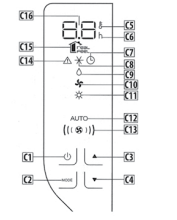
DESCRIPTION OF THE CONTROL PANEL: Cl ON/STAND-BY (on/off) key
- C2 Function selection key MODE (air conditioning, dehumidifying, fan, heating)
- C3 Increase key
- C4 Decrease key
- CS Temperature indicator
- C6 Timer indicator
- C7 Timer symbol
- CS Air conditioning symbol
- C9 Dehumidifying symbol
- Cl O Fan symbol
- Cl 1 Heating symbol
- C12 Auto indicator
- CB Air flow indicator
- C14 Alarm symbol
- Cl 5 Real feel symbol
- Cl 6 Set temperature values, programmed on/off time
OPERATING FROM THE CONTROL PANEL
TURNING THE APPLIANCE ON/OFF
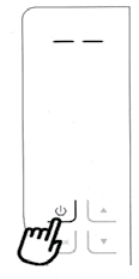
Before plugging the appliance, check! The cap on the back of the unit is correctly inserted on the drainage host. Insert the plug into the socket. Two dashes appear on the display indicating that the appliance k in standby. Touch the(!) ((1) k) the appliance. When the appliance comes on, the last function
MODES SELECTION
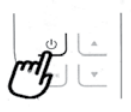
To select the desired optimizing mode, repeatedly touch the MODE key until the desired function is selected.
AIR CONDITIONING MODE
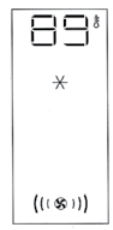
This is Ideal for hot and humid weather if the room needs to be both cooled and dehumidified. To correctly set this mode:
- Touch repeatedly the MODE key until the air conditioning symbol •ppeaB. The display “111 shows the desired temperature.
- To change, the temperature is 10 be rt> Called, touch tire • 0< • key. ( ( I ® > l) Note: The most “‘itable temperatures, during the summer range & from 7S to 81’f. Li <lwfflt, sensing the temperature slgnlfi• cantly lower than the outdoor temperature is not recommended. In conditioning mode, the air flow c,n be selected only from the remote control.
DEHUMIDIFYING MODE
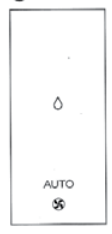
This is Ideal for reducing h11nidity in the tire room (spring and autumn, damp mornings, rainy periods, et<). For tllis type of use, the appliance Jl1llst be set up as f0< air condl· tlonef mode. That is, the air exhaust hose must be fitted to the apt)liance 10 allow the humidity to be discharged outside. To correctly set this mode:
- Touch repeatedly the MODE key!)’ until the dehumidifying symbol appears.
- The appliance automatically closes the best air flow
FAN MODE
When using this mode, the air ..traust hose does nOI need to be attached to the appliance. To correctly set this mode:
- Touch rtpNtedly the MODE k!)’ until the Ian Jr symbol appears.
- Select the desired air flow by touching the increase • (0) or decrease (C4)
HEATING MODE

This is clear in spring and aut11nn when 0C. _D 14 outdoor tem~-·-tures are not parlicular·severe. For this mode, the appliance should be prepared in the same way as 10<air conditioning. With the air exhaust hose attached. To set this mode:
- Touch repeatedly the MODE button until the heating symbol is displayed.
- Touch incltase • (Cl) °’ decrease• (C4) buttons to adjust the desired temperature.
REAL FEEL FUNCTION
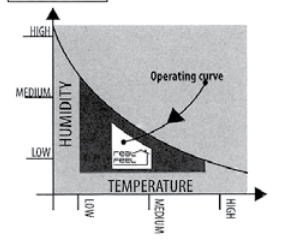
(available only & on remote control) REAL FEEL is the innovative De’Longhi technology that works simultaneously on temperature reduction and humidity control, securing the best comfort level
SELECT THE TEMPERATURE SCALE

The temperature can be displayed in ‘( or ‘F. To < change the temperature unit or measure touch both the increase/decrease keys • and • for about 10sec.
OPERATING FROM THE REMOTE CONTROL, INSERTING OR REPLACING THE BATTERIES
- Remove the cover on the rear of the remote control
- Insert or replace the batteries with two new RO AAA•1. SV
batteries. inserting them c0<rectly (see the ln1truct!ons inside
the battery compartment); - Replace the cover.
If the tire remote control unit~ replaced or discarded, the battery
must be removed and disposed of under current Legislation as they are harmful to the environment. Do not mix old and new batteries. Do not mix alkaline, standard (carbon-zinc) 0< and rechargeable
(nickel-cadmium) batteries. Do not dispose of batteries in a fire. Batteries may explode or leak. If the remote control is not used for a certain length of time, remove the batteries.
USING THE REMOTE CONTROL
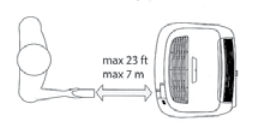
- Point the remote control at the receiver < (AS) on the tilt air
conditioner. The remote control must be no more than 23 ft (7 metres) away from the appliance (without obstacles between the remote control and the receiver). - The remote control must be handled with care. Do not drop it or expose it to direct sunlight or IOIJJ(esof, heat.
DESCRIPTION OF THE REMOTE CONTROL
- 01) ON/SWIO-BY button
- D2) Real Fe<! button
- D3.1) Airflow increase/decrease button
- D3.2) Temperature increase/de<rea~ button
- D4) Timer button
- OS) MODE button

TURNING THE APPLIANCE ON/OFF
- Plug into the outlet.
- Press the (.!) button (01). When turned on, the air conditioner is operating in the same mode as when it was turned off.
SETTING THE TIMER
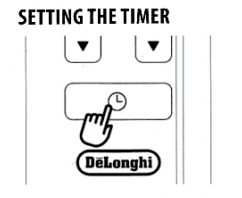
The timer allows for the delayed start-up or shut-down of the appliance. This function will prevent wasting electricity by optimising the operating periods
The timer allows for the delayed start-up or shut-down of the
appliance. This function will prevent wasting electricity by optimising the operating periods.
How to program a delayed shutdown
While the appliance is on in any operating mode, delayed shutdown can be programmed.
- Press the timer button (D4): the timer symbol (C7) and
hours (C6) light up. - Press the timer key until the desired number of hours to shut down appears on the display (1,2,4,6,8, 12 hours).
- A few seconds after the timer is set, the setting is acquired, the
display shows the operating mode, and the timer symbol stays lit. - Once the set time has elapsed, the air conditioner goes into standby.
- To cancel the timer program, press the timer button (D4) twice.
The timer symbol (C7) will go off. Note: Once the timer has been activated, by pressing the timer key only once, the remaining hours to shut down will be displayed.
How to program a delayed start-up
- Plug in the appliance and set it to standby.
- Press the timer button (D4): the timer symbol (C7) and hours (C6) light up.
- Press the timer key until the desired number of hours to start up appears (1,2,4,6,8, 12 hours).
- When the set time has elapsed, the appliance will start to operate in the same operating mode that was previously set. To cancel the timer program, touch the timer button (D4) twice.
The timer symbol (C7)will go off. NOTE: Once the timer has been activated, by pressing the timer key only once, the remaining hours to the start-up will be displayed.
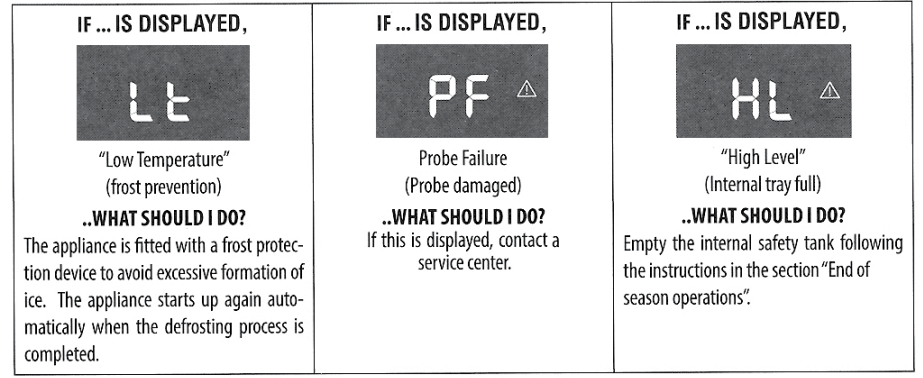
SELF-DIAGNOSIS
Notes: This equipment has been tested and found to comply with the limits for a Class B digital device, under part 15 of the FCC Rules.
- These limits are designed to provide reasonable protection against harmful interference in a residential installation.
- This equipment generates, uses, and can radiate radio frequency energy and, if not installed and used per the instructions, may cause harmful interference to radio communications. However, there is no guarantee that interference will not occur in a particular installation.
- If this equipment does cause harmful interference to radio
or television reception, which can be determined by turning - The equipment is turned off and on, and the user is encouraged to try to correct the interference by one or more of the following measures:
- – Reorient or relocate the receiving antenna.
- – Increase the separation between the equipment and receiver.
- – Connect the equipment to an outlet on a circuit different
from that to which the receiver is connected. - – Consult the dealer or an experienced radio/TV technician
for help. · - Changes or modifications not expressly approved by the party responsible for compliance could void the user’s authority
to operate the equipment. - This device complies with Part 15 of the FCC Rules. Operation
is subject to the following two conditions: (1) this device may not cause harmful interference, and (2) this device must accept any interference received, including interference that may cause undesired operation. This Class B digital apparatus complies with Canadian ICES-003.
SELF-DIAGNOSIS
The appliance has a self-diagnosis system to identify a number of warning/malfunctions. Error messages are displayed on the appliance display.
CLEANING
Before cleaning or maintenance, turn the appliance off by touching the (b button, then unplug from the outlet.
CLEANING THE CABINET
You should clean the appliance with a slightly damp cloth, then dry it with a dry cloth. For safety reasons, never wash the air conditioner
with water.
Precautions
- Never use petrol, alcohol, or solvents to clean the appliance.
- Never spray insecticide liquids or similar.
CLEANING THE BIO SILVER AIR FILTER (If fitted)
- If the filter is dirty, air circulation is compromised, and the efficiency of the dehumidifying and air purifying functions decreases.
- It is therefore good practice to clean the filter at regular intervals.
- The frequency depends on the duration and conditions of
operation. - If the unit is used constantly or systematically, you are recommended to clean the filter once a week.
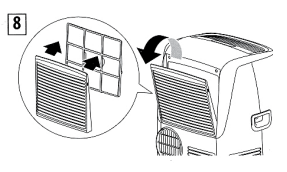
- The filter is housed in the intake grille.
- To clean the filter, extract as shown in the figure. 8.
- To maintain the efficiency of the air conditioner, it is recommended to clean the dust filter after every week of use.
- The filter is located near the intake grille. Remove the grille to
access the filter. To clean the filter, it will need to be extracted
as shown in the figure. 8.
CHECKS AT THE START OF THE SEASON
Make sure the power cable and socket are in perfect condition, and make sure the earthing system is efficient. Comply strictly with the installation standards.
END OF SEASON OPERATIONS
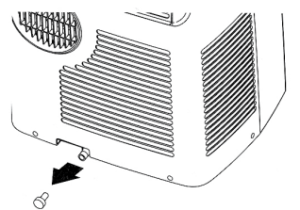
To drain all water from the circuit, remove the cap from the drainage on the back of the appliance and allow the water to drain out into a basin (fig. 10).
TECHNICAL SPECIFICATIONS
- Power supply voltage, see rating label
- Max. absorbed power during air conditioning
- Refrigerant
- Cooling capacity
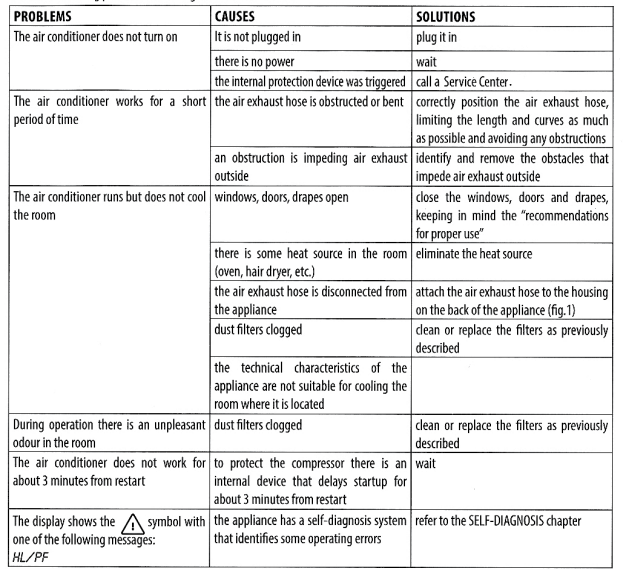
TROUBLESHOOTING
FOR MORE MANUALS BY DELONGHI, VISIT MANUALSLIBRARYY
Delonghi EL275 Series Air Conditioner-FAQs
What is the lifespan of a DeLonghi AC?
With proper maintenance: 8–12 years.
Clean filters regularly.
Drain condensation.
Service annually.
What’s the best mode for fast cooling?
Turbo Mode (if available) for maximum cooling.
Fan Speed: High for quick airflow.
What does the blue light mean?
Blue light = Comfort mode (optimal cooling).
Other lights: Check the manual for specific indicators.
Can the EL275 be used as a heater?
Yes, if it’s a 4-in-1 model (Cool/Heat/Fan/Dehumidify).
Check for a Heat Mode (🔥) button.
What does “PF” or “E1” error mean?
PF = Sensor failure (contact service).
E1 = WiFi module error (reset or call support).
What’s the best temperature setting?
Summer: 24°C–26°C (75°F–78°F).
Winter (Heat Mode): 20°C–22°C (68°F–72°F).
How do I maintain my DeLonghi AC?
Clean filters every 2 weeks.
Drain water tank regularly.
Check vent hose for blockages.
Why is my DeLonghi AC loud?
Dirty filters (clean them).
Loose parts (check hose & panels).
High fan speed (lower if needed).
How do I reset my DeLonghi AC?
Unplug for 5+ minutes.
Restart. If issues persist, consult the manual.