
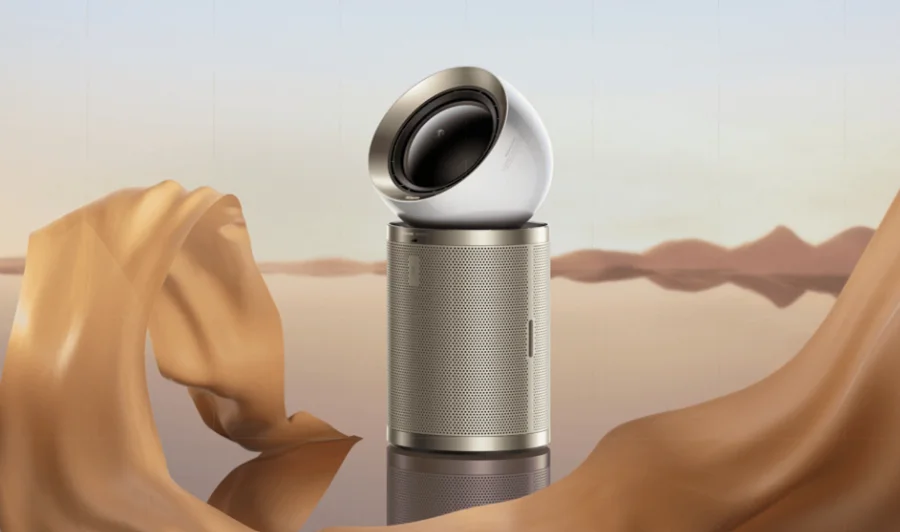

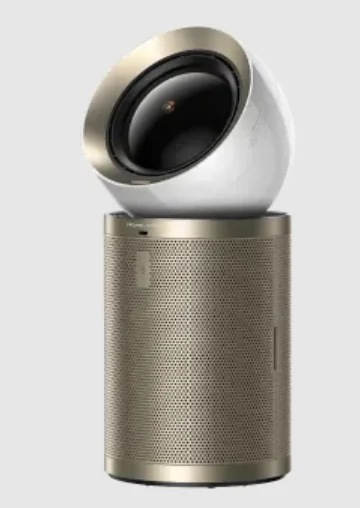
Dreame AirPursue PM20
Safety Instructions
READ ALL INSTRUCTIONS BEFORE USING (THIS APPLIANCE). Failure to follow the warnings and instructions may result in electric shock, fire, and/or serious injury.
Warning
- This appliance can be used by children aged 8 years and above under supervision.
- This appliance can be used by persons with reduced physical, sensory, or mental capabilities or a lack of experience and knowledge if they have been given supervision or instruction concerning use of the appliance in a safe way and understand the hazards involved.
- The purifier is not a toy. Children shall not play with or operate this product. Please exercise caution when using the purifier near children. Do not allow children to clean or maintain the purifier unless supervised by a parent or guardian.
- Do not use the purifier outdoors or on wet surfaces. Only use the product on dry indoor surfaces. Do not touch the plug or any part of the product with wet hands.
- Do not use the purifier near bathtubs, showers, or swimming pools.
- To reduce the risk of fire, make sure that the supply cord and the product are kept away from heat sources or direct sunlight.
- Make sure the appliance is off and unplugged when not used for extended periods as well as prior to performing any maintenance or repairs.
- To reduce the risk of fire, explosion, or injury, make sure that the supply cord and lithium battery are undamaged before use. Do not use the appliance if the supply cord and lithium battery are damaged.
- If the supply cord is damaged, it must be replaced by the manufacturer, its service department, or similarly qualified personnel to avoid hazards.
- Do not stretch the cable or place the cable under strain. Do not unplug by pulling on the cable. To unplug, grasp the plug, not the cable. Do not use a power extension cord.
- Do not route the cable under the product. This product must not be placed directly below a socket.
- In order to avoid overheating, do not cover the appliance or power cord.
- To avoid burns, do not let bare skin touch the product’s heating components.
- The fans can be used for tropical climates.
- Keep combustible materials, such as textiles and curtains, away from the product outlet.
- This appliance contains a UV-C emitter.
- Unintended use of the appliance or damage to the housing may result in the escape of dangerous UV-C radiation. UV-C radiation may, even in small doses, cause harm to the eyes and skin.
- Appliances that are obviously damaged must not be operated.
- The replacement of the UV-C emitter by the user is not allowed.
- Warning: Do not spray or apply perfume directly on or near the filter. Keep essential oils and chemicals away from this product.
- Always carry the appliance by the base; do not carry it by the product head.
- Do not use the product if it is damaged or has been submerged in water.
- Do not lean the appliance against any unstable surface, as this may cause damage to the appliance or personal injury. If the appliance becomes damaged or is otherwise malfunctioning, please contact our authorized service department. Never attempt to disassemble the device on your own.
- WARNING: Chemical Burn and Choking Hazard. Keep batteries away from children. If swallowed, contact your physician or local poison control.
- Pacemakers, defibrillators, and electronic storage media may be affected by strong magnetic fields. Anyone using a pacemaker, defibrillator, or electronic storage media should avoid carrying the remote in their pocket or near the device.
- Only use accessories and replacement parts recommended by the manufacturer.
- Only use or install the product on dry indoor surfaces.
- Do not use this heater in the immediate surroundings of a bath, a shower or a swimming pool.
- Do not use this heater if it has been dropped.
- Do not use if there are visible signs of damage to the heater.
- Use this heater on a horizontal and stable surface.
- Children under 3 years should be kept away unless continuously supervised.
- Children aged from 3 years and less than 8 years shall only switch on/off the appliance provided that it has been placed or installed in its intended normal operating position and they have been given supervision or instruction concerning the use of the appliance in a safe way and understand the hazards involved. Children aged from 3 years and less than 8 years shall not plug in, regulate and clean the appliance or perform user maintenance.
CAUTION — Some parts of this product can become very hot and cause burns. Particular attention has to be given where children and vulnerable people are present.
WARNING: Do not use this heater in small rooms when they are occupied by persons not capable of leaving the room on their own, unless constant supervision is provided.
WARNING: To reduce the risk of fire, keep textiles, curtains, or any other flammable material a minimum distance of 1 m from the air outlet. We, Dreame Trading (Tianjin) Co., Ltd., hereby declare that this equipment complies with the applicable Directives and European Norms, and amendments. The full text of the EU declaration of conformity is available at the following internet address: https://global.dreametech.com
For the detailed e-manual, please go to https://global.dreametech.com/pages/user-manuals-and-faqs
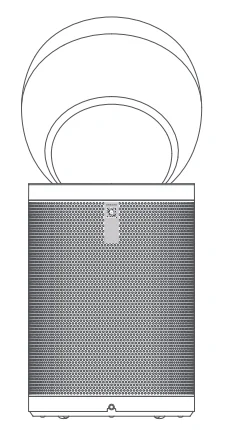
Product Overview
Note: The illustrations in this manual are indicative only. The actual product may differ.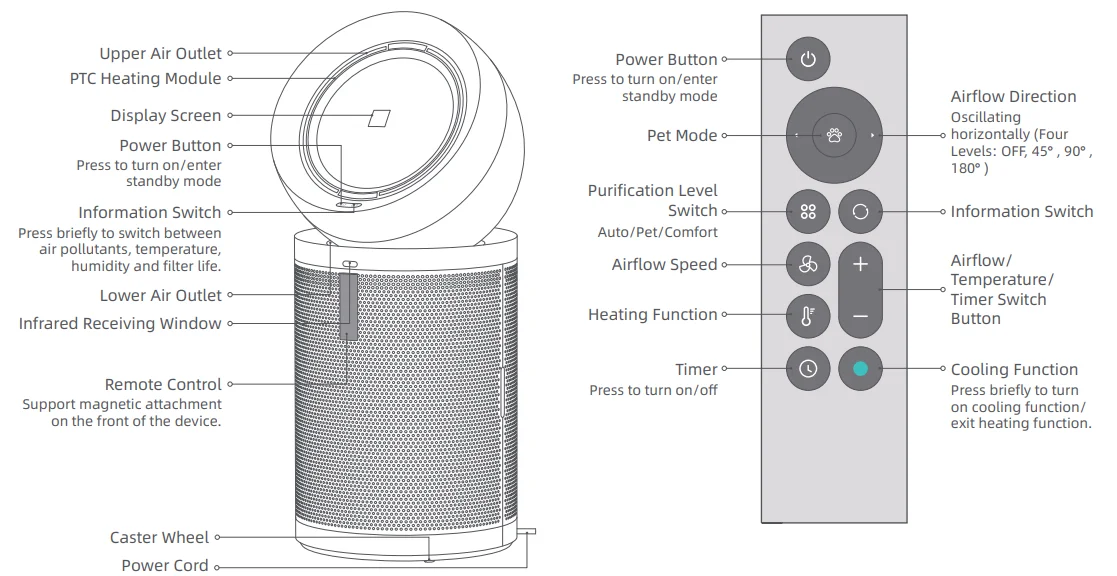
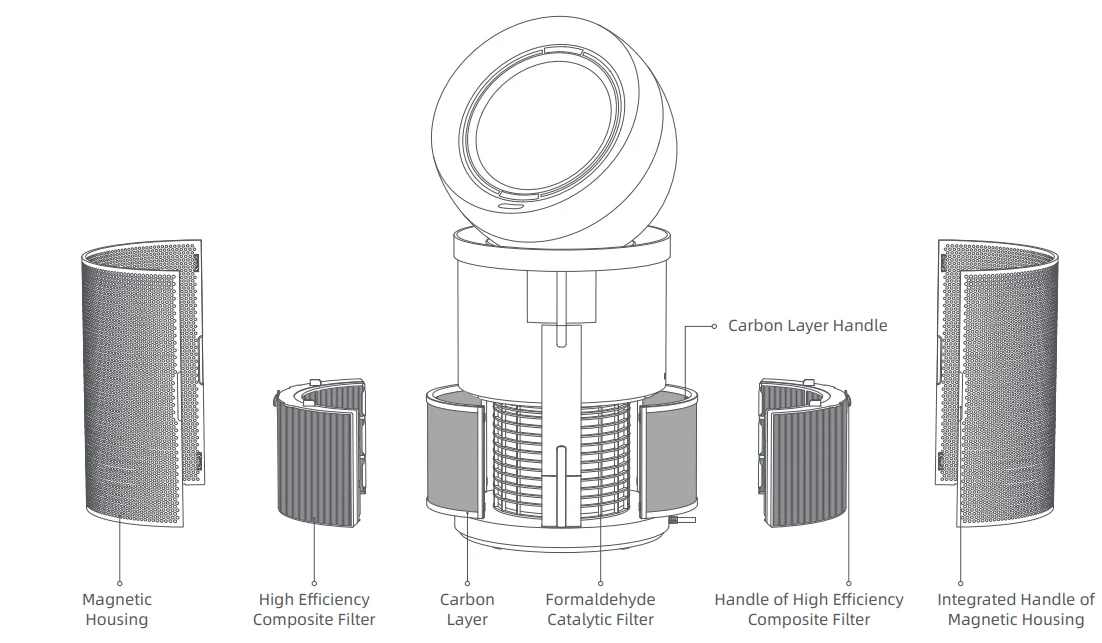
Filter Assembly
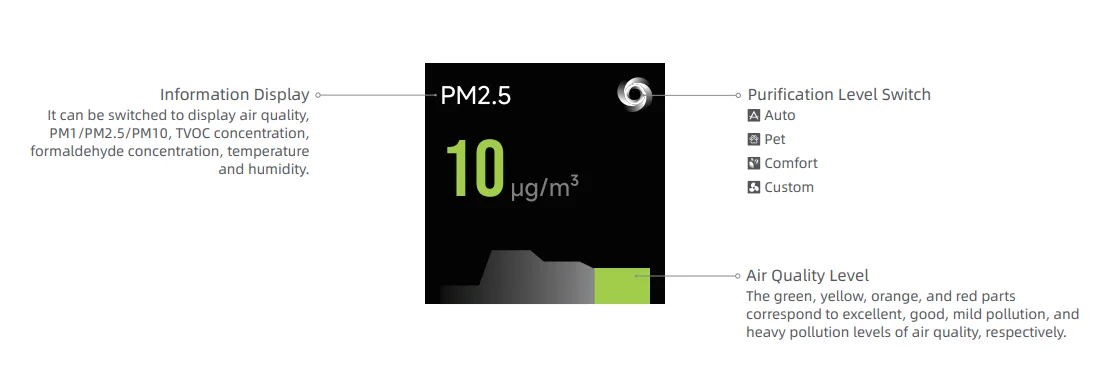
Display Screen
Connecting with the Dreamehome App
- Download the Dreamehome App
Scan the QR code on the purifier, or search “Dreamehome” in the app store to download and install the app.
Note:- Only 2.4 GHz Wi-Fi is supported.
- Due to upgrades in the app software, the actual operations may differ from the descriptions in this manual. Please follow the instructions based on the current app version.
- Add Device
Open the Dreamehome App, tap “Scan QR code to connect,” and scan the same QR code again to add the device. Please follow the prompts to finish the Wi-Fi connection.
How to Use
Note:
- Do not pull or manually rotate the machine head.
- Before use, place the product steadily in a suitable position, and then connect the power supply.
 Power On/Standby
 Power On/Standby
Briefly press the power button on the machine or remote control to turn on the machine. Wi-Fi is enabled by default, and the factory default setting is auto mode. When the machine stops operating, it will resume the last settings upon restarting. Besides, you can enter the standby mode by pressing the power button.
Note: If the machine is in standby mode, it will automatically start working when it detects someone within a 3-meter range. It is disabled by default and can be enabled in the App.
 Information Switch
 Information Switch
Briefly press the information switch button to switch between air quality, pollutants, temperature, humidity, and filter life.
Purification Level Switch
- Auto: Airflow speed will be adjusted automatically based on air quality, and the screen brightness will be adjusted automatically based on ambient light. When the target air quality has been reached, the airflow speed will be at the lowest level.
- Pet: It supports capturing floating pet hair and odors from the air. When the function is enabled, both the upper and lower air outlets open simultaneously, the airflow speed will be at the highest level and the screen brightness will be adjusted automatically based on ambient light.
- Comfort: Airflow speed will be at the lowest level. If there is no operation for 3 seconds, the display will automatically turn off.
- Custom: Briefly press the airflow speed button (“+”, “-”) to exit the selected purification level and adjust the airflow speed as needed.
 Heating Function
 Heating Function
Briefly press the heating function to enable the function. Within 3 seconds, briefly press the “+” or “-” buttons to adjust the temperature within the range of 0-40° C. If there is no operation for 3 seconds, the temperature will be automatically confirmed. Briefly press the cooling function to exit the heating function.
Note: The temperature range is based on laboratory test conditions.
 Timer
Timer
 Timer
TimerBriefly press the timer button to enable the function. Within 3 seconds, briefly press the “+” or “-” buttons to adjust the time within the range of 0-12 hours. The time will be automatically confirmed after 3 seconds without any operation. Press the timer button again to cancel the timer.
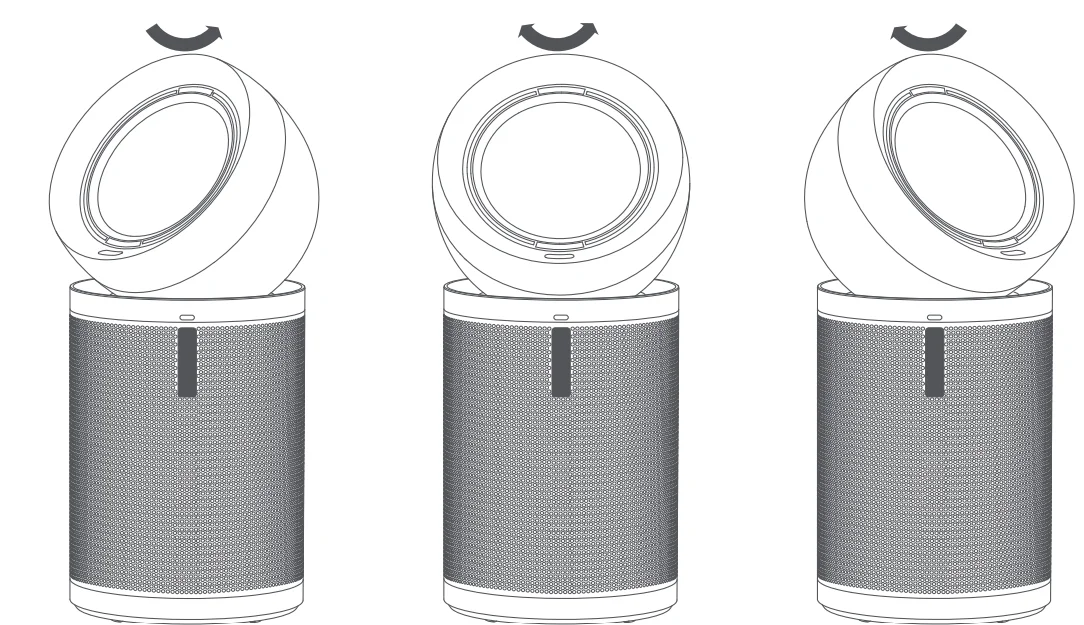
Directional Air Delivery
When only a single person is detected, air delivery follows the person’s position. When multiple people are detected, air delivery oscillates between the largest angle formed by the people’s positions.
Note: It is disabled by default and can be turned on in the App. When fixed angle oscillation function is turned on, the function is disabled.
Restore Factory Setting
If the machine stops responding or cannot be turned off, press and hold the power button for 10 seconds to forcefully turn it off. Then press and hold the power button for 3 seconds to turn the machine on.
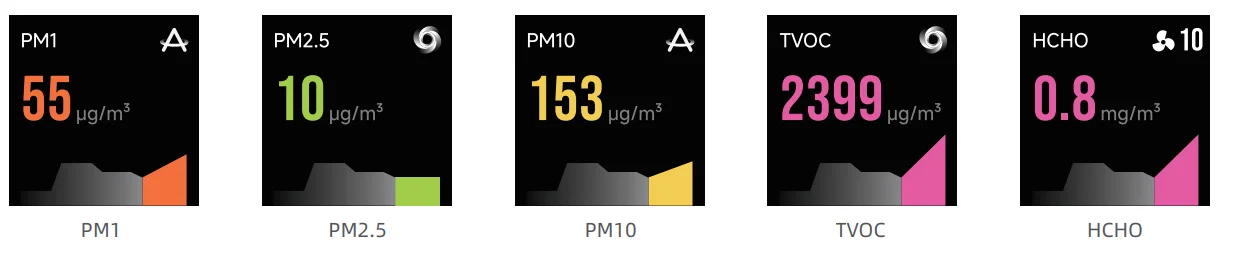
Air Pollutants
- Particulate matter (PM1): Microscopic particles up to 1 micron in size, suspended in the air we breathe. These include industrial emissions and vehicle exhaust.
- Particulate matter (PM2.5): Microscopic particles up to 2.5 microns in size, suspended in the air we breathe. These include smoke, bacteria, and allergens.
Particulate matter (PM10): Microscopic particles up to 10 microns in size, suspended in the air we breathe. These include dust, mould and pollen. - TVOC: Total Volatile Organic Compounds. Volatile Organic Compounds(VOCs) are indoor gases emitted from solids or liquids, typically from paint, carpets, ceilings, and adhesives.
- Formaldehyde(HCHO): A common indoor pollutant. It can usually be released from new furniture and paint materials.
Care & Maintenance
Note:
- When the filter life remaining is 10%, the screen will display a reminder. When the life of the filter is exhausted, it means the filter is clogged with pollutants and may restrict purified air flow and may give off an unpleasant smell if continue running over time. To ensure the product runs at maximum efficiency, kindly replace the filter during scheduled maintenance.
- The remaining life of the carbon layer and high efficiency composite filter can be checked in the App.
- According to Dreame’s internal testing, based on 12 hours of daily usage, it is recommended to replace the carbon layer every 6 to 12 months and the high-efficiency composite filter every 16 to 24 months.
- Before the care and maintenance, please turn off the product and unplug the power cord.
* Only use accessories and replacement parts recommended by the manufacturer.
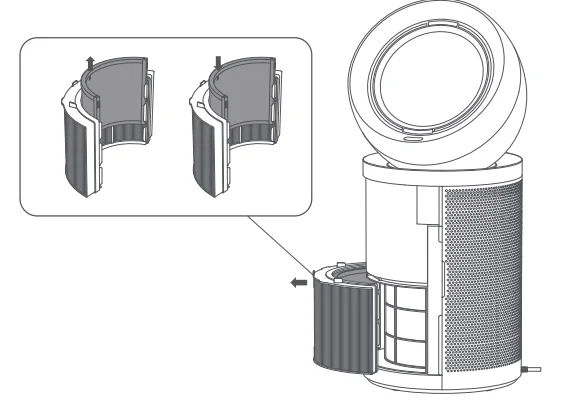
Replacing the Carbon Layer
- Remove the magnetic housing from the machine. Grab the handle of high efficiency composite filter to pull it out of the machine. Then, pull the handle of the carbon layer upwards to take it out.
- Insert the new carbon layer vertically into the high-efficiency composite filter.

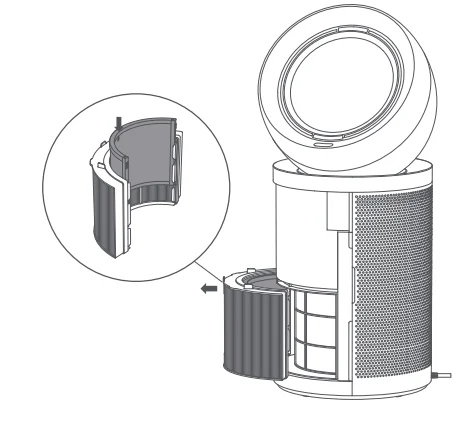
Replacing the High Efficiency Composite Filter
- Remove the magnetic housing from the machine. Grab the handle of high efficiency composite filter to pull it out of the machine. Then, pull the handle of the carbon layer upwards to take it out.
- Insert the carbon layer vertically into the new high-efficiency composite filter.

Reset the Filter Life
Slide the assembled high-efficiency composite filter and carbon layer into the machine, then reinstall the magnetic housing. After replacing the new filter assembly, connect the power and start the machine. Briefly press the information switch button on the machine to select the filter life interface of the new filter. Then, simultaneously press and hold the power button and the information switch button for 5 seconds until the screen indicates that the filter life reset is complete.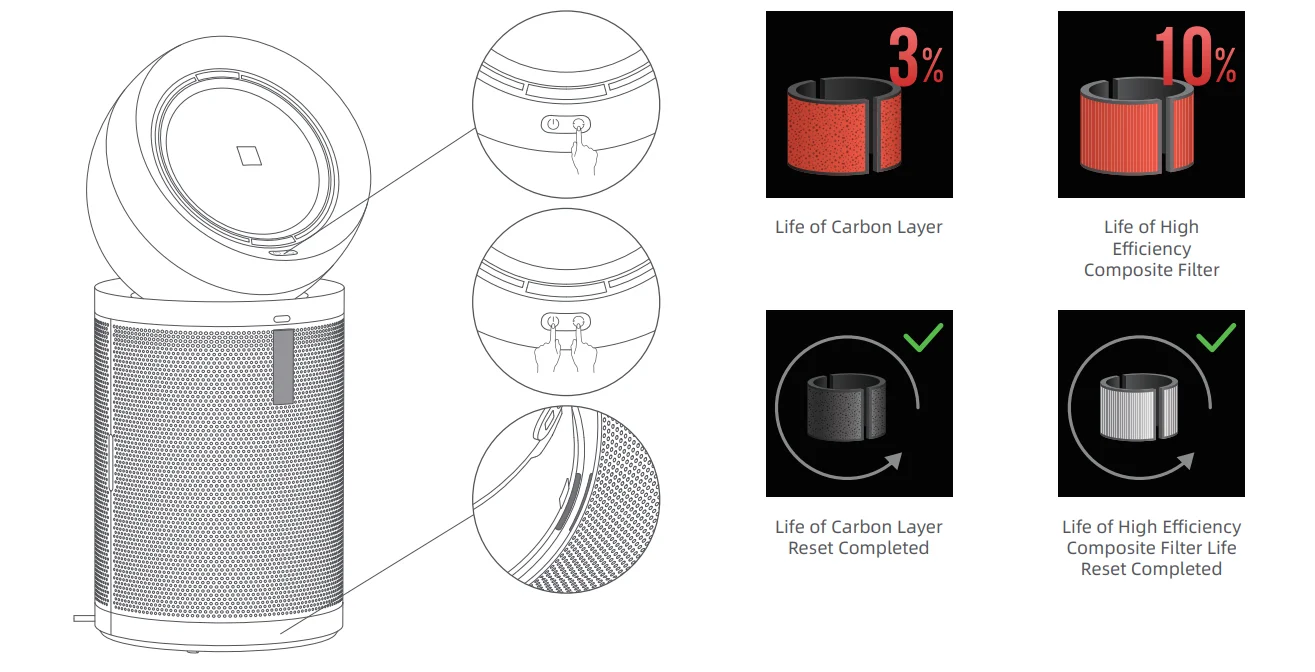
Note: After connecting the power, if the screen displays “ “, the filter is not properly installed. Please reinstall the filter.
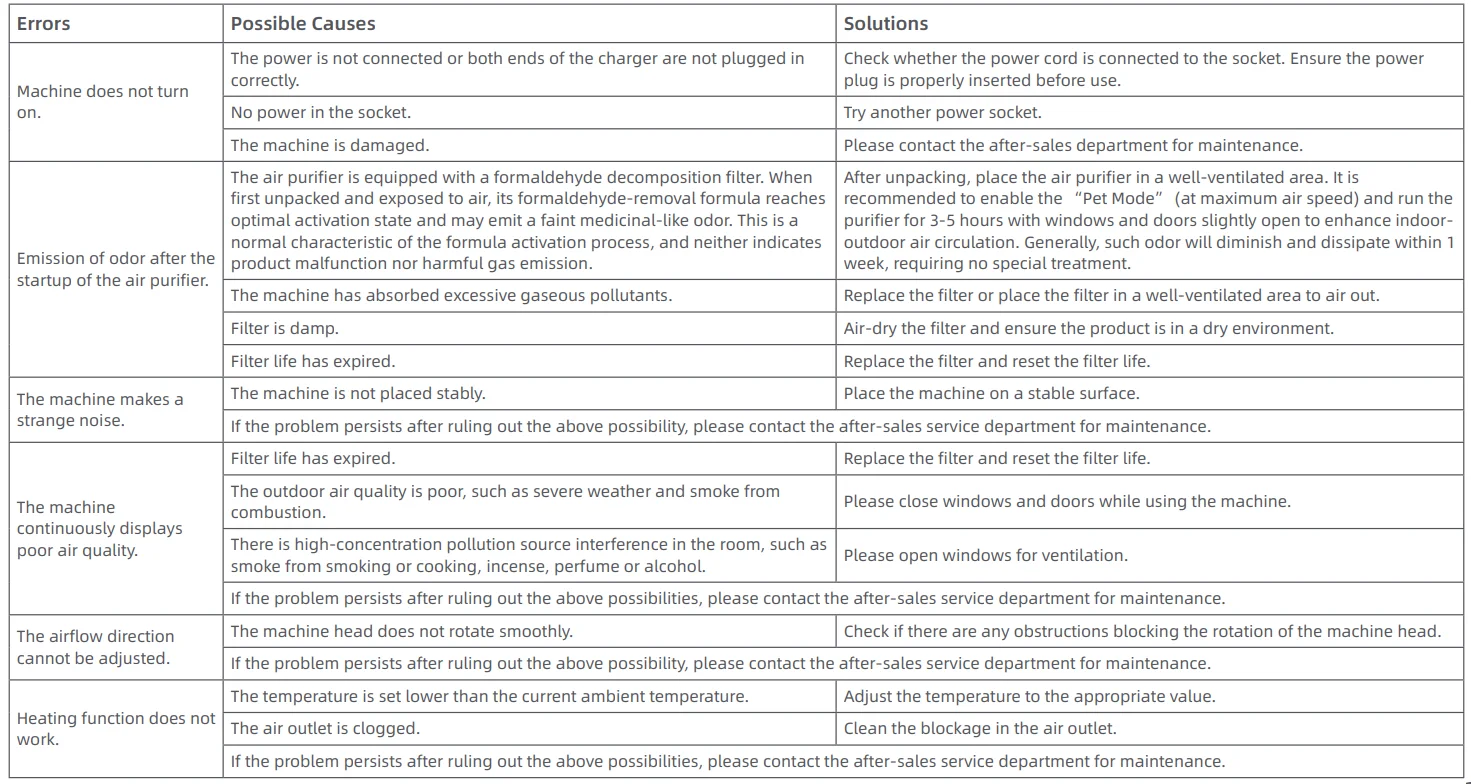
FAQ
If the machine is not working properly, please refer to the table below.

Specifications

The purification values are obtained with the machine operating in Pet Mode with both upper and lower air outlets fully open. The filter material of this machine consists of treated H13 grade composite, treated activated carbon, and a unique material that never needs replacement. The filter’s purification performance gradually diminishes over its lifecycle. The machine’s LCD screen will indicate the remaining filter life and notify when a replacement is needed.
WEEE Information

All products bearing this symbol are waste electrical and electronic equipment (WEEE, as in Directive 2012/19/EU), which should not be mixed with unsorted household waste. Instead, you should protect human health and the environment by handing over your waste equipment to a designated collection point for the recycling of waste electrical and electronic equipment, appointed by the government or local authorities. Correct disposal and recycling will help prevent potential negative consequences to the environment and human health. Please contact the installer or local authorities for more information about the location as well as the terms and conditions of such collection points.
For more manuals by Coway, visit ManualsLibraryy
Dreame AirPursue PM20-FAQs
Is Dreame owned by Xiaomi?
Dreame is part of the Xiaomi ecological chain. While it operates independently, Xiaomi has supported Dreame’s growth and global expansion.
Which country is Dreame from?
Dreame is a Chinese brand, headquartered in Suzhou, China, and specializes in smart home cleaning appliances.
Is Dreame a good vacuum and air care brand?
Yes, Dreame is known for advanced technology, strong performance, and competitive pricing, making it a popular choice worldwide.
What is the Dreame AirPursue PM20?
The Dreame AirPursue PM20 is a smart air purifier designed to improve indoor air quality by filtering dust, allergens, and airborne particles.
How long do Dreame devices usually last?
With regular maintenance, Dreame products typically last 4 to 6 years, and proper care can extend their lifespan further.
Is it safe to use Dreame smart devices daily?
Yes, daily use is generally safe, as long as filters are cleaned or replaced on time and the device is properly maintained.
Are there any disadvantages of smart cleaning devices?
Common drawbacks may include regular maintenance, filter replacement costs, and reliance on sensors or software.
What are the main advantages of Dreame products?
Key benefits include powerful performance, smart features, energy efficiency, and modern design.
Does the Dreame AirPursue PM20 work in low light or at night?
Yes, Dreame smart devices are designed to operate smoothly day and night, including in dim or dark environments.