

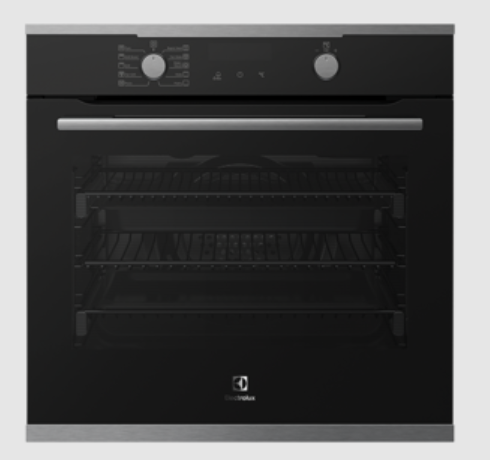
Electrolux 700 Series EVEP6818BF Pyrolytic Oven
SAFETY INFORMATION
Before the installation and use of the appliance, carefully read the supplied instructions. The manufacturer is not responsible for any injuries or damage that are the result of incorrect installation or usage. Always keep the instructions in a safe and accessible location for future reference.
Children’s and vulnerable people’s safety
- This appliance can be used by children aged 8 years and above and persons with reduced physical, sensory or mental capabilities or lack of experience and knowledge if they have been given supervision or instruction concerning the use of the appliance in a safe way and understand the hazards involved. Children of less than 8 years of age and persons with very extensive and complex disabilities shall be kept away from the appliance unless continuously supervised.
- Children should be supervised to ensure that they do not play with the appliance and mobile devices with the app.
- Keep all packaging away from children and dispose of it appropriately.
- WARNING: The appliance and its accessible parts become hot during use. Keep children and pets away from the appliance when in use and when cooling down.
- If the appliance has a child safety device, it should be activated.
- Children shall not carry out cleaning and user maintenance of the appliance without supervision.
General Safety
- This appliance is for cooking purposes only.
- This appliance is designed for single household domestic use in an indoor environment.
- This appliance may be used in offices, hotel guest rooms, bed & breakfast guest rooms, farm guest houses and other similar accommodations where such use does not exceed (average) domestic usage levels.
- Only a qualified person must install this appliance and replace the cable.
- Do not use the appliance before installing it in the built-in structure.
- Disconnect the appliance from the power supply before carrying out any maintenance.
- If the supply cord is damaged, it must be replaced by the manufacturer, its Authorised Service Centre or similarly qualified persons to avoid an electrical hazard.
- The means for disconnection must be incorporated in the fixed wiring in accordance with the wiring rules.
- WARNING: Ensure that the appliance is switched off before replacing the lamp to avoid the possibility of electric shock.
- WARNING: The appliance and its accessible parts become hot during use. Care should be taken to avoid touching heating elements or the surface of the appliance cavity.
- Always use oven gloves to remove or insert accessories or ovenware.
- Use only the food sensor (core temperature sensor) recommended for this appliance.
- To remove the shelf supports first pull the front of the shelf support and then the rear end away from the side walls. Install the shelf supports in the opposite sequence.
- Do not use a steam cleaner to clean the appliance.
- Do not use harsh abrasive cleaners or sharp metal scrapers to clean the glass door since they can scratch the surface, which may result in the shattering of the glass.
- Before pyrolytic cleaning, remove all accessories and excessive deposits/spills from the appliance cavity.
PRODUCT DESCRIPTION
General overview
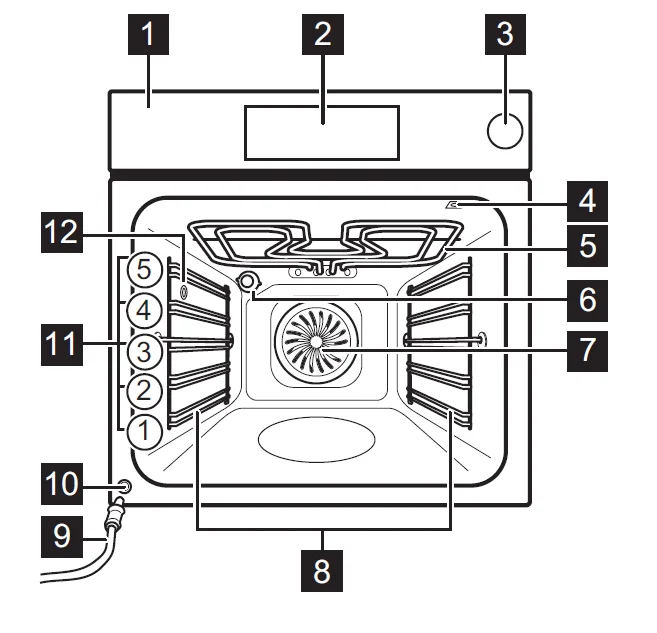
- Control panel
- Display
- Water tank
- Socket for the food sensor
- Heating element
- Lamp
- Fan
- Shelf support, removable
- Draining pipe
- Water outlet valve
- Shelf positions
- Steam outlet
CONTROL PANEL
Control panel overview
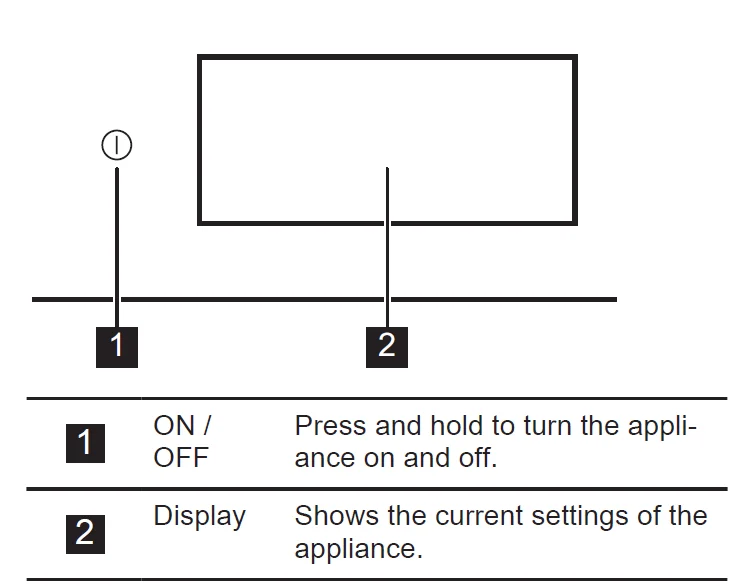
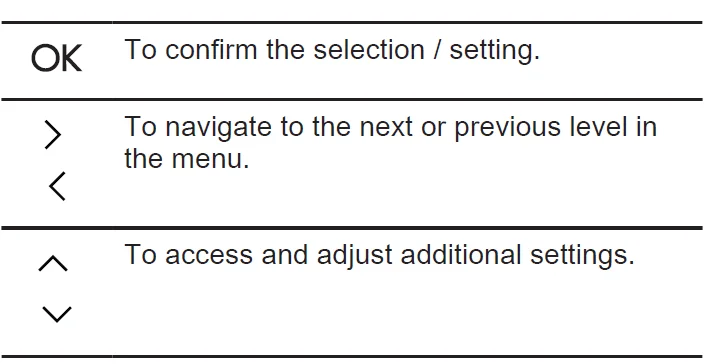
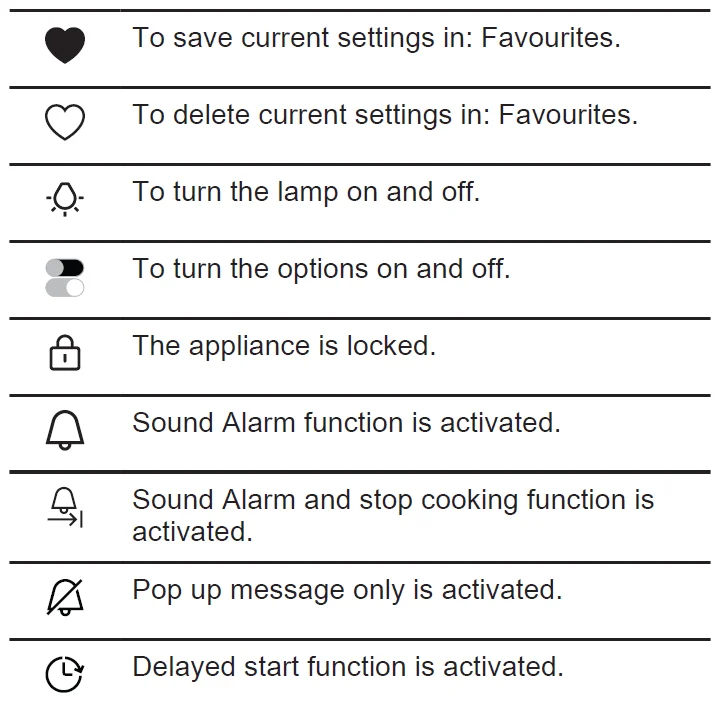
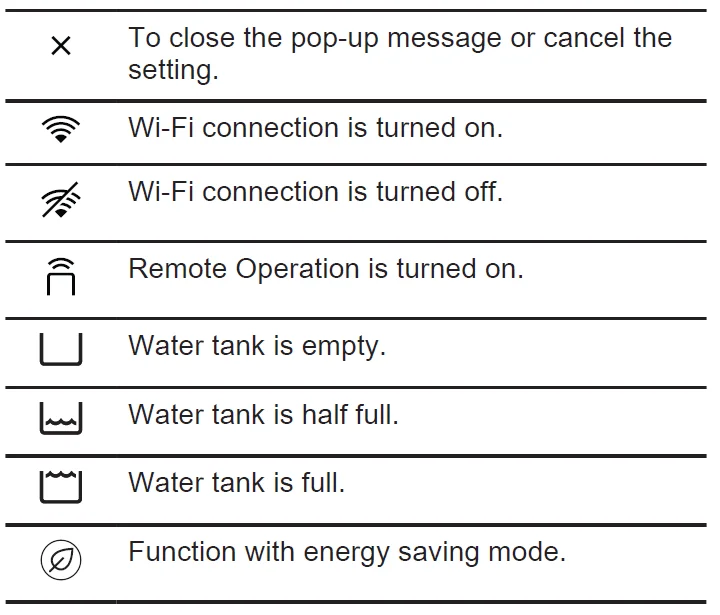
The control panel provides access to various cooking functions and dishes. It also displays the information about its current operating status.
Display
The display is fully interactive, scrollable, and divided into defined sections. You can swipe across the screen to navigate left or right.
BEFORE FIRST USE
WARNING! Refer to the Safety chapters.
First connection
The display shows a welcome message after the first connection. You can choose between starting and skipping the onboarding process. The settings can be revisited and modified whenever it is necessary. Adjust the settings: Language, Time of Day, Wireless connection.
Wireless connection
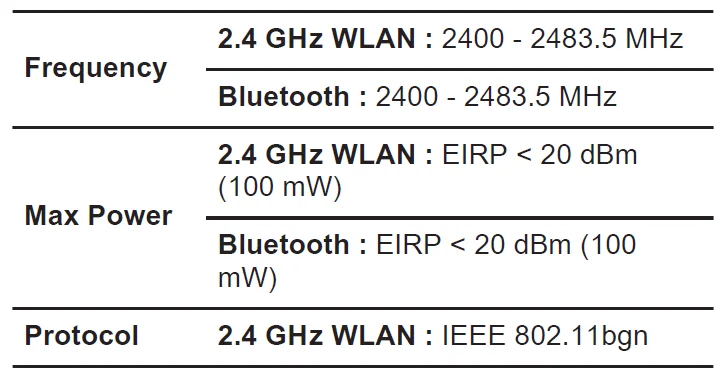
The appliance enables Wi-Fi network connection and mobile device linking. You can receive notifications, control, and monitor your appliance from your mobile device. To connect the appliance, you need:
- Wireless network with an Internet connection.
- Mobile device connected to the same wireless network.
- To download the app, scan the QR code located on the back cover of the user manual. You can also download the app directly from the App Store.
- Follow the app onboarding instructions.
- Turn on the appliance.
- Press ‹ and swipe to the left to enter the menu. Select: Settings / Connections.
- Press to turn on or off: Wi-Fi. The appliance wireless module starts within 90 sec.
Software licences
The software in this product contains components that are based on free and open source software. Electrolux acknowledges the contributions of the open source software and robotics communities to the development project. To access the source code of these free and open source software components whose license conditions require publishing, and to see their full copyright information and applicable license terms, visit: http://electrolux.opensoftwarerepository.com (folder NIU6).
Initial preheating and cleaning
Preheat the empty appliance before the first use and contact with food. The appliance can emit an unpleasant smell and smoke. Ventilate the room during preheating.
- Remove all accessories and removable shelf supports from the appliance.
- Enter the menu and select: Functions.
- Set the function
 . Set the maximum temperature. Let the appliance operate for 1 h.
 - Set the function
 . Set the maximum temperature. Let the appliance operate for 15 min.
 - Turn off the appliance and wait until it is cold.
- Clean the appliance and the accessories only with a microfibre cloth, warm water, and a mild detergent.
- Put the accessories and removable shelf supports back in their initial position.
 . Set the maximum temperature. Let the appliance operate for 1 h.
 . Set the maximum temperature. Let the appliance operate for 15 min.
Functions
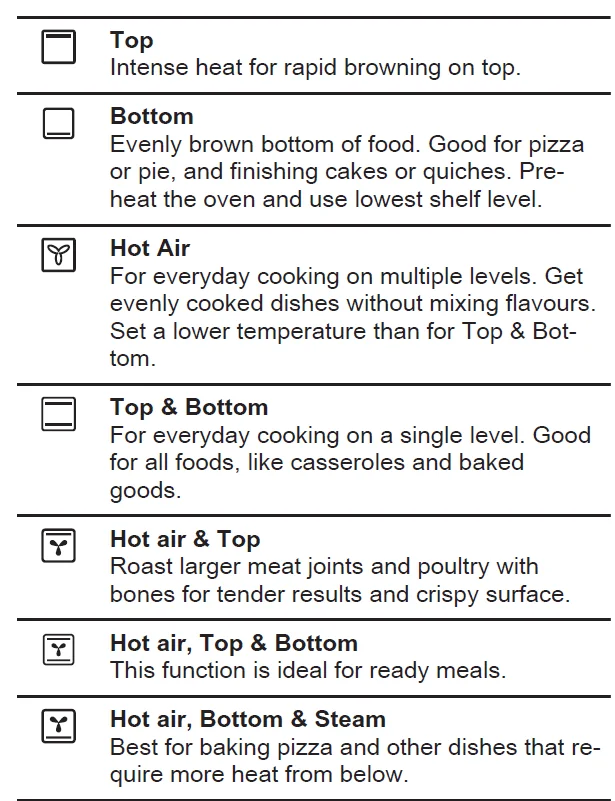
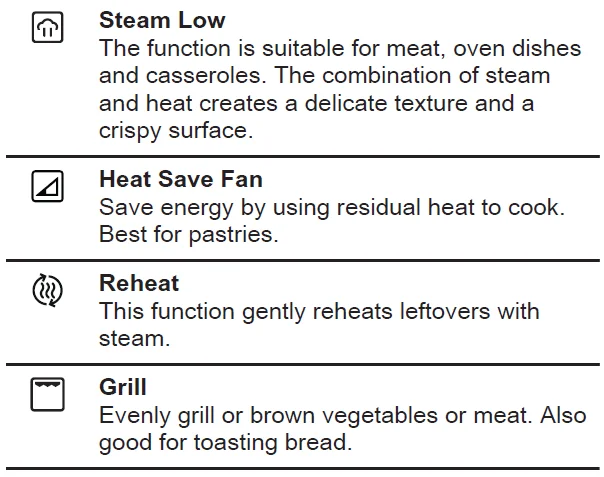
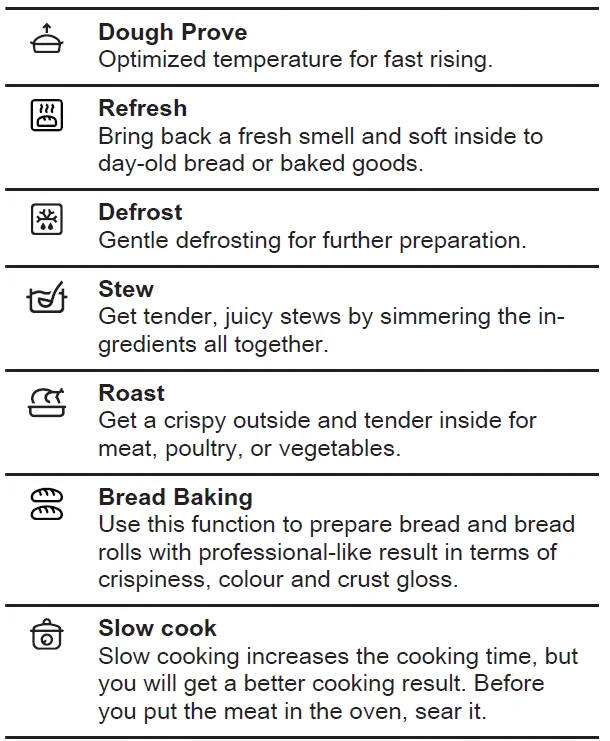
Submenu includes a list of cooking functions. The list of functions may vary depending on the software version.
- Enter the menu and select: Functions.
- Select the heating function.
- Adjust the settings.
- Press START. You can plug the Food Sensor at any time before or during cooking. Refer to the “Using the accessories, Food sensor” chapter.
- ∧ – Press to adjust the settings during cooking.
- STOP – press to turn off the heating function.
Info:
- Fast Preheat is available only for some heating functions. For more information on preheat options, refer to “Daily use.” Chapter, Settings, Submenu: Preferences.
- The lamp may turn off automatically at a temperature below 80 °C during some heating functions.
Dishes
The dishes submenu consists of a set of programmes that are designed for dedicated dishes. Each dish in this submenu is provided with a suitable setting. The time and temperature can be adjusted during cooking. For some of the dishes, you can also cook with Food Sensor.
- Enter the menu and select: Dishes.
- Choose a dish or a food type.
- Adjust settings according to cooking preferences. Adjust the weight. An option is available for selected dishes. Press OK.
- Place the food inside the appliance according to the instructions available on the screen.
- Press START.
When the function ends, check if the food is ready. Extend the cooking time, if needed.
Favourites
Info: This functionality is available for selected models only.
You can save up to 20 of your favourite settings, such as heating function and dish. To save the setting, select the preferred setting and press .
.
Select: Favourites
- Enter the menu and press Favourites to check the saved settings.
- Select one of the saved settings.
Delete: Favourites
- Enter the menu and press: Favourites to check the saved settings.
- Press:
 to delete the saved settings.
 to delete the saved settings.
Steam heating functions
The functions: Steam Low,
 Hot air, Bottom & Steam allow you to use heat and steam to keep meals crispy and juicy.
- Enter the menu and select: Functions.
- Set the steam heating function. The display shows available settings.
- Set the temperature and the steam level, if available.
- Press and follow the instructions on the display.
- Press the cover of the water tank to open it.
- Fill the water tank with cold water to the maximum level (around 950 ml) until the signal sounds or the display shows the message. Do not fill the water tank over its maximum capacity. There is a risk of water leakage, overflow and furniture damage.
WARNING! Use only cold tap water. Do not use demineralised or distilled water. Do not pour flammable or alcoholic liquids into the water tank. - Fill the water tank with cold water to the maximum level (around 900 ml) until the signal sounds or the display shows the message. Do not fill the water tank over its maximum capacity. There is a risk of water leakage, overflow and furniture damage.
WARNING! Use only cold tap water. Do not use demineralised or distilled water. Do not pour flammable or alcoholic liquids into the water tank. - Push the water tank to its initial position. When the appliance reaches the set temperature, the signal sounds.
- When the water tank runs out of water, the signal sounds. Refill the water tank.
- Turn off the appliance.
- Empty the water tank.
- After cooking, carefully open the oven door. Residual water can condensate in the oven interior. Wait for at least 60 min after each use to prevent hot water from exiting the water outlet valve.
WARNING! The appliance is hot. There is a risk of burns. Be careful while emptying the water tank.
Emptying the water tank
Empty the water tank after each steam cooking to prevent limestone residue.
- Turn off the appliance. Leave the oven door open and wait until the appliance is cold.
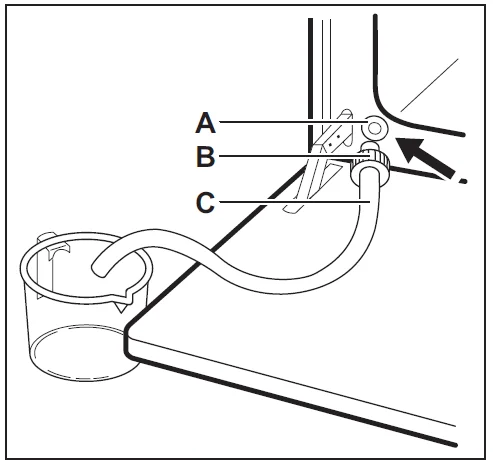
- Connect the draining pipe C to the outlet valve A through the connector B.

- Keep the end of the pipe below the level of A and push B repeatedly to collect remaining water.
- Detach C and B and dry the oven interior with a soft sponge.
Notes on: Heat Save Fan
This function was used to comply with the energy efficiency class and ecodesign requirements (according to EU 65/2014 and EU 66/2014). Tests according to: IEC/EN 60350-1.
USING THE ACCESSORIES
WARNING! Refer to the Safety chapters.
Inserting accessories
Accessories available depending on the model. Scan the QR code to check how to use the accessories supplied with your appliance. You can order optional accessories separately. For more information, please contact your local supplier.

A small indentation at the top increases safety and provides tilt protection. The indentations are also anti-tip devices. The rim around the shelf prevents cookware from slipping off the shelf. Insert the accessory (wire shelf/tray) between the guide bars of the shelf support. Make sure that the shelf touches the back of the oven interior and the feet point down.
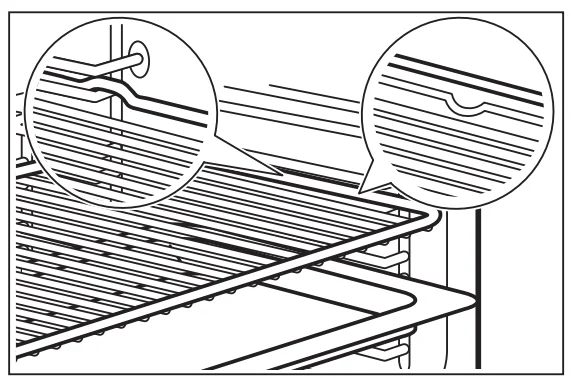
If your tray has a slope, position it towards the back of the oven interior. If there is an inscription on the accessory, make sure it is facing you. If you are using a tray with holes, place the tray/pan underneath to collect dripping liquids.
Food Sensor
It measures the temperature inside the food. There are two temperatures to be set:
 the temperature inside the appliance. It should be at least 25°C higher than the food core temperature.
 – the food core temperature.
 the temperature inside the appliance. It should be at least 25°C higher than the food core temperature.
 – the food core temperature.
Recommendations:
- Ingredients should be at room temperature.
- Do not use it for liquid dishes.
- During cooking, the needle of the food sensor must be fully inserted into the dish.
Cooking with: Food Sensor
WARNING! There is a risk of burns as the Food Sensor and shelf supports become hot. Do not touch the Food Sensor handle with your bare
hands. Always use oven gloves.
- Select a heating function from the menu: Functions or a dish from the menu: Dishes.
- Set the oven temperature and cooking time, if needed.
- Press OK.
- Press START.
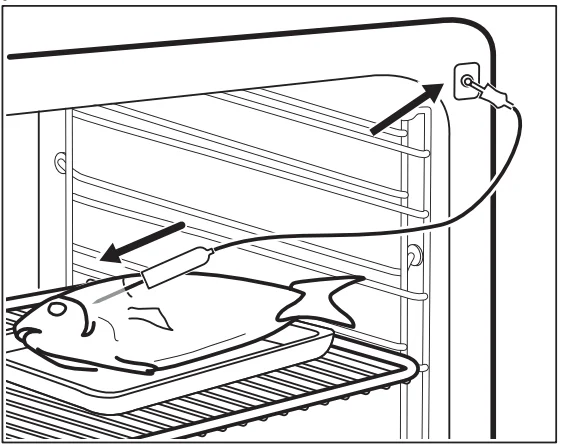
- Insert the Food Sensor inside the dish:
Meat, poultry and fish
Insert the entire needle of the Food Sensor into the meat or fish at its thickest part.
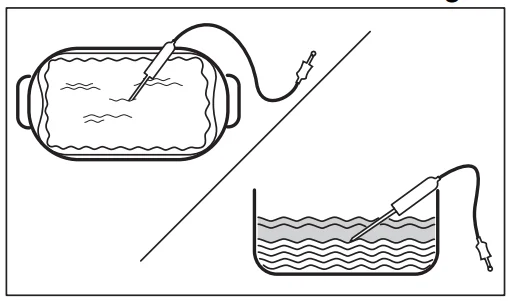
Casserole
Insert the tip of the Food Sensor exactly in the centre of the casserole. The food sensor should be stabilised in one place during cooking. Use a solid ingredient to achieve that. Use the rim of the baking dish to support the silicone handle of the Food Sensor. The tip of the Food Sensor should not touch the bottom of a baking dish.
- Plug the Food Sensor into the socket located inside the appliance. Refer to the product description. The display shows the symbol and the current temperature of the Food Sensor.
- ∧ – Press to adjust the settings.
- Select the Food Sensor card to set the core temperature of the sensor or set up the preferred option:
- Sound Alarm – when the food reaches the core temperature, the signal sounds.
- Sound Alarm and stop cooking – when the food reaches the core temperature, the signal sounds and the cooking stops.
- Pop-up message only – when the food reaches the core temperature, the message appears on the display.
- Press OK.
- When the food reaches the set temperature, the signal sounds. Check if the food is ready. Extend the cooking time, if needed.
- STOP – press to turn off the heating function.
- Remove the Food Sensor plug from the socket and remove the dish from the appliance.
Steam pot for steam cooking
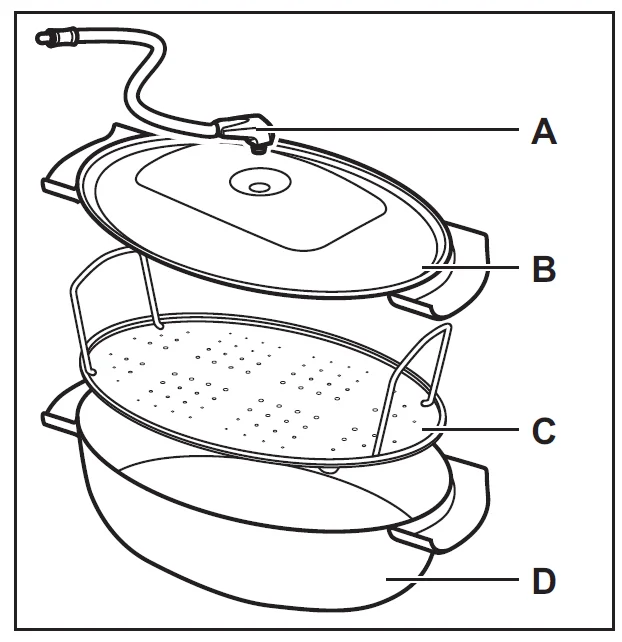
A steam pot is supplied with the appliance for selected models only. A steam pot consists of:
- A. Injector tube – for steam cooking,
- B. Lid,
- C. Steel grill,
- D. Glass bowl.
Do not:
- Put the hot steam pot on cold/wet surfaces.
- Pour cold liquids into the steam pot when it is hot.
- Use the steam pot on a hot cooking surface.
- clean the steam pot with abrasives, scourers and powders.
Steam cooking in the steam pot
- Put the food onto the steel grill in the steam pot and cover it with the lid.
- Put the injector tube into the hole in the lid.
- Put the steam pot onto the second shelf position from the bottom.
- Connect the injector tube to the steam inlet. Refer to the product description.
- Set the appliance for the steam cooking function.
HINTS AND TIPS
Cooking recommendations
The temperature and cooking times in the tables are for guidance only. They depend on the recipes, quality and quantity of the ingredients used. Your appliance may bake or roast differently from your previous appliance. The hints below show recommended settings for temperature, cooking time and shelf position for specific types of food. Count the shelf positions from the bottom of the oven floor. If you cannot find the settings for a specific recipe, look for a similar one. For energy-saving tips, refer to Energy efficiency.
Symbols used in the tables:
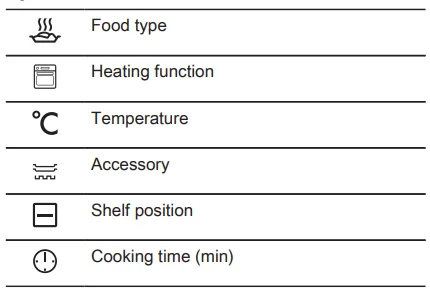
Heat Save Fan – recommended accessories
Use dark and non-reflective tins and containers. They have better heat absorption than light-coloured and reflective dishes.
- Pizza pan – dark, non-reflective, diameter 28 cm
- Baking dish – dark, non-reflective, diameter 26 cm
- Ramekins – ceramic, diameter 8 cm, height 5 cm
- Flan base tin – dark, non-reflective, diameter 28 cm
CARE AND CLEANING
WARNING! Refer to the Safety chapters.
Notes on cleaning
Cleaning agents
- Clean the front of the appliance only with a microfibre cloth with warm water and a mild detergent.
- Use a cleaning solution to clean metal surfaces.
- Clean stains with a mild detergent.
Everyday use
- Clean the interior of the appliance after each use. Fat accumulation or other residue may cause fire.
- Moisture can condense in the appliance or on the door glass panels. To decrease the condensation, let the appliance work for 10 minutes before cooking. Do not store food in the appliance for longer than 20 minutes. Dry the interior of the appliance only with a microfibre cloth after each use.
Accessories
- Clean all accessories after each use and let them dry. Use only a microfibre cloth with warm water and a mild detergent. Do not clean the accessories in a dishwasher.
- Do not clean the non-stick accessories using abrasive cleaners or sharp-edged objects.
Removing the shelf supports
Remove the shelf supports to clean the appliance.
- Turn off the appliance and wait until it is cold.
- Pull the front of the shelf support away from the side wall.
- Pull the rear end of the shelf support away from the side wall and remove it.

- Put the shelf supports back to the initial position. Repeat the steps in the reverse order.
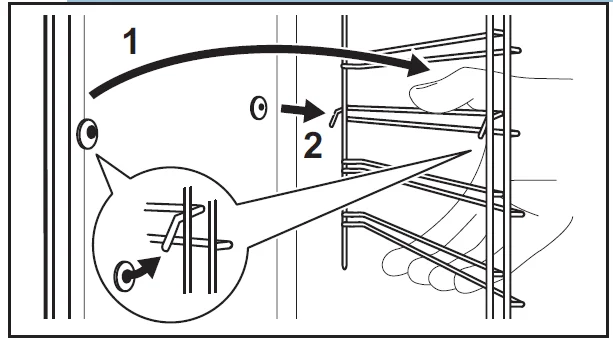
If the telescopic runners are supplied, their retaining pins must point to the front.
Pyrolytic cleaning
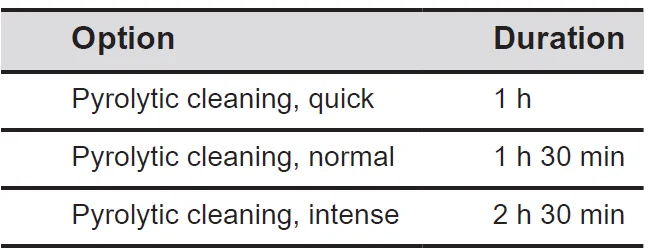
This programme burns off residual dirt in the appliance. When the cleaning cycle ends and the appliance cools down, wipe away the ash. Use it whenever your appliance needs a deep cleaning.
WARNING! There is a risk of burns.
CAUTION! If a hob is installed above the oven or if there are other appliances installed in the same cabinet, do not use them at the same time as this function. It can cause damage to the oven.
Do not start the function if you have not fully closed the oven door.
- Make sure the appliance is cold.
- Remove all accessories.
- Clean the oven floor and the inner door glass to remove any remaining food particles. Use warm water, a soft cloth and a mild detergent.
- Press: Maintenance / Pyrolytic cleaning.
- Select the cleaning mode and press START. Follow the instructions on the display.

- The signal sounds when the cleaning ends.
- When the appliance is cold, clean the oven floor with a wet, soft cloth.
INFO: When this function works, the lamp is off.
Cleaning the water tank
- Turn off the appliance.
- Pour water into the water tank: 650 ml. Add lactic acid: 250 ml. Wait for 60 min.
- Empty the water tank. Refer to Daily use, Emptying the water tank.
- Rinse the water tank and clean the remaining limestone residue with a soft cloth.
- Clean the drain pipe with warm water and a mild detergent.
Contact your water supplier to check the water hardness level.
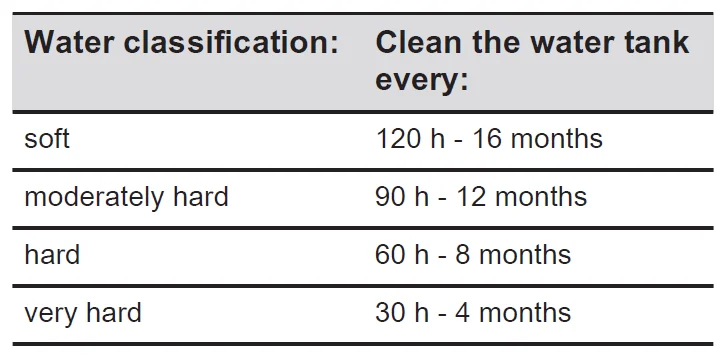
Cleaning Reminder
When the reminder appears, cleaning is recommended. Use the function: Pyrolytic cleaning.
Removing and installing the door
You can remove the oven door and the internal glass panels to clean them. Read the whole “Removing and installing door” instruction before you remove the glass panels.
CAUTION! Do not use the appliance without the glass panels.
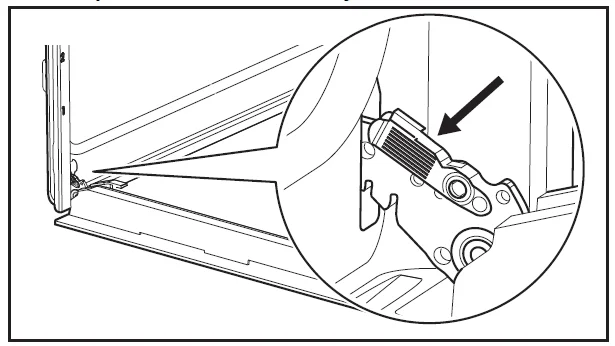
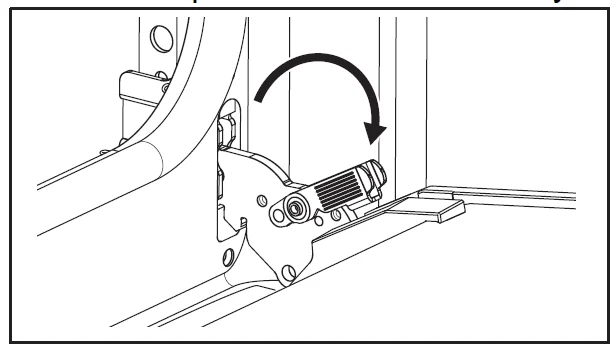
- Open the door fully and hold both hinges.

- Lift and pull the latches until they click.

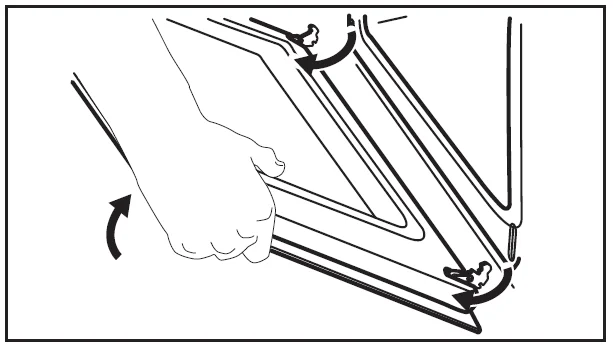
- Close the oven door halfway to the first opening position. Then lift and pull to remove the door from its seat.

- Put the door on a soft cloth on a stable surface.
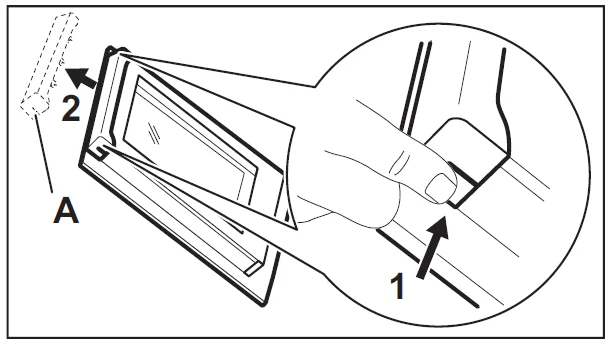
- Hold the door trim A on the top edge of the door at the two sides and push inwards to release the clip seal.

- Pull the door trim to the front to remove it.
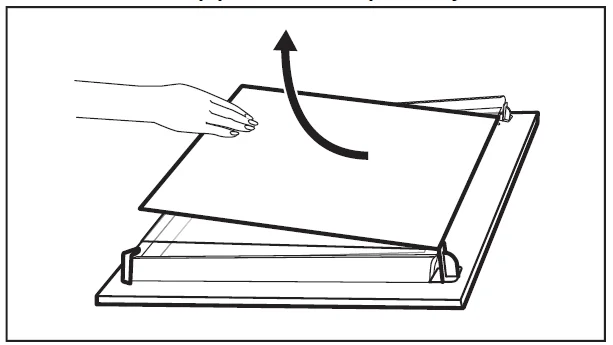
- Hold the door glass panels on their top edge one by one and pull them up out of the guide. Make sure the glass slides out of the supports completely.
- Clean the glass panels with water and soap. Dry the glass panels carefully. Do not clean the glass panels in the dishwasher.
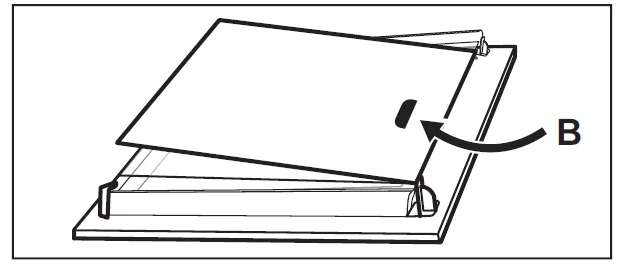
- After cleaning, install the glass panels and the oven door. Make sure that you put the glass panels back in the correct sequence. Check for the symbol/printing on the side of the glass panel. If the door is installed correctly, you will hear a click when closing the latches.
TROUBLESHOOTING
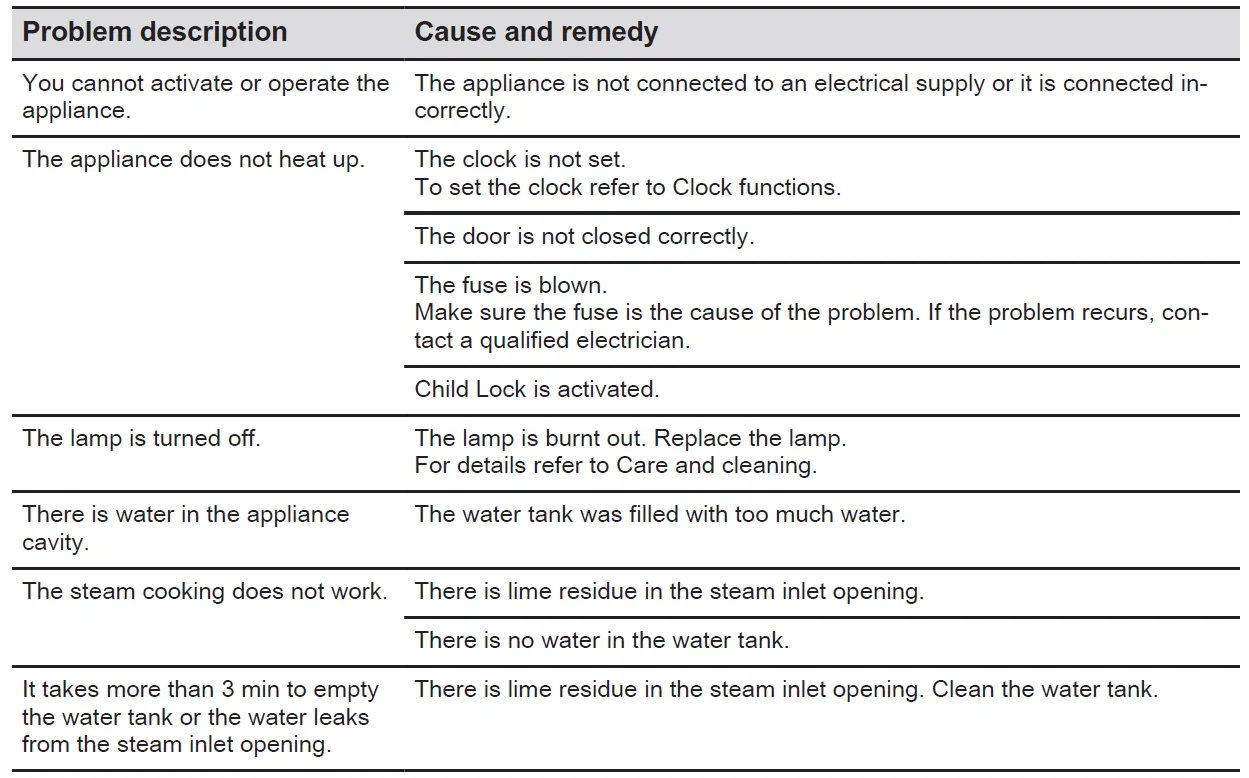
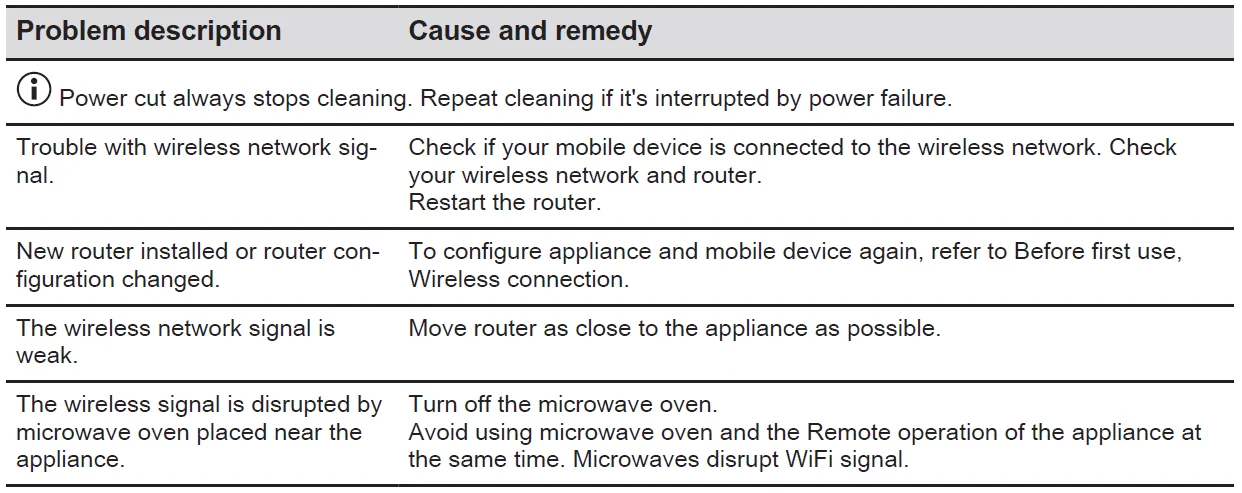
What to do if…
Error codes
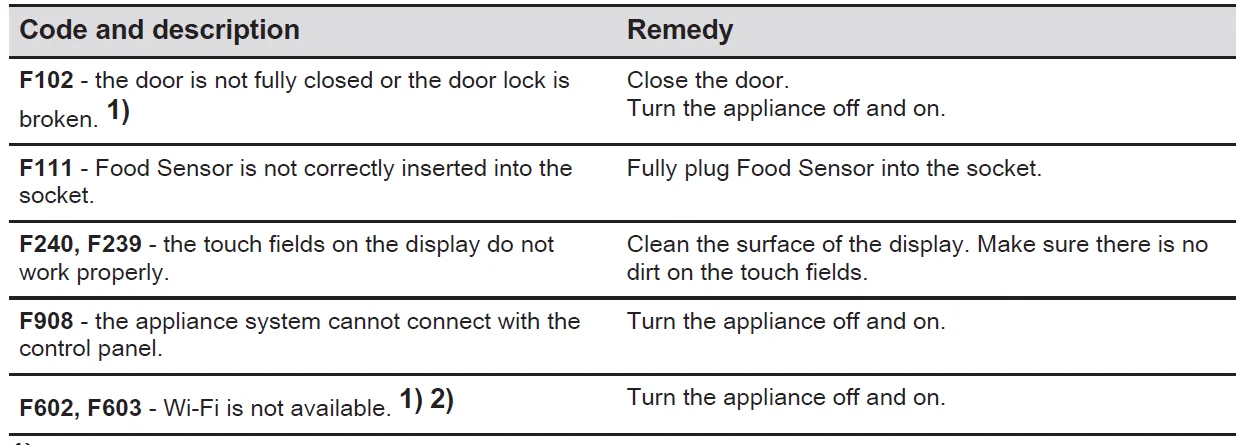
When the software error occurs, the display shows an error message. You will find the list of problems in the table below.
- When the following error message continues to appear on the display, it means a faulty subsystem may have been disabled. In such a case, contact your dealer or an Authorised Service Centre.
- If one of these errors occurs, the rest of the appliance functions will continue to work as usual.
Service data
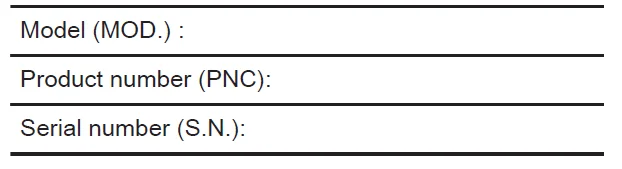
If you cannot find a solution to the problem yourself, contact your dealer or an Authorised Service Centre. The necessary data for the service centre is on the rating plate. The rating plate is located on the front frame of the appliance. It is visible when you open the door. Do not remove the rating plate from the appliance. We recommend that you write the data here:
For more manuals by Electrolux, visit ManualsLibrarryy
Electrolux 700 Series EVEP6818BF Pyrolytic Oven-FAQs
What is special about the Electrolux 700 Series EVEP6818BF oven?
The Electrolux 700 Series EVEP6818BF is a multifunction pyrolytic oven designed for convenient cooking and easy maintenance. It offers even heat distribution, multiple cooking modes, and a self-cleaning function that turns grease and food residue into ash for quick cleanup.
How does the pyrolytic cleaning function work?
The pyrolytic cleaning feature heats the oven to a very high temperature, usually around 500°C. This process burns leftover grease and food particles into fine ash, which can be wiped away with a damp cloth once the oven cools down.
How long does pyrolytic cleaning take?
The cleaning cycle generally takes between 1 and 3 hours, depending on the selected cleaning level and the amount of dirt inside the oven. Extra cooling time may also be needed before opening the door.
Can I cook while the pyrolytic cleaning program is running?
No, cooking is not possible during the cleaning cycle. The oven door locks automatically for safety because the internal temperature becomes extremely high.
Does the oven require special cleaners?
No, harsh chemical cleaners are usually unnecessary because the pyrolytic feature handles deep cleaning automatically. For daily maintenance, a soft cloth and mild detergent are typically enough.
What are common problems users may experience with Electrolux ovens?
Some common issues include incorrect temperature readings, unresponsive controls, heating problems, or door-lock issues during cleaning cycles. Regular maintenance and proper use can help prevent many of these problems.
Is Electrolux considered a premium appliance brand?
Yes, Electrolux is widely recognized for producing high-quality kitchen and home appliances. The brand is known for modern technology, durable construction, and user-friendly features.
Should oven racks stay inside during pyrolytic cleaning?
Most oven racks and accessories should be removed before starting the cleaning cycle unless the manual specifically states they are pyro-safe. High heat may discolor or damage certain accessories.
What does the “PYR” symbol mean on the display?
The “PYR” symbol indicates that the pyrolytic self-cleaning program is active or ready to be activated. It reminds users that the oven is entering a high-temperature cleaning mode.