
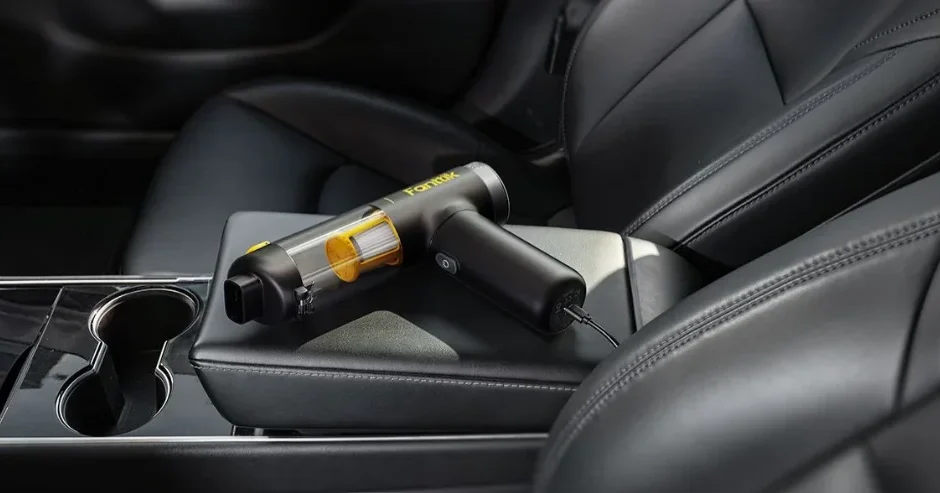

Fanttik Slim V10 Mix Cordless Car Vacuum
Quick Start Guide
How to assemble
Cleaning

Charge
IMPORTANT SAFETY INSTRUCTIONS
 Warning:
To reduce the risk of fire or injury:
All the safety and operating instructions should be read before use and should be followed to avoid injury, fire, electric shock, property loss, and other risks.
- This product is only for household and car use.
- This product has an internal battery. Do not put the device into fire or heat it. Do not charge, use, place it under high temperature conditions, and do not store it in the car in case of overheating, ignition, or explosion.
- It is recommended to charge, use, or store the device between 32°F and 104°F
- People with physical, mental, or sensory disabilities should not use the device for their safety.
- Children should not use, clean, or play with the device.
- Do not use the device with wet hands to avoid injury.
- Do not use this device to vacuum up any liquids, such as water and cola.
- Do not vacuum smoking or burning things such as cigarette butts, matches, or hot ashes.
- Do not vacuum hard or sharp objects to avoid injury when cleaning the dust cup.
- Do not use scented products on this equipment to avoid fire caused by the flammable chemicals in them.
- Do not modify or repair the internal battery.
- Do not use it in heated or moist places, such as the heating room and bathroom.
- When the vacuum cleaner’s service life is over, please give it to the recycling location designated by the government because the internal battery cannot be taken out.
- If the charging wire is damaged or broken, please stop using it immediately.
- If you don’t use it for a long time, please unplug the charging cable after full charge and place it in a cool, dry place. Charge it at least once every 3 months to maintain the battery performance.
- If the device needs to be transported, it is recommended to use the original packaging box and keep it in the “OFF” state.
- Unplug from the outlet when not in use and before servicing.
- Do not allow it to be used as a toy. Close attention is necessary when used near children.
- Use only as described in this manual. Use only the manufacturer’s recommended attachments.
- If the appliance is not working as it should, has been dropped, damaged, left outdoors, or dropped into water, return it to a service center.
- Do not pull or carry by cord, use cord as a handle, close a door on cord, or pull cord around sharp edges or corners. Keep the cord away from heated surfaces.
- Do not put any object into openings. Do not use with any opening blocked.
- Keep hair, loose clothing, fingers, and all parts of the body away from openings and moving parts.
- Use extra care when cleaning on stairs.
- Do not use to pick up flammable or combustible liquids, such as gasoline, or use in areas where they may be present.
- Do not use without a dust bag and/or filters in place.
- Prevent unintentional starting. Ensure the switch is in the off position before picking up or carrying the appliance. Carrying the appliance with your finger on the switch or energizing an appliance that has the switch on invites accidents.
- Recharge only with the charger specified by the manufacturer.
- Under abusive conditions, liquid may be ejected from the battery; avoid contact. If contact accidentally occurs, flush with water. If liquid contacts the eyes, additionally seek medical help. Liquid ejected from the battery may cause irritation or burns.
- Do not use an appliance that is damaged or modified. Damaged or modified batteries may exhibit unpredictable behavior, resulting in fire, explosion, or risk of injury.
- Do not expose a battery pack or appliance to fire or excessive temperature. Exposure to fire or temperature above 130°C may cause an explosion.
- Follow all charging instructions and do not charge the appliance outside of the temperature range specified in the instructions. Charging improperly or at temperatures outside of the specified range may damage the battery and increase the risk of fire.
- Have servicing performed by a qualified repair person using only identical replacement parts. This will ensure that the safety of the product is maintained.
- Do not modify or attempt to repair the appliance except as indicated in the instructions for use and care.
- Use only with Listed/Certified Information Technology (Computer) Equipment, or Listed/Certified ITE Power Supply, or Listed Class 2 Power Un..
- This appliance contains non-replaceable batteries.
SAVE THESE INSTRUCTIONS
Please save the safety and operating instructions. We assume no responsibility for your property loss caused by improper use.
PRODUCT OVERVIEW
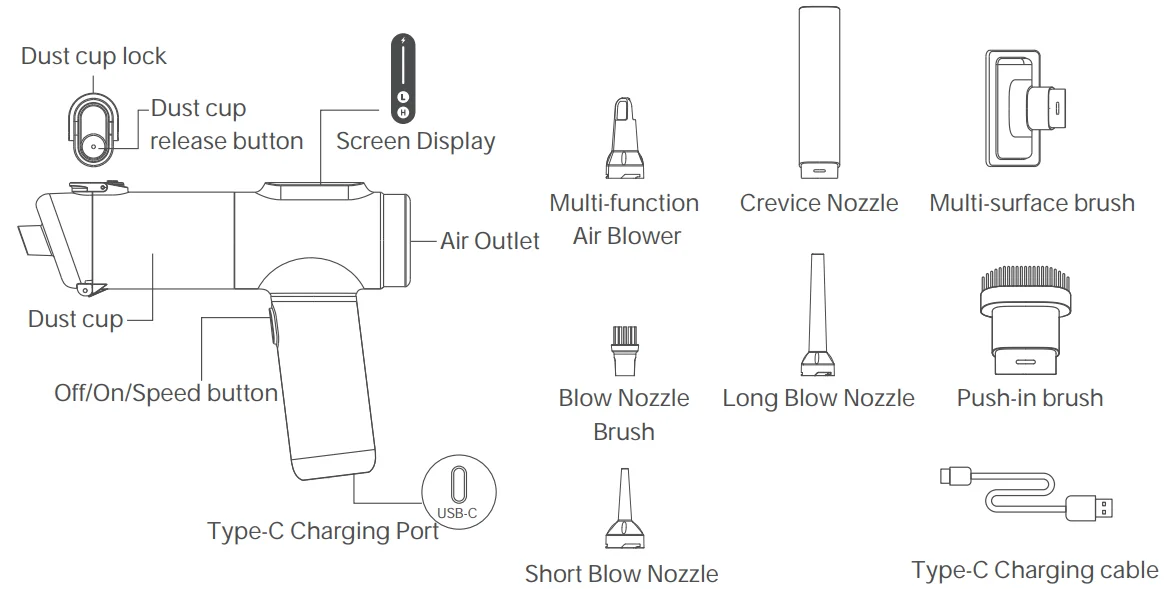
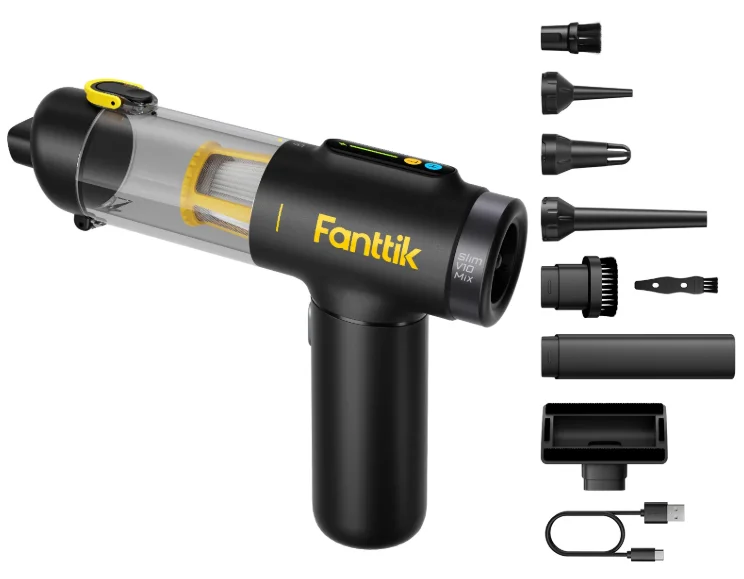
PACKAGE CONTENTS
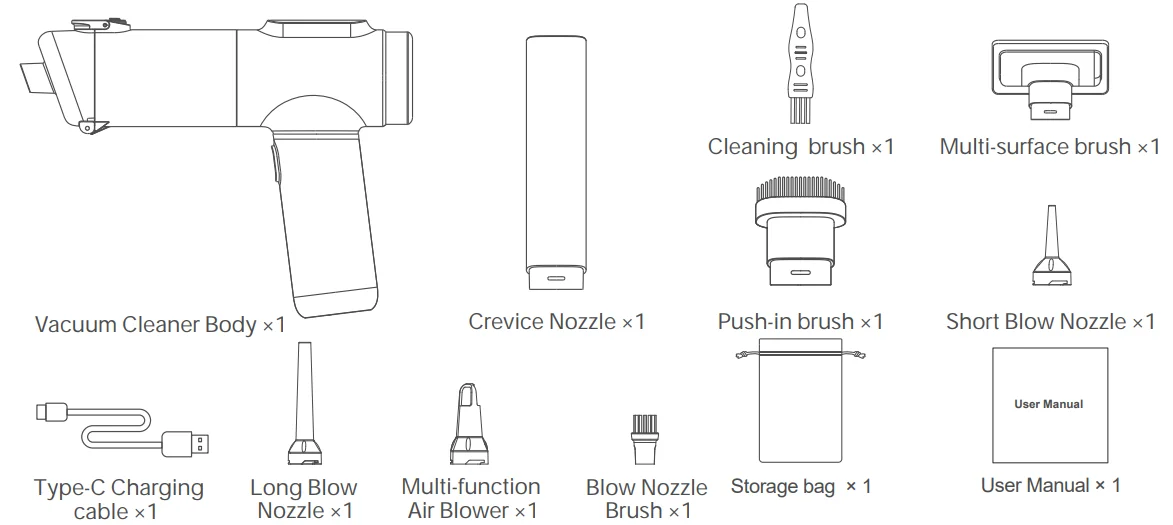
Carefully check the package contents. If anything is missing or damaged, please contact our online customer service for support.
HOW TO USE
How to assemble
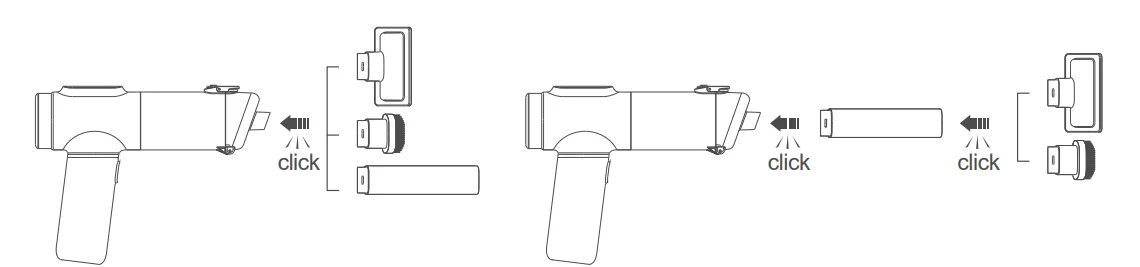
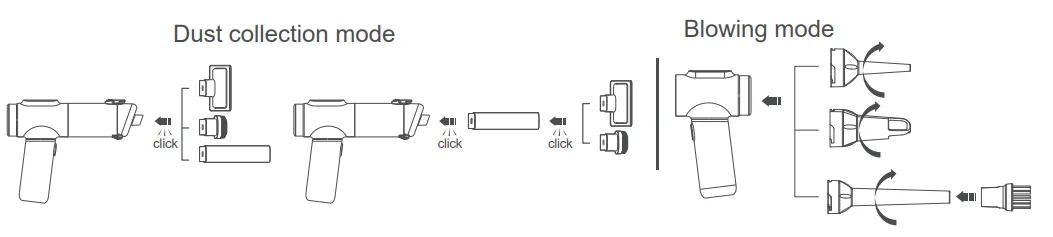
Dust collection mode
Select the suction head according to your needs and install it in the corresponding port to use. The two cleaner heads can be used separately or in combination.

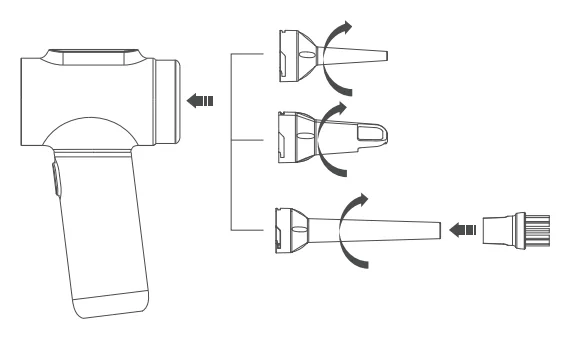
Blowing mode
Select the blow nozzle according to your needs and install it for use. The blow nozzle brush can only be fitted to the long blow nozzle.
How to charge
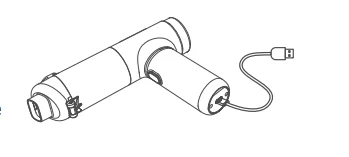
- Please use a 5V/3A max power adapter (not included) and the type-C charging cable(included) to charge. The type-C charging cable can only be used for charging.
- It takes about 2.5-3 hours to fully charge. You can use the device in high-speed mode for about 13 minutes or in low-speed mode for about 35 minutes after a full charge.
- Please wait until the device temperature stabilizes between 32°F(0 °C) and 104 °F(40°C) after it fully discharges at high speed before plugging in the charger to charge the device.
- The lithium-ion battery must be FULLY charged before first use and after long-term storage.
- It is recommended to charge the device every three months.
How to use(Only one Button)
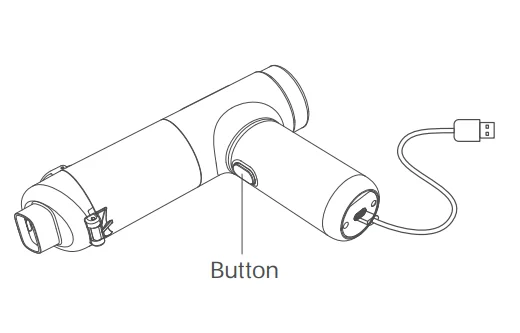
On/Off
Long-press the Button to turn on the device, and long-press again to turn off.
Speed adjustment
Low speed by default. Short-press the Button to switch to high speed, and press again to switch back.
CLEAN AND MAINTENANCE
- Push the dust cup lock upward, and press the dust cup release button to empty the dirt inside.

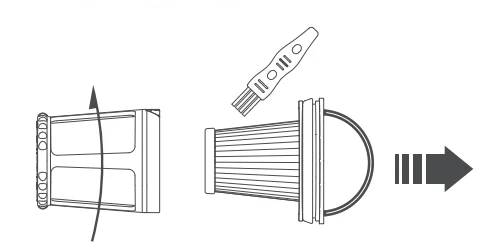
- Rotate the dust cup in the direction shown on the unit and pull it out.

- Pull out the filter system from the bottom of the dust cup.

- Rotate the Pre-filter anticlockwise and pull out the HEPA filter. Clean the HEPA filter and Pre-filter with a cleaning brush.

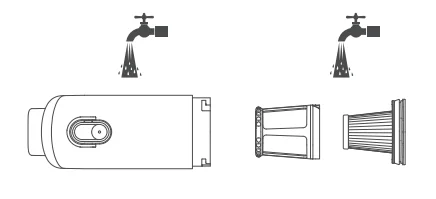
- Wash the dust cup, Pre-filter, and HEPA filter with clean water.

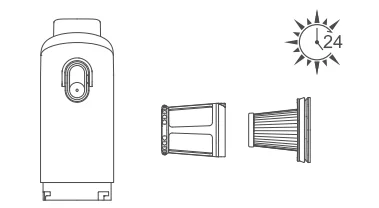
- Wait for the filter system and dust cup to dry completely before putting them back.

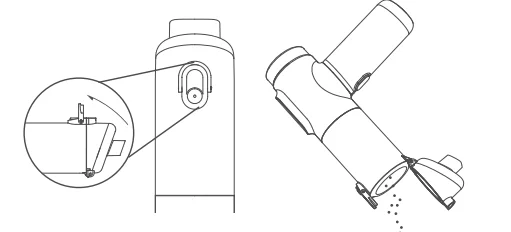
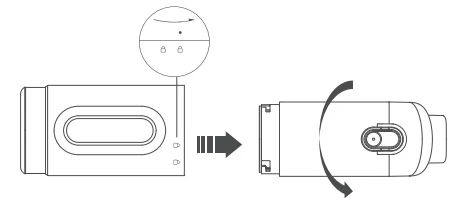
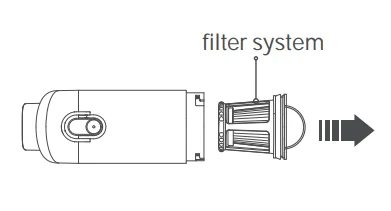
Do not wash the unit or get the charging port wet. The filter element is recommended to be replaced every 3 months.
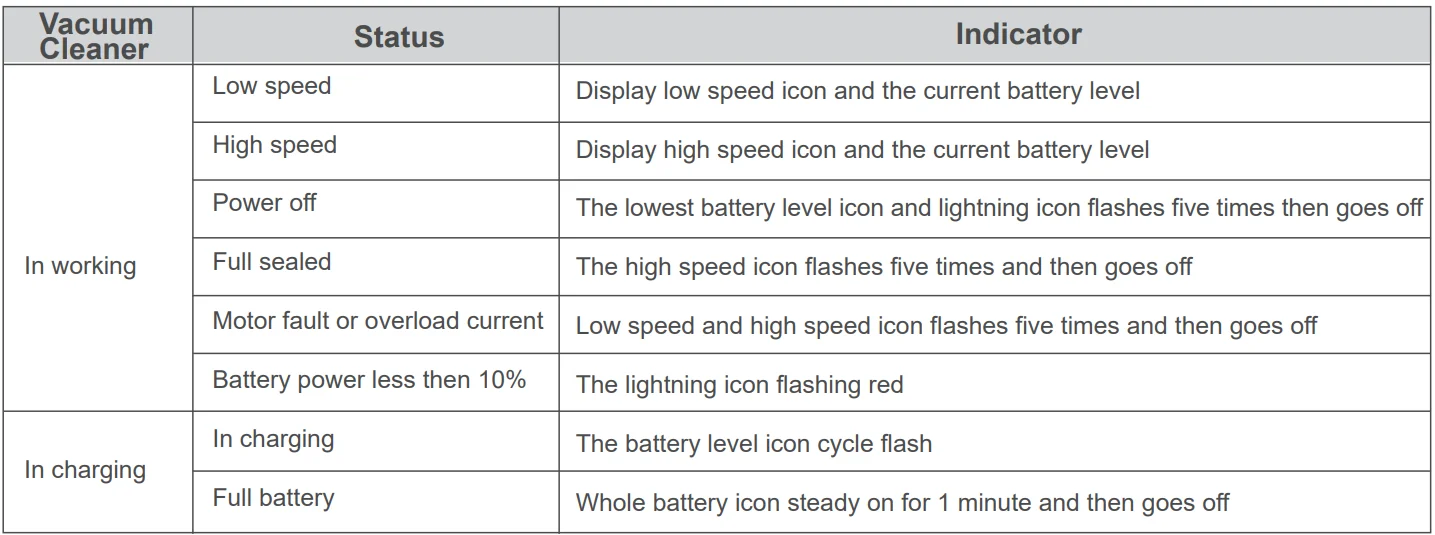
SCREEN DISPLAY
TOXIC AND HAZARDOUS SUBSTANCES

О Indicates all homogeneous materials’ hazardous substances content is below the limit specified in the Standard 2011/65/EU.
X indicates that the hazardous substances content in at least one homogeneous material of the component is the limit specified in the Standard 2011/65/EU.
X indicates that the replacement of non-environmental protection substances cannot be achieved currently due to the global technology limitations, which will be gradually improved with technical improvement.
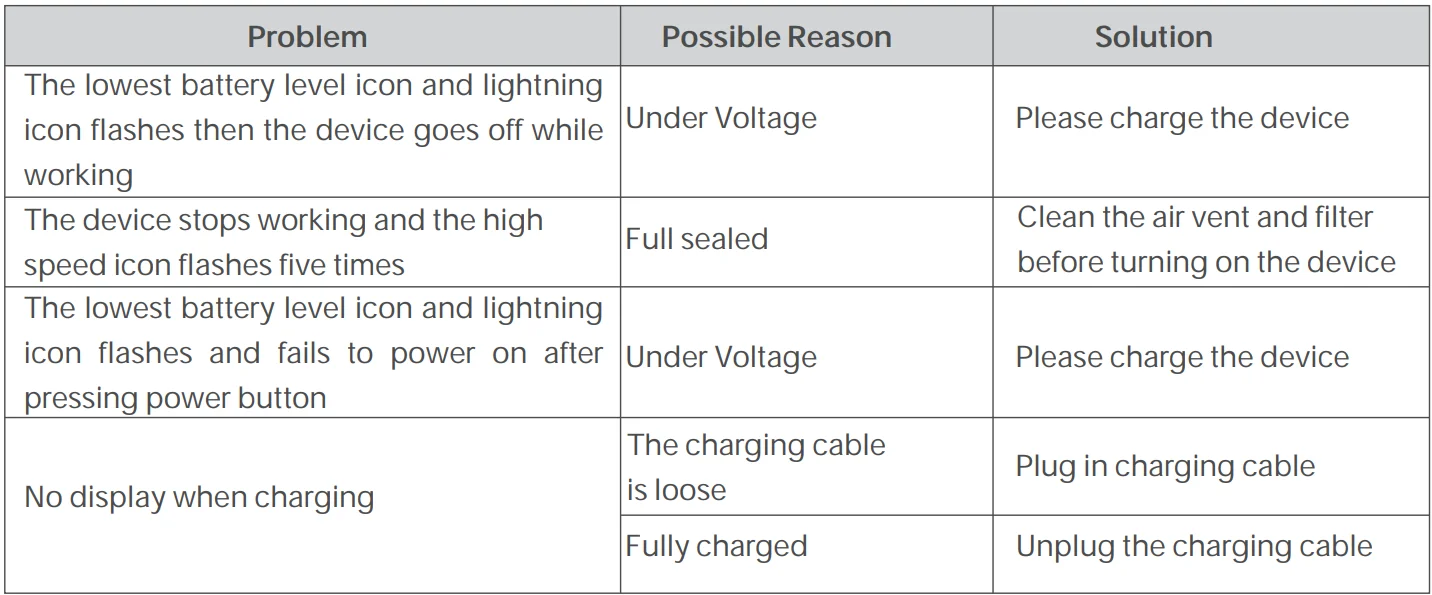
TROUBLESHOOTING
If the following operations can not solve your problems, please stop using the device and contact the manufacturer with Email [email protected]
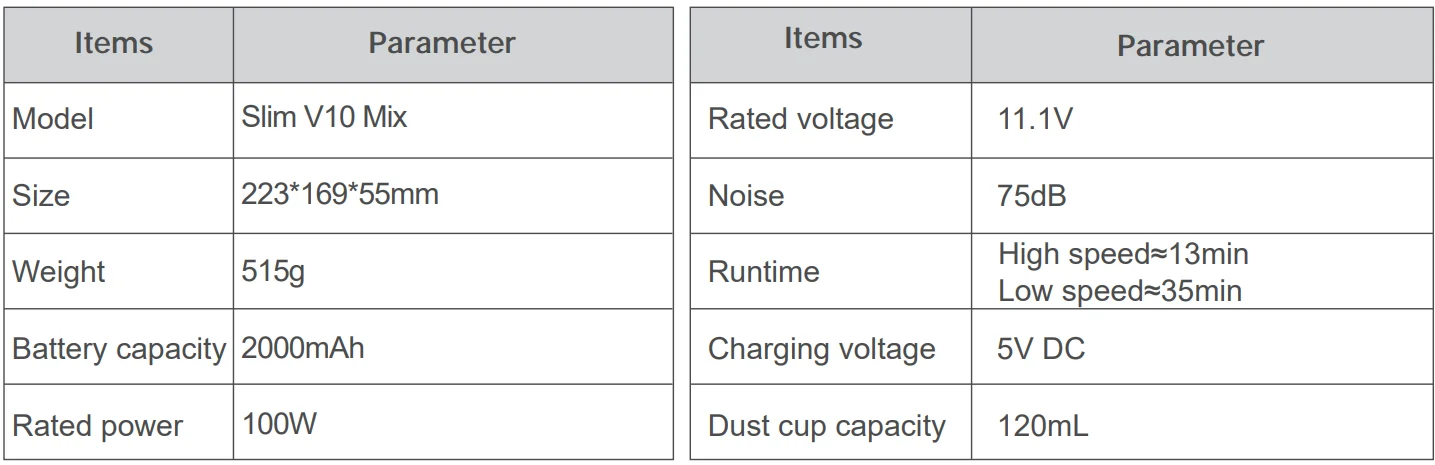
SPECIFICATIONS
WARRANTY CARD
Your Warranty Includes
12-Month Coverage
Within 12 months of purchase, we will provide timely and effective online after-sales service. We will repair or replace any defective product (due to a manufacturing fault) within the warranty period.
How to Return Your Fanttik Product
- Contact [email protected] with your order number.
- We will issue you a return label for your return.
- Tear off the ‘Return Details’ page and fill in the details. Include this inside your return package.
- We will issue your replacement/refund on receiving the return package.
Email: [email protected]
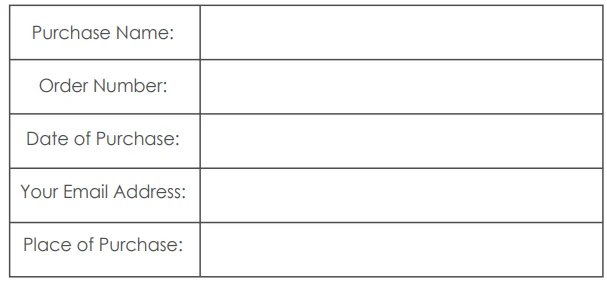
Return Details
In order to process your return as quickly as possible, we require the following information. Please fill out this form and include it in your return package.
If your purchase was fulfilled by Amazon, please use Amazon’s 30-day return service.
For more manuals by Fanttik, visit ManualsLibraryy
Fanttik Slim V10 Mix Cordless Car Vacuum- FAQs
How do I turn on the Fanttik Slim V10 Mix vacuum?
Press and hold the power button for a few seconds until the suction motor starts.
How long does the Fanttik Slim V10 Mix take to charge?
It typically charges fully in about 2.5 hours using a USB-C cable.
Why is my Fanttik handheld vacuum not charging?
Your vacuum may not charge due to a faulty cable/adapter, a damaged charging port, a weak battery, or an issue with the power outlet. Try another charger and clean the port.
How do I empty the Fanttik Slim V10 Mix vacuum?
Twist and remove the dust cup, take out the filter, and empty the collected debris into a bin. Reattach securely before use.
How do I remove debris stuck inside the vacuum?
Turn off the device, detach the dust cup, and carefully pull out any trapped debris from the nozzle or filter area.
Does the Fanttik Slim V10 Mix have a reset button?
Most Fanttik handheld vacuums do not have a dedicated reset button. Restart by turning it off, checking for clogs, and ensuring the battery is charged.
What does it mean when the charger is plugged in but not charging?
This may indicate a loose cable, debris in the charging port, or a damaged power adapter. Try another USB-C cable or outlet.
How long does a Fanttik handheld vacuum last on a single charge?
Fanttik handheld vacuums generally last 30–38 minutes in Eco Mode and 10–15 minutes on Max Mode, depending on the model.
How do I open or remove the Fanttik filter?
Detach the dust cup and gently pull the filter straight out. It is washable and reusable.