
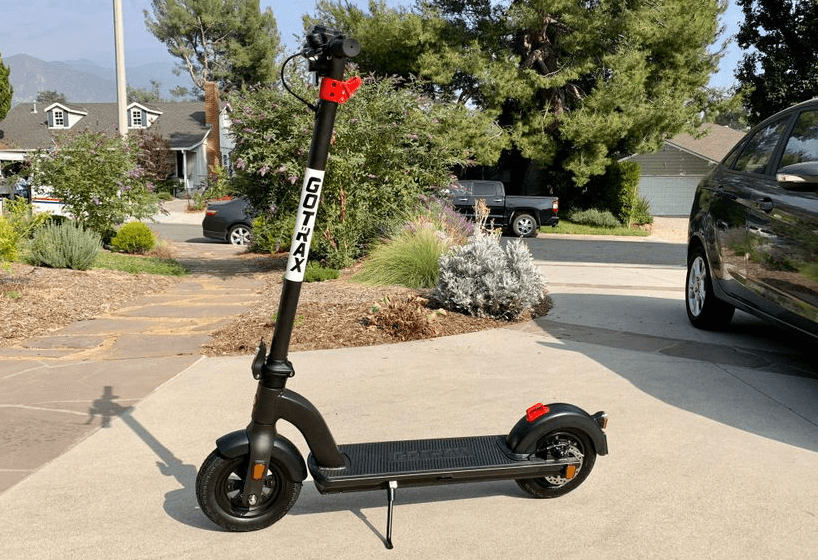

Gotrax G4 Electric Scooter
Warning Message
- Avoid water – The scooter is not waterproof. The electronics may be damaged due to water, and water damage is not covered by our warranty. Riding in wet conditions is also very dangerous and may result in injury.
- Abuse – We do not cover physical damage due to negligent care and extreme riding.
- Whenever you ride the GOTRAX scooter, you risk severe injury or even death from loss of control, collisions, and falls. Use caution and ride at your own risk.
- Do not modify the product from the manufacturer’s original design.
- Keep your hands and all body parts away from moving parts while operating the scooter.
- Before riding, be sure to check the scooter over and make sure the scooter is operating correctly before each use.
- Before riding, be sure to check that the braking system is functioning properly; also, be sure to check that all safety labels are in place and you understand the safety warnings.
- Before riding, be sure that any and all axle guards, chain guards, or other covers or guards supplied by the manufacturer are in place and in serviceable condition.
- Before riding, be sure to check that the tires are in good condition, inflated properly, and have sufficient tread remaining.
- Never exceed the 220 lb (100 kg) maximum load rating.
- The electric scooter should never be used by children under the age of 16.
- Maximum Speed – Your electric scooter goes a maximum speed of 20 mph.
Unpack
You should find each of these items in your box:
- Electric Scooter
- 4 Screws
- 3mm Allen Wrench
- Approved Power Adapter / Charging Unit
- Tire pump extender

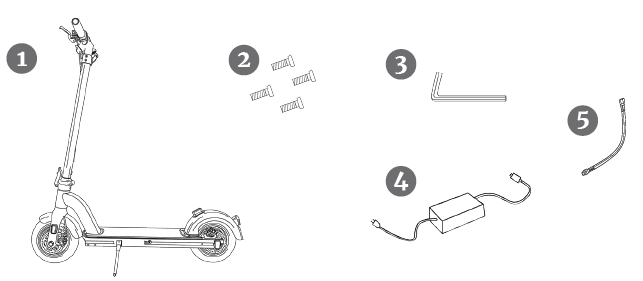
Remove all packaging material, then inspect each item for any accidental damage that may have occurred during shipping.
Get To Know Your Scooter
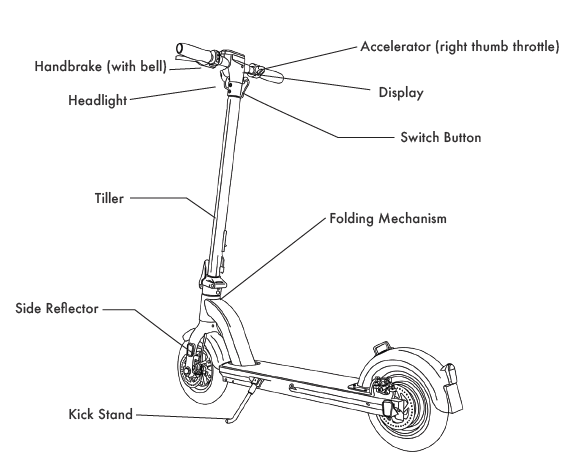
The electric scooter comes partially assembled.
Specifications
- Top Speed: 20 mph
- Distance per Charge: 21-25 Miles
- Weight Range Up To: 220lbs
- Battery Type: 36V 10.4AH
- Battery Charger: DC 42V 2.0A
- Charge Time: 3-4 hours
- Power Requirements: AC 100-240V~50/60HZ 3.0A
Assemble Your Scooter
- Straighten the tiller and lift the tiller upright.
- Press the folding lever to lock the tiller.
- Insert the exposed cable into the tiller, and then insert the console into the tiller. Use the tool and screws to lock the console into place.
Charge Your Scooter
Before using the scooter, you must fully charge the battery.
- Open the rubber charging port cover.
- Insert the charging plug into the port.
- The charger box will have a green light when fully charged and a red light when charging.
- When you are done charging, be sure to cover the charging port to keep it clear of dust and debris.
- Charging Time: 4.5 hours
Charging Requirement:
Make sure to charge your scooter in conditions that do not exceed 104 degrees Fahrenheit or fall below 32 degrees Fahrenheit.
Scooter Console Functions
Long-press press power button to power on and off.
Hold the “+” button for 3 seconds to power the headlight and tail light on and off.
To unlock the display lock the password is 000. Use the “ + “ button to input 0 and press the power button to set. Repeat the process to enter the full code 000. Once all three zeros have been selected, press the power button twice to deactivate the lock.
To set your own code, press the “ + “ button and the power button together for 10 seconds. Then use the “ + “ button to input the first number of your code and press the power button to set. Repeat the process to set your own individual three-number code. Once your three-number code is selected, press the power button twice to deactivate the lock.
Press the throttle for 8 seconds to activate Cruise Control while moving. Press the handbrake to cancel the cruise control feature.
Hold the “ – “ button while walking next to the scooter to activate push assist mode. Once the push assist mode has been activated, the scooter will move at 1.8 mph to make it easier to walk next to the scooter.
The console on the scooter displays speed in MPH, Distance, Battery life, and the Headlights.
To lock the tiller lock, adjust the password wheel to show “0000”. Pull the lock pin and insert it into the lock hole. Scramble the password wheel to lock.
To unlock the tiller lock, adjust the password wheel to show “0000”. Press the button and pull out the lock pin from the lock hole, and insert the lock pin cord back into the tiller.
To set your own code, adjust the password wheel to show “0000” and then push the set button to the “set” position. Adjust the password wheel to the four-digit code of your choice and then push the set button back to the left.
Riding Tips
- You will want to start riding your scooter with one foot on the platform and one foot on the ground. Use your foot on the ground to push off and at the same time, press the throttle button to begin movement.
- Press the brake or handbrake to slow down or stop.
- The scooters perform best when on a smooth surface, e.g., carparks, smooth roads, footpaths, & bike lanes.
- Always clean your scooter (wheels, platform, etc.), it’s a machine and it needs to be maintained.
- Do not press the throttle while walking with the scooter beside you.
- Be aware of the terrain you are riding on, and watch out for curbs and obstacles!
Putting Your Scooter Away/Folding
Before folding the scooter, make sure that the scooter is powered off.
Folding:
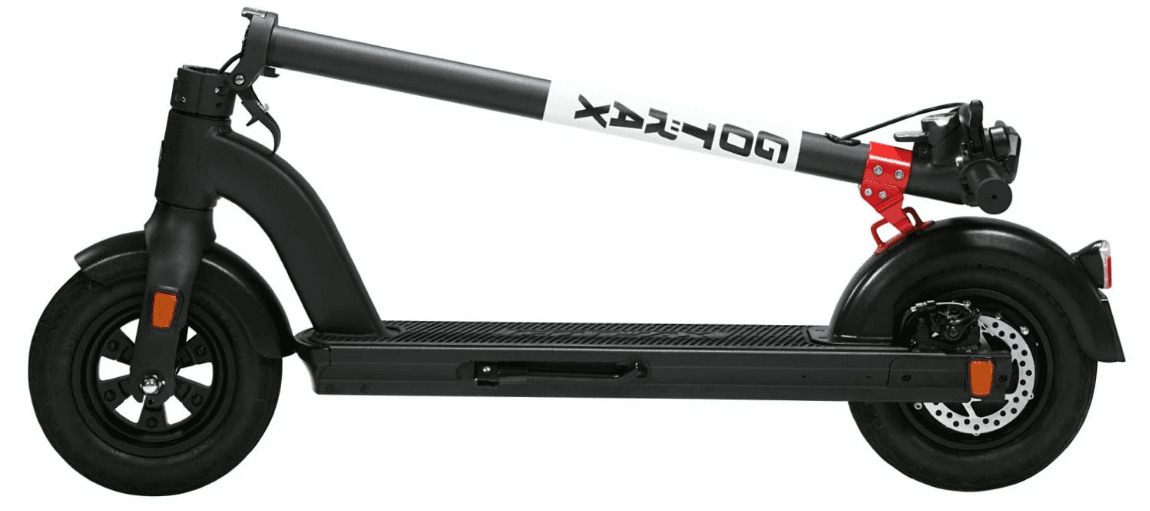
Ensure the electric scooter is powered off, press the lock buckle as the figure shows, and pull down the lever. Fold the tiller down towards the rear fender and lock the tiller hook to the fender hook buckle.
Unfolding:
Disconnect the tiller hook from the fender hook. Once unhooked, pull the tiller upwards and lock the locking device on the bottom of the tiller by pulling the clamp towards the tiller. Make sure to test the tiller before riding to make sure it is locked into place.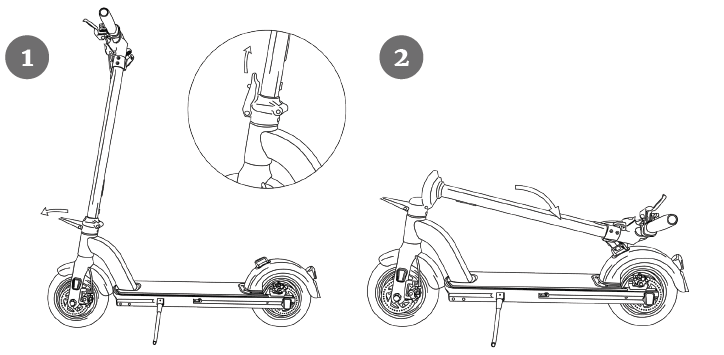
Maintenance & Repair
If you regularly clean and maintain your electric scooter, it will extend its life.
Cleaning and storage:
If the scooter is dirty, wipe it clean with a soft, damp cloth.
Disc Brake Adjustments:
If the brake is too tight, use a 4mm Allen wrench to loosen the screws counterclockwise. Push the brake wire to shorten and lock the screw in place. If the brake is too loose, loosen the screws and pull the brake wire to extend the wire and lock the screws.
Tiller Adjustments:
If the tiller wiggles while riding, please check the folding mechanism. Use an Allen wrench to tighten the screws as the figure shows.
Tires:
If you notice that the tire pressure is low, please fill to the recommended PSI on the side of the tire. Recommended PSI: 50
DO NOT use alcohol, gasoline, kerosene, or other corrosive chemical solvents to clean the scooter. It can severely damage the appearance and structure of the scooter. Please do not use a pressure washer, as it may also cause damage to the electronics.
Storage:
When you’re not using your scooter, store it in a dry and cool location. Avoid storing your scooter outdoors because sun exposure can damage its appearance and may cause wear on the life of the battery and tires.
Battery Information
Only use the approved GOTRAX power adapter to charge your scooter; others may cause a risk of fire & equipment may be damaged.
Improper disposal of used batteries may seriously pollute the environment. Please comply with local disposal regulations.
Make sure to store your scooter and power adapter in conditions that do not exceed 122 degrees Fahrenheit or below -4 degrees.
Warning – Risk of Fire – No User Serviceable Parts. The prolonged exposure to UV Rays, Rain, and the Elements may damage the enclosed materials; store indoors when not in use.
Troubleshooting
We frequently update our user manuals at GOTRAX.com, and reserve the right to update and change manuals online.
Please contact our customer service team if you are experiencing problems or need more detailed information. They can be reached at GOTRAX.com
Warranty
For warranty information, please visit GOTRAX.com.
For more Manuals by Gotrax, visit ManualsLibraryy
Gotrax G4 Electric Scooter-FAQs
Is the Gotrax G4 waterproof?
It has an IPX4 rating, meaning it can handle light splashes but should not be ridden in heavy rain.
How do I maintain my Gotrax G4?
Wipe down regularly with a damp cloth.
Apply oil to the folding mechanism every few months.
Avoid submerging in water.
Why is my charger light blinking green?
A blinking green light means the battery voltage is low but charging.
A solid green light means fully charged.
How do I unlock the Gotrax G4?
Turn on the scooter and enter the unlock code (if applicable).
Some models have a manual lock mechanism.
Can I lock my Gotrax G4 to prevent theft?
Yes, some models (G4, GMAX, G Pro) have an integrated tiller lock.
Use a strong metal cable lock for extra security.
Does the Gotrax G4 have GPS tracking?
No, it does not have built-in GPS.
How do I check the battery status?
The digital display shows battery percentage.
Reduced range or slow charging may indicate battery wear.
What does error code E4 mean?
E4 indicates a motor issue—contact Gotrax support for assistance.
Can I ride my Gotrax G4 while charging?
No, always turn off the scooter before charging.
How can I extend my scooter’s battery life?
Avoid draining the battery completely.
Store in a cool, dry place when not in use.
What should I do if my scooter overheats?
Stop riding immediately if you see an E9 error.
Let it cool down before restarting.