
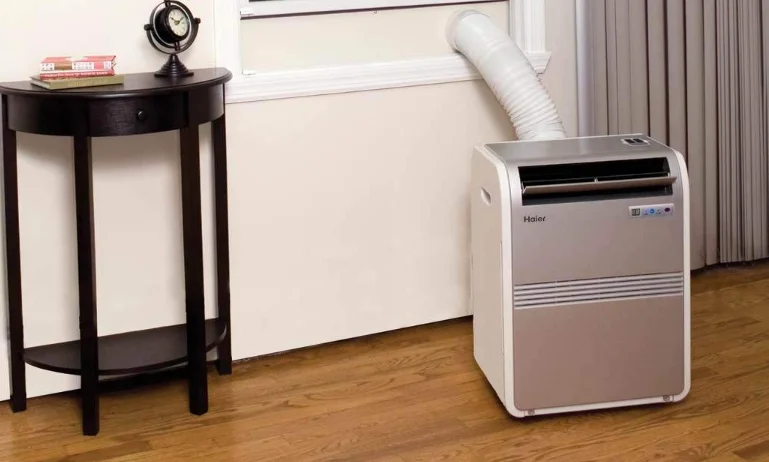

Haier HPRB08XCM Portable AC Unit
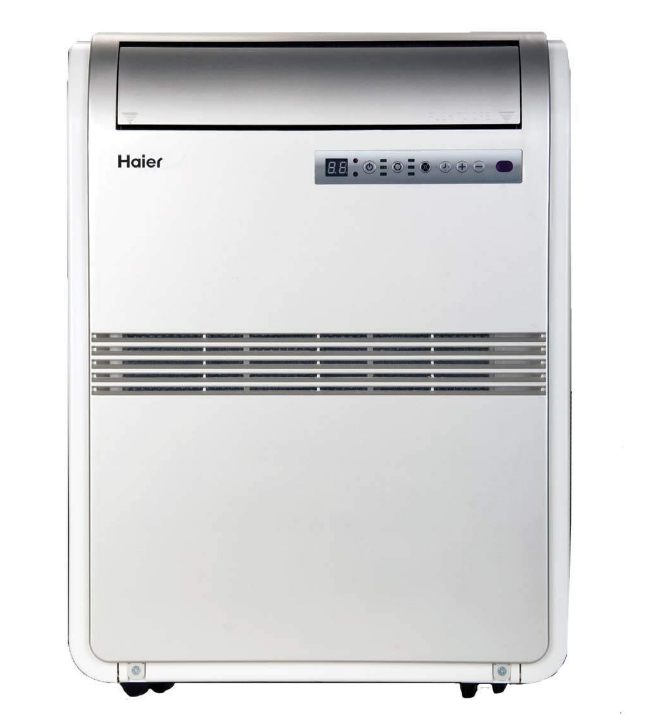
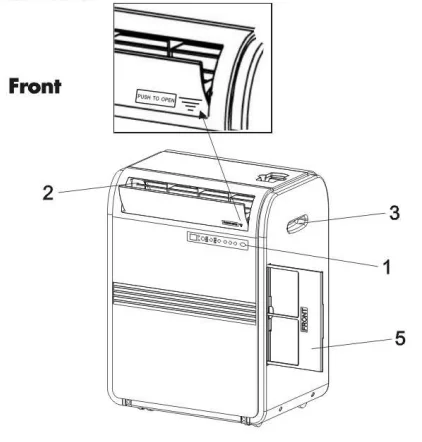
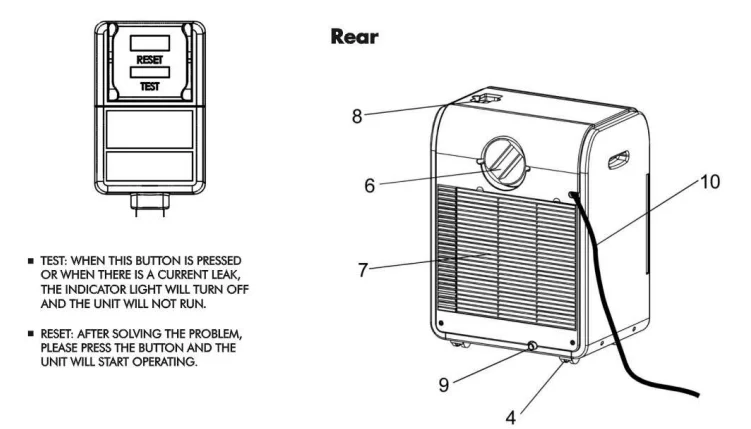
Parts and Features
- Control Panel
- Air Outlet (To be opened manually)
- Handle Hole
- Caster
- Air Filter
- Air Outlet (Heat Exhaust)
- Air Intake (Condenser)
- Remote Control Storage Facility
- Water Outlet Drain (Note: Please ensure that the water outlet drain is well installed before use.)
- Power Supply Cord


Assembly and Installation
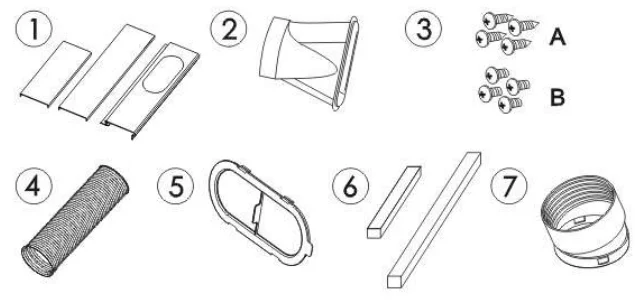
Accessories Include
- Main window panel and extension panels – extend from 20″ up to 46″. 3 pieces
- Exhaust nozzle…1 piece
- Screws….8 pieces
- Exhaust hose…1 piece
- Cover…1 piece
- Foam…2 pieces
- Hose connector…..1 piece

- Connect the 3 pieces of the window panels by sliding the 2 extension panels into the main window panel.
- Apply a foam strip to the end of each extension panel.
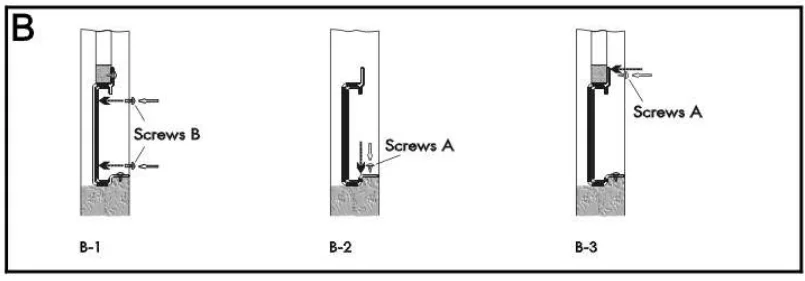
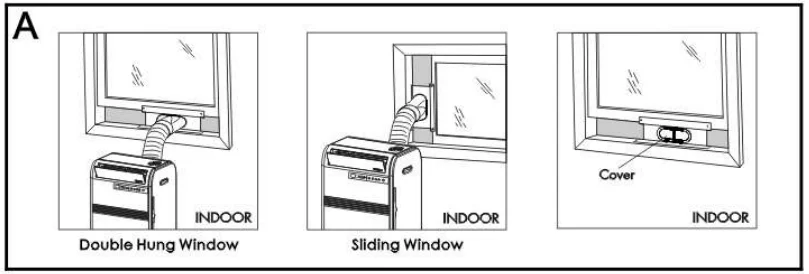
- Open the window and place the window panel assembly into the window. Adjust the extension panels to fit the width or height of the window as shown below (see figure A). Secure the extension panels using 4 blunt tip screws (see figure B-1). Secure the main window panel using 4 pointed screws (see figures B-2 and B-3).

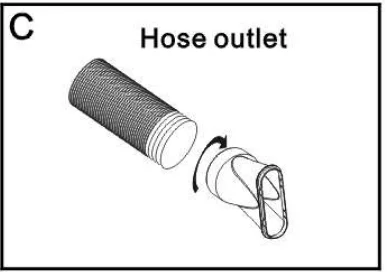
- Expand the 2 ends of the exhaust hose. Connect the hose connector to one end of the exhaust hose by turning clockwise. Then insert the exhaust nozzle at the other end of the exhaust hose by turning clockwise (see figure C) to create the hose assembly.

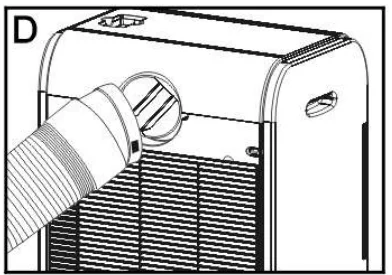
- Insert the hose connector end of the hose assembly into the rear of the unit and turn clockwise to secure (see figure D).

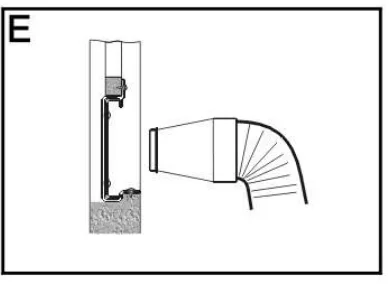
- Insert the exhaust hose with the nozzle end into the window panel (see figure E).

- Plug the power cord into the wall outlet and press the “Reset” button.
- Please allow 8″ of space around the unit for proper air circulation.
- When removing the portable air conditioner for storage, the window panel may be left in place. Simply place the cover over the nozzle hole (see figure A).

Operation
Control Panel
Power Control
The power control turns the unit on and off.
Warning Light
Condensed water may accumulate in the unit. If the internal tank becomes full, the warning light will light up, and the unit will not operate until it has been drained.
Mode Control
The Mode Control has three settings:
- Cool
- Dehumidify
- Fan
The settings are adjusted with the Mode Control button. A light will indicate which setting is currently being used.
Cooling Mode
When cool mode is selected, the indicator light turns blue. During the cooling mode, the air is cooled, and hot air is exhausted to the outside through the exhaust tube. Adjust fan speed and air temperature to suit your desired comfort level. Note: The air exchange hoses must vent outside the room when using cool mode.
Dehumidify Mode
When the dehumidify mode is selected, the indicator light turns yellow. Air is dehumidified as it passes through the unit, without being in full cooling mode. If the room temperature is higher than 77 degrees Fahrenheit, fan speed can be adjusted; otherwise, fan speed is fixed to “Low”. Note: If the unit is to be used as a dehumidifier, do not connect the exhaust hose. Let the warm air return to the room. Continuous drainage is then necessary.
Fan Mode
When fan mode is selected, the indicator light will shine green. Air is circulated throughout the room with no cooling. Note: Unit does not need to be vented in Fan mode.
Fan Speed Control
The Fan Speed Control has 3 settings: High, Medium, and Low.
Timer
- Auto turn off: With the machine in running mode, press the timer button to select the number of hours you would like the unit to run in air conditioning mode until it automatically shuts off.
- Auto turn on: With the machine in standby mode, press the timer button to select the number of hours until you would like the unit to automatically start running in air conditioning mode.
Timer / Temp set controls
- Used for adjusting the timer and thermostat. The default display is room temperature.
- In cooling mode, when the”▲” or “▼” button is pressed, the set temperature is displayed and may be adjusted. After 15 seconds, the display will revert to room temperature. Temperature is only adjustable in cool mode. The time is adjustable between 1~24 hours.
Note: By pressing both Timer/Temp set buttons at the same time, the display will toggle between Celsius and Fahrenheit. After switching the air conditioner off, you must wait 3 minutes before switching it back on again.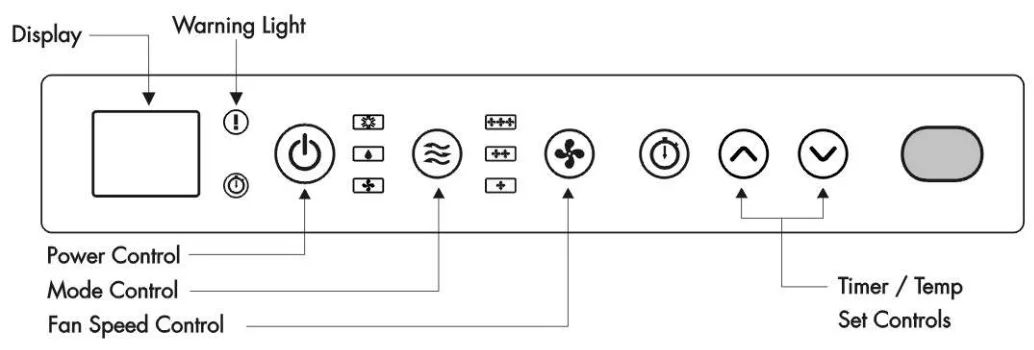
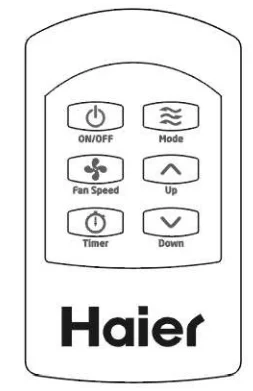
Remote Control
Power Control 
The power control turns the unit on and off.
Mode Control 
There are 3 modes of operation: “Cool” (when the unit is cooling), “Dehumidify”, and “Fan” (only the fan running). A mode indicator light on the unit control panel shows the following colors: Blue for “Cool” mode, Orange for “Dehumidify”, and Green for “Fan”.
The unit will start in “Cool” mode with a blue indicator light. Once you press the “Mode” button on the remote, it will change to “Dehumidify” mode. Press the “Mode” button again to get “Fan” mode. It goes back to the “Cool” mode once the “Mode” button is pressed again. Note: When you press the “Up” and “Down” buttons, and there is no response, please press the “Mode” button until the unit indicator light is blue (“Cool”). You can then adjust the temperature accordingly.
Cooling Mode
During the cooling mode, the air is cooled, and hot air is exhausted to the outside air through the air exhaust hose. Adjust fan speed and temperature to suit your desired comfort level. Note: The air exchange hoses must vent outside the room when using Cool Mode.
Dehumidify Mode
Air is dehumidified as it passes through the air conditioner, without being in full cooling mode. If the room temperature is greater than 77°F, the fan speed can be adjusted; otherwise fan speed is fixed to “Low”.
Fan Mode
Air is circulating throughout the room with no cooling. Note: Unit does not need to be vented in Fan Mode.
Fan Speed Control
The Fan Speed Control has 3 settings: High, Medium, and Low.
Temp Set Controls
Press “Up” or “Down” to set the temperature. The setting range is from 61°F to 89°F. Note: When using Dehumidify or Fan Mode, the temperature setting button is invalid.
Timer Setting Control
- When you use the timer setting button while the unit is operating, you can preset a time for the unit to turn off.
- When you use the timer setting button while the unit is on standby, you can preset a time for the unit to turn on.
- If you press the “ON/OFF” button, the preset timer function will be cancelled.
- The Timer setting range is 1~24 hours.

Care and Cleaning Guide
- Always unplug your air conditioner before cleaning.
- The air filter needs to be cleaned at least once a week for your unit to operate at optimum efficiency. Slide out the filter from the back by pulling on the tab. The filter may be washed or vacuumed. Remove the excess water from the filter by gently shaking the filter. This will remove dust and particles trapped in the filter. After cleaning, reinstall the filter. DO NOT use your air conditioner without the air filter in place.
- To clean the cabinet, DO NOT use harsh chemicals, abrasives, ammonia, chlorine, bleach, concentrated detergents, solvents, or metal scouring pads. Some of these chemicals may dissolve, damage, and/or discolor your air conditioner.
- Always use a soft cloth dampened with water or a mild soap and water solution to wipe the front of the cabinet. Wipe dry with a soft cloth.
Storage
- To store your air conditioner when not in use for a long period of time, drain condensed water using the drain pipe. Remove the exhaust hose, clean the filters, cover with a plastic bag, and store.
Troubleshooting
If the air conditioner does not operate:
- Check if the unit is plugged in. The plug may have come loose.
- Press the “Reset” button on the plug to resume operation.
- Check if the electrical wall receptacle is of the proper voltage.
- Check if the circuit breaker needs to be reset or if the fuse needs to be replaced.
- Check if the unit is in “Off” mode.
- If the warning light is on, drain the water drain pipe by removing the plug.
The air conditioner is working, but the room is not cooling:
- The Room may have appliances that produce heat. Use an exhaust fan to remove excess heat.
- Check the exhaust hose for proper installation.
- Redirect the airflow. Remove any obstacles.
- All doors and windows need to be closed so that cool air does not escape the room.
- The air filter may be blocked or may need cleaning.
- Unit BTU may be too low for the required cooling area.
- On extremely hot and humid days, air conditioners may take a little longer to cool.
- Drain the water drain pipe by removing the plug.
- The Unit may be in fan or dry mode. Put the air conditioner in cool mode.
Limited Warranty
This warranty covers all defects in workmanship or materials for:
- The mechanical and electrical parts (including labor costs) contained in this product for a period of 12 months from the date of purchase (for commercial or rental applications, the warranty is 90 days).
- The sealed system and compressor contained in this product are for a period of 5 years from the date of purchase (excluding labor costs after the initial 12-month period). In commercial or rental use, the additional limited compressor warranty is for 1 year and 9 months (excluding labor costs after the initial 90-day period). You must keep and be able to provide your original sales receipt as proof of the date of purchase.
Who is covered?
The original retail purchaser of this product.
What will be done?
Haier America will repair or replace in your home any mechanical, electrical part, or the compressor, which proves defective in normal household use for a period of 12 months. Haier America will repair or replace (excluding labor costs) the sealed system and compressor (parts only) for an additional 4-year period.
How can you get service?
- Contact your nearest Haier America Authorized Service Depot. For the name of the Service Depot nearest you, contact Haier America at (877) 337-3639.
- All services must be performed by an authorized Haier America Service Depot.
THIS WARRANTY COVERS UNITS WITHIN THE CONTINENTAL UNITED STATES, CANADA, AND PUERTO RICO, AND DOES NOT COVER:
- Damages from improper installation.
- Damages in shipping.
- Damages from misuse, abuse, accident, alteration, lack of proper care, and maintenance.
- Damages from service by the other than an authorized dealer or service center.
- Labor, service, transportation, and shipping charges for the removal of defective parts and installation of a replacement part, beyond the initial 12-month period.
THIS LIMITED WARRANTY IS GIVEN INSTEAD OF ALL OTHER WARRANTIES, EXPRESS OR IMPLIED, INCLUDING THE WARRANTIES OF MERCHANTABILITY AND FITNESS FOR A PARTICULAR PURPOSE. The remedy provided in this warranty is exclusive and is granted instead of all other remedies. This warranty does not cover incidental or consequential damages. Some states do not allow the exclusion of incidental or consequential damages, so this limitation may not apply to you. Some states do not allow limitations on how long an implied warranty lasts, so this limitation may not apply to you. This warranty gives you specific legal rights, and you may also have other rights, which vary from state to state.
For More Manuals By Haier, Visit ManualsLibraryy.
Haier HPRB08XCM Portable AC Unit-FAQ
How do I set up the Haier HPRB08XCM portable air conditioner?
Place the unit near a window, attach the exhaust hose to the back of the AC, connect it to the window kit, plug it into a grounded outlet, and turn it on using the control panel or remote.
What operating modes are available on the Haier portable AC?
This unit includes Cool, Dehumidify (Dry), and Fan modes to suit different room conditions.
Which mode is best for cooling a room?
Cool mode is best for lowering room temperature, while Swing mode helps distribute cool air evenly and prevents hot spots.
What temperature range can I set on the Haier portable AC?
In Cool mode, the temperature can be set between 62°F and 86°F (17°C to 30°C).
What is the recommended temperature for energy savings?
Setting the AC around 24°C (75°F) provides effective cooling while keeping electricity usage lower.
What is the 3-minute rule for air conditioners?
After turning the AC off, wait at least 3 minutes before restarting it. This protects the compressor and ensures smooth operation.
Why is my Haier portable AC not cooling properly?
Common reasons include a dirty air filter, blocked airflow, poor exhaust hose placement, or insufficient space around the unit. Cleaning the filter weekly often resolves the issue.
Do I need to drain water from the unit?
In Cool mode, draining is usually not required because moisture is evaporated automatically. In very humid conditions or Dehumidify mode, occasional draining may be needed.
Can I operate the Haier portable AC without a remote?
Yes, basic functions can be controlled using the buttons on the unit’s control panel.
Can I control my Haier AC using my phone?
If your model supports smart features, you can control settings through the SmartHQ app, including mode selection and fan speed.