
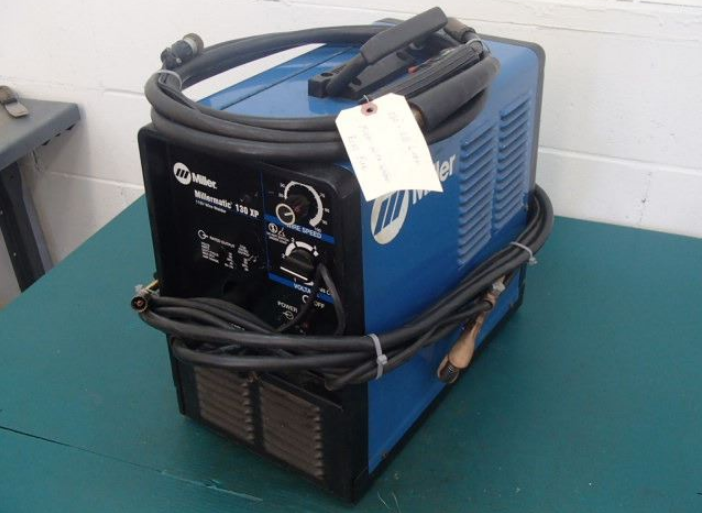

Miller MillerMatic 130XP Welding Machine
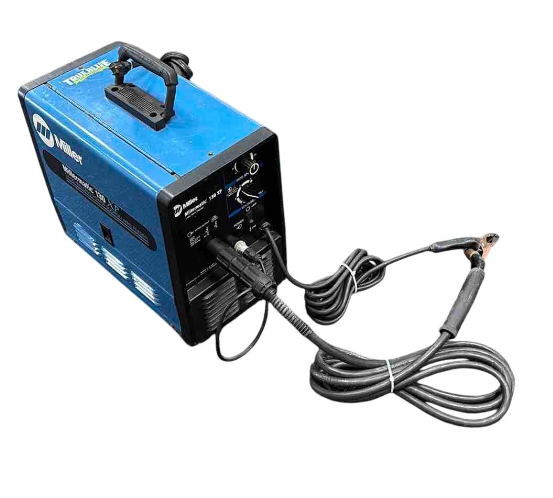
From Miller to You
Thank you and congratulations on choosing Miller. Now you can get the job done and get it done right. We know you don’t have time to do it any other way. That’s why when Niels Miller first started building arc welders in 1929, he made sure his products offered long-lasting value and superior quality. Like you, his customers couldn’t afford anything less. Miller products had to be more than the best they could be. They had to be the best you could buy.
Today, the people who build and sell Miller products continue the tradition. They’re just as committed to providing equipment and service that meet the high standards of quality and value established in 1929. This Owner’s Manual is designed to help you get the most out of your Miller products. Please take time to read the safety precautions. They will help you protect yourself against potential hazards on the worksite. We’ve made installation and operation quick and easy.
 Miller is the first welding equipment manufacturer in the U.S.A. to be registered to the ISO 9001 Quality System Standard. With Miller, you can count on years of reliable service with proper maintenance. And if, for some reason, the unit needs repair, there’s a Troubleshooting section that will help you figure out what the problem is. The parts list will then help you to decide which exact part you may need to fix the problem. Warranty and service information for your particular model are also provided.
Miller Electric manufactures a full line of welders and welding-related equipment. For information on other quality Miller products, contact your local Miller distributor to receive the latest full-line catalog or individual catalog sheets. To locate your nearest distributor, call 1-800-4-A-Miller or visit us at www.MillerWelds.com.
SECTION 2 – SPECIFICATIONS
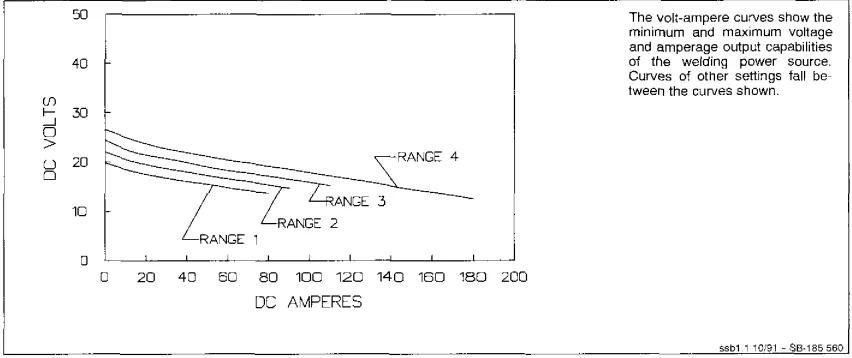
Specifications
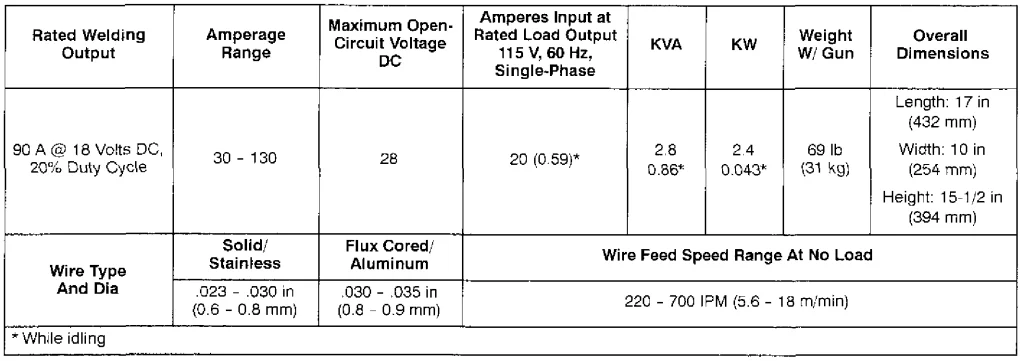
Welding Power Source Duty Cycle and Overheating Weld Amperes
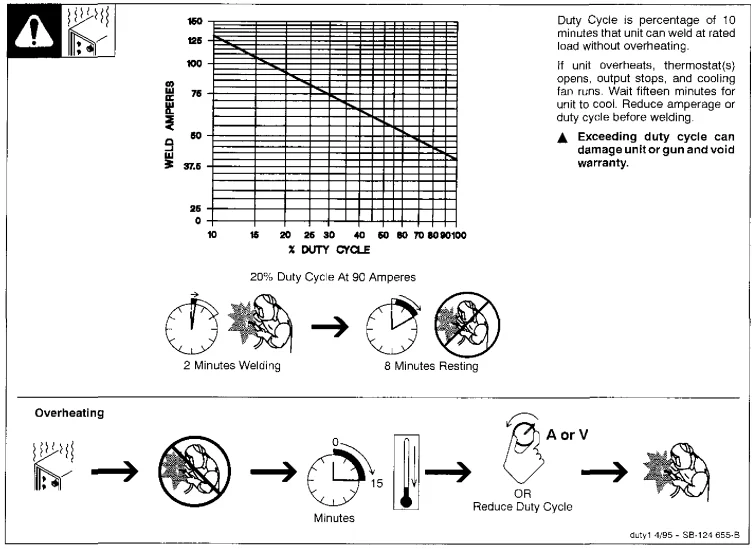
Welding Gun Duty Cycle and Overheating
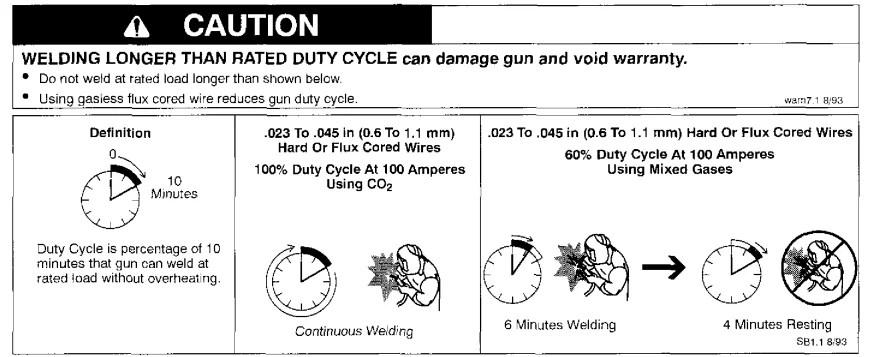
Volt-Ampere Curves DC Volts
SECTION 3 – INSTALLATION
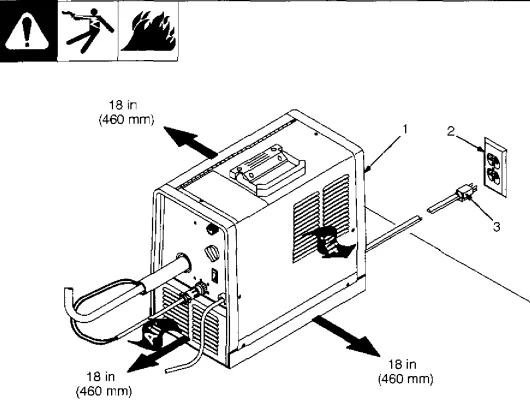
Selecting a Location
- Rating Label
- Grounded Receptacle: A 115-volt, 20-ampere individual branch circuit protected by time-delay fuses or a circuit breaker is required.
- Plug From Unit: Select an extension cord of 12 AWG for up to 75 ft (23 m) or 10 AWG for up to 140 ft (46 m).
- Special installation may be required where gasoline or volatile liquids are present – see NEC Article 511 or CEC Section.

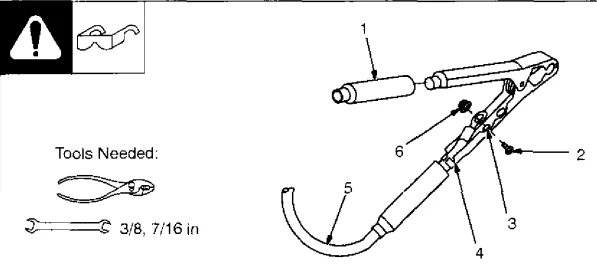
Installing Work Clamp
- Insulator
- Bolt
- Smaller Hole
- Work Clamp Tabs Bend tabs around the work cable.
- Work Cable From Unit
- Nut

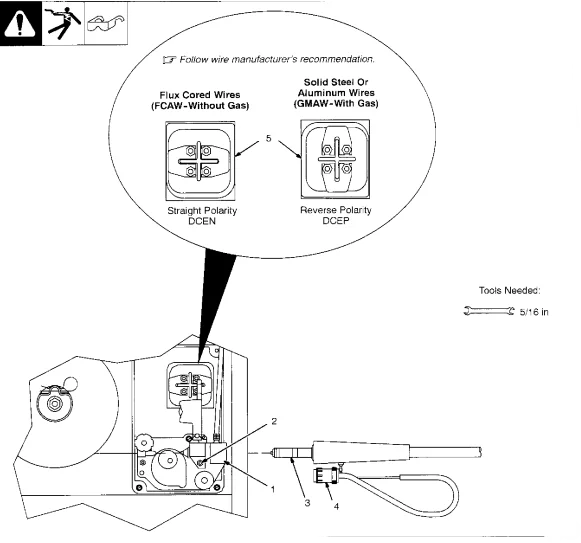
Installing the Welding Gun and Changing Polarity
- Drive Assembly
- Gun Securing Nut
- Gun End: Loosen the securing nut. Insert the gun end through the opening until it bottoms against the drive assembly. Tighten the nut.
- Gun Trigger Plug Insert plug into receptacle and tighten threaded collar.
- Jumper Links the Place jumper links in position shown for the desired polarity. Close the door.

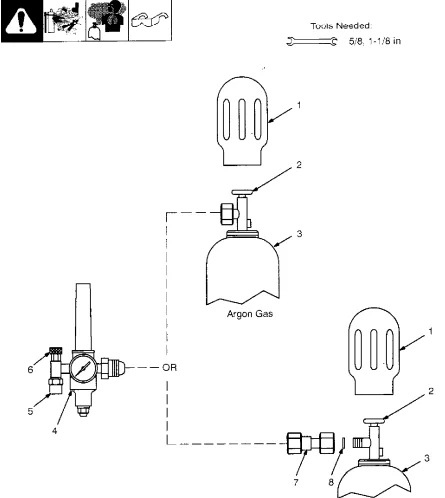
Installing Gas Supply
Obtain a gas cylinder and a chain to the running gear, wall, or other stationary support so the cylinder cannot fall and break off the valve.
- Cap
- Cylinder Valve: Remove the cap, stand to the side of the valve, and open the valve slightly. Gas flow blows dust and dirt from the valve. Close the valve.
- Cylinder
- Regulator/Flowmeter: Install so the face is vertical.
- Gas Hose Connection: Fitting has 5/8-18 right-hand threads. Install the gas hose.
- Flow Adjust: Typical flow rate is 20 cfh (cubic feet per hour). Check the wire manufacturer’s recommended flow rate.
- CO2 Adapter
- O-Ring: Install the adapter with the O-ring between the regulator/flowmeter and the CO2 cylinder.

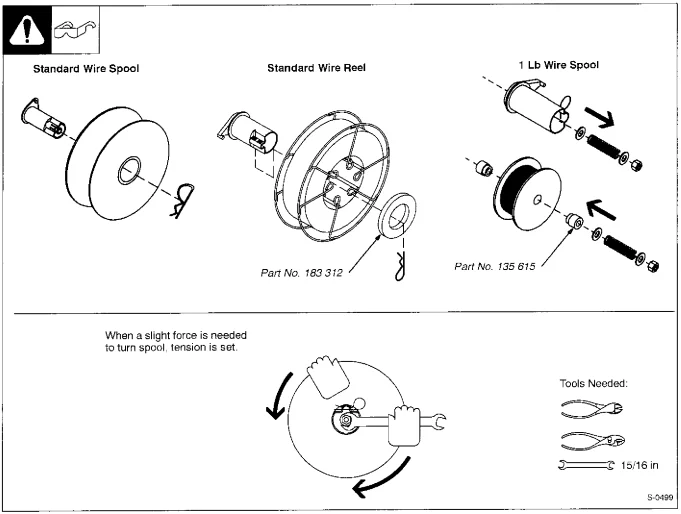
Installing Wire Spool and Adjusting Hub Tension
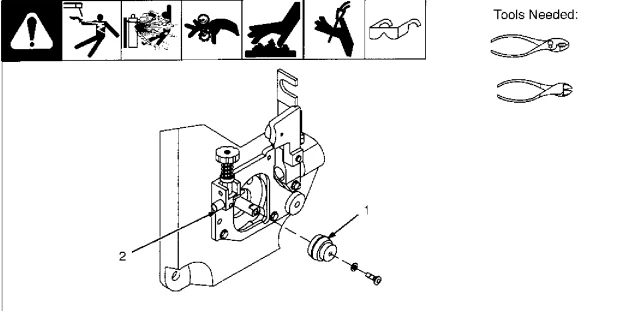
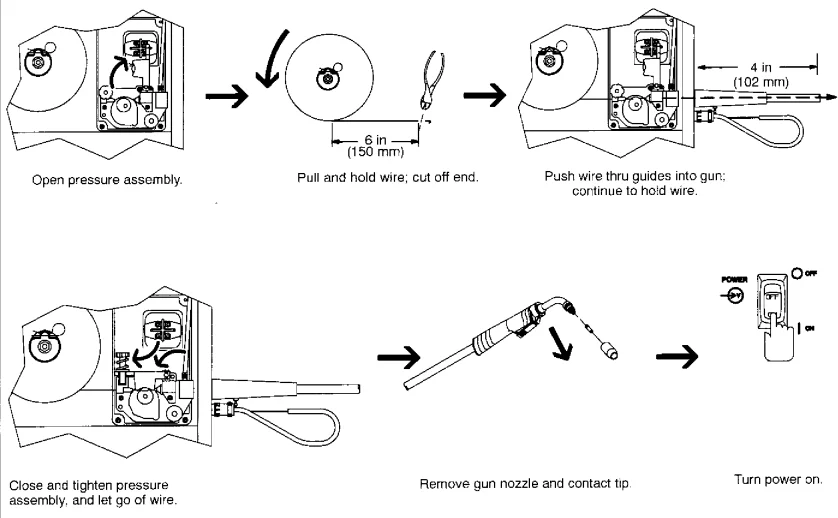
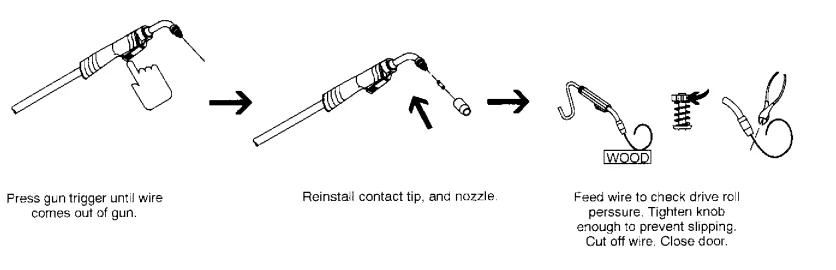
Installing Drive Roll, Wire Guide, and Threading Welding Wire
- Drive Roll: Choose the correct drive roll for the wire type and align the drive roll with the flat spot on the shaft. Slide the drive roll onto the shaft and secure it with a screw.
- Inlet Wire Guide: Remove the guide by pressing on the barbed area or cutting off one end near the housing and pulling it out of the hole. Push the new guide into the hole from the rear until it snaps in place.


OPERATION
Controls
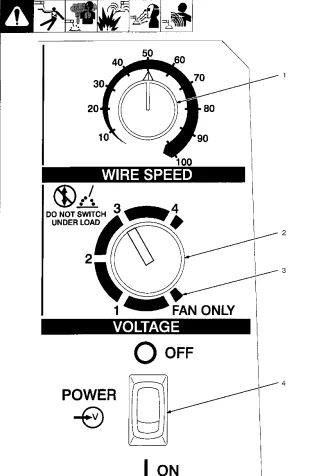
- Wire Speed Control: Use the control to select a wire feed speed. As the voltage switch setting increases, the wire speed range also increases (see weld setting label in the welding power source).
- Voltage Switch (5 Position): The switch must click into detent position 1, 2, 3, or 4 for proper contact. The higher the selected number, the thicker the material that can be welded (see weld setting label in welding power source). Do not switch under load.
- Voltage Switch – Fan Only Position: In the Fan Only position, the fan runs, but there is no weld output.
- Power Switch.

MAINTENANCE & TROUBLESHOOTING
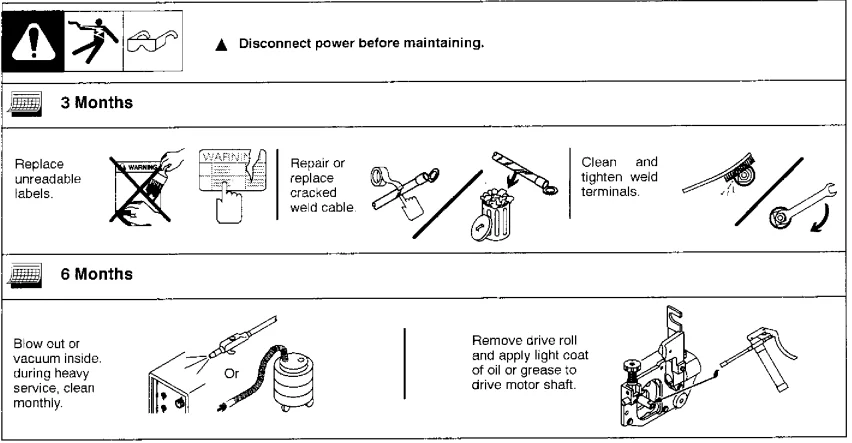
Routine Maintenance
Drive Motor Fuse F1
Turn off the power, unlatch the door, and remove the wrapper.
- Circuit Board PC1
- Fuse F1 (See Parts List For Rating)
If the drive motor is inoperative, pull the fuse from the fuse holder on PC1. Replace the fuse if necessary. To reinstall, push the fuse into the fuse holder. Reinstall the wrapper and latch door.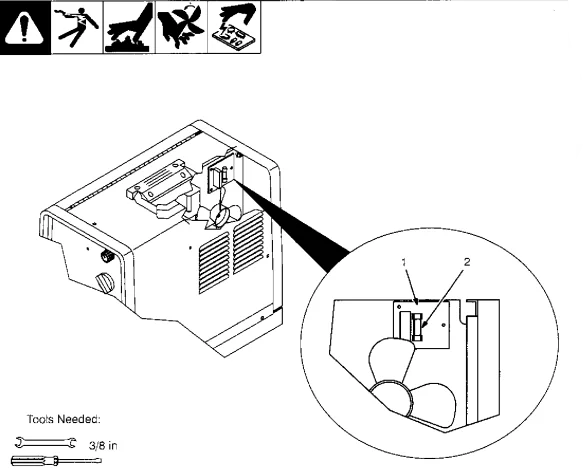
Short Circuit Shutdown
If the contact tip is shorted and sticks to the workpiece, the unit shuts down, but the fan runs. To resume operation, release the gun trigger, turn off the unit, and remove the contact tip from the workpiece. Check the contact tip and replace it if damaged. Turn the On unit on to continue operation.
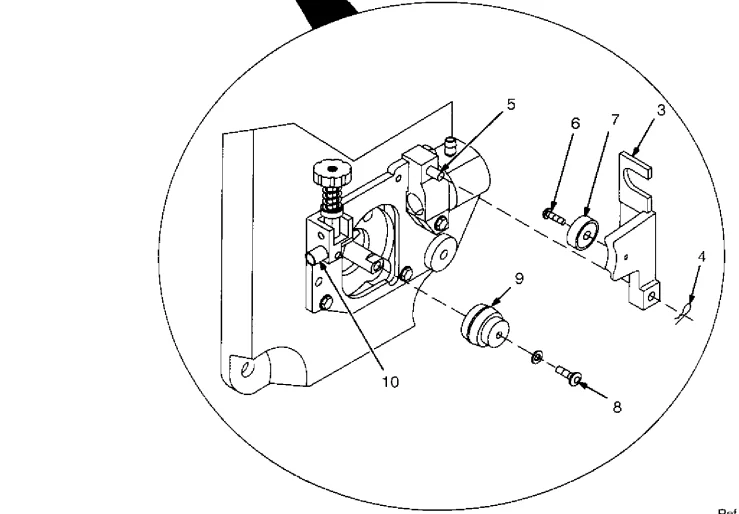
Cleaning or Repairing Drive Assembly
Turn off the power before cleaning or repairing the drive assembly.
- Wire Spool
- Nozzle: Cut the welding wire off at the nozzle. Retract the wire onto the spool and secure.
- Pressure Roll Arm
- Cotter Pin
- Pin
- Screw
- Bearing: Remove bearing. Install a new bearing and secure it with a screw. Reinstall the arm onto the pin and secure with a cotter pin.
- Screw
- Drive Roll: Remove the drive roll. Align the drive roll with the flat spot on the shaft. Slide the drive roll onto the shaft and secure it with a screw.
- Wire Inlet Guide: Remove the guide by pressing on the barbed area or cutting off one end near the housing and pulling it out of the hole. Push the new guide into the hole from the rear until it snaps in place. Close the door.


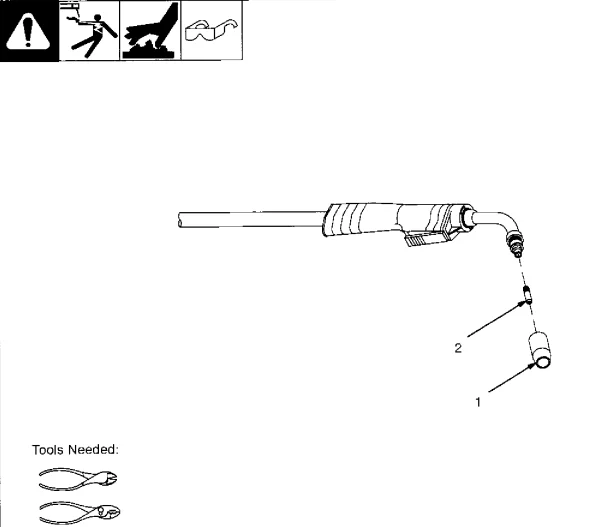
Replacing Gun Contact Tip
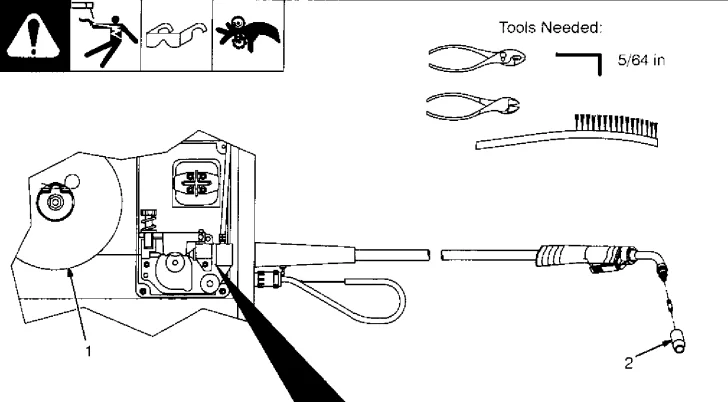
Turn off the power before replacing the contact tip.
- Nozzle
- Contact Tip: Cut off the welding wire at the contact tip. Remove nozzle. Remove the contact tip and install a new contact tip. Reinstall the nozzle.

Cleaning or Replacing Gun Liner
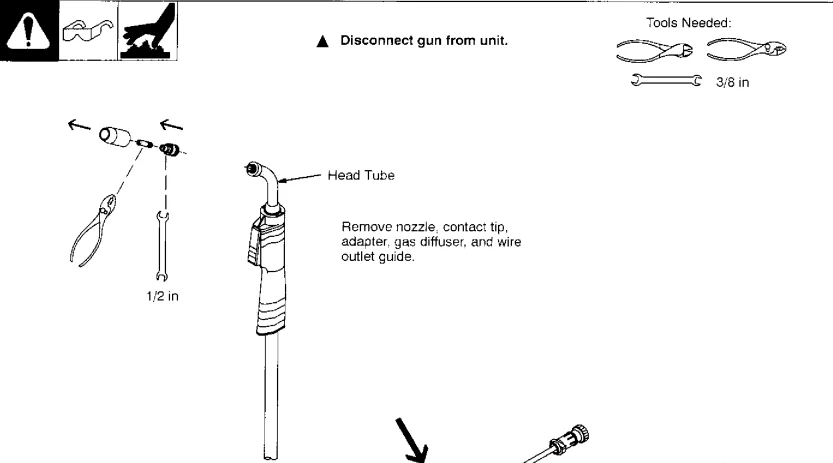
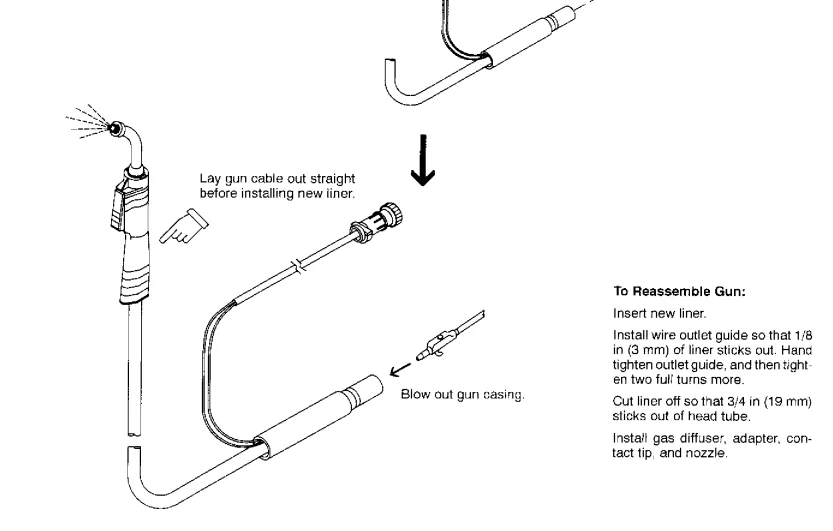
Replacing Switch and/or Head Tube
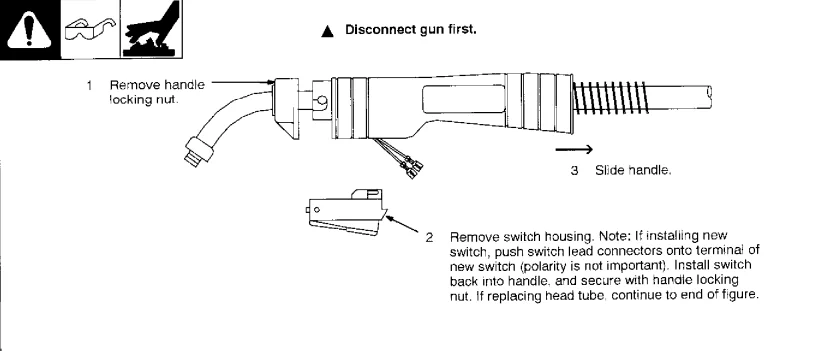
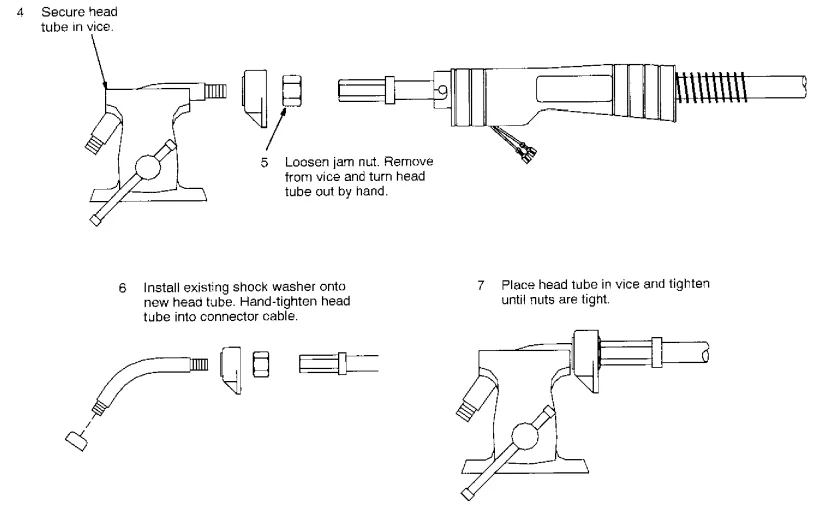
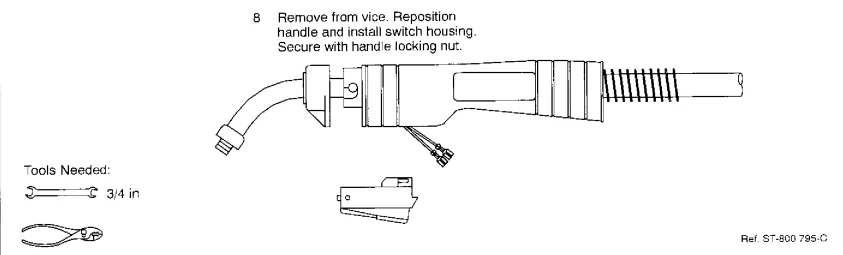
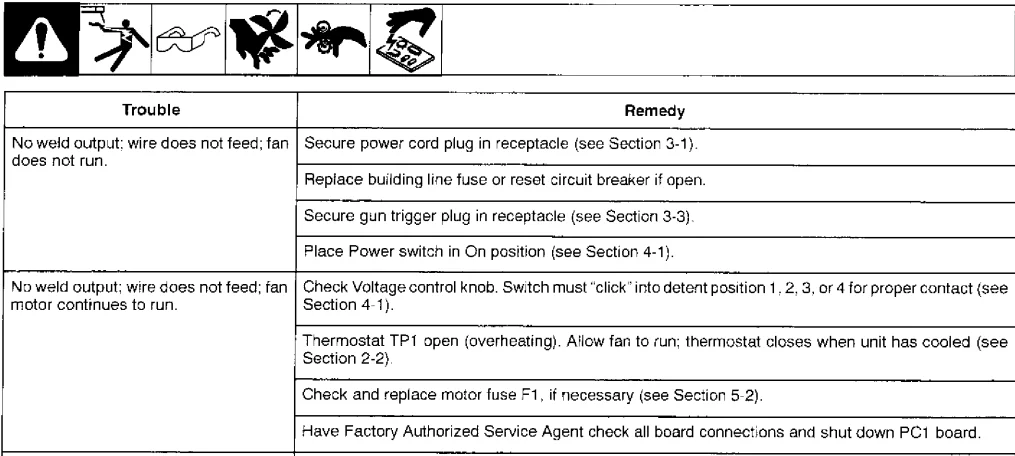
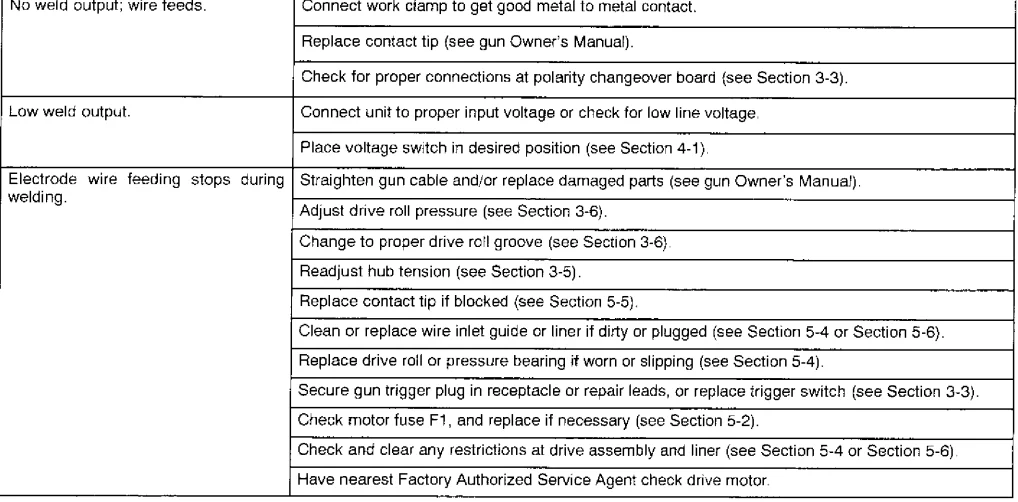
Troubleshooting Table
MIG WELDING (GMAW) GUIDELINES
Typical MIG Process Connections
Welding current can damage electronic parts in vehicles. Disconnect both battery cables before welding on a vehicle. Place the work clamp as close to the weld as possible.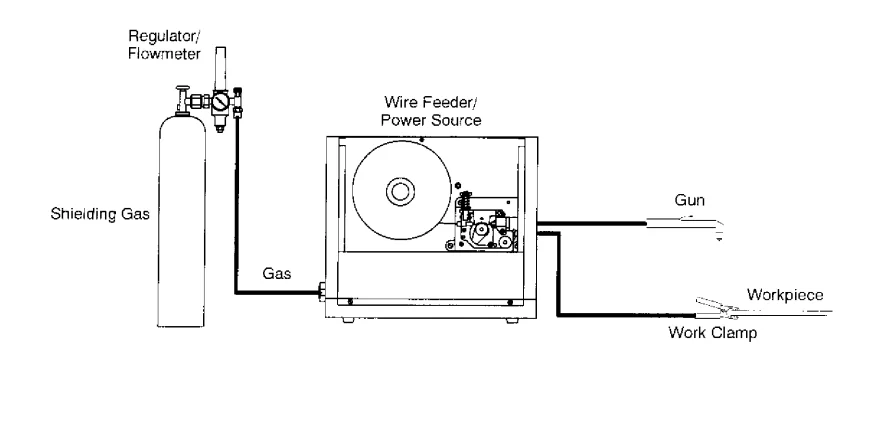
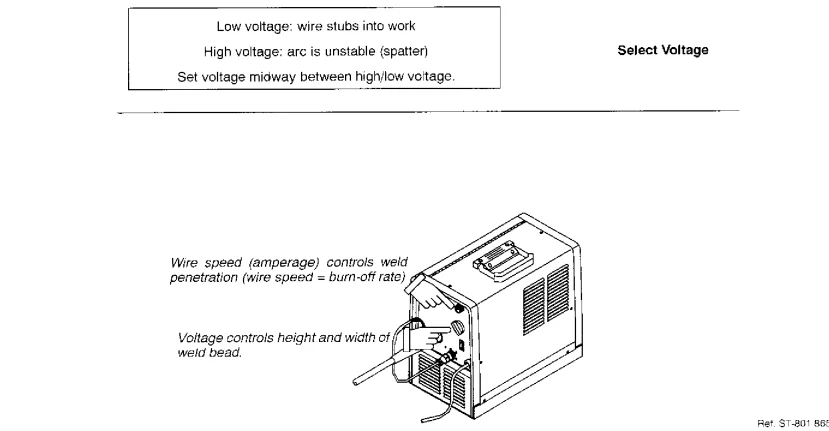
Typical MIG Process Control Settings
Note: These settings are guidelines only. Material and wire type, joint design, fit-up, position, shielding gas, etc., affect settings. Test welds to be sure they comply with specifications.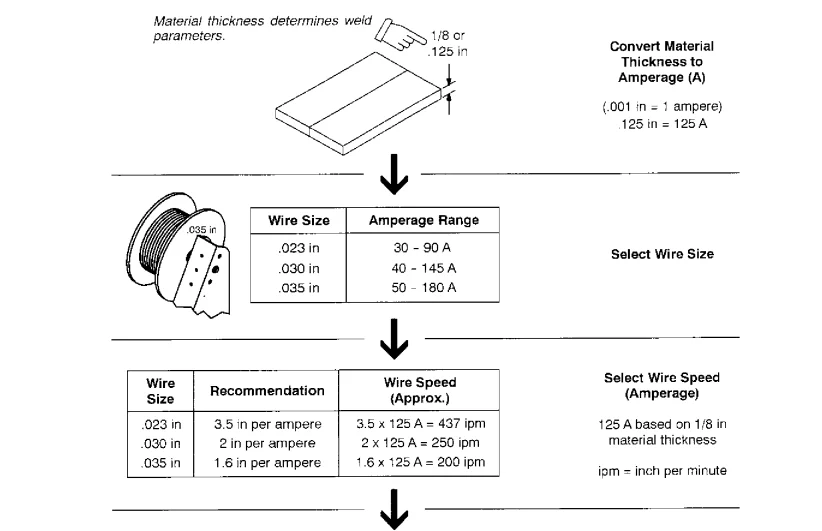
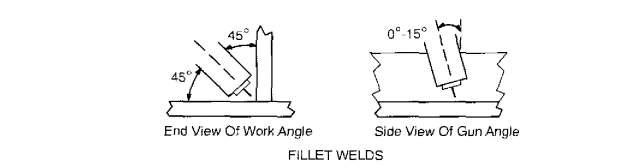
Holding and Positioning the Welding Gun
Note: Welding wire is energized when the gun trigger is pressed. Before lowering the helmet and pressing the trigger, be sure the wire is no more than 1/2 in (13 mm) past the end of the nozzle, and the tip of the wire is positioned correctly on the seam.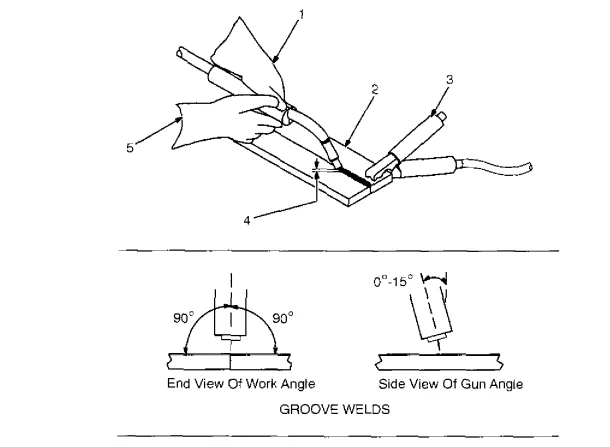
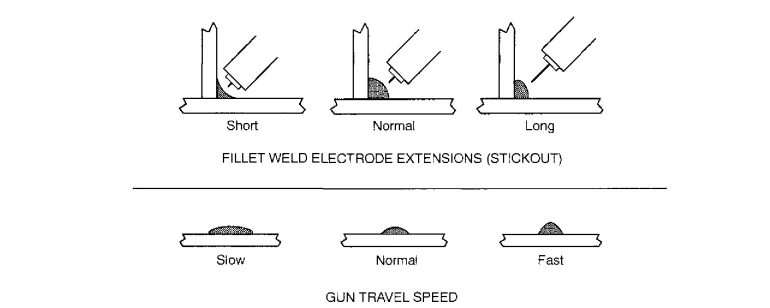
Conditions That Affect Weld Bead Shape
Note: Weld bead shape depends on gun angle, direction of travel, electrode extension (stickout), travel speed, thickness of base metal, wire feed speed (weld current), and voltage.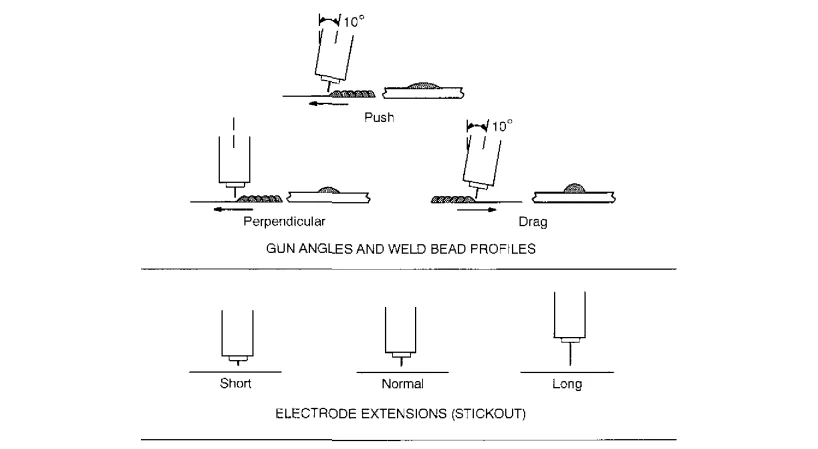
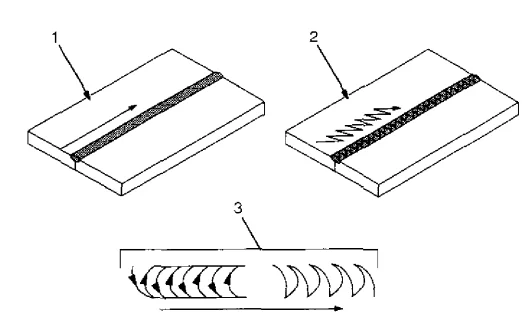
Gun Movement During Welding
Note: Normally, a single stringer bead is satisfactory for most narrow groove weld joints; however, for wide groove weld joints or bridging across gaps, a weave bead or multiple stringer beads work better.
- Stringer Bead – Steady Movement Along Seam
- Weave Bead – Side to Side Movement Along Seam
- Weave Patterns: Use weave patterns to cover a wide area in one pass of the electrode.

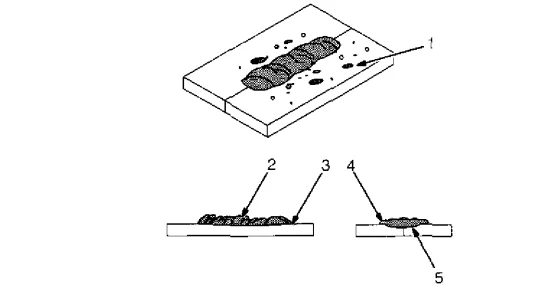
Poor Weld Bead Characteristics
- Large spatter deposits
- Rough, uneven bead
- Slight crater during welding
- Bad overlap
- Poor penetration

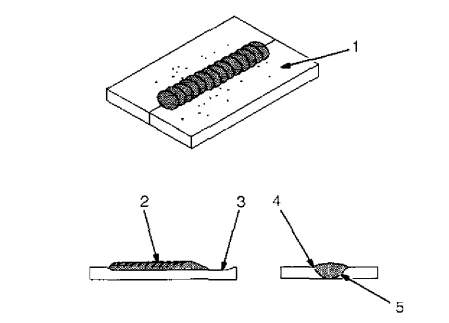
Good Weld Bead Characteristics
- Fine spatter
- Uniform bead
- Moderate crater during welding (weld a new bead or layer for each 1/8 in (3.2 mm) thickness in metals being welded)
- No overlap
- Good penetration into base metal

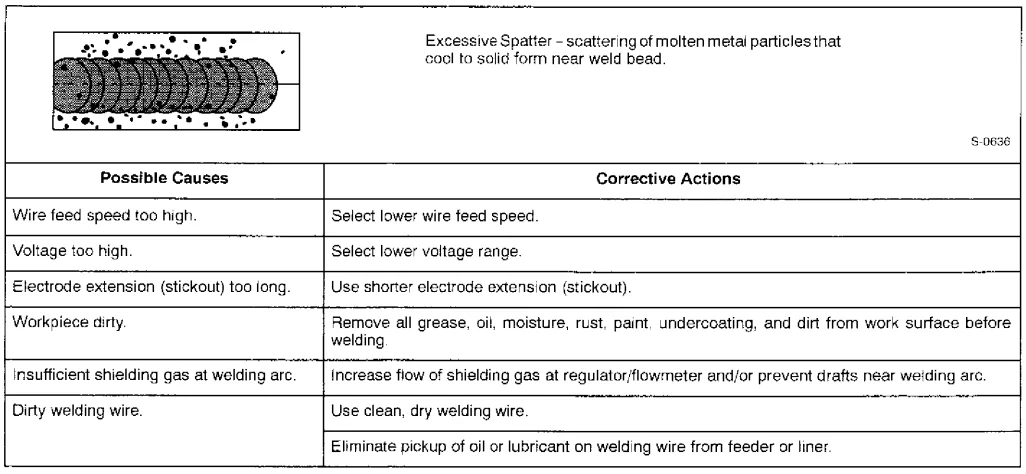
Troubleshooting – Excessive Spatter
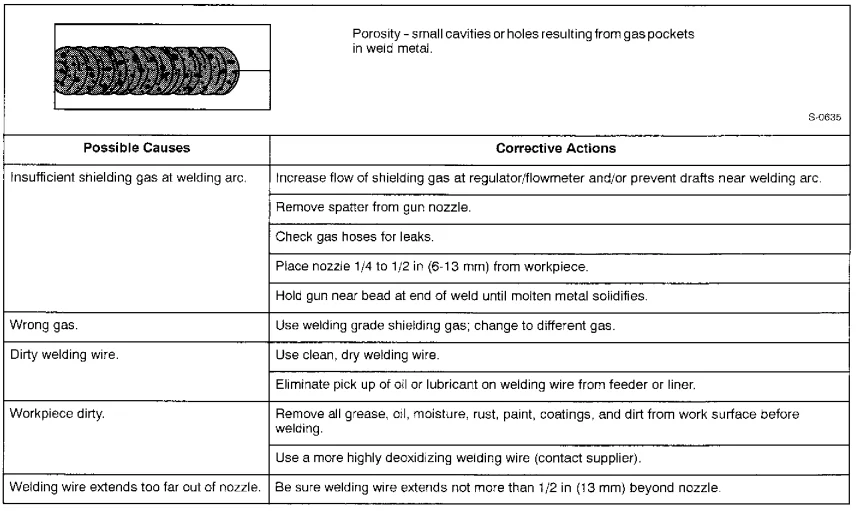
Troubleshooting – Porosity
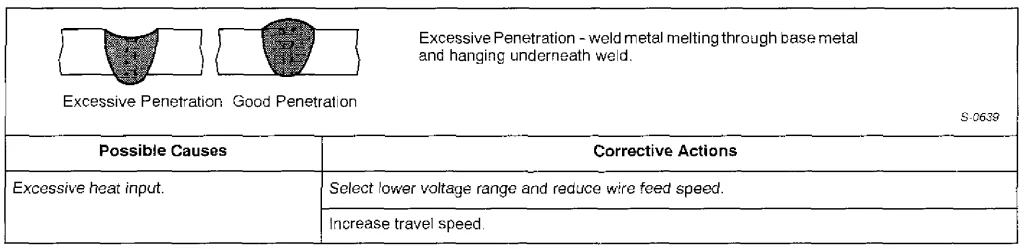
Troubleshooting – Excessive Penetration
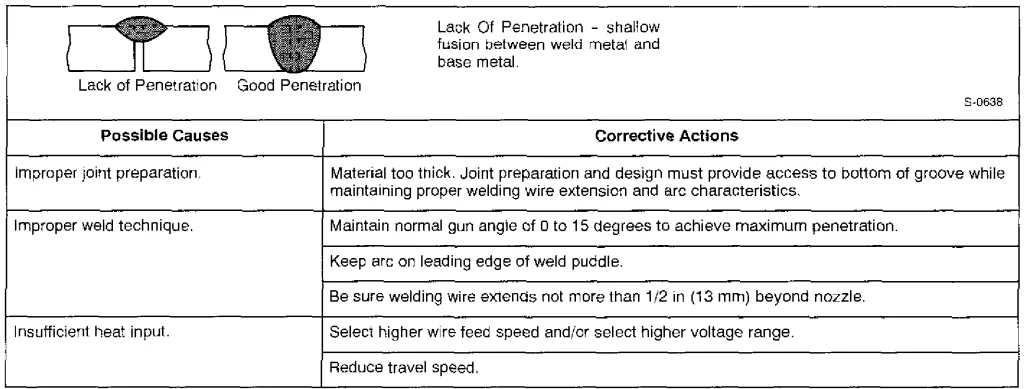
Troubleshooting – Lack of Penetration
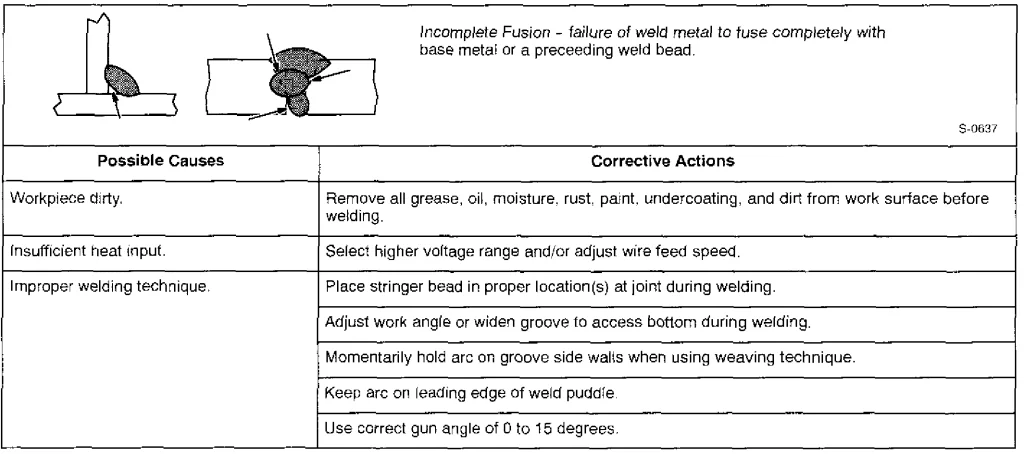
Troubleshooting – Incomplete Fusion
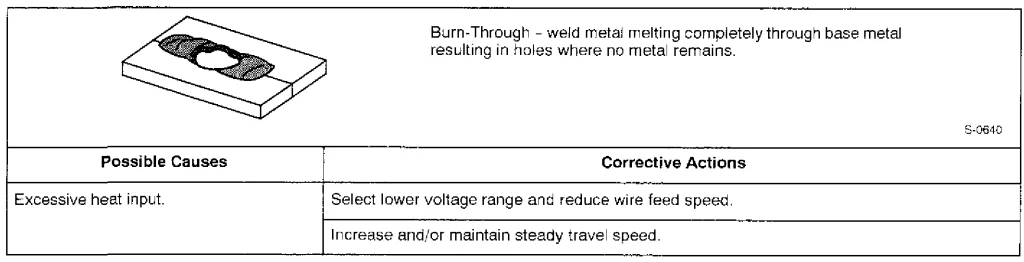
Troubleshooting – Burn-Through
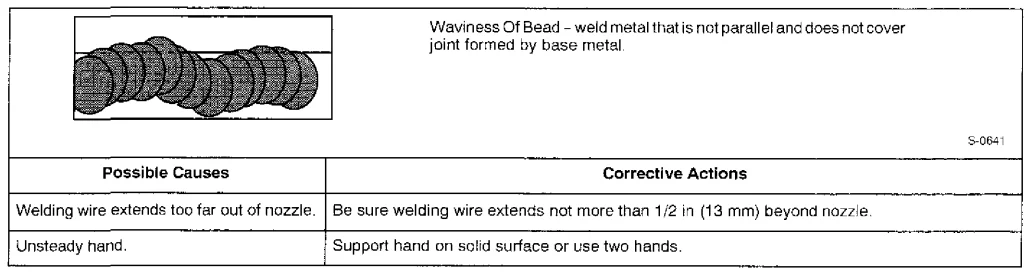
Troubleshooting – Waviness of Bead
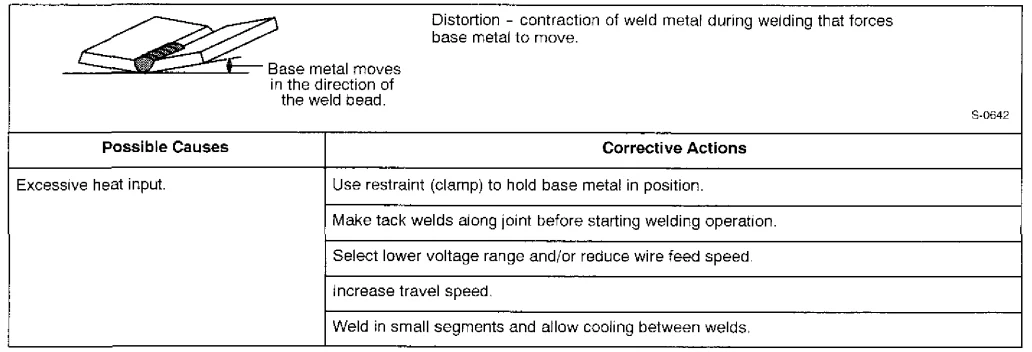
Troubleshooting – Distortion
Common MIG Shielding Gases
This is a general chart for common gases and where they are used. Many different combinations (mixtures) of shielding gases have been developed over the years. The most commonly used shielding gases are listed in the following.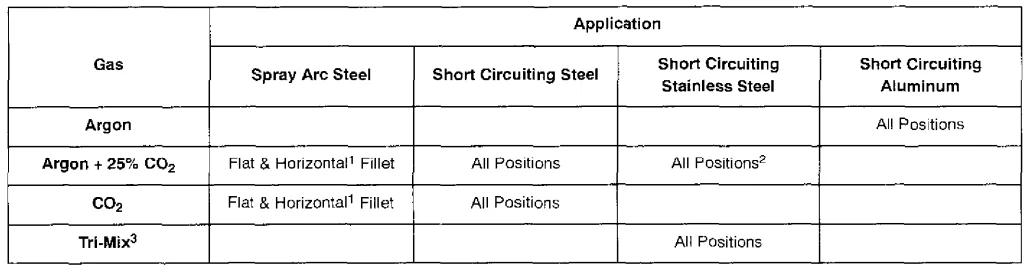
- Globular Transfer
- Single Pass Welding Only
- 90% He + 7-1/2% Ar + 2-1/2% CO₂
For More Manuals By Miller Welding, Visit ManualsLibraryy.
Miller MillerMatic 130XP Welding Machine-FAQs
1. What voltage does the Millermatic 130XP use?
It operates on 115 volts single-phase power.
2. What materials can it weld and how thick?
It can weld mild steel, aluminum, and stainless steel up to 6 mm thick.
3. What are the main benefits of using a Miller welder?
Miller welders produce clean, high-quality welds with minimal smoke, sparks, or spatter. They are precise and ideal for projects where appearance matters.
4. What is the duty cycle of the Millermatic 130XP?
130 amps at 20% duty cycle for MIG welding.
5. How much power is required to run it on a generator?
A 6 kVA generator is recommended for reliable operation.
6. How heavy is the Millermatic 130XP?
It weighs approximately 27 lbs (12.25 kg), making it portable.
7. What welding positions can it handle?
It supports flat, horizontal, vertical, and overhead positions, suitable for 1G to 4G welds.
8. Can it be used for professional high-paying welding jobs?
Yes, skilled welders using machines like the Millermatic 130XP can earn high salaries, especially in specialized industries.
9. Which is better: Miller or Lincoln welders?
Both are top brands, but Miller welders are often preferred for clean, precise MIG and TIG welding.
10. Can you use 100% argon for MIG welding?
Yes, 100% argon is recommended for aluminum MIG welding.