
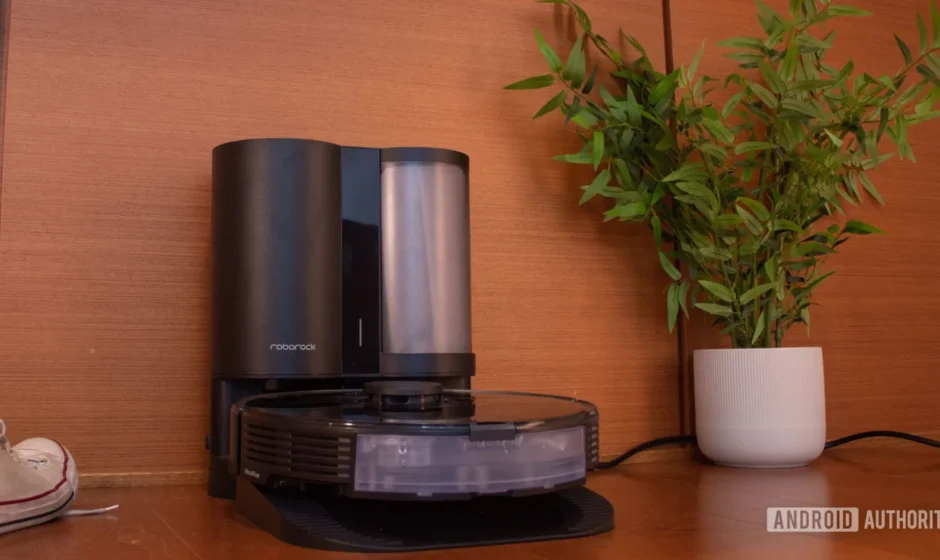

Roborock Auto-Empty Dock Pure
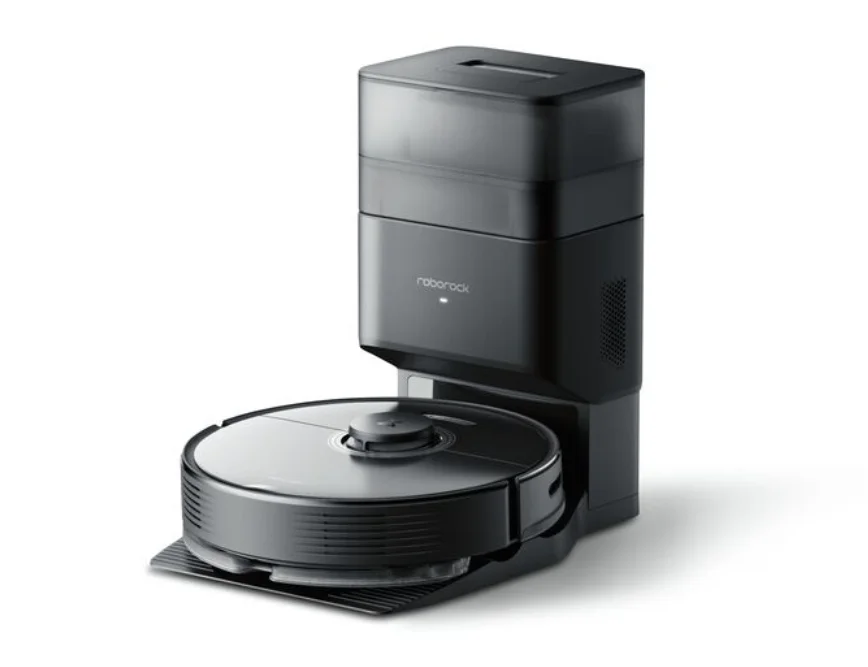
Safety Information
Restrictions
- This product is designed for indoor use only; do not use it outdoors (such as on an open-ended terrace), on any surface other than the ground (such as a sofa), or in any commercial or industrial environment.
- The product must be switched off, and the plug removed from the socket outlet before cleaning or maintenance.
- Do not place any object near the suction inlet of the dock.
- Do not put fingers into the seam of the dock to avoid possible injury.
- Do not operate the product in a room where an infant or child is sleeping.
- Do not carry the product using the dock base or dustbin.
- Make sure the robot is compatible with the dock, emptying or charging may fail.
- Do not use the product to clean hard or sharp objects (such as decoration wastes, glass and nails).
- This product is not intended for use by persons (including children) with reduced physical, sensory or mental capabilities, or a lack of experience and knowledge, unless they have been given supervision or instruction concerning use of the product by a person responsible for their safety (CB).
- This product can be used by children aged 8 years and above and persons with reduced physical, sensory or mental capabilities or lack of experience and knowledge if they have been given supervision or instruction concerning the use of the product in a safe way and understand the hazards involved. Children shall not play with the product. Cleaning and user maintenance shall not be made by children without supervision (EU).
- Children should be supervised to ensure that they do not play with the appliance.
- Do not use the dock to pick up stones, paper scraps, or other objects that may block the air duct. If the air duct gets blocked, clean it
immediately. - Do not use the product when the ambient temperature is higher than 40°C (104°F) or lower than 4°C (39°F).
- Place the dock on a flat floor away from fire, heat, and water. Avoid narrow spaces or locations where the robot may be suspended in the air.
- Do not place any object (including children and pets) on the dock or cover it with any item (including a dust-proof cover), whether it is in
operation or not. - Do not pick up anything that is burning or smoking, such as cigarettes, matches, or hot ashes.
- Do not use the dock to pick up flammable or explosive objects such as firelighters, gasoline, or toner used in printers or copiers.
Battery and Charging
WARNING
- Do not charge non-rechargeable batteries.
- To avoid a hazard due to inadvertent resetting of the thermal cut-out, this appliance must not be supplied through an external switching device, such as a timer, or connected to a circuit that is regularly switched on and off by the utility.
- Be sure that the supply voltage meets the requirements listed on the dock.
- Only use the power cable provided with the product to prevent potential smoke, heat or fire.
- Do not use the product with any type of power adapter, as this may cause danger and void the warranty.
- Do not dismantle, repair or modify the battery or charging dock.
- Do not wipe the charging contacts with a wet cloth or wet hands.
- If the power cord is damaged, stop using it immediately. It must be replaced by the manufacturer, its service agent, or similarly qualified persons to avoid a hazard.
- If the dock is placed in an area susceptible to thunderstorms or with unstable voltage, take protective measures.
- Use of the original packaging for transportation is advised.
- Unplug the power cable before placing the dock into storage.
Accessories
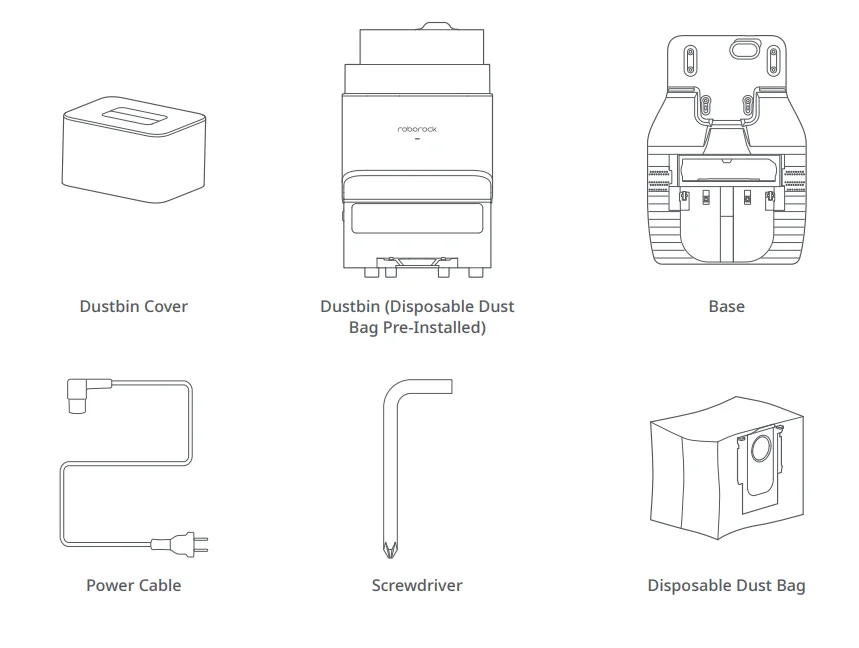
Product Introduction
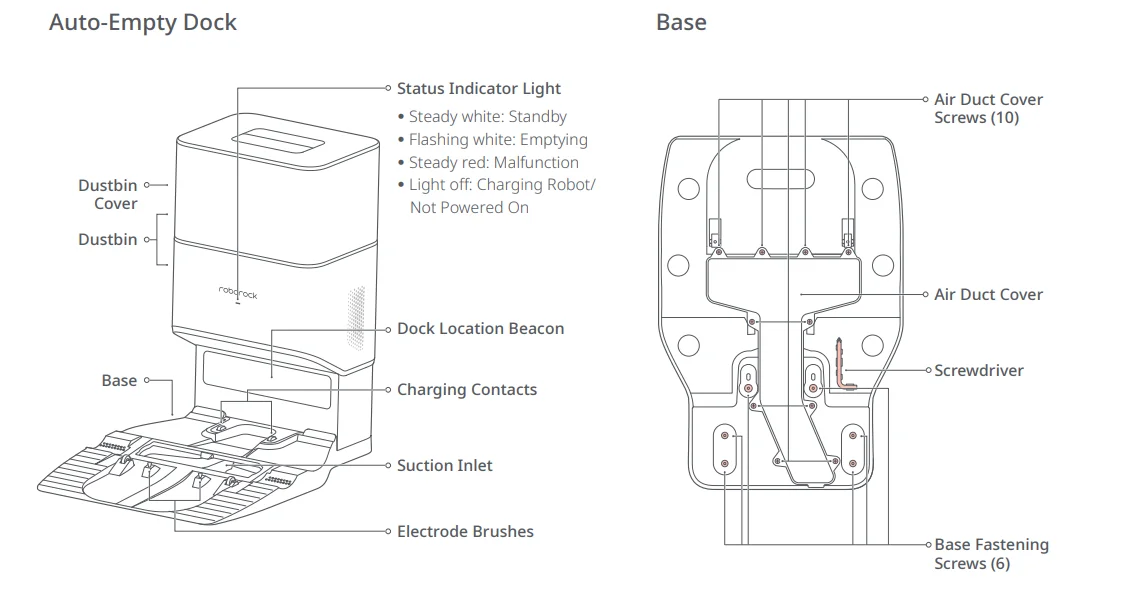
Power Cable Storage
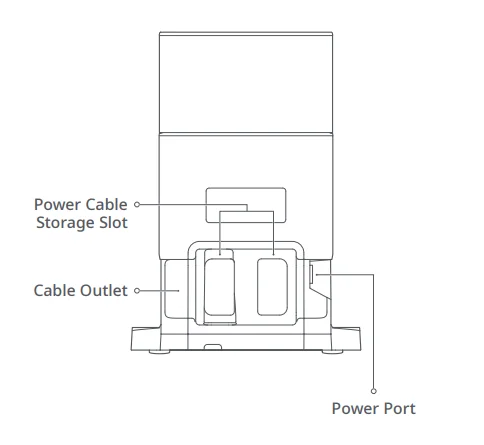
Note: The power cable can be pulled out at both sides.
Auto-Empty Dock (Cover Removed)
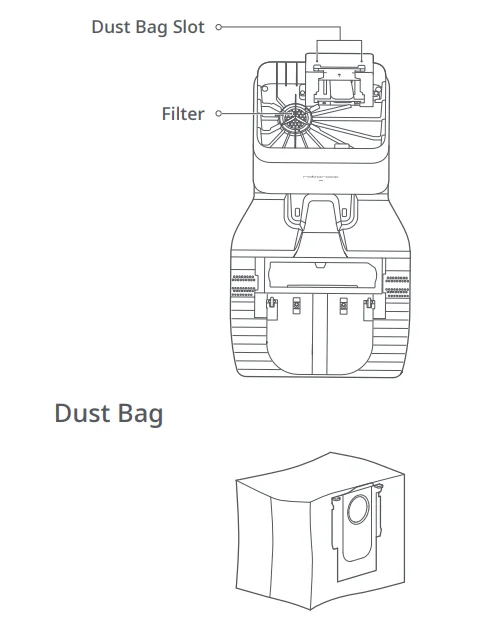
Getting Started
Assembly
- Take the screwdriver from its storage bin at the bottom of the base.

- Place the dock upside down on a soft, flat surface (carpet/towel/cloth) and attach the base by using the six screws provided.
 Note: Hold the dustbin cover securely when upside down to prevent damage from falling.
 - Connect the power cable to the dock, and keep the excess cable inside the storage slot.

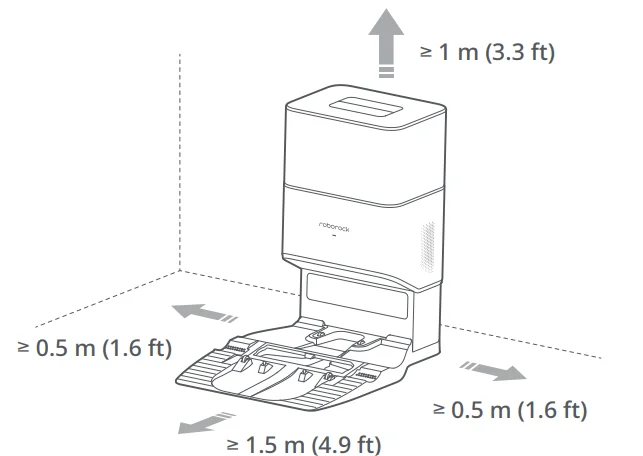
- Place the dock on a hard and flat floor (wood/tile/concrete, etc.). Keep at least 0.5 m (1.6 ft) of clearance on either side, 1.5 m (4.9 ft) in front, and 1 m (3.3 ft) above. Check the location has good Wi-Fi, then plug it in.

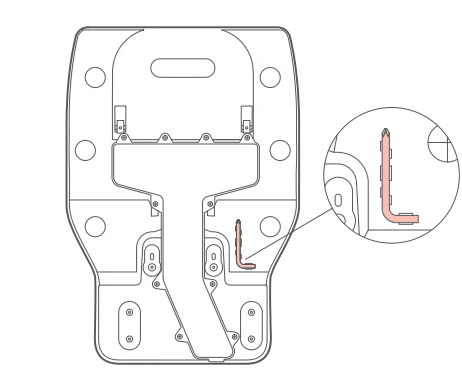
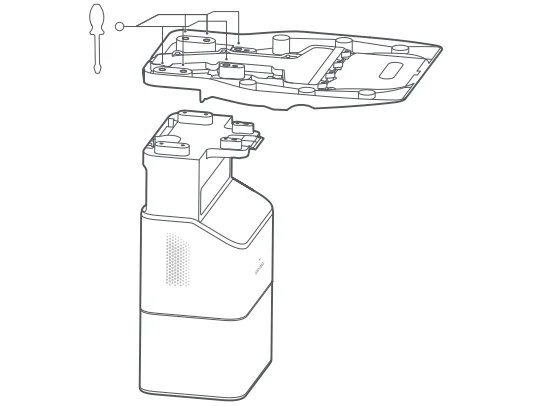 Note: Hold the dustbin cover securely when upside down to prevent damage from falling.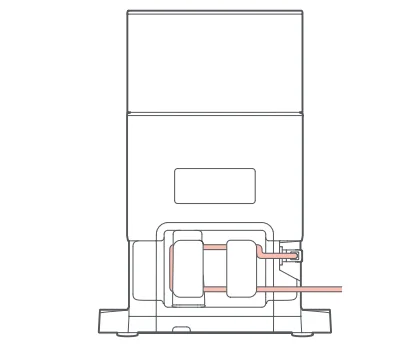
Emptying
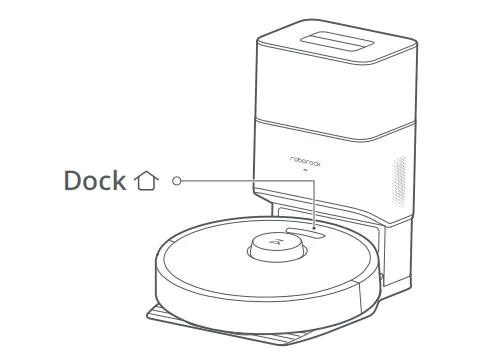
Auto-emptying will begin when the robot returns to the dock after cleaning. Press the Dock button to trigger emptying manually. Press any button to stop emptying.
Notes:
- The status indicator light turns off automatically when the robot is charging.
- Do not use without a dustbin cover or dust bag.
- Place the dock on a flat floor away from fire, heat, and water. Avoid narrow spaces or locations where the robot may be suspended in the air.
- Placing the dock on a soft surface (carpet/mat) may cause the dock to tilt over and cause problems docking and departing.
- Keep the excess power cable inside the storage slot so that the robot will not get tangled in the cables, and the dock will not be dragged away or disconnected from the power supply.
- Keep the dock away from direct sunlight or anything that may block the dock location beacon; otherwise, the robot may fail to return to the dock.
- The Auto-Empty Dock recharges and empties. Store the standard robot dock before use. Failure to do so may cause issues returning to the dock.
- Maintain the dock according to the maintenance instructions. Do not clean the dock with a wet cloth.
- Avoid frequent manual emptying.
- Images are for illustration purposes only and may not exactly represent the product.
Routine Maintenance
Dust Bag Replacement
* Replace as needed
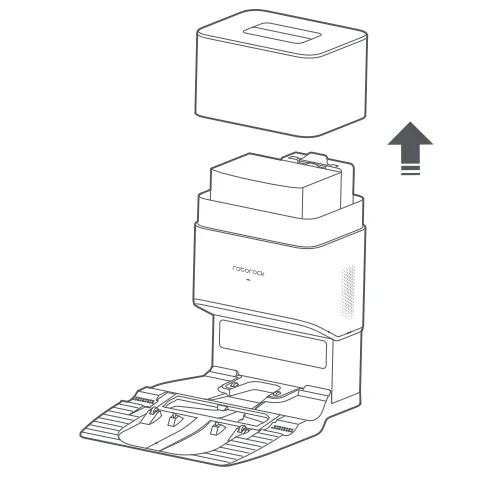
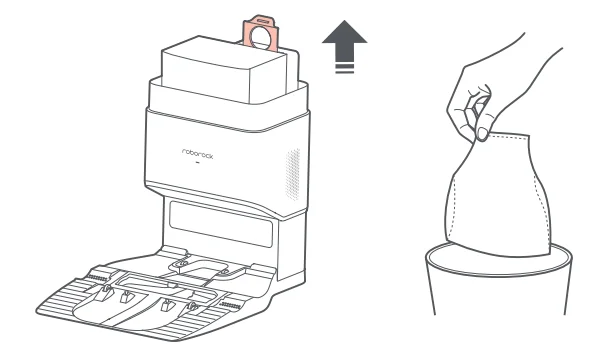
- Remove the dustbin cover vertically as shown.

- Lift the dust bag out of the dustbin and discard it.
 Note: The dust bag handle seals the bag on removal to prevent dust leakage.
 - Clean the filter with a dry cloth.

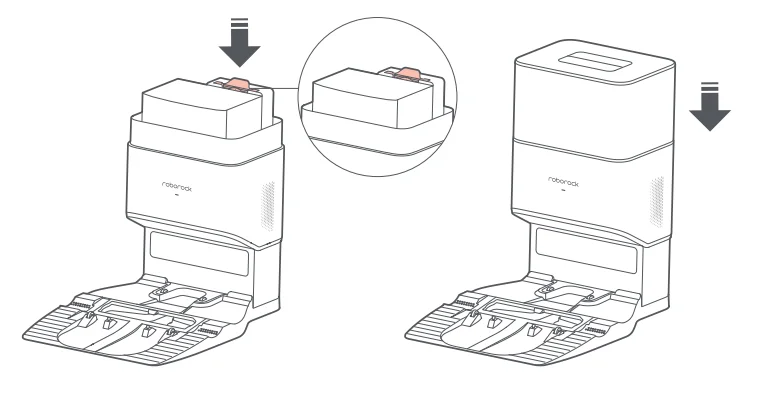
- Install a new dust bag in place along the slot and put the dustbin cover back.

 Note: The dust bag handle seals the bag on removal to prevent dust leakage.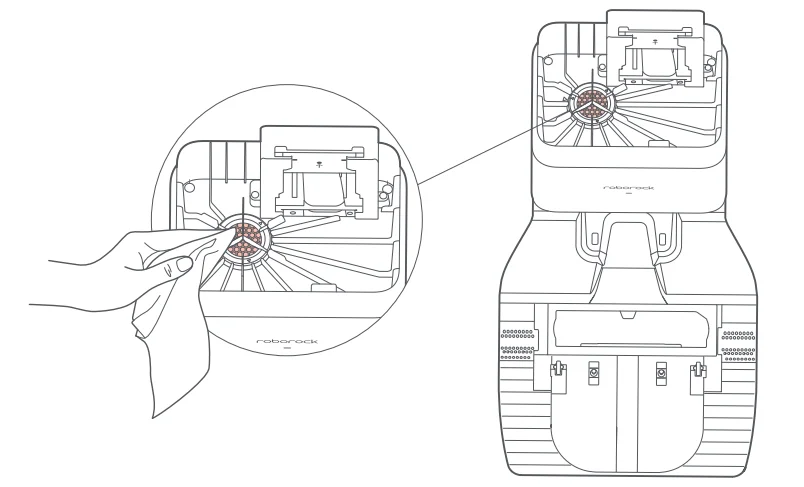
Air Duct
* Clean as needed
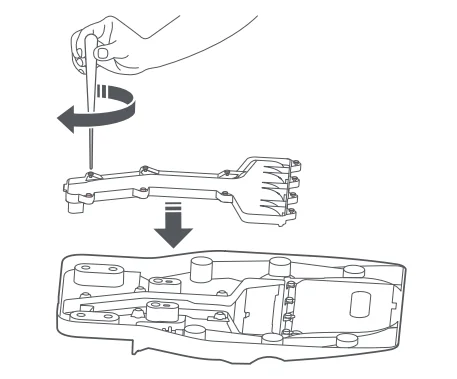
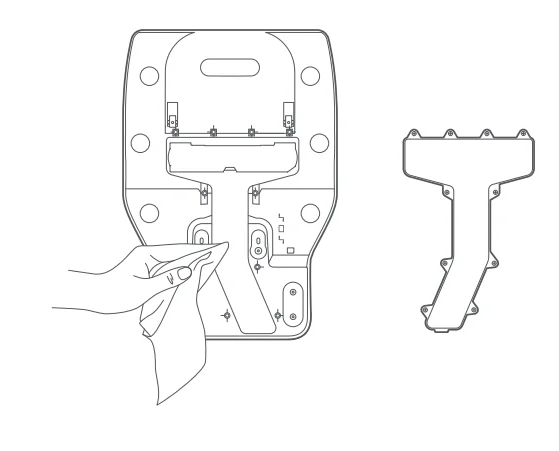
- Unscrew the screws (10) and remove the cover.

- Wipe the air duct and cover with a dry cloth.

- Reinstall the cover and screw it back in place.
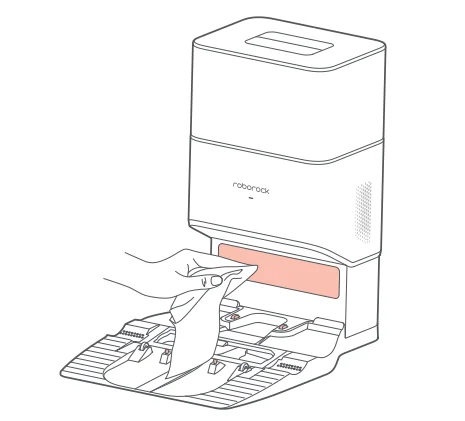
Charging Area Cleaning
Clean the dock location beacon, charging contacts, and electrode brushes with a dry cloth.
* Clean as needed
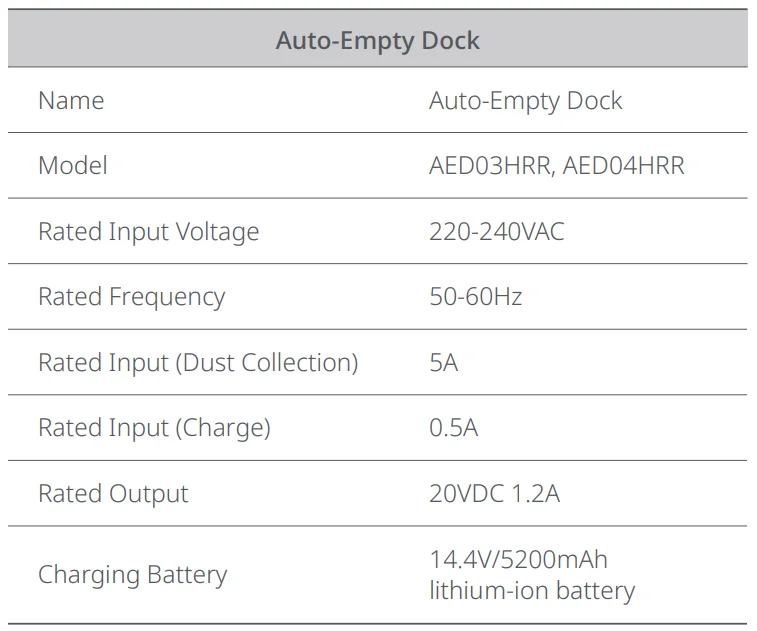
Basic Parameters
FAQs & Troubleshooting
Operating conditions are indicated by the LED status indicator light on the dock.
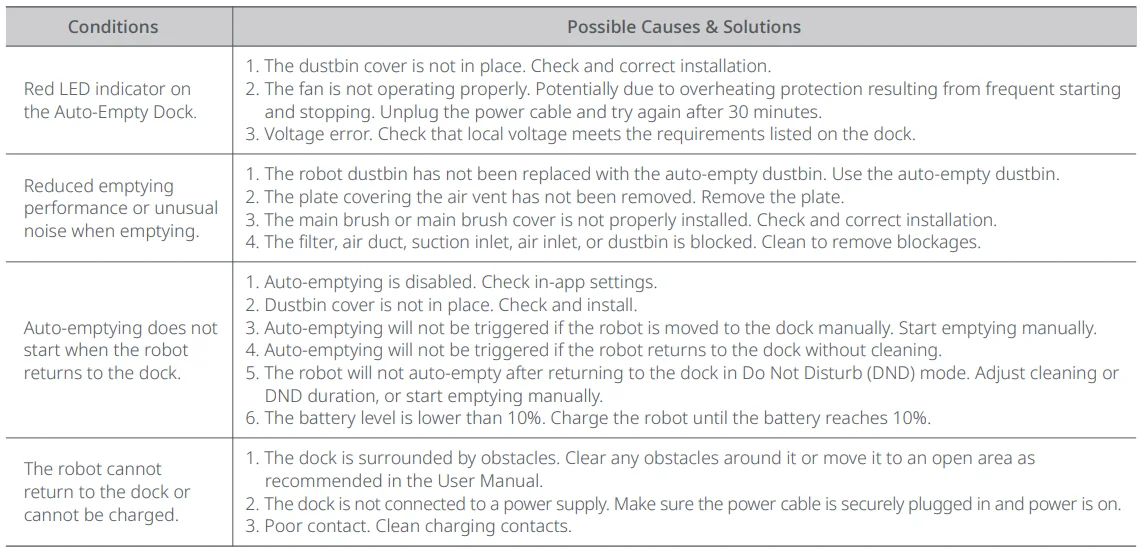
If the problem persists after using the recommendations in the table above, email our after-sales service team:
Europe Support: [email protected]
Australia Support: [email protected]
EU Declaration of Conformity
We, Beijing Roborock Technology Co., Ltd., hereby declare that this equipment complies with the applicable Directives and European Norms and amendments. The full text of the EU declaration of conformity is available at the following internet address: https://global.roborock.com/pages/compliance
WEEE Information
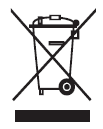
Correct Disposal of this product. This marking indicates that this product should not be disposed of with other household wastes throughout the EU. To prevent possible harm to the environment or human health from uncontrolled waste disposal, recycle it responsibly to promote the sustainable reuse of material resources. To return your used device, please use the return and collection systems or contact the retailer where the product was purchased. They can take this product for environmentally safe recycling.
Warranty Information
The warranty period depends on the laws of the country in which the product is sold, and the warranty is the responsibility of the seller. The warranty only covers defects in material or workmanship. The repairs under warranty may only be carried out by an authorised service centre. When making a claim under the warranty, the original bill of purchase (with purchase date) must be submitted.
The warranty will not apply in cases of:
- Normal wear and tear.
- Incorrect use, e.g. overloading of the appliance, use of non-approved accessories, or use of force.
- Damage caused by external influences.
- Damage caused by non-observance of the user manual, e.g. connection to an unsuitable mains supply or non-compliance with the installation instructions.
- Partially or completely dismantled appliances.
For more manuals by Roborock, visit ManualsLibraryy
Roborock Auto-Empty Dock Pure- FAQs
What does the Roborock Auto-Empty Dock Pure do?
The Roborock Auto-Empty Dock Pure automatically empties the dustbin of your robot vacuum into a larger dust bag after each cleaning session. This reduces the need for frequent manual emptying and helps maintain consistent suction performance. It is designed to improve convenience, especially for users who want a more hands-free cleaning experience with minimal daily maintenance.
Which Roborock models are compatible with this dock?
The dock is compatible with selected Roborock models such as the S7, S7+, and some Q-series variants that support auto-empty functionality. However, compatibility may vary depending on the model and region. Always check your vacuum’s specifications before purchasing to ensure it supports an auto-empty dock feature.
How often do I need to replace the dust bag?
The dust bag typically lasts 4–8 weeks, depending on usage, home size, and the amount of dirt collected. Homes with pets or heavy debris may require more frequent replacements. Regularly checking the bag helps prevent overfilling and ensures optimal suction and hygiene.
Is the Auto-Empty Dock Pure noisy during operation?
Yes, the dock produces a noticeable noise when it empties the dustbin, similar to a short burst from a traditional vacuum. However, the process usually lasts only a few seconds. The noise level is normal and expected due to the powerful suction required to transfer debris into the dust bag.
What are common issues with the auto-empty dock?
Some users may experience issues like clogging, incomplete emptying, or error notifications. These problems are often caused by blockages in the airflow path, overfilled dust bags, or improper installation. Regular cleaning and proper maintenance can help avoid most of these issues.
Can I use the dock without an internet connection?
Yes, the dock works with the robot vacuum even without Wi-Fi. Basic cleaning and auto-empty functions operate normally. However, connecting to the app unlocks advanced features like scheduling, suction control, and cleaning history, offering a more customized experience.
Does the dock require special maintenance?
Yes, basic maintenance is required to keep the dock functioning properly. This includes replacing dust bags, cleaning filters, and checking for blockages in the air channels. Performing routine maintenance ensures efficient operation and extends the lifespan of both the dock and the vacuum.
What are the disadvantages of using an auto-empty dock?
While convenient, the dock adds extra cost and requires ongoing purchases of dust bags. It also takes up more space than a standard charging dock. Additionally, the emptying process can be noisy, which may be inconvenient in quiet environments or at night.
Can I use regular vacuum bags with the dock?
It is recommended to use only compatible or official dust bags designed for the dock. Using non-compatible bags may lead to poor sealing, reduced suction, or potential damage. Properly fitted bags ensure efficient dust collection and help maintain hygiene.
How long does a Roborock system typically last?
A Roborock vacuum system, including the dock, generally lasts 4–6 years with proper care. Battery performance, usage frequency, and maintenance habits all influence lifespan. Regular cleaning, timely part replacement, and correct usage can significantly extend the overall durability.