
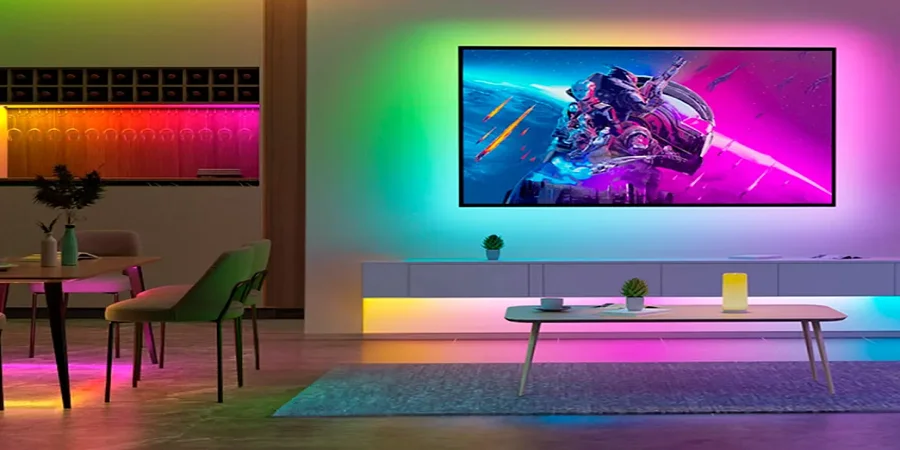

Rockville ROCKSTRIP 252 DMX-RGB Color LED
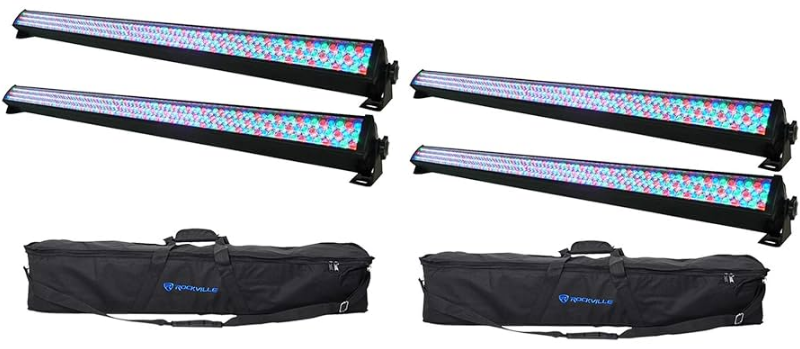
Includes
- ROCKSTRIP 252
- 2x tall mounting brackets
- 2x short mounting brackets
- Power cord
- owner’s manual
- warranty
IMPORTANT SAFETY INSTRUCTIONS
NO USER SERVICEABLE PARTS INSIDE. WE RECOMMEND TAKING THE UNIT TO A QUALIFIED SERVICE TECHNICIAN FOR ANY REPAIRS.
- To reduce the risk of electric shock, never open the unit. There are no user serviceable parts; refer service to an authorized Rockville service center.
- Avoid looking directly into the lights.
- Do not expose this unit to any kind of moisture.
- The product’s housing may become hot during operation. Do not touch.
- Please ensure that the unit is situated in a properly ventilated area. Allow at least 20 inches between this device and a wall.
- Do not attempt to operate this unit if the power cord has frayed or broken.
- Do not attempt to break off or remove the ground prong. This prong is used to reduce the risk of electrical shock and fire in case of an internal short.
- Never plug this unit into a dimmer pack.
- Do not operate this unit if it is damaged.
- This unit is intended for indoor use only.
- During long periods of non-use, disconnect the unit from the power source.
- Always mount this unit in a safe and stable manner.
- Power supply cords should be routed so that they are not likely to be walked on or pinched by items placed upon or against them, paying particular attention to the point of exit from the unit.
- To avoid unnecessary wear and to improve the unit’s lifespan, unplug the unit when not in use for extended periods of time.
- When choosing a location for your device, make sure to avoid impact, vibration, dust, hot and cold temperatures, and dampness. Furthermore, no powerful transformers or motors must be used close to the device.
- The effect light must only be operated at a maximum ambient temperature of 104° Fahrenheit (40 °C).
- Never cover the device. Make sure when mounting with other equipment that there is sufficient ventilation. Maintain a sufficient distance from other devices and walls. Never install the effect light in direct proximity to heat sources. Do not point any strong spotlights or light sources towards the device. This may cause overheating (danger of fire!).
- Do not drill or screw additional screws into the casing to fasten the device.
- The device must be mounted out of normal reach.
- Illuminated objects must be at least 0.5 m away from the device’s light emission source. Easily flammable materials, such as decorative fabric, must also have a distance of at least 0.5 m to the device. Otherwise, such objects may catch fire!
- When mounting the product, make sure that the power cord is neither jammed nor damaged by sharp edges.
- During installation or service work, the area below the place of installation must be cordoned off.
- The installation surface or mounting fixture needs to be designed in a way that it ccan withstand10 times its load capacity for at least 1 hour without permanent damage or deformation.
- It is also essential that the device is secured by means of a second safety restraint that is independent of the actual mounting supports when installing it in an elevated position. No part of the installation must fall if the main suspension system fails.
- Observe all relevant regulations of your country when installing the device.
- Please keep the lenses out of direct sunlight, as it can cause heatbuildupd up which will cause serious damage to the unit.
ATTENTION
If using a 220V/50Hz power supply, do not connect more than 14 units in series. Be sure to use a separate power supply for any additional units. If using a 110/60Hz power supply, do not connect more than 9 units in series. Be sure to use a separate power supply for any additional units.
Functions
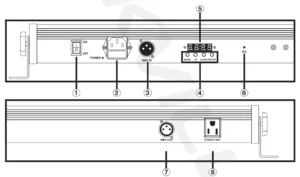
- Power switch
- Powerinn the socket w/user serviceable fuse
- DMXin
- Controls: Menu – Press repeatedly to see mode options
- Up – Scroll up through settings
- Down – Scroll down through settings
- Enter – Enter submenu
- Digital display
- Infrared remote control sensor
- DMXout
- Power out
Remote
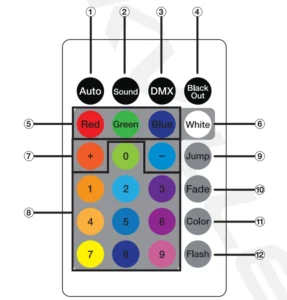
- AUTO: Chase mode, cycle through chases 1 – 8.
- SOUND: Press to activate sound mode.
- Use +/- to select sound mode A or B.
- OMX: Select OMX address. Press for 2 seconds to set the address to 001. Use +/- to cycle through OMX addresses/channels.
- BLACK OUT: Turns all lights off.
- RED, GREEN, BLUE: Turns on the corresponding light.
- WHITE: Turns on all lights.
- +/-: Increase or decrease chase speed, OMX address, sound mode, and strobe speed.
- Number pad: Use to directly select chase mode or sound mode.
- JUMP: Press repeatedly to select chases 1 – 8.
- FADE: Activate/deactivate color fade mode.
- COLOR: Press to cycle through 7 preset colors.
- FLASH: Activate/deactivate strobe function. UUse- to adjust strobe speed.
Please note:
- Strobe fufunctions only available when the color is set to red, green, blue, or white.
- In OMX mode, you can quickly change the OMX address by long pressing the/-.
Installation
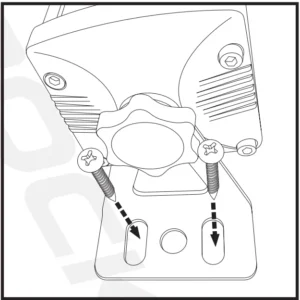
For floor or wall installation, use the appropriate type of screws and anchors, if necessary, to secure the fixture to the mounting surface.
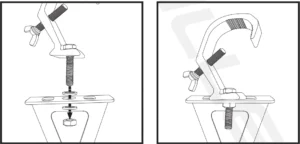
If the fixture is being hung from a truss, use a mounting clamp. Secure the mounting clamp to the fixture as shown below. Please note, your mounting clamp may differ from the one in the illustration. Refer to your clamp’s manual for mounting instructions.
Operation
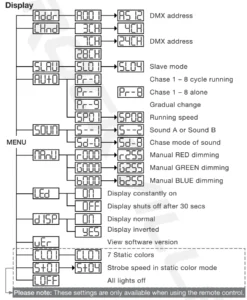
Use the MENU button to enter the settings menu. Use the UP and DOWN buttons to select the desired setting and set titsvalues. Press the ENTER button to save your selection. Press MENU to exit.
Display
Operating Modes
DMXMode
The ROCKSTRIP 252 can be controlled via any DMX controller. Simply link the fixture to your DMX controller, program a chase, and then run the chase. You can also daisy chain multiple units. When you run a chase, the units will automatically be set to the appropriate DMX channel. If you are using multiple fixtures and you want independent control of each fixture, set them 4 DMX channels apart, like the example below:

Master/Slave Mode
In this mod,e you can link up to 16 fixtures together via the DMX IN/DMX OUT ports. The first fixture will control all the other fixtur,es which will automatically switch to slave mode. Any fixture can act as a master fixture.
DMX Controller Function
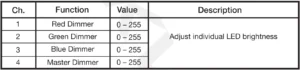
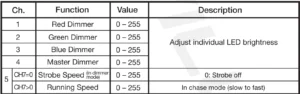
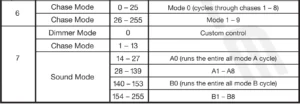
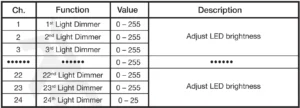
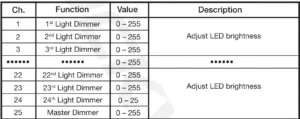
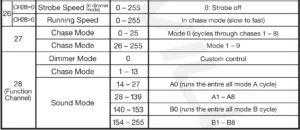
When using a DMX controller, use the chart below to reference each channel’s function.
3 Channel Mode

4 Channel Mode
7 Channel Mode
24 Channel Mode
28 Channel Mode
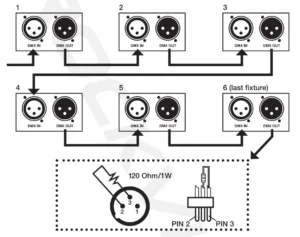
DMX Termination (Optional)
The last fixture anf a OMX chain has to be “terminated”. This prevents electrical noise from disturbing and corrupting the OMX control signals. To terminate the last fix,ture solder a 1/4 Watt, 120 Ohm resistor across the DATA – and DATA+ wires. The connections are illustrated below. If you are only connecting a few fixtthatwhich are close together and use a short run to the controller, you may be able to operate without a terminator.
Features and Specifications
- 252 briLEDsED’s
- Static colors and RGB color mixing with or without OMX controller
- LED’s: 84 red + 84 green + 84 blue
- Built-in automated programs
- Master/slave controls allow you to link multiple lights to clone the same program
- Additional power output to link multiple lights together easily (up to 9 @ 11 OV, up to 14 @ 220V)
- High speed color changer 1 – 13Hz (one of the fastest speeds on the market)
- Bulb Life: 100,000 houof rs life
- Red, green, and blue LEDs (RGB)
- Dimmer: 0 -100%
- Strobe with adjustable speed
- Lights can operate safely without overheating for months straight!
- Control: Standard DMX-512 controls with 4 or 5 channels
- 3-pin OMX input and output for linking lights
- Lux: 1,452@ 1 m
- 110/220 volt switchable
- Fuse: 2A / Max Power: 50VA
- Weight: 3.97 Lbs
- Dimensions: 44.09″ x 3.94″ x 4.33″
Troubleshooting
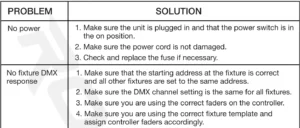
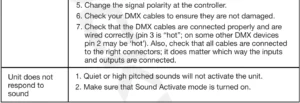
For more manuals by Rockville, visit ManualsLibraryy
Rockville ROCKSTRIP 252 DMX-RGB Color LED- FAQs
What is the Rockville ROCKSTRIP 252 DMX-RGB Color LED used for?
It’s a professional LED light bar designed for stage, DJ, and event lighting. It provides vibrant RGB color mixing and can be used for wall washing, mood lighting, or visual effects.
How do I control the Rockville ROCKSTRIP 252?
You can control it through DMX mode, automatic programs, sound activation, or manual settings using the built-in digital display.
What does DMX mode do?
DMX mode allows you to connect multiple lights and control them via a DMX controller for synchronized lighting effects, fades, and color transitions.
How do I connect multiple ROCKSTRIP 252 lights together?
Use standard DMX cables to link the lights. Connect the DMX OUT of the first unit to the DMX IN of the next one, then set the addresses properly for group control.
How many LEDs are in the Rockville ROCKSTRIP 252?
The light bar contains 252 ultra-bright RGB LEDs, offering smooth color blending and powerful output for professional setups.
Can the Rockville ROCKSTRIP 252 operate without a controller?
Yes. It has built-in auto and sound-active modes, allowing it to run light patterns and color changes without needing a DMX controller.
How do I mount the Rockville ROCKSTRIP 252?
You can mount it on walls, trusses, or stands using the included brackets. Make sure it’s securely fixed and not exposed to moisture during operation.
What power source does the Rockville ROCKSTRIP 252 use?
It runs on AC power (110–240V, 50/60Hz). Always connect to a grounded outlet and avoid overloading circuits when linking multiple units.