
TOZO Color Pods
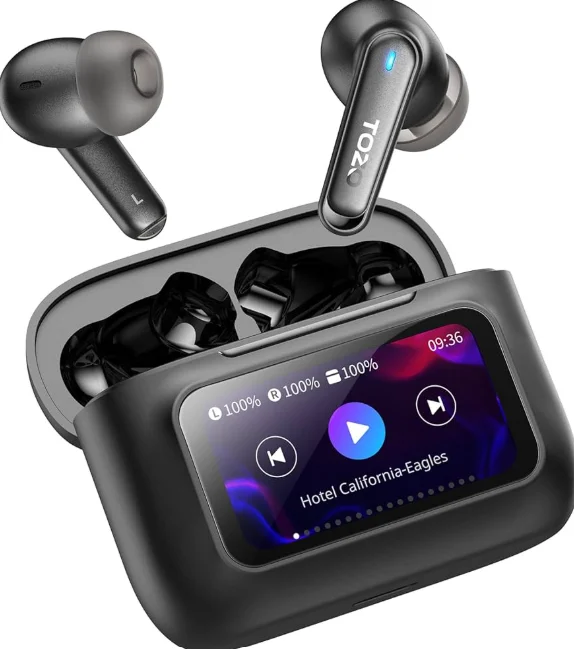
Product Overview and Features
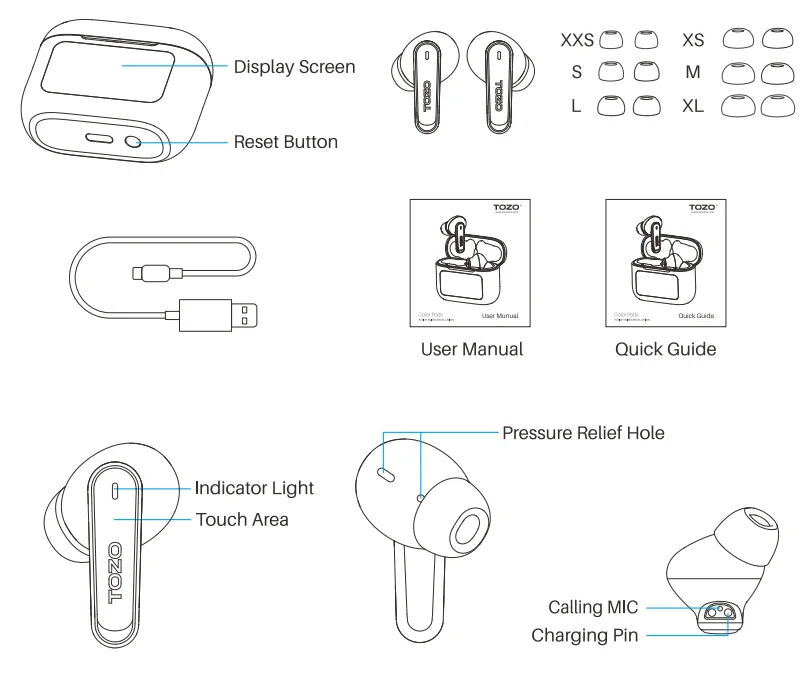
The package contains TOZO Color Pods earbuds, a charging case, a USB-C cable, extra eartips, and instructions.
Wearing Guide
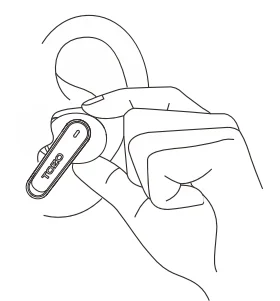
For a better fit, adjust the wearing angle slightly after putting on the earbuds to push them gently into the ear canal.
Pairing and Connectivity
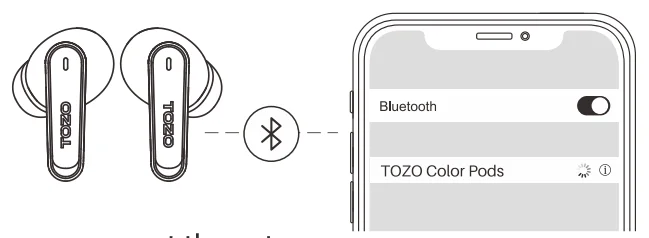
- Pick up two earbuds from the charging case, and the white indicator will blink slowly. (pairing mode)
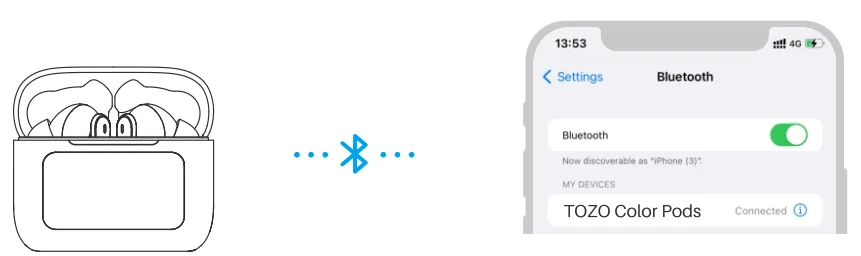
- Search for the pairing name [TOZO Color Pods] and select it on your mobile.
- When you power on the earbuds for the first time, if you connect them to the charging case initially, you will need to disconnect the charging case from the earbuds first to release the earbuds’ signal before you can connect them to your phone. If you connect the earbuds to your phone initially, you can directly connect the charging case to the earbuds, allowing the earbuds to connect to both the charging case and the phone simultaneously.
Power on/off
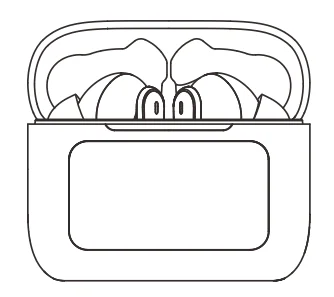
Earbuds auto power on
Upon opening the charging case, the earbuds will automatically power on.
Earbuds auto power off
Placing the earbuds back in the charging case and closing the cover will
automatically turn them off.
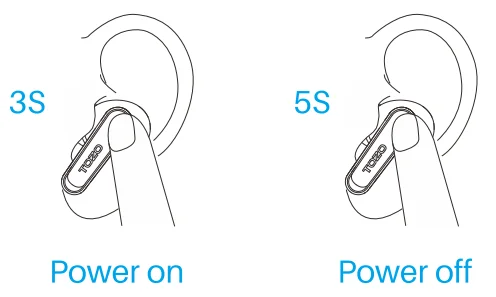
Another method of earbuds’ power on/off
- Holding L or R for 3 seconds will turn on when the earbuds power off.
- Holding L or R for 5 seconds will turn off when not playing media.
- The earbuds will automatically turn off if they remain disconnected for more than 6 minutes.
Operation and Controls
Wearing both earbuds
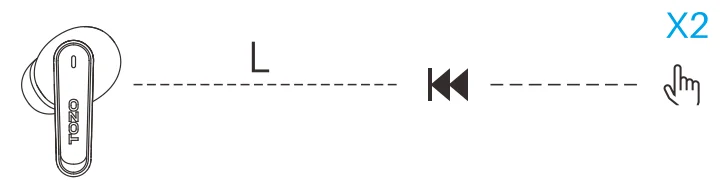
- Double-tap the “L” touch area to switch to the previous song.
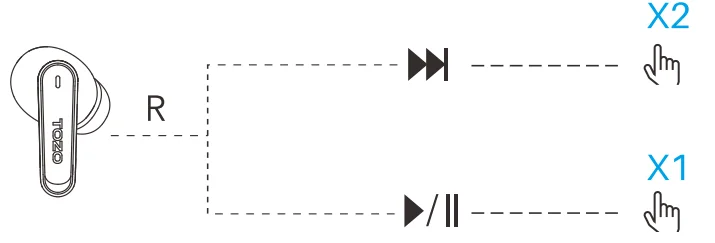
- Double-tap the “R” touch area to switch to the next song.
- Tap the “R” touch area to play or pause music.
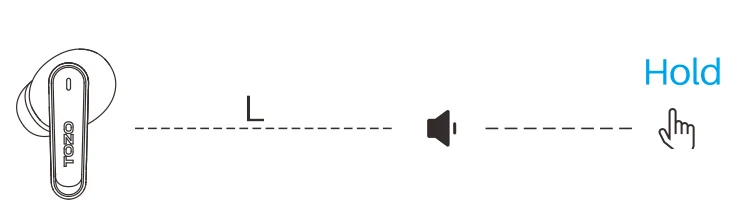
- Long-press the “L” to lower the volume when music is playing.
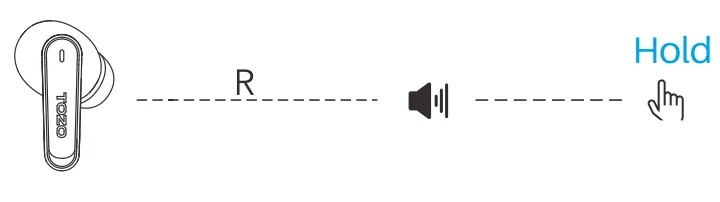
- Long-press the “R” to increase the volume when music is playing.
Wearing one earbud
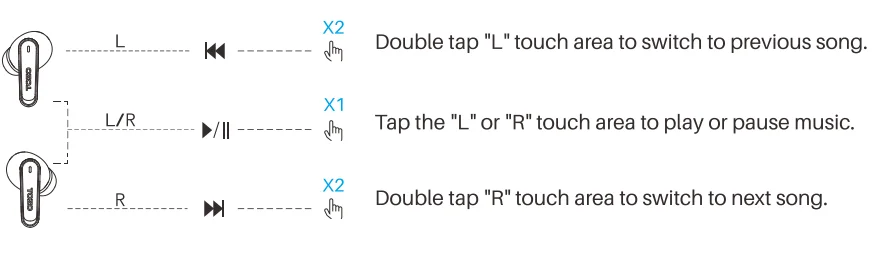
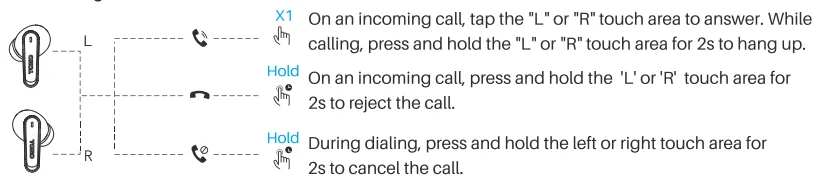
Calling Control
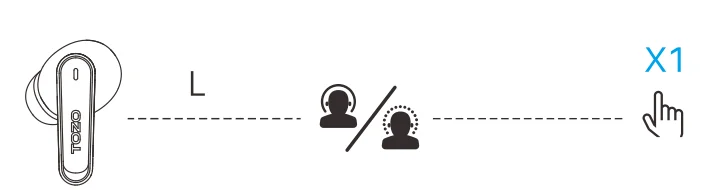
Active Noise Cancellation Control
The Active Noise Cancellation function is not available when using a single earbud.
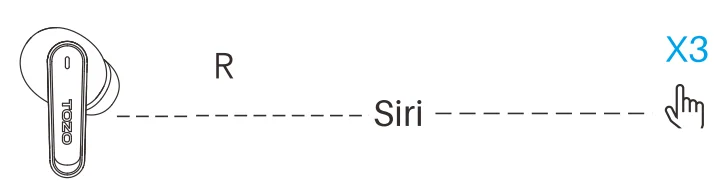
Voice Assistant
Charging case power on
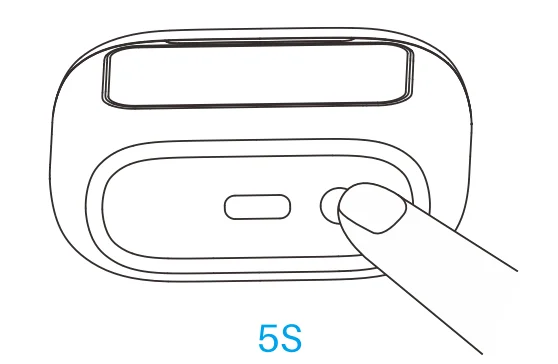
The charging case is always on by default. To turn it on if off, press and hold the reset button for 5s.
Charging case power off
While powered on, press and hold the reset button for 5s to access the shutdown interface. Then press the central shutdown button to turn it off.
Shutdown Interface Functions
When the charging case is turned on, press and hold the reset button for 5 seconds to open the shutdown interface.
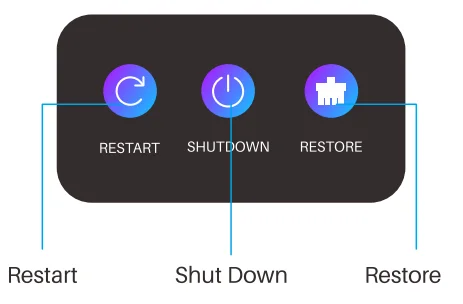
- Restart: Restart the earbuds’ charging case.
- Shut Down: Tap to shut down the case.
- Restore: Reset to factory settings of earbuds & case.
Reset
If only one earbud is working or the charging case cannot control the earbuds, please reset it using one of the following methods:
- Put both earbuds into the case and keep the lid closed for 10 seconds to complete the reset.
- Put the earbuds into the case, close the lid, and press and hold the reset button of the charging case for 16 seconds. Wait for 10s to complete the reset.
- Put the earbuds into the case, close the lid, press and hold the reset button of the charging case for 5s to enter the shutdown interface. Tap the reset button on the right side of the screen, and wait for 10 seconds to complete the reset.
Active Noise Cancellation Mode and Transparency Mode
Active Noise Cancellation Mode
With Active Noise Cancellation, TOZO Color Pods earbuds detect external sounds through an outward-facing microphone and counter them with anti-noise, cancelling them before they reach your ears. Additionally, an inward-facing microphone listens for unwanted internal sounds, which are also negated by the anti-noise feature.

Transparency Mode
Transparency Mode enhances the voice frequency band, improving
awareness of your surroundings, so you can hear what’s around you without removing your earbuds. Both Active Noise Cancellation and Transparency Mode work best when your TOZO Color Pods fit, and is worn properly.
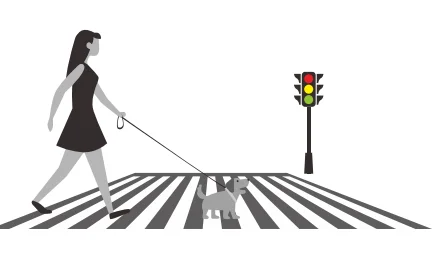
Active Noise Cancellation Mode Off
Active Noise Cancellation Off Mode is the default mode.
Charging Case Instructions
USB Flash Drive Functionality
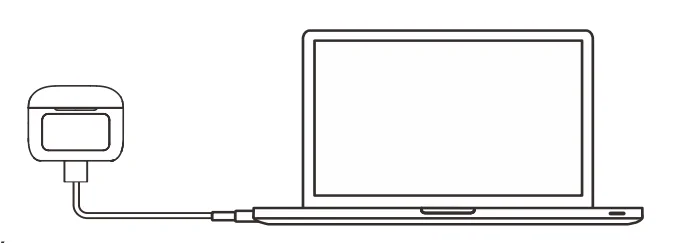
The charging case incorporates USB flash drive functionality, allowing you to conveniently store a wide range of music file formats, including MP3, WMA, WAV, APE, and FLAC, as well as data, simply by connecting to a computer via a data cable.
Turn on/off the Display Screen
- To turn on the display: Touch the screen or tap the reset button once while the screen is off.
- To turn off the display: It will automatically turn off after 5s in normal mode, or 15s in playback mode. And you can tap the reset button once to turn it off manually.
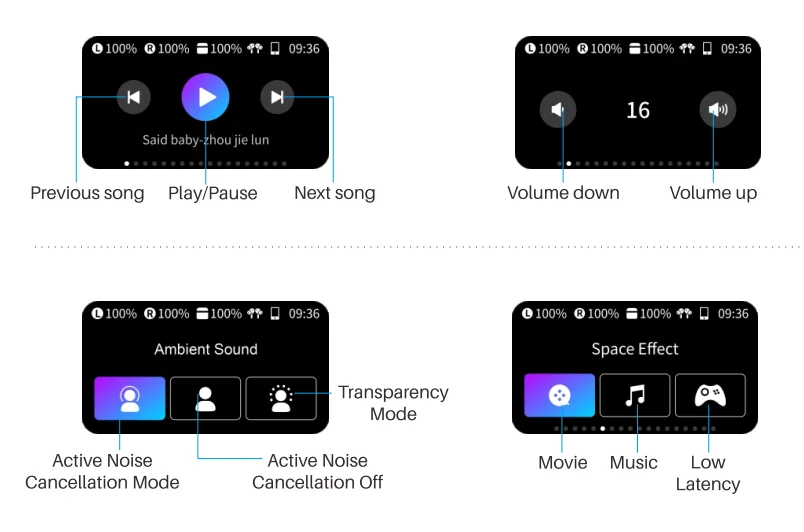
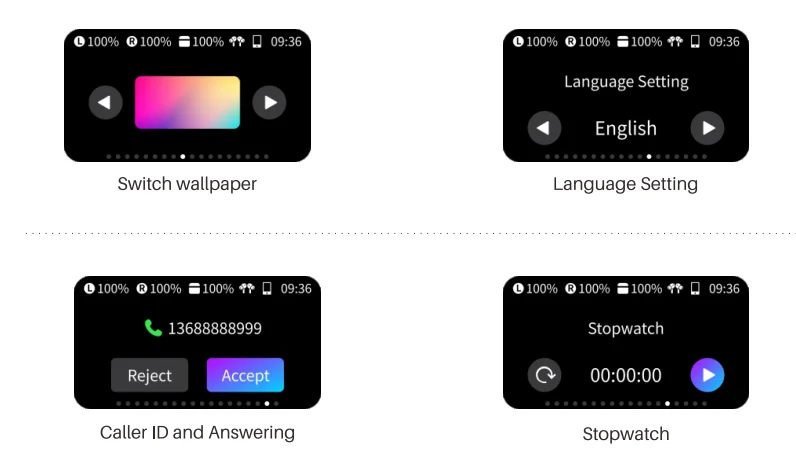
Operate the Display Screen
To unlock the screen, swipe your finger across the unlock bar on
the screen. Slide your finger left or right on the display to select the desired function and complete the operation.
Partial Display Functions Overview
- When the screen is off, double-click the screen to wake it up.
- Click the function icons on the charging case screen to enter the corresponding sub-menu to control the earphones.
- Swipe left and right on the main menu of the screen to scroll and display the function icons of the earphones.
- When the charging case screen is in the sub-menu interface, swipe the screen to the right to return to the main menu interface.
Charging and Battery
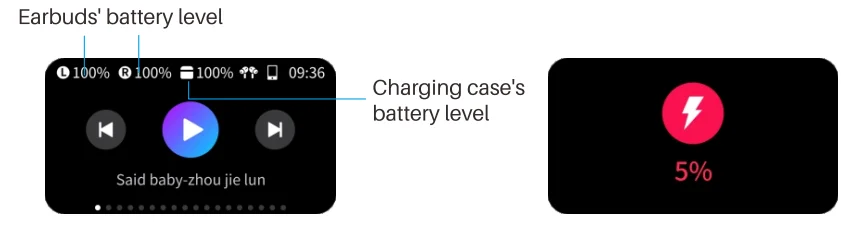
A low earbud battery will alert every 4 minutes until shutdown. Promptly charge the case before the icon turns red or the battery drops below 5%. Both earbuds and the charging case take around 2 hours to fully charge.
TOZOAPP
Download the TOZO App for Ul customisation, EQ settings, and more.
- Ul customisation: Most of the controls can be customised in the App.
- EQ settings: There are lots of EQ settings you can choose in the App to optimise your experience while enjoying different music genres.
- Earbuds firmware update: The earbuds’ firmware can be updated in the App.
Once you connect the earbuds to the App, you will be informed if a new version of firmware is detected.
TOZO APP pairing
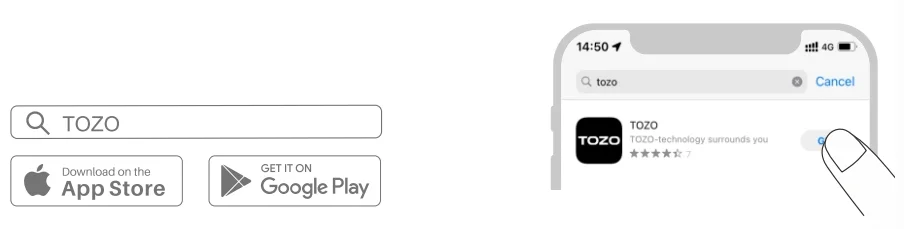
- Step 1: Download the TOZO App on your phone.

- Step 2: Bluetooth pairing with your earbuds.
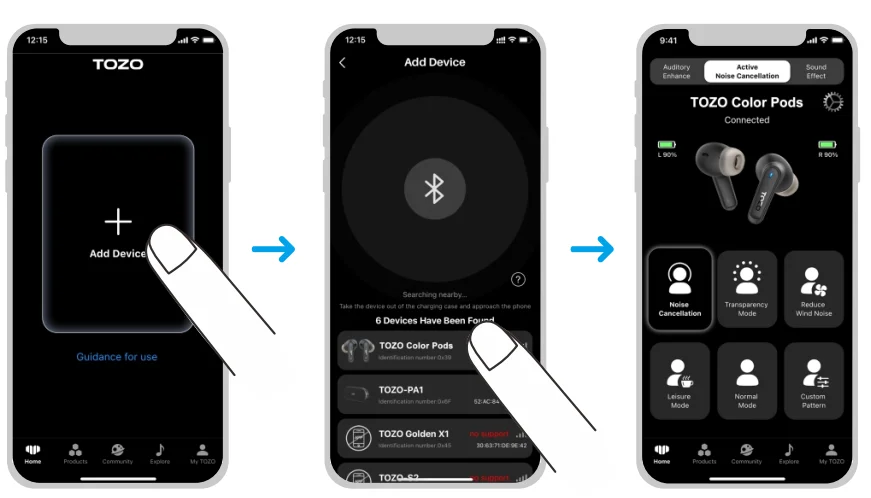
- Step 3: TOZO App pairing with your earbuds.
FCC Compliance Statements
This device complies with Part 15 of the FCC Rules. Operation is subject to the following two conditions:
- This device may not cause harmful interference, and
- This device must accept any interference received, including interference that may cause undesired operation.
Caution: Changes or modifications not expressly approved by the party responsible for compliance could void the user’s authority to operate the equipment.
Note: This equipment has been tested and found to comply with the limits for a Class 8 digital device pursuant to Part 15 of the FCC Rules. These limits are designed to provide reasonable protection against harmful interference in a residential installation. This equipment generates, uses, and can radiate radio frequency energy and, if not installed and used in accordance with the instructions, may cause harmful interference to radio communications. However, there is no guarantee that interference will not occur in a particular installation.f this equipment does cause harmful interference to radio or television reception, which can be determined by turning the equipment off and on, the user is encouraged to try to correct the interference by one or more of the following measures:
- Reorient or relocate the receiving antenna
- Increase the separation between the equipment and receiver.
- Connect the equipment to an outlet on a circuit different from that to which the receiver is connected.
- Consult the dealer or an experienced radio/TV technician for help.
RF Exposure Compliance
This equipment complies with FCC radiation exposure limits set forth for an uncontrolled environment. This transmitter must not be co-located or operating in conjunction with any other antenna or transmitter.
EU Battery Regulation

This symbol on the battery(ies) or on the packaging indicates that the battery(ies) provided with this product shall not be treated as household waste. Instead, please separate batteries from other types of waste and recycle them through your local recycling system to protect the environment and health. (When Cd is more than 20ppm or Pb is more than 40ppm, the chemical symbol of the excess substance shall be marked under the separate collection symbol) For more detailed information about the recycling of these batteries, please contact your local authority or the shop where you purchased the product or batteries.
ISED Compliance Statements
This device contains licence-exempt transmitter(s)/receiver(s) that comply with Innovation, Science and Economic Development Canada’s licence-exempt RSS(s). Operation is subject to the following two conditions:
- This device may not cause interference.
- This device must accept any interference, including interference that may cause undesired operation of the device.
This equipment complies with IC RSS-102 radiation exposure limits set forth for an uncontrolled environment. This transmitter must not be co-located or operating in conjunction with any other antenna or
transmitter.
CE-DOC
Hereby, [Manufacturer] declares that the radio equipment type [Model No.] complies with Directive 2014/63/EU. The full text of the EU declaration of conformity is available at the following internet address: www.tozostore.com
For more manuals by TOZO, Visit ManualsLibraryy
TOZO Color Pods-FAQs
What are TOZO Color Pods and who are they best for?
TOZO Color Pods are stylish true wireless earbuds designed for everyday listening, combining modern design with reliable performance. They are ideal for users who want affordable earbuds with good sound quality, comfortable fit, and vibrant color options. Whether you’re listening to music, watching videos, or taking calls, they offer a balanced experience suitable for casual and daily use.
What colors are available in TOZO Color Pods?
TOZO Color Pods are designed with aesthetics in mind and typically come in multiple attractive color options. These may include classic shades like black and white, along with more vibrant colors such as blue, pink, or gradient finishes. The variety allows users to choose a style that matches their personality while still enjoying solid audio performance.
Is TOZO a reliable brand for wireless earbuds?
Yes, TOZO is known for producing affordable and reliable audio products. The brand focuses on delivering value-for-money earbuds with features like decent battery life, waterproofing, and stable Bluetooth connectivity. While they may not compete with premium brands, TOZO earbuds are widely appreciated for their consistent performance and budget-friendly pricing.
How is the sound quality of TOZO Color Pods?
The sound quality of TOZO Color Pods is balanced and suitable for everyday listening. They usually offer clear vocals, decent bass, and a stable connection for streaming music or videos. While they may not deliver high-end audiophile sound, they provide a satisfying listening experience for most users, especially considering their price range.
Are TOZO Color Pods good for calls and online meetings?
Yes, TOZO Color Pods are designed with built-in microphones that help capture your voice clearly during calls. Many models include noise reduction technology to minimize background noise. This makes them suitable for phone calls, voice chats, and online meetings, providing a smooth communication experience in most environments.
How do I use and connect TOZO Color Pods?
Using TOZO Color Pods is simple. Turn on Bluetooth on your device, take the earbuds out of the charging case, and they will automatically enter pairing mode. Select them from your device’s Bluetooth list to connect. Once paired, they reconnect automatically when you open the case, making everyday use quick and convenient.
How can I improve the sound quality of TOZO Color Pods?
To get the best sound, ensure the earbuds fit properly in your ears, as a secure fit improves bass and clarity. You can also adjust equalizer (EQ) settings through your device or supported apps. Keeping the earbuds clean and maintaining moderate volume levels can further enhance overall audio performance.
Are TOZO Color Pods waterproof or sweat-resistant?
Most TOZO earbuds, including Color Pods, offer some level of water or sweat resistance. This makes them suitable for workouts, light rain, or daily use. However, they are not designed for full water immersion, so it’s best to avoid using them in situations like swimming or showering.
How long does the battery last on TOZO Color Pods?
TOZO Color Pods typically provide several hours of playback on a single charge, with additional charges available through the case. Combined battery life can reach up to a full day of use, depending on volume and usage patterns. This makes them convenient for daily activities without frequent recharging.
How do TOZO Color Pods compare to other TOZO earbuds?
Compared to models like NC-series earbuds, TOZO Color Pods focus more on design and affordability rather than advanced features like strong active noise cancellation. They are a great choice for users who want stylish earbuds with solid everyday performance, while higher-end models may offer better ANC and longer battery life.