
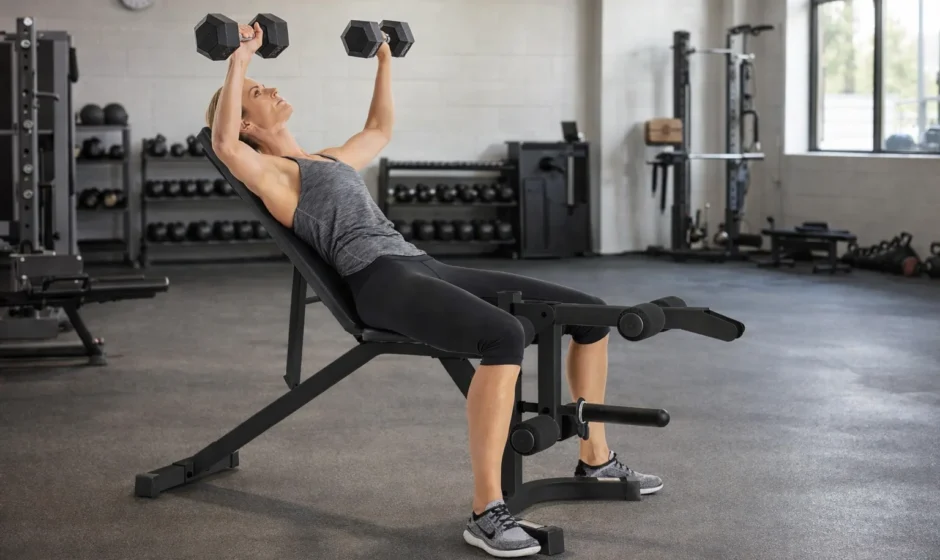

Weider Club 550 WEBE29301 Exercise Bench

Before You Begin
Thank you for selecting the versatile CLUB WEIDER® 550 weight bench. The 550 weight bench is designed to help you develop every major muscle group of the body. Whether your goal is a shapely figure, a dramatic increase in muscle size and strength, or a healthier cardiovascular system, the 550 weight bench will help you achieve the specific results you want.
For your benefit, read this manual carefully before using the 550 weight bench. If you have additional questions, please call our Customer Service Department toll-free at 1-800-999-3756, Monday through Friday, 6 a.m. until 6 p.m. Mountain Time (excluding holidays). To help us assist you, please note the product model number and serial number before calling. The model number is WEBE29301. The serial number can be found on a decal attached to the weight bench (see the front cover of this manual). Before reading further, please review the drawing below and familiarize yourself with the parts that are labeled.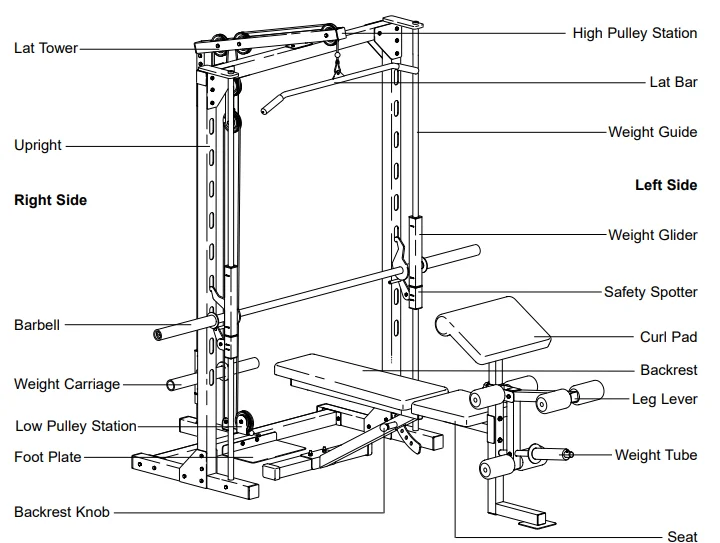
Note: The terms “right side” and “left side” are determined relative to a user standing with his back toward the weight rack; they do not refer to right and left on the drawings in this manual.
Assembly
Before beginning assembly, carefully read the following information and instructions:
Make Things Easier for Yourself!
This manual is designed to ensure that the weight bench can be assembled successfully by anyone. By setting aside plenty of time and by deciding to make the task enjoyable, assembly will go smoothly.
- The Assembly requires two people.
- Place all parts in a cleared area and remove the packing materials. Do not dispose of the packing materials until assembly is completed.
- Tighten all parts as you assemble them, unless instructed to do otherwise.
- For help identifying small parts, use the PART IDENTIFICATION CHART on page 5. Note: Some small parts may be pre-assembled.
- As you assemble the weight bench, make sure all parts are oriented as shown in the drawings.
Assembly requires the following tools (not included):
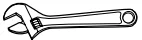
- Two adjustable wrenches

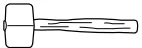
- One rubber mallet

- One standard screwdriver

- One Phillips screwdriver

- Lubricant, such as grease or petroleum jelly, and soapy water.


Assembly will be more convenient if you have a socket set, a set of open-end or closed-end wrenches, or a set of ratchet wrenches.
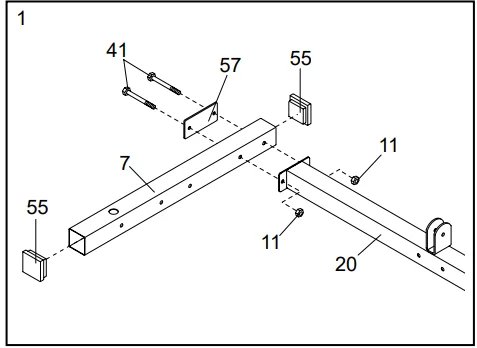
- Before beginning, make sure you understand the information in the box above. Note: Some parts described in the assembly steps may be pre-assembled. Press a 60mm Square Inner Cap (55) into each end of a Base (7). Attach the Base to the indicated end of the Base Crossbar (20) using a Support Plate (57), two M10 x 80mm Bolts (41), and two M10 Nylon Locknuts (11). Do not tighten the Nylon Locknuts yet. Attach the other Base (not shown) to the opposite side of the Base Crossbar (20) in the same manner.

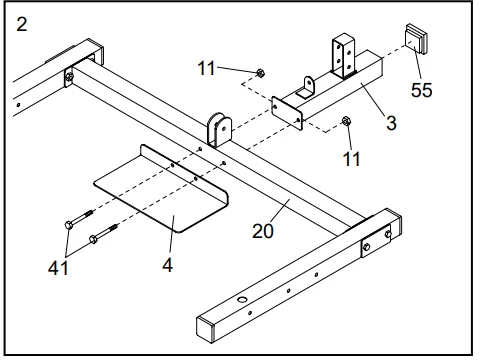
- Press a 60mm Square Inner Cap (55) into the end of the Rear Base (3). Attach the Rear Base and the Foot Plate (4) to the Base Crossbar (20) using two M10 x 80mm Bolts (41) and two M10 Nylon Locknuts (11). Do not tighten the Nylon Locknuts yet.

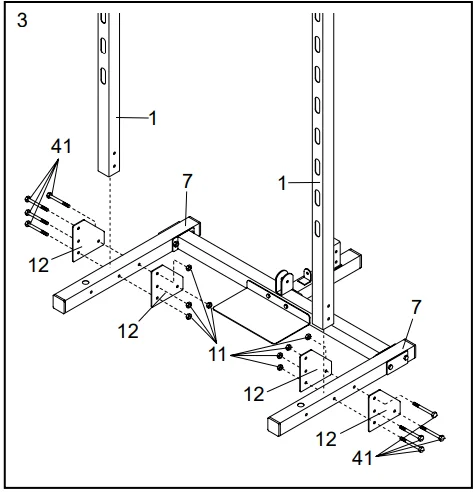
- Attach an Upright (1) to each Base (7) using two Joint Plates (12), four M10 x 80mm Bolts (41), and four M10 Nylon Locknuts (11). Make sure the Uprights are oriented exactly as shown. Do not tighten the Nylon Locknuts yet.

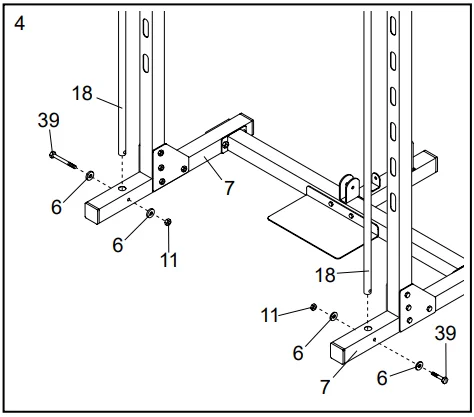
- Insert a Weight Guide (18) into the indicated hole in each Base (7). Attach the Weight Guides to the Bases using M10 x 75mm Bolts (39), M10 Small Washers (6), and M10 Nylon Locknuts (11). Do not tighten the Nylon Locknuts yet.

- Press a 25mm Bushing (48) into each end of the Locking Bar (34). Slide the Barbell (35) into the Locking Bar.

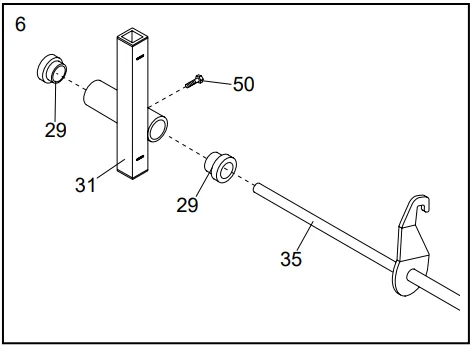
- Press a 38mm Bushing (29) into each end of the Right Weight Glider (31). Slide the Right Weight Glider onto the indicated end of the Barbell (35) and attach it to the Barbell using an M8 x 20mm Screw (50). Do not tighten the Screw yet. Make sure the Right Weight Glider is oriented exactly as shown.

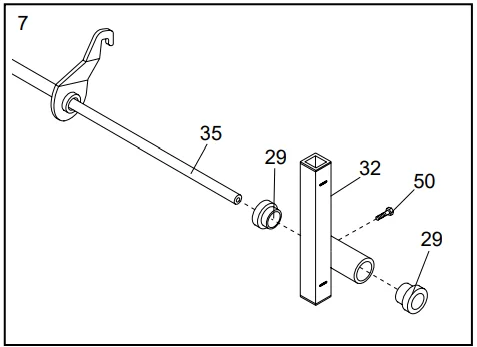
- Press a 38mm Bushing (29) into each end of the Left Weight Glider (32). Slide the Left Weight Glider onto the indicated end of the Barbell (35) and secure it to the Barbell using an M8 x 20mm Screw (50). Do not tighten the Screw yet. Make sure the Left Weight Glider is oriented exactly as shown.

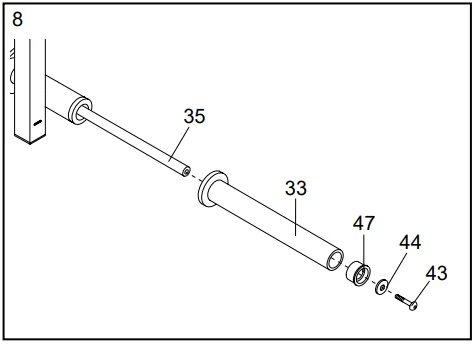
- Press a 50mm Bushing (47) into the indicated end of a Weight Adapter (33). Slide the Weight Adapter onto the Barbell (35) and secure it to the Barbell using a Large Washer (44) and an M10 x 25mm Bolt (43). Attach the other Weight Adapter (33) to the other end of the Barbell (35) in the same manner. Tighten the M8 x 20mm Screws used in steps 6 and 7.

- Note: This step requires the help of a second person. Slide the Right Safety Spotter (23) and the Left Safety Spotter (24) onto the Weight Guides (18). Make sure the Safety Spotters are oriented exactly as shown. Slide the assembled Locking Bar (34) and the Right and Left Weight Gliders (31, 32) onto the Weight Guides (18). Make sure the Locking Bar and Weight Gliders are oriented exactly as shown.

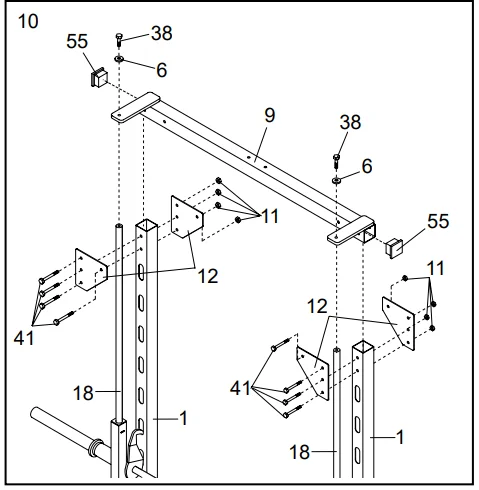
- Press a 60mm Square Inner Cap (55) into each end of the Top Crossbar (9). Attach the Top Crossbar to the Uprights (1) using four Joint Plates (12), eight M10 x 80mm Bolts (41), and eight M10 Nylon Locknuts (11). Do not tighten the Nylon Locknuts yet. Secure the Top Crossbar (9) to the Weight Guides (18) using two M10 x 30mm Bolts (38) and two M10 Small Washers (6).

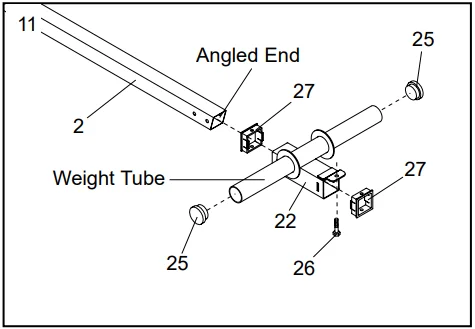
- Press Carriage Bushings (27) into the ends of the Weight Carriage (22). Press 50mm Round Inner Caps (25) into the ends of the weight tube on the Weight Carriage. Insert an M10 x 20mm Bolt (26) into the bracket on the Weight Carriage (22). Slide the Weight Carriage (22) onto the Rear Upright (2) as shown. Make sure that the Weight Carriage and the Rear Upright are oriented as shown.

- Refer to the inset drawing. Press a Carriage Bushing (27) into the top of the Carriage Stop (28) as shown. Slide the Carriage Stop (28) onto the lower end of the Rear Upright (2). Attach the Carriage Stop to the Rear Upright with an M8 x 70mm Bolt (30) and an M8 Nylon Locknut (54). Slide the Rear Upright (2) onto the bracket on the Rear Base (3). Attach the Rear Upright to the Rear Base using two M10 x 65mm Bolts (56), four M10 Small Washers (6), and two M10 Nylon Locknuts (11). Do not tighten the Nylon Locknuts yet.

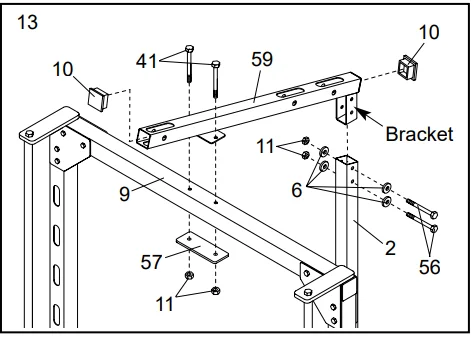
- Press a 50mm Square Inner Cap (10) into each end of the Pulley Bar (59). Slide the bracket on the Pulley Bar into the top of the Rear Upright (2). Attach the Pulley Bar to the Rear Upright using two M10 x 65mm Bolts (56), four M10 Small Washers (6), and two M10 Nylon Locknuts (11). Attach the Pulley Bar (59) to the Top Crossbar (9) using a Support Plate (57), two M10 x 80mm Bolts (41), and two M10 Nylon Locknuts (11). Tighten all Nylon Locknuts used in steps 1 through 13.

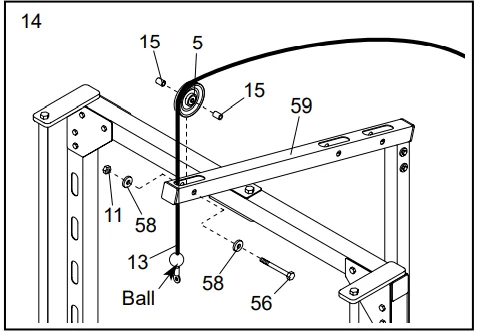
- Identify the High Cable (13), which is the shorter of the two Cables. Route the High Cable up through the indicated slot in the Pulley Bar (59). Make sure the ball is in the indicated location. Route the High Cable (13) around a Pulley (5) as shown. Attach the Pulley inside the slot in the Pulley Bar (59) using an M10 x 65mm Bolt (56), two M10 Large Washers (58), two Pulley Spacers (15), and an M10 Nylon Locknut (11). Do not overtighten the Nylon Locknut; the Pulley must be able to turn freely.

- Route the High Cable (13) around another Pulley (5) and through the indicated slot in the Pulley Bar (59) as shown. Attach the Pulley inside the slot using an M10 x 65mm Bolt (56), two M10 Large Washers (58), two Pulley Spacers (15), and an M10 Nylon Locknut (11). Do not overtighten the Nylon Locknut; the Pulley must be able to turn freely.

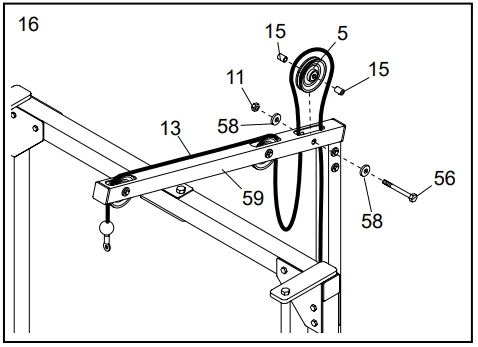
- Route the High Cable (13) up through the Pulley Bar (59), around another Pulley (5), and back down through the Pulley Bar, as shown. Attach the Pulley inside the slot in the Pulley Bar using an M10 x 65mm Bolt (56), two M10 Large Washers (58), two Pulley Spacers (15), and an M10 Nylon Locknut (11). Do not overtighten the Nylon Locknut; the Pulley must be able to turn freely.

- Slide the indicated end of the High Cable (13) onto the M10 x 20mm Bolt (26) in the Weight Carriage (22). Tighten an M10 Nylon Locknut (11) onto the Bolt.

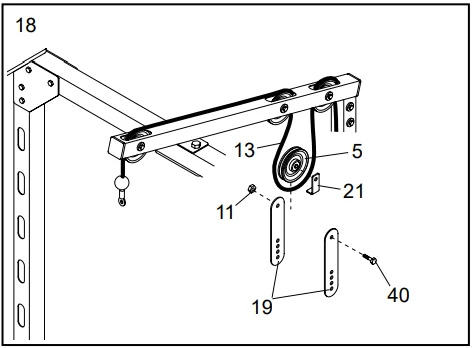
- Route the High Cable (13) around a Pulley (5) as shown. Hold a Cable Trap (21) against the Pulley and attach a Pulley Plate (19) to each side of the Pulley using an M10 x 45mm Bolt (40) and an M10 Nylon Locknut (11). Make sure the Cable Trap holds the High Cable in the groove of the Pulley. Do not overtighten the Nylon Locknut; the Pulley must be able to turn freely.

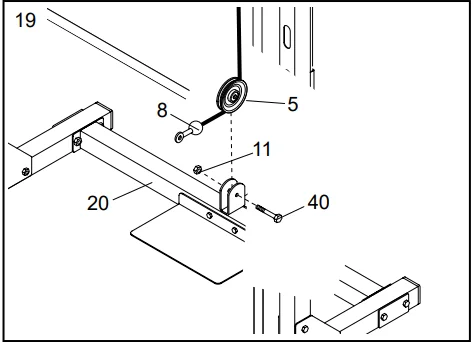
- Route the indicated end of the Low Cable (8) around a Pulley (5). Attach the Pulley to the bracket on the Base Crossbar (20) using an M10 x 45mm Bolt (40) and an M10 Nylon Locknut (11). Do not overtighten the Nylon Locknut; the Pulley must be able to turn freely.

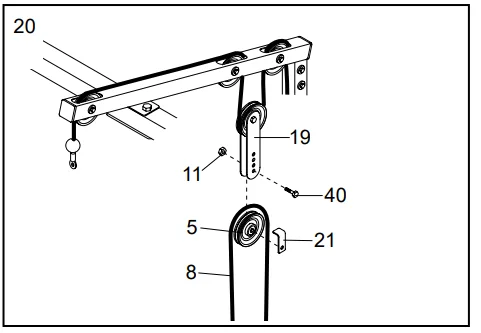
- Route the Low Cable (8) around a Pulley (5) as shown. Hold a Cable Trap (21) against the Pulley and attach the Pulley and Cable Trap to the lowest holes in the two Pulley Plates (19) using an M10 x 45mm Bolt (40) and an M10 Nylon Locknut (11). Make sure the Cable Trap holds the Low Cable in the groove of the Pulley. Do not overtighten the Nylon Locknut; the Pulley must be able to turn freely.

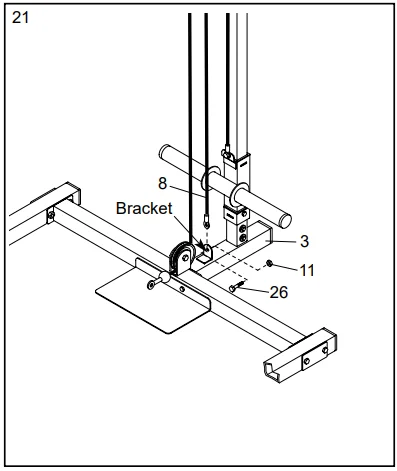
- Attach the indicated end of the Low Cable (8) to the bracket on the Rear Base (3) using an M10 x 20mm Bolt (26) and an M10 Nylon Locknut (11).

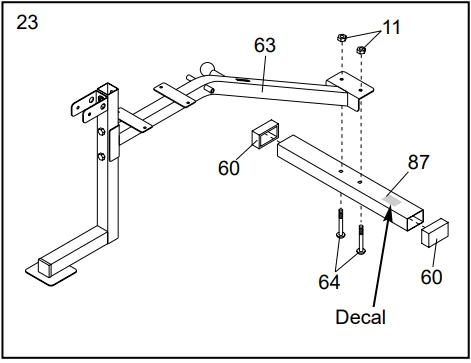
- Press two 50mm Square Inner Caps (10) into the bottom and the indicated end of the Front Leg (73). Attach the Front Leg (73) to the Bench Frame (63) using two M10 x 65mm Bolts (56), two M10 Small Washers (6), and two M10 Nylon Locknuts (11). Insert the Backrest Knob (80) into the Bench Frame (63) and tighten.

- Press a 50mm x 70mm Outer Cap (60) onto each end of the Stabilizer (87). Attach the Stabilizer to the Bench Frame (63) using two M10 x 60mm Carriage Bolts (64) and two M10 Nylon Locknuts (11). Note: The dents on the Stabilizer (87) should face the floor, and the decal should be in the indicated location.

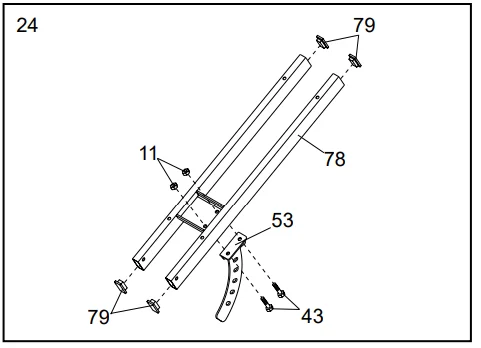
- Press four 25mm x 50mm Inner Caps (79) into the ends of the Backrest Frame (78). Attach the Backrest Bracket (53) to the Backrest Frame using two M10 x 25mm Bolts (43) and two M10 Nylon Locknuts (11).

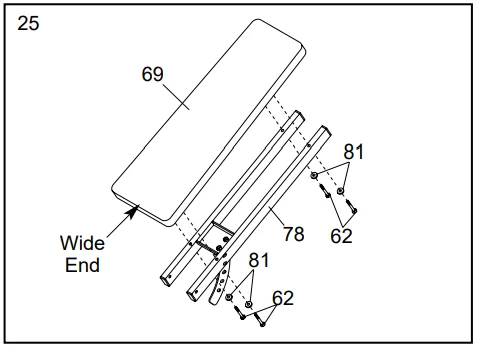
- Attach the Backrest (69) to the Backrest Frame (78) with four M6 x 65mm Screws (62) and four M6 Washers (81). Make sure that the Backrest is turned as shown.

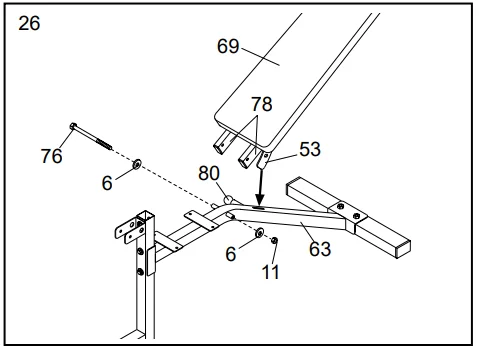
- Lubricate an M10 x 180mm Bolt (76). Attach the Backrest Frame (78) to the Bench Frame (63) using the Bolt, two M10 Small Washers (6), and an M10 Nylon Locknut (11). Slide the Backrest Bracket (53) into the indicated slot on the Bench Frame. Do not overtighten the Nylon Locknut; the Backrest must be able to pivot freely. To adjust the position of the Backrest, pull the Backrest Knob (80) outward and move the Backrest up or down. Slowly release the Backrest Knob, making sure that the pin on the Backrest Knob is inserted through one of the holes in the Backrest Bracket (53).

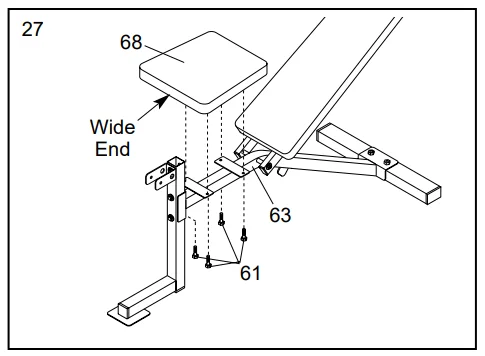
- Attach the Seat (68) to the Bench Frame (63) with four M6 x 16mm Screws (61). Make sure that the Seat is turned as shown.

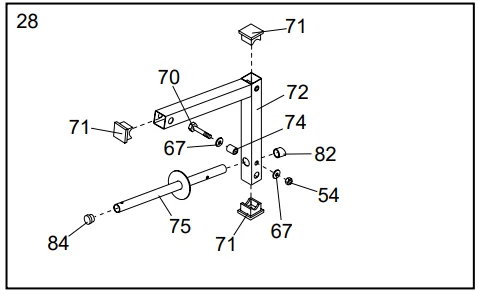
- 28. Press three 45mm Square Inner Caps (71) into the Leg Lever (72). Press a 25mm Round Inner Cap (84) into the indicated end of the Weight Tube (75). Attach the Weight Tube (75) to the Leg Lever (72) with an M8 x 55mm Bolt (70), two M8 Flat Washers (67), a 10mm Spacer (74), and an M8 Nylon Locknut (54). Press an Angled Outer Cap (82) onto the back end of the Weight Tube.

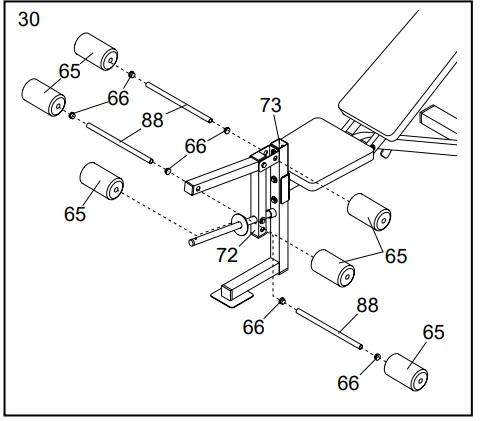
- Lubricate an M10 x 70mm Bolt (85). Attach the Leg Lever (72) to the Front Leg (73) with the Bolt and an M10 Nylon Locknut (11). Do not overtighten the Nylon Locknut; the Leg Lever must be able to pivot freely.

- Press two 3/4” Round Inner Caps (66) into each of the three Pad Tubes (88). Slide the Pad Tubes through the indicated holes in the Front Leg (73) and the Leg Lever (72). Slide two Foam Pads (65) onto each Pad Tube (88).

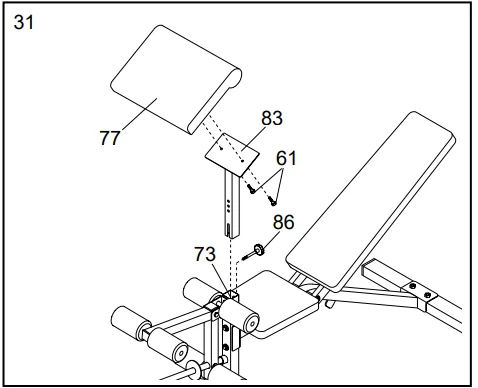
- Attach the Curl Pad (77) to the Curl Post (83) with two M6 x 16mm Screws (61). Insert the Curl Post into the Front Leg (73) and secure it with the Curl Post Knob (86).

- Make sure all parts are properly tightened before you use the weight bench. The use of all remaining parts will be explained in Adjusting the Weight Bench, starting on page 15.







Ordering Replacement Parts
To order replacement parts, simply call our Customer Service Department toll-free at 1-800-999-3756, Monday through Friday, 6 a.m. until 6 p.m. Mountain Time (excluding holidays). To help us assist you, please be prepared to give the following information when calling:
- The MODEL NUMBER of the product (WEBE29301)
- The NAME of the product (CLUB WEIDER 550 weight bench)
- The SERIAL NUMBER of the product (see the front cover of this manual)
- The KEY NUMBER and DESCRIPTION of the desired part(s) (see the PART LIST and the EXPLODED DRAWING in the center of this manual).
Limited Warranty
ICON Health & Fitness, Inc. (ICON) warrants this product to be free from defects in workmanship and material, under normal use and service conditions, for a period of ninety (90) days from the date of purchase. This warranty extends only to the original purchaser. ICON’s obligation under this warranty is limited to replacing or repairing, at ICON’s option, the product at one of its authorized service centers. All products for which a warranty claim is made must be received by ICON at one of its authorized service centers with all freight and other transportation charges prepaid, accompanied by sufficient proof of purchase. All returns must be pre-authorized by ICON.
This warranty does not extend to any product or damage to a product caused by or attributable to freight damage, abuse, misuse, improper or abnormal usage, or repairs not provided by an ICON authorized service center, products used for commercial or rental purposes, or products used as store display models. No other warranty beyond that specifically set forth above is authorized by ICON.
ICON is not responsible or liable for indirect, special, or consequential damages arising out of or in connection with the use or performance of the product or damages with respect to any economic loss, loss of property, loss of revenues or profits, loss of enjoyment or use, costs of removal, installation, or other consequential damages of whatsoever nature. Some states do not allow the exclusion or limitation of incidental or consequential damages. Accordingly, the above limitation may not apply to you.
The warranty extended hereunder is instead of any other warranties, and any implied warranties of merchantability or fitness for a particular purpose are limited in scope and duration to the terms set forth herein. Some states do not allow limitations on how long an implied warranty lasts. Accordingly, the above limitation may not apply to you. This warranty gives you specific legal rights. You may also have other rights which vary from state to state. ICON HEALTH & FITNESS, INC., 1500 S. 1000 W., LOGAN, UT 84321-9813. Visit our website at: www.weiderfitness.com for new products, prizes, fitness tips, and much more!
For More Manuals By Weider, Visit ManualsLibraryy.
Weider Club 550 WEBE29301 Exercise Bench-FAQS
How much does the bar weigh on a Weider weight bench?
For most Weider benches, the bar typically weighs between 15 and 25 pounds (6.8–11.3 kg), depending on the specific model and setup.
How much weight can the Weider Club 550 bench support?
Standard Weider benches are designed to handle several hundred pounds of combined user and weight load, making them suitable for beginner to intermediate strength training.
Is the Weider Club 550 good for beginners?
Yes, this bench is ideal for beginners. It offers a stable frame, adjustable positions, and supports basic strength exercises safely.
Is the bench adjustable?
Yes, the Weider Club 550 features multiple adjustable positions, allowing you to switch between flat, incline, and decline-style workouts.
How much space do I need to use this bench at home?
You’ll need a small home-gym area with enough room to extend your arms and safely load weights. A standard room with normal ceiling height works well.
Is assembly required for the Weider Club 550?
Yes, some assembly is required. The bench comes with instructions and hardware, and most users can assemble it using basic tools.
Can heavier users safely use the Weider Club 550 bench?
As long as the combined user weight and lifted weight stay within the recommended capacity, the bench can be used safely.
What materials are used in Weider benches and weights?
Weider benches are built with steel frames, while Weider weight plates are typically made from cast iron for strength and durability.