
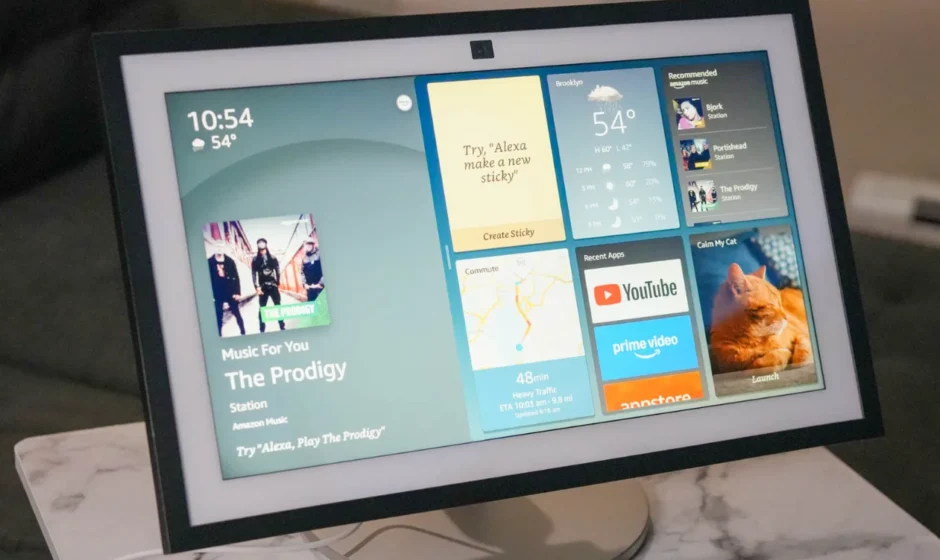

Amazon Echo Show 15 2nd Gen Smart Display
Introduction
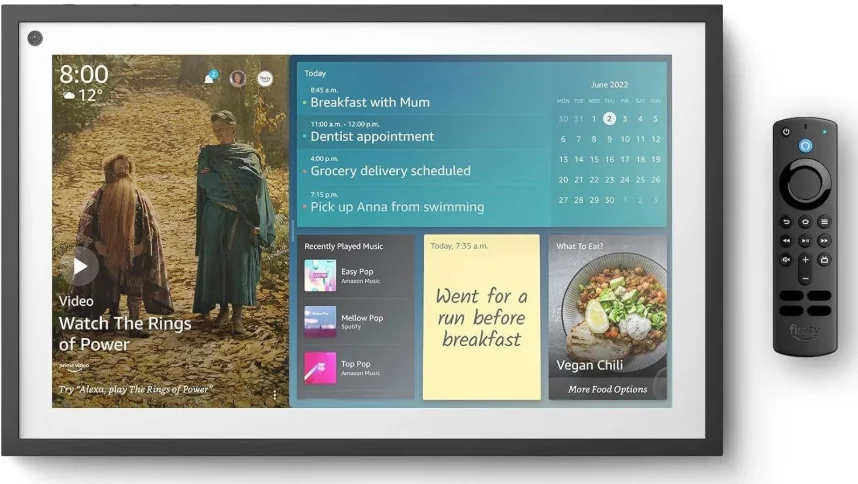
The Amazon Echo Show 15 (2nd Gen) Smart Display is a powerful and versatile smart home hub built to enhance everyday living with a large 15.6-inch Full HD touchscreen that serves as both an information center and entertainment display. Its crisp, 1080p screen is perfect for streaming your favorite movies and shows with built-in Fire TV support, browsing recipes hands-free while cooking, or checking the weather, calendars, and reminders at a glance.
Equipped with a 13 MP wide-angle camera that supports auto-framing and a physical privacy shutter, the Echo Show 15 makes video calls feel natural and secure. The device also doubles as a smart home control hub, supporting Zigbee, Thread, and Matter protocols to easily manage compatible lights, locks, and sensors with voice or touch commands.
With Wi-Fi 6E connectivity, rich stereo sound from dual woofers and tweeters, and customizable widget layouts for things like shopping lists, sticky notes, and smart device status, the Echo Show 15 integrates productivity, connectivity, and entertainment into one sleek display you can mount on a wall or place on a countertop.
MEET YOUR ECHO SHOW 15
ALSO INCLUDED:
Alexa Voice Remote
2 AAA batteries
Power adapter and cable wrap
INCLUDED FOR MOUNTING
Mounting on the wall is optional. You can also place your Echo Show 15 in a stand (sold separately).
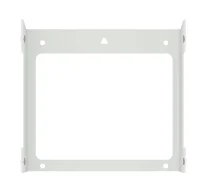
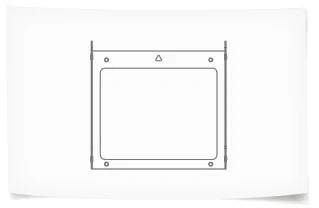
- Wall mount

- Wall mount template sized to the device 16″ x 10″(40.B x 25.8 cm)

- 4 screws

- 4 anchors
Not for use in wood or studs
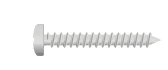

Note: Included screws and anchors are recommended for drywall, brick, and concrete, or tile surfaces. Do not use the anchors if drilling into wood or studs.
TOOLS YOU’LL NEED
Not included in the box:
- Electric drill
- 5/16″ (8 mm) drill bit
- Phillips #2 driver bit
- Level or level app
- Hammer
- Wall-safe tape
MOUNTING YOUR ECHO SHOW 15 ON THE WALL
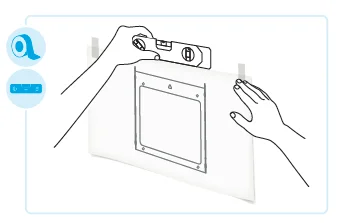
- FIND A LOCATION
- Choose a location near eye level. Consider everyone using the device.
- Ensure the power cable will reach a power outlet.
- WARNING: Do not drill into wiring or piping.
- LEVEL AND TAPE TEMPLATE TO THE WALL
- Place the template on the wall. Use a level or a level app on your phone to level the template.
- Tape the template in place.

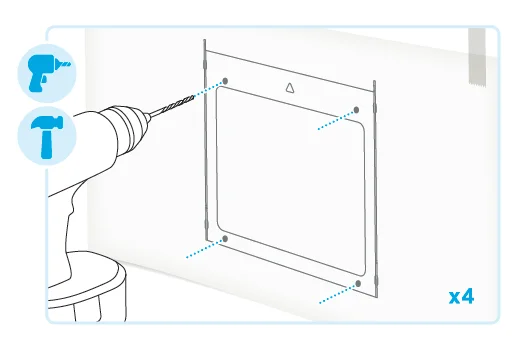
- DRILL HOLES AND INSTALL ANCHORS
- Use an electric drill with a 5/16″ (or 8 mm) drill bit. Drill through the 4 holes in the template. Remove the template.
- Hammer the 4 anchors into the holes until they are flat against the wall.
- INSTALL WALL MOUNT
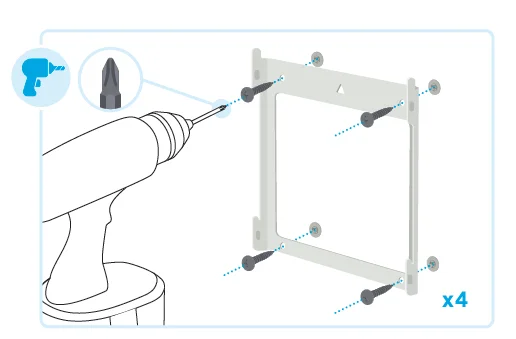
- With the triangle cutout on top, align the wall mount’s 4 holes with the installed anchors.
- Drill the screws through the holes and into the anchors until the screws are flat against the mount.

- PLUG INCLUDED POWER ADAPTER INTO ECHO SHOW 15
- Organize the cable in the mounting cavity with the cable wrap.
- Wait until after mounting your device to plug it into a power outlet.

- SLIDE DEVICE ONTO MOUNT
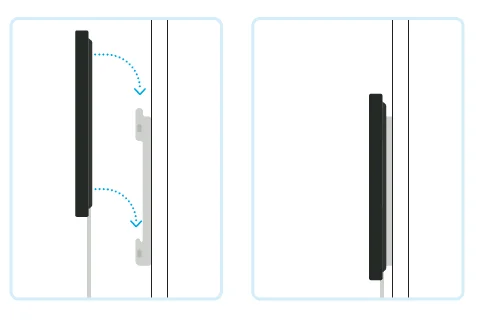
- Slide your Echo Show 15 down onto the wall mount’s hooks. Make sure to connect all 4 hooks.
SET UP YOUR ECHO SHOW 15
 HAVE YOUR WIFI AND AMAZON PASSWORDS READY
Prepare to connect to your wifi and sign in to your Amazon account. PLUG ECHO SHOW 15 INTO A POWER OUTLET
Use the included power adapter. In about a minute, the display will turn on, and Alexa will greet you. FOLLOW THE ONSCREEN SETUP
Log in with an existing Amazon account username and password or create a new account. DOWNLOAD THE AMAZON ALEXA APP
The app helps you get more out of your Echo Show 15. It’s where you set up calling and messaging and manage music, lists, settings, and news.
 HAVE YOUR WIFI AND AMAZON PASSWORDS READY
 PLUG ECHO SHOW 15 INTO A POWER OUTLET
 FOLLOW THE ONSCREEN SETUP
 DOWNLOAD THE AMAZON ALEXA APP
SET UP COMPATIBLE SMART HOME DEVICES
You can easily connect and control compatible devices with the built-in smart home hub. When ready to get started, open the Alexa app to add your device, or say, “Alexa, discover my devices.”
MEET YOUR ALEXA VOICE REMOTE
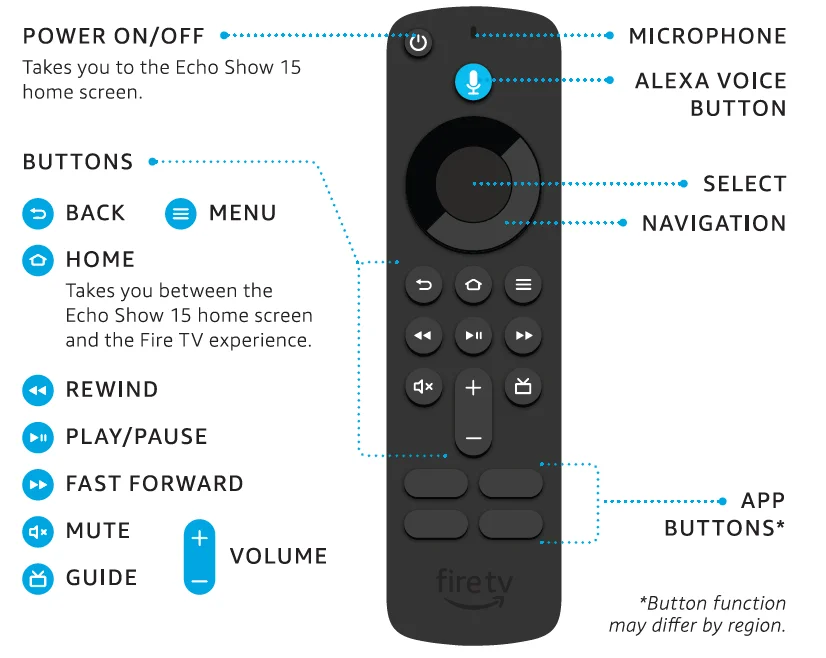
POWER UP YOUR REMOTE
- Press and hold your thumb on the arrow to release the latch.
- While pressing the arrow, slide open the cover.
- Insert included AAA alkaline batteries.
Note: The remote only pairs with one device at a time and can’t control skills and services outside of the Fire TV experience.
PRIVACY AND SUPPORT
 PRIVACY CONTROLS
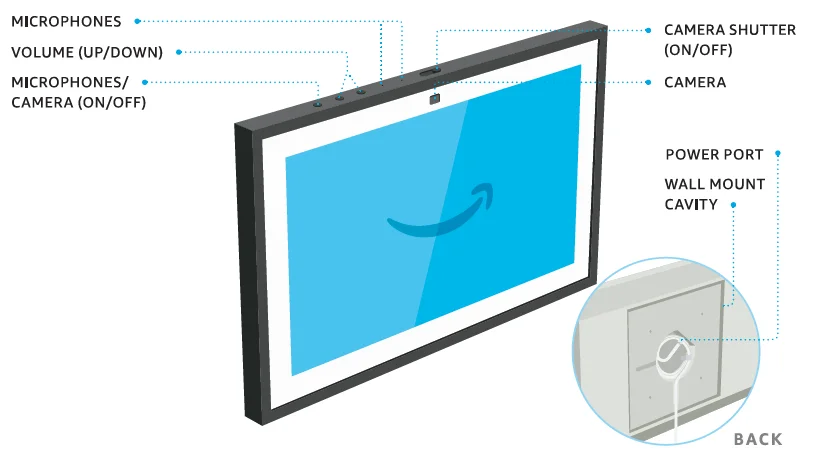
Turn the microphones and camera off by pressing the Microphones/Camera on/off button. Cover the camera easily with the built-in shutter. See when Alexa is recording and sending your request to Amazon’s secure cloud via a blue indicator light. MANAGE YOUR VOICE HISTORY
You can view, hear, and delete the voice recordings associated with your account in the Alexa app at any time. CUSTOMER SUPPORT
For help and troubleshooting, go to Help & Feedback in the Alexa app or visit amazon.com/devicesupport.
 PRIVACY CONTROLS
 MANAGE YOUR VOICE HISTORY
 CUSTOMER SUPPORT
You have control over your Alexa experience.
Explore more at amazon.com/alexaprivacy or amazon.ca/alexaprivacy.
Some features may require customization in the Alexa app, a separate subscription, or an additional compatible smart home device. You can find more examples and tips in the Alexa app.

SCAN FOR MORE HELP AND ACCESSIBLE INSTRUCTIONS
Scan the QR code or visit: amazon.com/setup/echoshow15
For more manuals by Amazon Basics, visit ManualsLibraryy
Amazon Echo Show 15 2nd Gen Smart Display-FAQs
Is the Echo Show 15 a touchscreen?
Yes. The Echo Show 15 features a large 15.6-inch Full HD (1080p) touchscreen with a resolution of 1920 × 1080, allowing easy touch and swipe control.
What is the display resolution of the Echo Show 15 (2nd Gen)?
The display resolution is 1080p Full HD, making it ideal for videos, widgets, and smart home dashboards.
Can I use the Echo Show 15 as a TV?
Yes. The 2nd Gen Echo Show 15 includes built-in Fire TV, letting you stream movies, TV shows, and live content from supported apps.
Does Echo Show 15 need to be plugged in all the time?
Yes. The Echo Show 15 does not have a battery and must remain plugged into a power outlet to work.
Can I browse the internet on Echo Show 15?
Yes. You can ask Alexa questions or use a web browser while in Fire TV mode for basic internet access.
Does the Echo Show 15 have a camera?
Yes. The device includes a camera for video calls and optional home monitoring features.
Is the Echo Show 15 waterproof?
No. It should not be exposed to water or moisture and should be kept away from sinks and wet areas.
Can I use Echo Show 15 as a security camera?
Yes. With home monitoring enabled, the built-in camera can function as a basic smart home camera.