
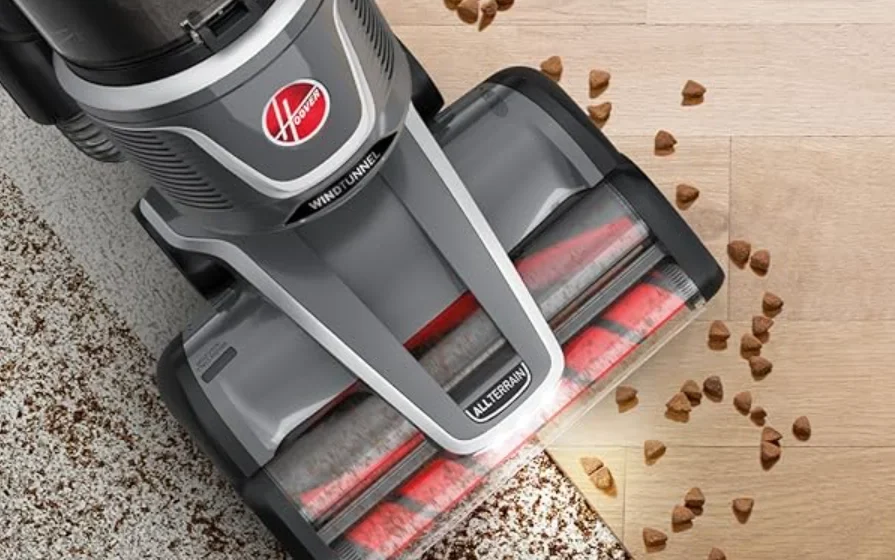

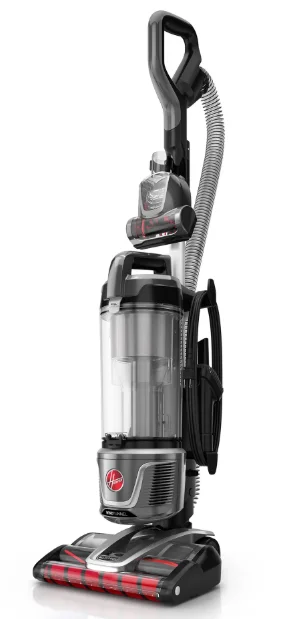
Hoover UH77200V WindTunnel All-Terrain Vacuum Cleaner
IMPORTANT SAFETY INSTRUCTIONS
SAVE THESE INSTRUCTIONS
READ ALL SAFETY WARNINGS AND INSTRUCTIONS BEFORE USING THIS PRODUCT.
WARNING: When using an electrical product, basic precautions should always be followed to avoid electric shock, fire, and/or serious injury, including the following:
- Fully assemble the product prior to use.
- Operate the cleaner only at the voltage specified on the data plate on the back of the cleaner.
- Do not leave the product when plugged in. Unplug from the outlet when not in use and before servicing.
- Do not use outdoors or on wet surfaces.
- Do not allow to be used as a toy. Not intended for use by or near children aged 12 and under. Close supervision is necessary when used by or near children. To avoid injury or damage, keep children away from the product, and do not allow children to place fingers or other objects into any openings.
- Do not use the product with a damaged cord or plug. If the product is not working as it should, has been dropped, damaged, left outdoors, or dropped into water, call customer service at 1-800-944-9200 prior to continuing use.
- Do not pull or carry by cord, use cord as a handle, close a door on cord, or pull cord around sharp edges or corners. Do not run the appliance over the cord. Keep the cord away from heated surfaces.
- Do not unplug by pulling on the cord. To unplug, grasp the plug, not the cord.
- Do not handle the plug or appliance with wet hands.
- Do not put any object into openings. Do not use with any opening blocked; keep free of dust, lint, hair, and anything that may reduce air flow.
- Keep hair, loose clothing, fingers, and all parts of the body away from openings and moving parts.
- Turn off all controls before unplugging.
- Use extra care when cleaning the stairs. To avoid personal injury or damage and to prevent the cleaner from falling, always place the cleaner at the bottom of the stairs or on the floor. Do not place cleaner on stairs or furniture, as it may result in injury or damage.
- Do not use to pick up flammable or combustible liquids, such as gasoline, or fine wood sandings, or use in areas where they may be present.
- Unplug before connecting the Turbo Tool.
- Do not pick up anything that is burning or smoking, such as cigarettes, matches, or hot ashes.
- Do not use without a separator, filters, or a dirt cup in place.
CAUTION:
TO REDUCE THE RISK OF DAMAGE:
- Avoid picking up hard, sharp objects with this product, as they may cause damage
- Store appropriately indoors in a dry place. Do not expose the machine to freezing temperatures.
- Do not use sharp objects to clean out the hose, as they can cause damage.
- With the brush roll on, do not allow the vacuum to sit in one location for an extended period of time, as damage to the floor can result.
ASSEMBLY
WARNING: Fully assemble the product prior to use.
- Insert the handle firmly into the body of the vacuum.
- Insert the hose into the hose port. It will click when secured.
- Attach the turbo tool holder to the wand.
- Then place the turbo tool onto the holder for storage.
OPERATION
CAUTION: Not to be used for grooming a pet.
Use extra care when cleaning on stairs. To avoid personal injury or damage and to prevent the cleaner from falling, always place the cleaner at the bottom of the stairs or on the floor. Do not place cleaner on stairs or furniture, as it may result in injury or damage. When using tools, always ensure the handle is in the upright position.
- Push the Power Button to turn ON/OFF.
- Step on the nozzle and lean the handle back.
- Make sure the vacuum is upright and press the wand release button.
- Press the handle release button to use the handle only for above-floor cleaning.
USING YOUR PRODUCT

- (A) Releases the handle for above-floor cleaning.
- (B) ON/OFF Power button.
- (C) The Unit will be in Max Suction Power when turned on.
To decrease suction power to low mode, press the button once.
MAINTENANCE
WARNING: To reduce the risk of personal injury, unplug before cleaning or servicing.
This product contains no serviceable parts.
If the appliance is not working as it should, has been dropped, damaged, left outdoors, or dropped into water, call customer service at 1-800-944-9200 prior to continuing use.
EMPTYING THE DIRT CUP
- Press the dirt cup release button.
- Empty over a trach can by pressing the dirt cup door release.
CLEANING THE EXHAUST FILTER PART #440015877

- Tilt the vacuum back, then release the latch to remove the Exhaust Filter
- Tap the filter on trash can and wipe away remaining dust with a dry cloth. Place exhaust filter back onto the vacuum.
CLEANING THE RINSABLE FILTER PART #440015878

- Remove the dirt cup, then remove the filter from the dirt cup lid.
- Rinse the filter with water only until the filter is clean and the water runs through clear. Gently squeeze the filter to remove excess water.
- Allow the filter to air dry for at least 24 hours.
IMPORTANT: The filter must be completely dry before replacing it. This may take between 24 and 48 hours.
Check the inside of the filter for dampness before replacing.
REMOVING SYSTEM CLOGS
If you are experiencing a loss of suction or you notice debris spitting out of the nozzle, we recommend checking the nozzle, tube, hose, and filters for any visible signs of blockage or built-up debris. It is also recommended to rinse your Filter if there is visible built-up dirt and dust on the filter. This should help improve performance on your vacuum.
TIP
Vacuum is equipped with an automatic brushroll shutoff in the event of overload or jam. Check for obstructions in the brush roll area and remove any obstructions. When obstructions are cleared, resume cleaning as normal.
THERMAL PROTECTION
A thermal protector has been designed into your cleaner to protect it from overheating. When the thermal protector activates, the cleaner will stop running.
If this happens, proceed as follows:
- Turn the cleaner OFF and unplug it.
- Empty the dirt cup.
- Inspect the nozzle inlet, hose connector, hose, dirt cup inlet, cyclonic filter, rinsable filter, and exhaust filter for any obstructions. Clear obstructions if present.
- When the cleaner is de-energized and the motor cools for 30 minutes, the thermal protector will deactivate, and cleaning may continue.
If the thermal protector continues to activate after following the above steps, your cleaner needs servicing.
TROUBLESHOOTING
FIND AVAILABLE REPLACEMENT PARTS AND ACCESSORIES AT HOOVER.COM
IF APPLIANCE IS NOT WORKING AS IT SHOULD, HAS BEEN DROPPED, DAMAGED, LEFT OUTDOORS, OR DROPPED INTO WATER, CALL CUSTOMER SERVICE AT 1-800-944-9200 PRIOR TO CONTINUING USE.
ALWAYS IDENTIFY YOUR CLEANER BY THE COMPLETE MODEL NUMBER. (THE MODEL NUMBER APPEARS ON THE BACK OF THE CLEANER.)
My vacuum will not turn ON
- Always be sure to plug it in firmly.
- The Thermal Protector may have been activated – unplug your vacuum, check for clogs, and let it cool for 30 minutes. If this does not work, there may be no voltage in the wall plug.
- Check the fuse or breaker in your home. If there is a blown fuse or tripped breaker, replace the fuse in your home or reset the breaker.
My vacuum is hard to push
- Adjust to low mode by pressing the mode button.
- Slide open the valve on the nozzle.
My vacuum is losing suction and/or not picking up
- Be sure to empty the dirt cup if it is full. Check that the dirt cup is properly assembled and installed onto the appliance.
- You may have a clogged filter or a clog in the system. Refer to the Maintenance section in this manual for directions on removing clogs.
- Your filter may be dirty. Pre-motor filters should be rinsed every 2-3 months. Refer to the Maintenance section for directions on how to clean filters.
- Adjust the mode for the appropriate floor type.
My brushroll is not spinning
- Unplug and remove any hair or other blockages around the brushroll.
- Resume normal operation.
HOOVER® WINDTUNNEL ALL-TERRAIN™ UPRIGHT ACCESSORY LIST
Look for these accessories on Hoover.com or call 1-800-944-9200
For more Manuals by Hoover, visit ManualsLibraryy
Hoover UH77200V WindTunnel All-Terrain Vacuum Cleaner-FAQs
How do I use the Hoover WindTunnel vacuum cleaner?
Attach the needed cleaning tool, plug in the unit, and turn it on. Adjust the floor setting for carpets or hard floors, then push the vacuum forward slowly to allow the WindTunnel technology to lift and remove dirt effectively.
What is the Hoover WindTunnel?
WindTunnel is Hoover’s suction technology designed to lift surface debris and deep-embedded dirt without losing suction. It improves cleaning efficiency on multiple floor types.
What country is the Hoover brand from?
Hoover originated in Ohio, United States, where the company was founded in 1908.
Is Hoover owned by Haier?
Yes. Hoover is currently part of the Haier Group, a global home appliance company.
Is Hoover still a brand today?
Hoover’s ownership belongs to Haier, a Chinese multinational corporation.
How does a vacuum cleaner work?
A vacuum uses a motor-driven fan to create low air pressure inside the machine. Higher outside air pressure pushes dust and debris into the nozzle and through the filters or dustbin.
How do I empty my Hoover WindTunnel vacuum?
Remove the dirt cup, press the bottom-release button over a trash bin, empty the contents, then reattach the dust cup securely.
Can I use any cleaning solution in my Hoover machine?
No. Hoover recommends using Hoover-branded solutions to maintain performance and prevent damage.
Should I dust or vacuum first?
Dust first, then vacuum. This ensures falling dust doesn’t settle on freshly cleaned floors.