
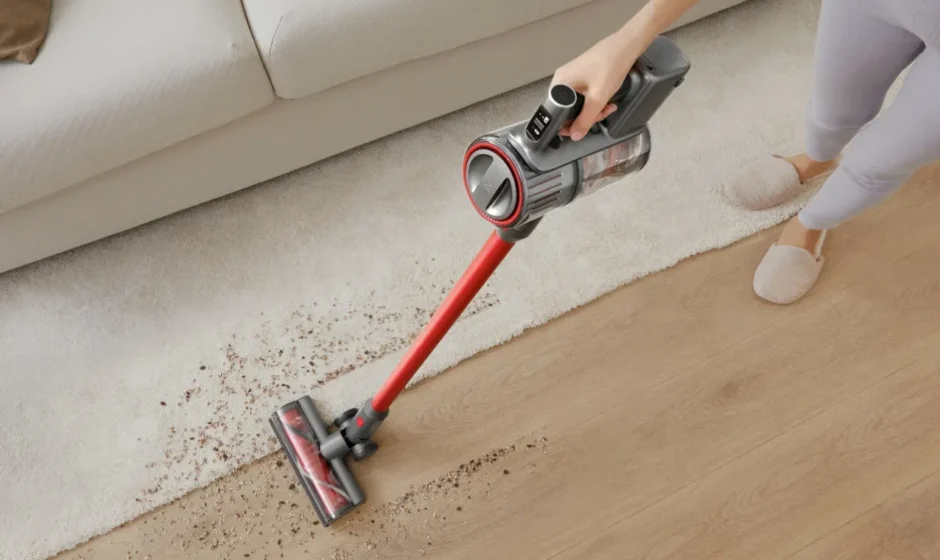

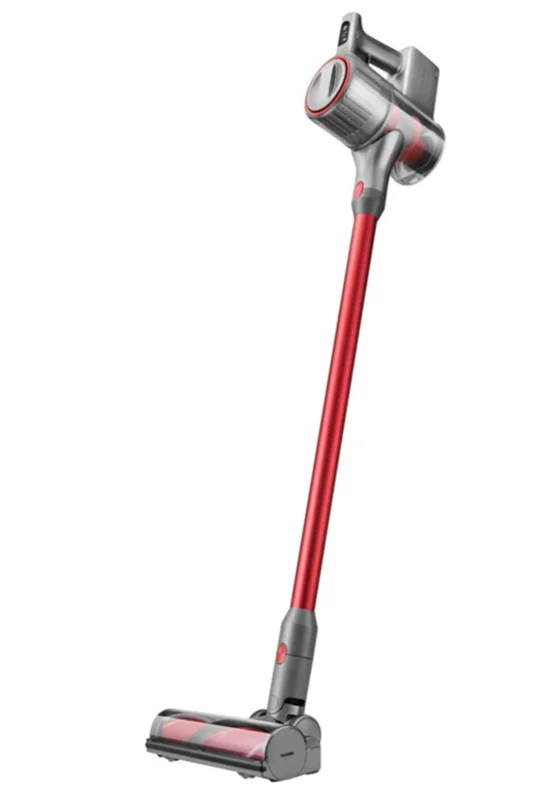
Roborock H7 Cordless Stick Vacuum Cleaner
Safety Information
IMPORTANT SAFETY INSTRUCTIONS
When using an electrical appliance, basic precautions should always be followed, including the following:
- READ ALL INSTRUCTIONS BEFORE USING (THIS APPLIANCE).
- Failure to follow the warnings and instructions may result in electric shock, fire and/or serious injury.
WARNING
To reduce the risk of fire, electric shock or injury:
- Do not use on wet surfaces. Do not expose to rain. Store indoors.
- Do not allow it to be used as a toy. Close attention is necessary when used by or near children, pets or plants.
- Use only as described in this manual. Use only the manufacturer’s recommended attachments.
- Do not use with a damaged cord or plug. If the appliance is not working as it should, has been dropped, damaged, left outdoors, or dropped into water, return it to a service centre.
- Do not pull or carry by cord, use cord as a handle, close a door on cord, or pull cord around sharp edges or corners. Do not run the appliance over the cord. Keep the cord away from heated surfaces.
- Do not unplug by pulling on the cord. To unplug, grasp the plug, not the cord.
- Do not handle the Power Supply, including the Power Supply plug and Power Supply terminals , with wet hands.
- Do not put any object into openings. Do not use with any opening blocked; keep free of dust, lint, hair, and anything that may reduce air flow.
- Keep hair, loose clothing, fingers, and all parts of the body away from openings and moving parts.
- Use extra care when cleaning the stairs.
- Do not use to pick up flammable or combustible liquids, such as gasoline, or use in areas where they may be present.
- Do not pick up anything that is burning or smoking, such as cigarettes, matches, or hot ashes.
- Do not use without a ust bag.
- Prevent unintentional starting. Ensure the switch is in the off position before picking up or carrying the appliance. Carrying the appliance with your finger on the switch or energising an appliance that has the switch on invites accidents.
- Recharge only with the Power Supply specified by the manufacturer. A Power Supply that is suitable for one type of battery pack may create a risk of fire when used with another battery pack.
- Use appliances only with specifically designated battery packs. Use of any other battery packs may create a risk of injury and fire.
- When the battery pack is not in use, keep it away from other metal objects, like paper clips, coins, keys, nails, screws or other small metal objects, that can make a connection from one terminal to another. Shorting the battery terminals together may cause burns or a fire.
- Under abusive conditions, liquid may be ejected from the battery; avoid contact. If contact accidentally occurs, flush with water. If liquid contacts the eyes, additionally seek medical help. Liquid ejected from the battery may cause irritation or burns.
- Do not use a battery pack or appliance that is damaged or modified. Damaged or modified batteries may exhibit unpredictable behaviour resulting in fire, explosion or risk of injury.
- Do not expose a battery pack or appliance to fire or excessive temperature. Exposure to fire or temperature above 130°C may cause an explosion.
- Follow all charging instructions and do not charge the battery pack or appliance outside of the temperature range specified in the instructions. Charging improperly or at temperatures outside of the specified range may damage the battery and increase the risk of fire.
- Have servicing performed by a qualified repair person using only identical replacement parts. This will ensure that the safety of the product is maintained.
- Do not modify or attempt to repair the appliance or the battery pack except as indicated in the instructions for use and care.
- Always turn off this appliance before connecting or disconnecting the motorised nozzle.
SAVE THESE INSTRUCTIONS
Household use only.
Battery and Charging
- Please keep the power supply and docking station away from heat (such as heating plates).
- For connection to a supply not in the U.S.A., use an attachment plug adapter of the proper configuration for the power outlet, if needed.
- The battery must be removed from the appliance before it is scrapped.
- The appliance must be disconnected from the supply mains when removing the battery.
- The battery is to be disposed of safely. Please do not discard waste batteries. Leave them to a professional recycling organisation.
- Do not wipe or clean the power supply or docking station shrapnel with a piece of wet cloth or wet hands.
- Please make sure the cleaner is powered off in shipment, and the original packaging is advised.
- If left unused for a long period, please store the cleaner in a cool and dry place after having it fully charged and switched off. Charge it at least every three months to avoid the battery being over-discharged.
- Please do not use the product when the temperature is higher than 40°C or lower than 4°C, or twhen here is any liquid or sticky substance on the floor.

International symbols explanation
 – ON-OFF (push-push) symbol [symbol IEC 60417-5010 (2009-02)]
- ∼ – ALTERNATING CURRENT symbol [symbol IEC 60417-5032 (2009-02)]
 – DIRECT CURRENT symbol [symbol IEC 60417-5031 (2009-02)]
 – ON-OFF (push-push) symbol [symbol IEC 60417-5010 (2009-02)]
 – DIRECT CURRENT symbol [symbol IEC 60417-5031 (2009-02)]
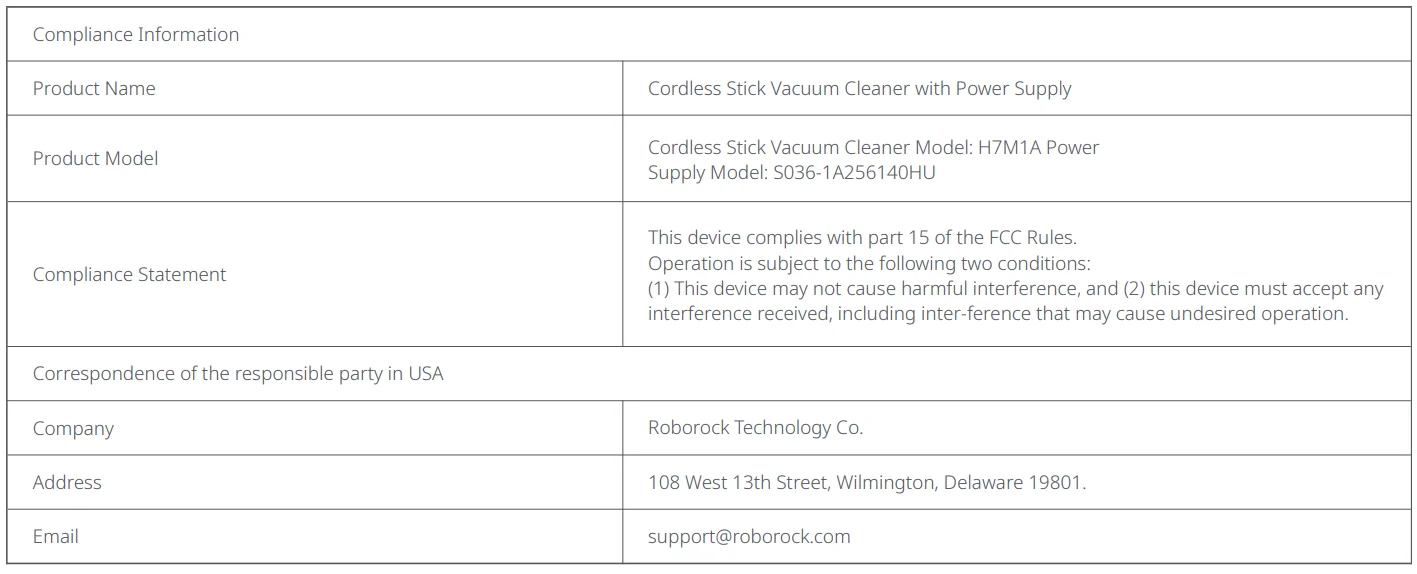
FCC Statement
Warning
Any changes or modifications to this unit not expressly approved by the party responsible for compliance could void the user’s authority to operate the equipment.
Note: This equipment has been tested and found to comply with the limits for a Class B digital device, pursuant to part 15 of the FCC
Rules. These limits are designed to provide reasonable protection against harmful interference in a residential installation. This equipment generates, uses and can radiate radio frequency energy and, if not installed and used in accordance with the instructions, may cause harmful interference to radio communications. However, there is no guarantee that interference will not occur in a particular installation. If this equipment does cause harmful interference to radio or television reception, which can be determined by turning the equipment off and on, the user is encouraged to try to correct the interference by one or more of the following measures:
- Reorient or relocate the receiving antenna.
- Increase the separation between the equipment and receiver.
- Connect the equipment into an outlet on a circuit different from that to which the receiver is connected.
- Consult the dealer or an experienced radio/TV technician for help.
IC Statement
This device contains licence-exempt transmitter(s)/receiver(s) that comply with Innovation, Science and Economic Development Canada’s licence-exempt RSS(s). Operation is subject to the following two conditions:
- This device may not cause interference, and
- This device must accept any interference, including interference that may cause undesired operation of the device.
CAN ICES-3 (B)/NMB-3(B)
Product Introduction
Vacuum
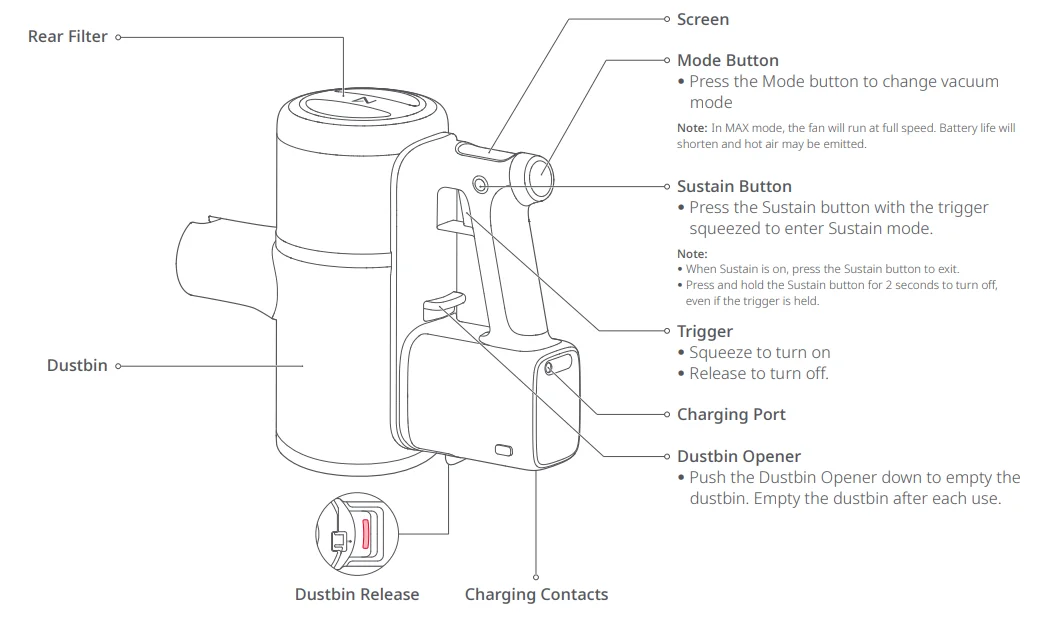
Parts List
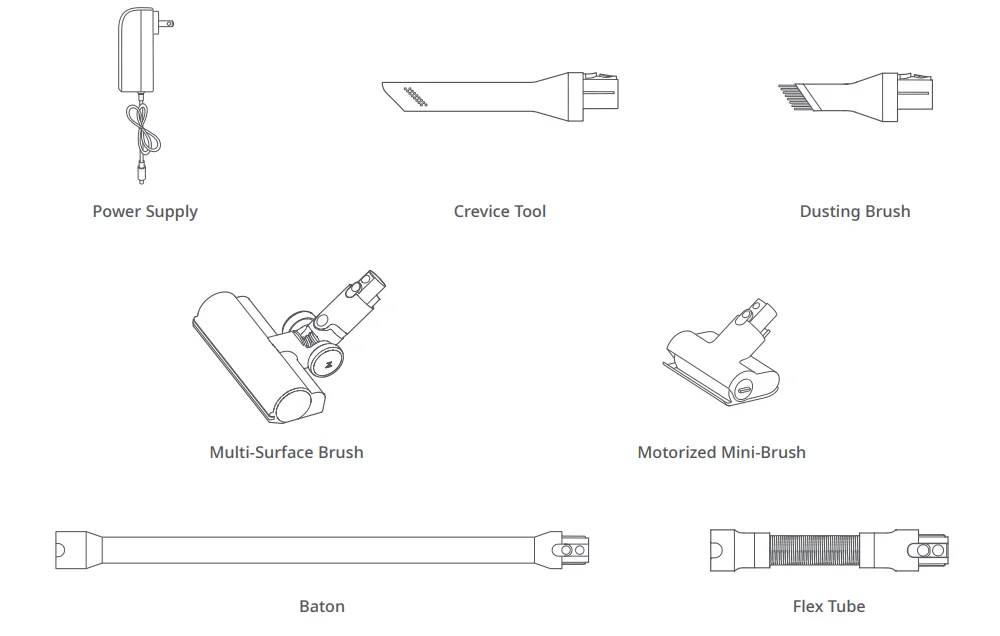
Display
This Roborock cordless vacuum is equipped with a 1.3-inch OLED display that shows relevant information in real-time.
Standby and Operating Modes
Active
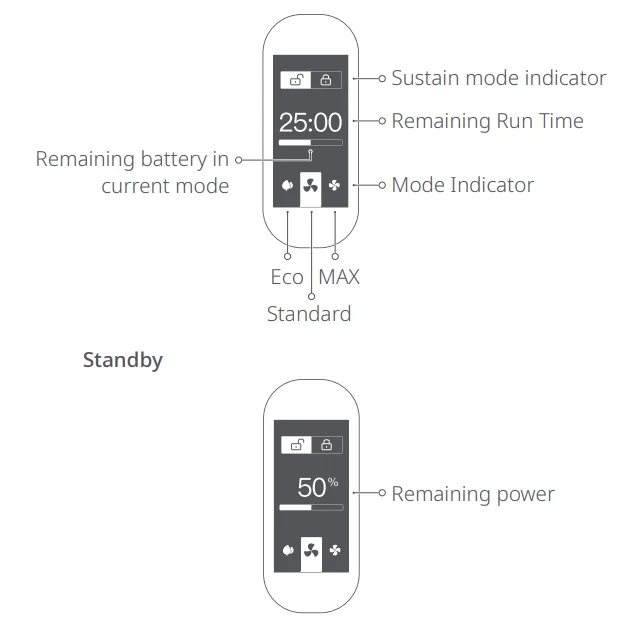
Notes:
- The remaining run time indicator will appear after several seconds of use.
- Remaining run time is for reference only and may be different to actual run time.
Charging
When the battery is charging, a charging animation will show alongside the current battery level. The screen will turn off automatically after 1 minute of inactivity.
Error
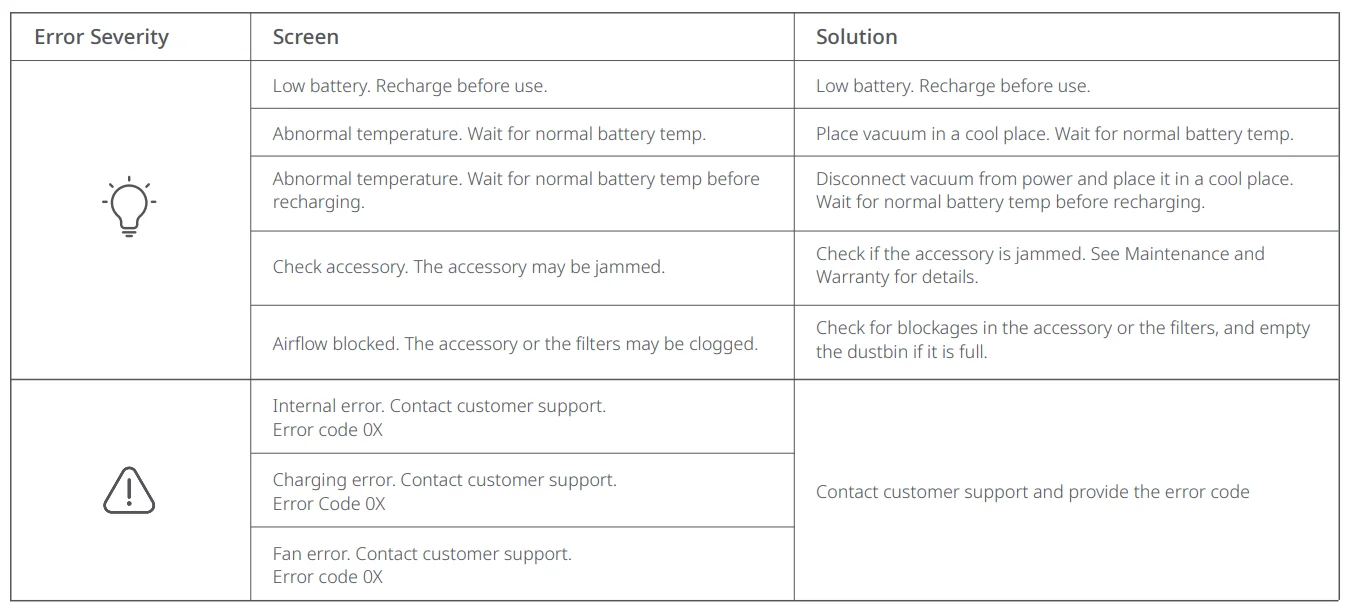
If an error occurs while the vacuum is in operation, the screen will show an error message. See Troubleshooting for details.
Language selection
Press the Mode button for 10 seconds to enter language selection. Press the Mode button to scroll through language options. Squeeze the Trigger to confirm a language and exit language selection.
Buttons
Sustain Button
Press the Sustain button to enter Sustain mode. The Sustain icon will be highlighted on the screen. Squeeze the trigger while in Sustain mode to start the vacuum and enable it to run continuously. In Sustain mode, the vacuum will not stop when the trigger is released. Press the Sustain button again to disengage Sustain mode and stop vacuuming.
You can also enable the vacuum to continuously run by first pressing the trigger and pressing the Sustain button.
Pressing the Sustain button for 5 seconds will activate the child lock. The vacuum will not start when the Child Lock is on. Press the Sustain button again for 5 seconds, then turn the Child Lock off.
Notes:
- Squeezing the trigger while the vacuum is already running continuously in Sustain mode will have no effect.
- Pressing the Sustain button for 2 seconds in any active mode will stop the vacuum.
Trigger
Squeeze the trigger to start vacuuming. Releasing the trigger will stop the vacuum and enter it into Standby mode, unless it is in Sustain mode. The screen will turn off automatically after 30 seconds of inactivity, and the vacuum will automatically turn off after 1 minute of inactivity. Squeeze the trigger to start the vacuum again.
Notes:
- Pressing the Sustain button while Sustain mode is on will switch off Sustain mode.
- The vacuum will stop running when charging.
- Insufficient power or other errors may cause the vacuum to fail. See Troubleshooting for details.
Mode Button
When the vacuum is on, press the Mode button to switch between Eco, Standard, or MAX modes. The respective icon will be highlighted on-screen.
Note:
The vacuum will return to Standard mode after turning off or when charging.
Installation
Vacuum and accessories setup
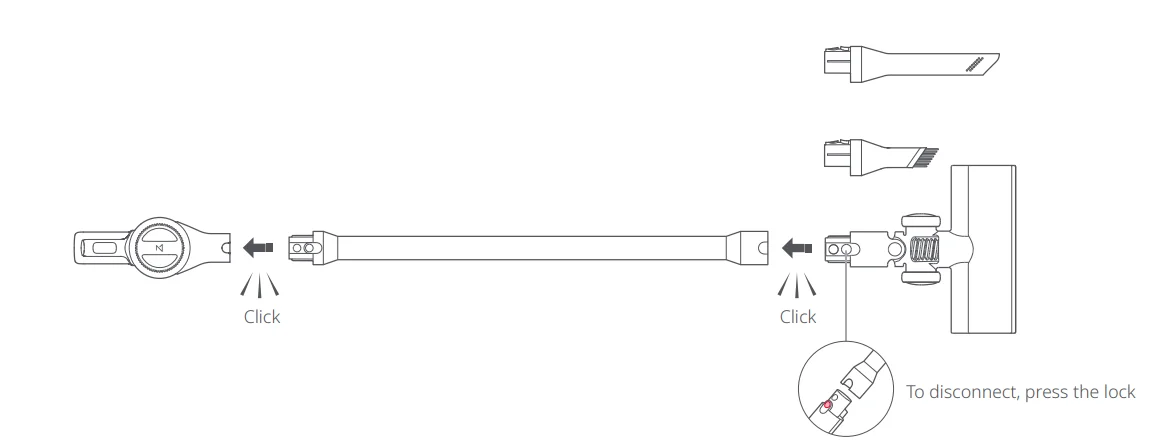
Option 1
Connect the Baton to the vacuum, then attach an accessory.
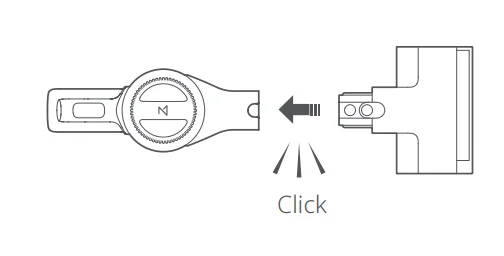
Option 2
Connect the vacuum directly to an accessory.
Option 3
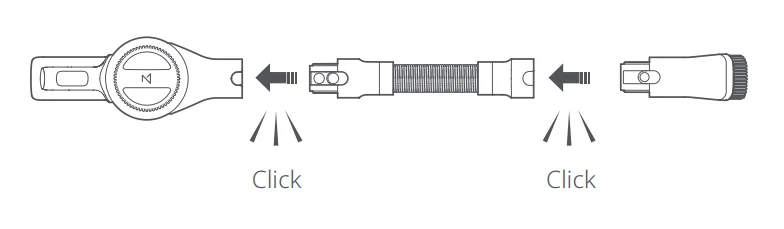
Connect the flex tube to the vacuum, then attach an accessory.
Note: Motorised accessories such as the motorised mini-brush or Multi-Surface Brush cannot be used with the flex tube.
Use
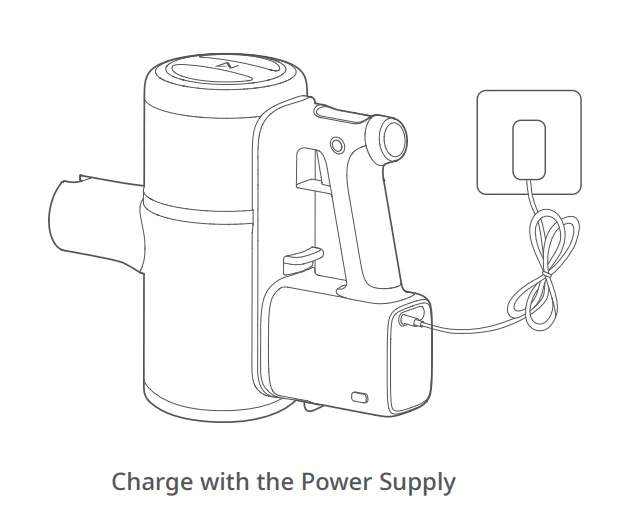
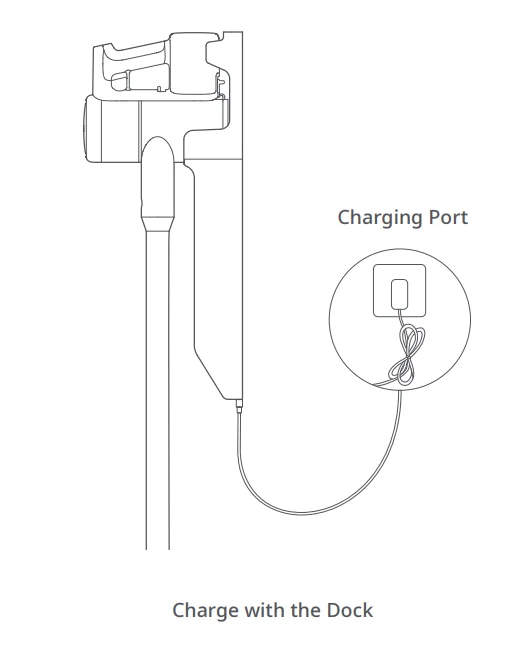
Charging
When the battery is charging, a charging animation will show alongside the current battery level. The screen will turn off automatically after 1 minute of inactivity.
Notes:
- When charging, the screen image faces the user for easy viewing.
- When charging, the vacuum will enter Charging mode and stop operating.
- The battery temperature will increase after continuous use in MAX mode. As a result, recharging may take longer.
- When battery levels are very low, the vacuum screen will only light up after a period of charging.
Before using the vacuum, read the ” Safety Information” in this user manual
Note:
Make sure the Power Supply is firmly inserted into the power socket.
Using the vacuum
- When using the Multi-Surface Brush or motorised mini-brush on the vacuum cleaner, the surfaces of some fabrics may pill or be difficult to vacuum. If this occurs, it is recommended that you use the dusting brush or crevice tool to vacuum these surfaces.
- Before vacuuming shiny floors such as parquet or tiles, ensure there is no hard debris trapped in the Multi-Surface Brush to avoid scratches.
- Before using the vacuum, ensure that the Dustbin, Multi-Cyclone Assembly, and filters have been properly installed.
Note: The filters are installed during production. Please refer to the “Maintenance” section of this manual for details on filter assembly and cleaning. - Do not block the exhaust outlet when vacuuming.
- Flour, construction dust, and other fine particles should only be vacuumed in small amounts.
- To avoid damage to the vacuum or the floor, do not vacuum up hard or sharp objects such as toys, pins, and paper clips.
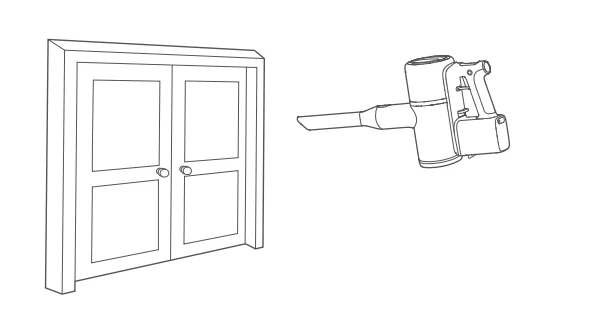
- Be aware of your environment as you vacuum, especially around stairs and windows.
- To avoid accidental fall damage, avoid placing the vacuum on raised surfaces such as desks and shelves, or leaning it against other objects.
- The rotation of the Multi-Surface Brush may leave an unevenly polished floor. This can be resolved by wiping with a damp cloth or polishing with floor wax.
Auto Shutoff
- If any rotating parts get jammed, the vacuum will shut off automatically. Clear the jam to continue vacuuming.
- If the motor gets too hot, the vacuum will automatically shut off. Wait until the temperature returns to normal before continuing.
Keep the Brush Clear
- Electric brushes will automatically stop if jammed by dirt or long fibres during use. If this occurs, clear them before continuing.
- To avoid potential injury, detach the brush from the vacuum before removing entangled objects.
Caution: Beware of sharp objects trapped in the roller.
Brush Accessory Uses
Crevice Tool
Narrow crevices, including skirting boards, corners, and stairs.
Dusting Brush:
Sofas, chairs, and other soft furnishings, and flat surfaces such as desks and shelves.
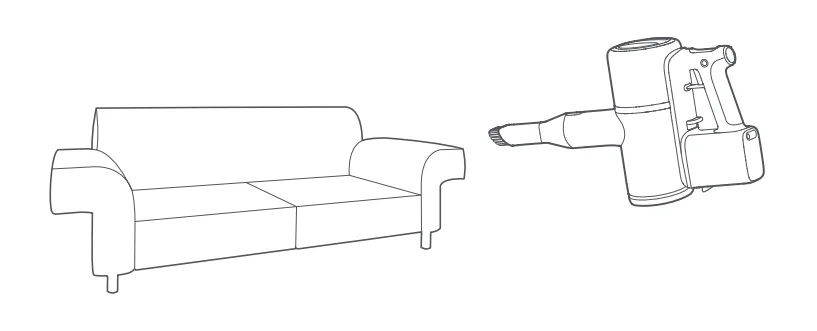
Tip:
The Dusting Brush can also be used on its own to dust the vacuum and other items around the house.
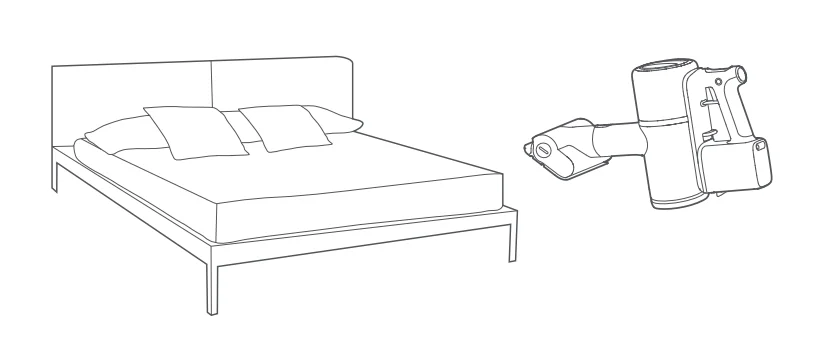
Motorised Mini-Brush
Cleaning dust from beds, sofas, and soft furnishings to avoid mites.
Multi-surface brush:
Connect to the baton for cleaning low and medium-pile carpets. It can also be used on tiles or other floor surfaces.
Carpet Boost is automatically activated when the Multi-Surface Brush is installed. When a carpet is detected, suction is automatically boosted for a deeper clean. It will return to the previous mode when a carpet is no longer detected.
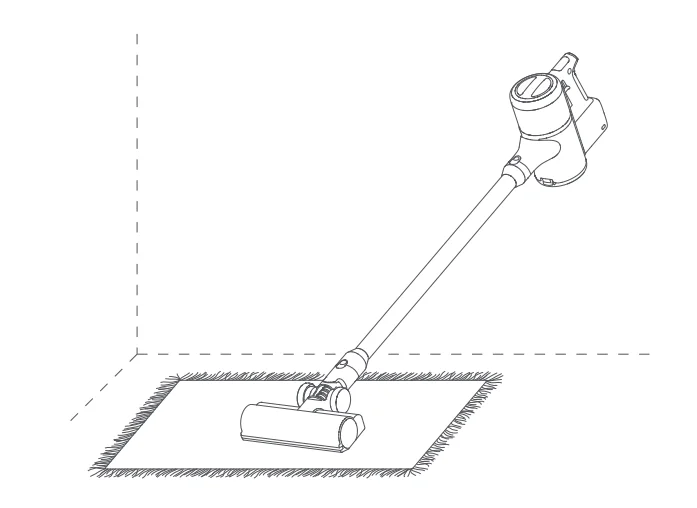
Note:
Carpet Boost will not activate when vacuuming in MAX mode.
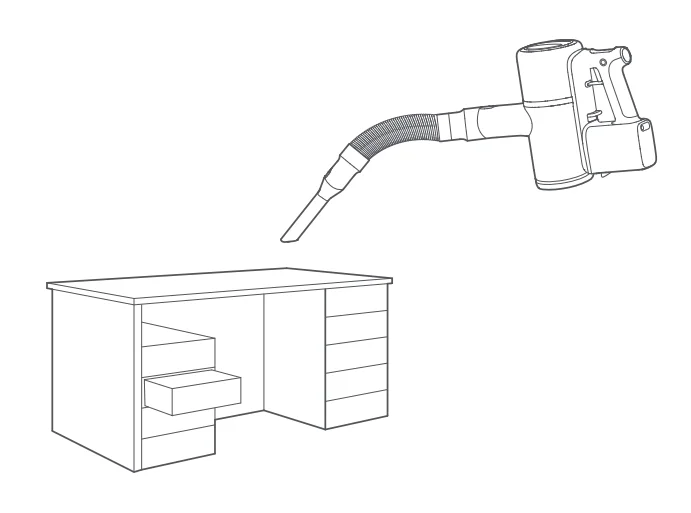
Flex Tube
Connect to the Dusting Brush or Crevice Tool to clean small or narrow spaces such as drawers and car interiors.
Maintenance
Product Warranty
- Only use original parts. The use of non-original parts may affect your eligibility for warranty services.
- If the filter or airflow is blocked, the vacuum will start and stop several times before shutting off. Clean the filters and the accessory before further use.
- If the vacuum is to be left unused for an extended period, fully charge it and shut it down before storing it in a cool and dry place. Do not place the vacuum in humid locations or in direct sunlight. Charge the vacuum at least once every 3 months to prevent damage to the battery.
Cleaning the vacuum
Use a soft, dry cloth to wipe the vacuum.
Cleaning the dustbin
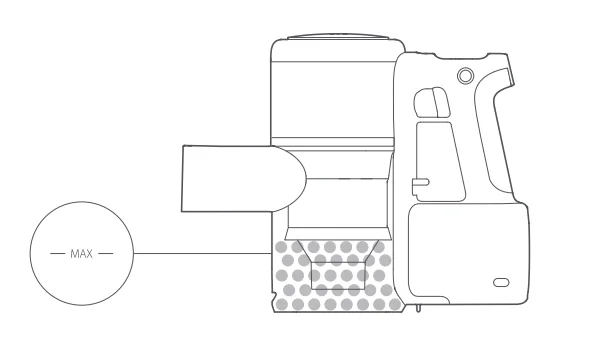
- When the dustbin is full, suction will be reduced. Empty it before continuing with vacuuming. Before cleaning the dustbin, disconnect the vacuumfrom the mains power and keep it inactive.

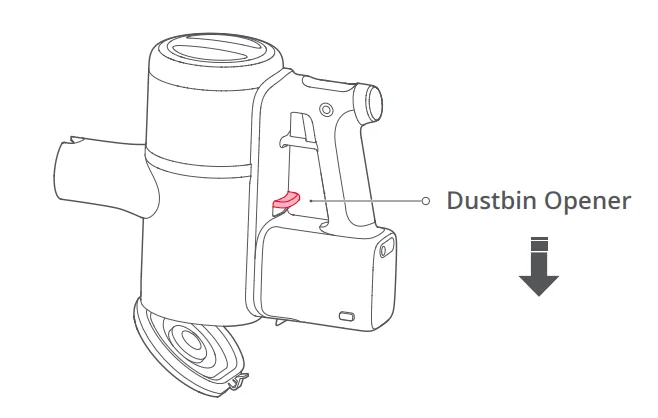
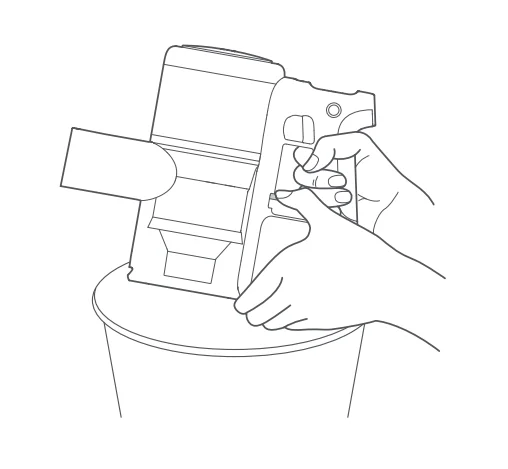
- To empty the dustbin, push the Dustbin Opener on the front of the handle in the direction of the arrow to open it, then empty it into a bin. The dustbin should be emptied at least once a week.


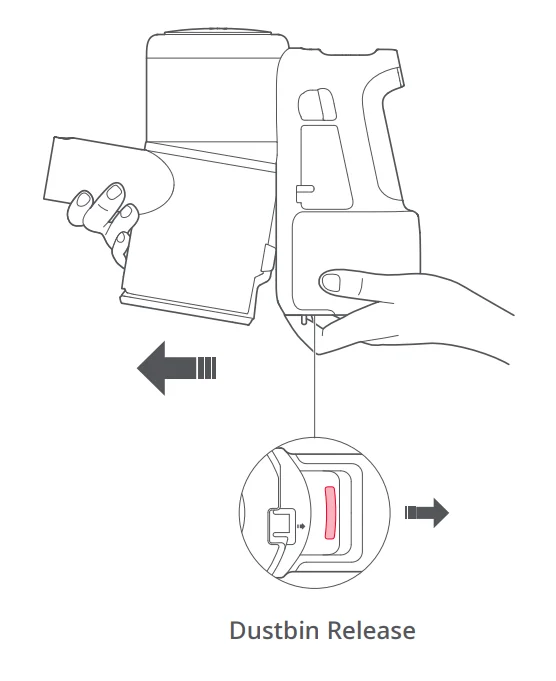
- Push the Dustbin Release next to the dustbin after emptying it to remove the dustbin for cleaning.

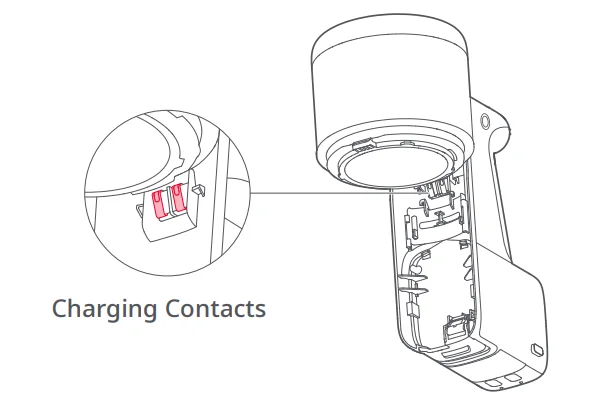
- The dustbin should be rinsed with water at least once a month. Charging contacts should also be wiped with a soft, dry cloth once a month.
 Notes:
- Do not clean the dustbin with detergents, polishes, or air fresheners.
- Do not put the dustbin in a dishwasher or any similar appliance.
- When the dustbin is thoroughly dry, reinstall it as shown.

 Notes: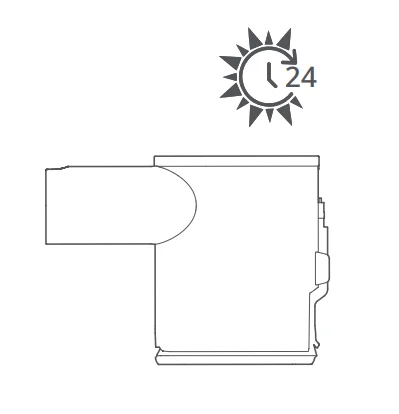
Cleaning the Multi-Surface Brush
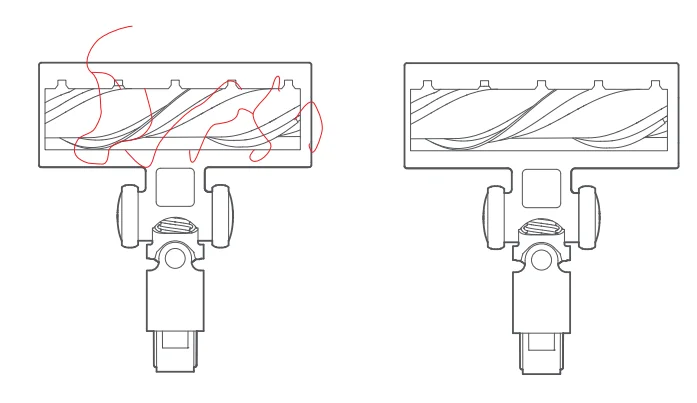
- Turn the brush head over with the bottom facing you. Look for debris, including hair and fibres, on the head or in the bearings.
- Remove all debris. Use scissors if necessary.
Basic parameters
Vacuum
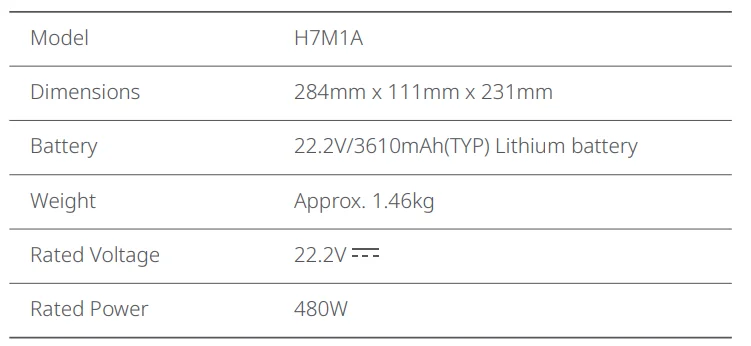
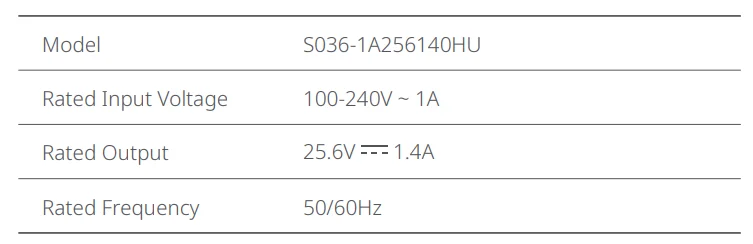
Power Supply
Troubleshooting
Error messagesare displayed onscreen.
If the vacuum is not operating properly, the screen will display an error message. Check the screen and then read the table below to resolve any issues.
Other errors
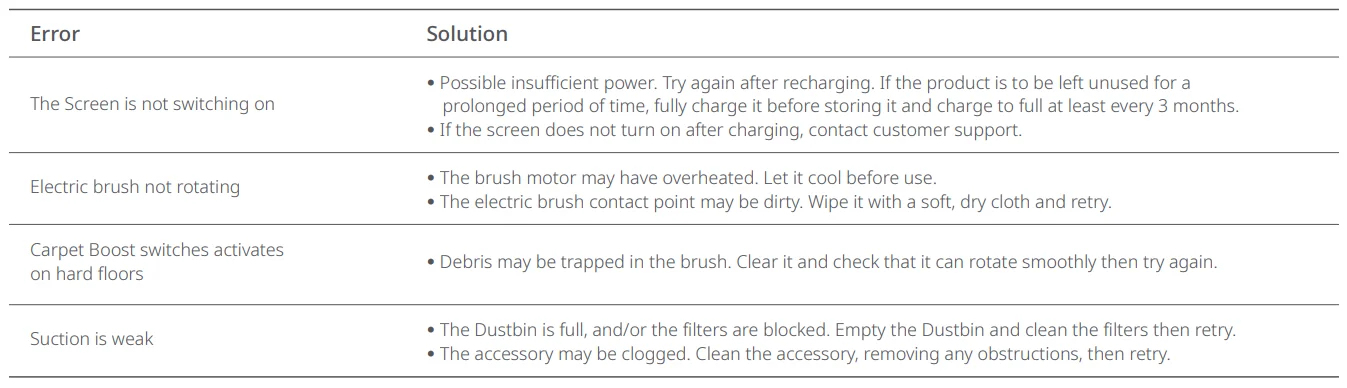
If the problem persists after using the recommendations in the table above, please email our after-sales service team:
US/Non-Europe Support: [email protected]
Europe Support: [email protected]
For more manuals by Roborock, visit ManualsLibraryy
Roborock H7 Cordless Stick Vacuum Cleaner- FAQs
Is the Roborock H7 Cordless Stick Vacuum Cleaner worth buying?
Yes, the Roborock H7 is a solid choice for everyday cleaning. It performs especially well on hard floors, easily picking up dust, pet hair, and small debris. Its lightweight design and cordless convenience make it easy to handle. While it works well on carpets, thicker debris may require an extra pass for thorough cleaning. Overall, it offers a good balance of power, portability, and usability.
What is the suction power of the Roborock H7?
The Roborock H7 delivers up to 160 air watts (AW) of suction power, which is strong for a cordless stick vacuum. This level of suction allows it to handle dust, crumbs, and pet hair effectively on both hard floors and low-pile carpets. It also features multiple power modes, so you can adjust suction based on the cleaning task and save battery when needed.
How long does the battery last on the Roborock H7?
The Roborock H7 offers a runtime of up to 90 minutes in eco mode, making it suitable for extended cleaning sessions. On higher power settings, the runtime decreases but still provides enough time for most cleaning tasks. The removable battery design also allows users to swap batteries if needed, extending overall cleaning time without waiting for a recharge.
Does the Roborock H7 have a HEPA filtration system?
Yes, the Roborock H7 uses a 5-stage filtration system with HEPA filtration. This setup captures fine dust particles and allergens, helping maintain cleaner indoor air. It is particularly beneficial for households with pets or allergy concerns. The filtration system is also washable, making maintenance simple and cost-effective over time.
Can the Roborock H7 be used on carpets and hard floors?
Yes, the Roborock H7 is designed for both surfaces. It performs excellently on hard floors and does a good job on carpets, especially low- to medium-pile types. The vacuum’s motorized brush helps lift dirt from carpet fibers, though deeply embedded debris may require slower passes for best results.
Is the Roborock H7 good for pet hair?
The Roborock H7 is effective at removing pet hair from floors, furniture, and carpets. Its strong suction and brush design help capture hair without excessive tangling. It also includes useful attachments for cleaning upholstery and tight spaces, making it a practical option for pet owners looking for a versatile cordless vacuum.
Does the Roborock H7 support dust bags or is it bagless?
The Roborock H7 offers both bagless and optional dust bag operation. You can use it as a traditional bagless vacuum or install a disposable dust bag for more hygienic dirt disposal. This flexibility is helpful for users who prefer less direct contact with dust and allergens when emptying the bin.
How loud is the Roborock H7 during operation?
The Roborock H7 operates at around 74 dB, which is relatively quiet compared to many cordless vacuums. In lower power modes, it is even quieter, making it suitable for use in homes where noise levels matter. This allows you to clean without causing too much disturbance during daily use.
How easy is it to maintain the Roborock H7?
Maintenance is straightforward. The dustbin is easy to empty, and the filters are washable for long-term use. The brush roll can also be cleaned without much effort, helping prevent buildup of hair and debris. Regular maintenance ensures consistent performance and extends the vacuum’s lifespan.
What are the main drawbacks of the Roborock H7?
While the Roborock H7 performs well overall, it has a few limitations. Its performance on thick carpets is decent but not exceptional, sometimes requiring multiple passes. Additionally, higher suction modes reduce battery life significantly. Despite these minor drawbacks, it remains a reliable and efficient cordless vacuum for most household cleaning needs.