
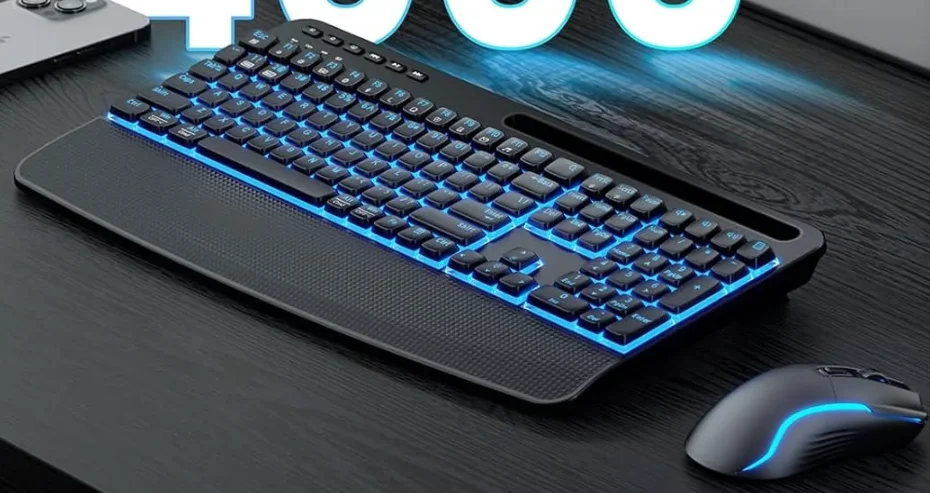

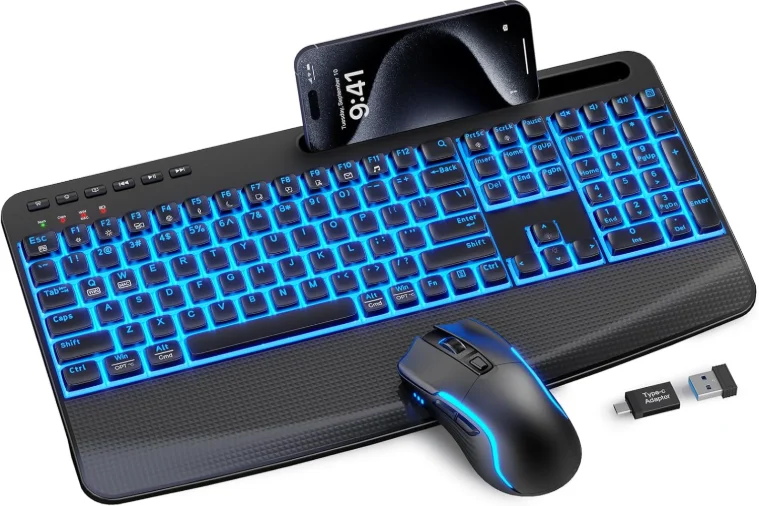
Sablute KM25Pro Wireless Keyboard Combo
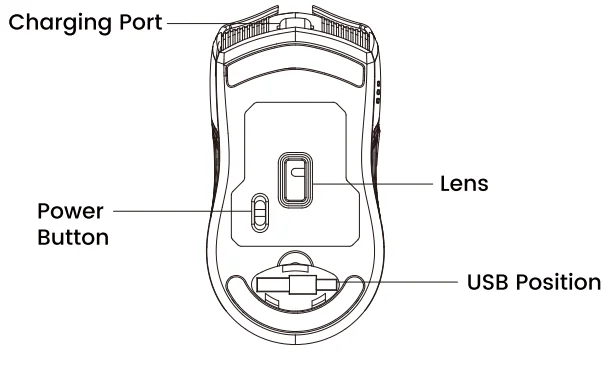
Where is USB?
Take out the USB from the back of the mouse. The mouse and keyboard share one USB.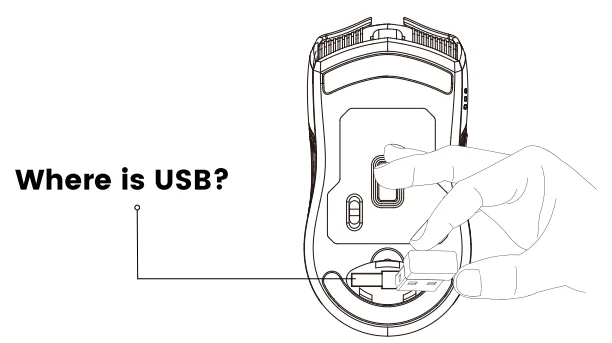
How to set up
- Please put the USB receiver into your computer.
- Then turn on the keyboard and mouse.
Note: The keyboard and mouse will automatically connect to the computer, no driver needed.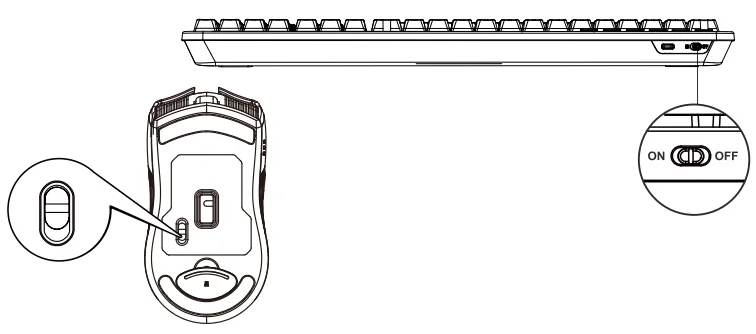
What to do if the keyboard loses connection with the USB?
Pairing method: long-press the “ESC” + “=” keys for three seconds until the red light flashes. Then, immediately plug in the receiver.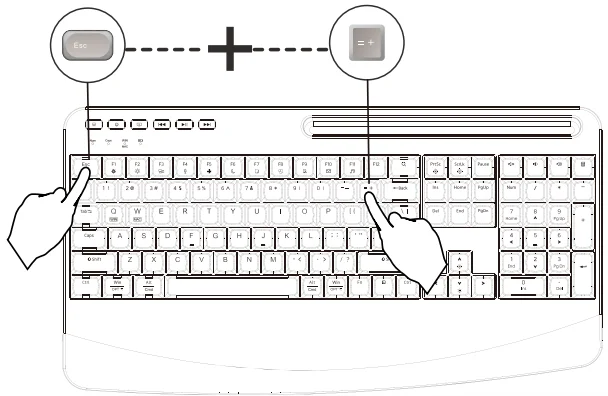
What to do if the mouse loses connection with the USB?
Press and hold the left, middle, and right buttons of the mouse for 3-5 seconds, then plug the USB into the computer.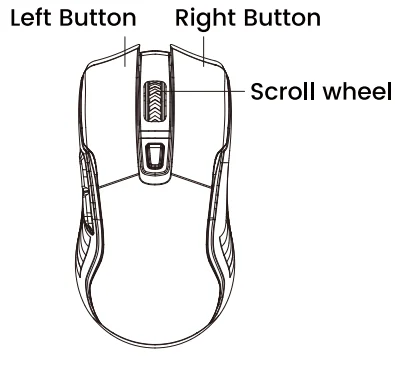
The Functions of a Mouse
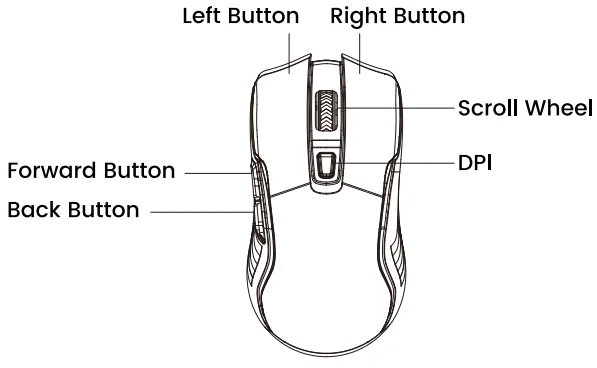

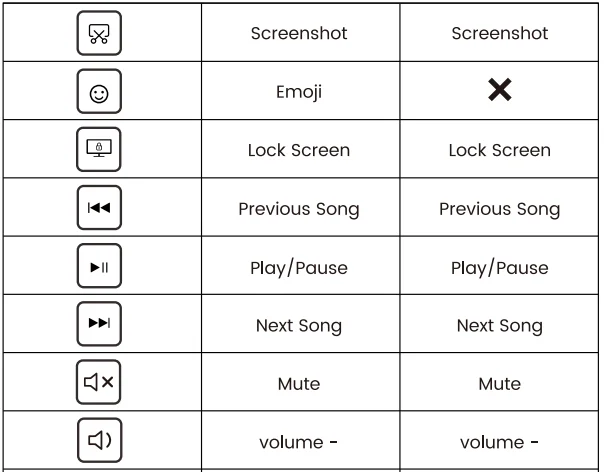
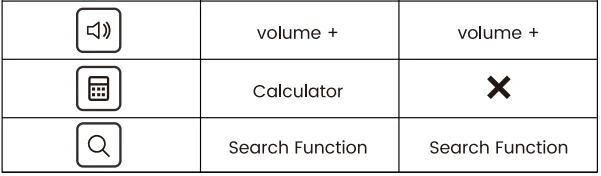
Shortcut keys
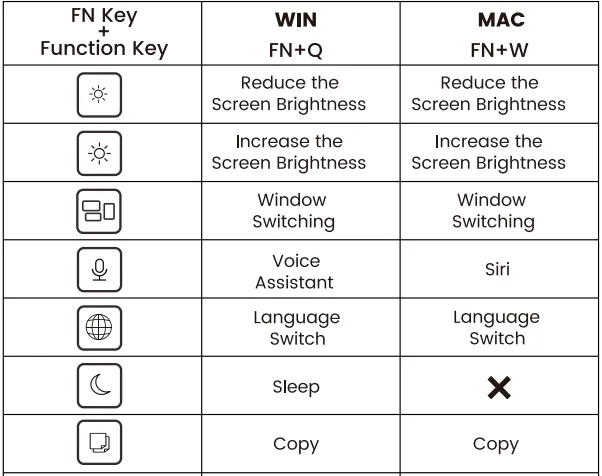
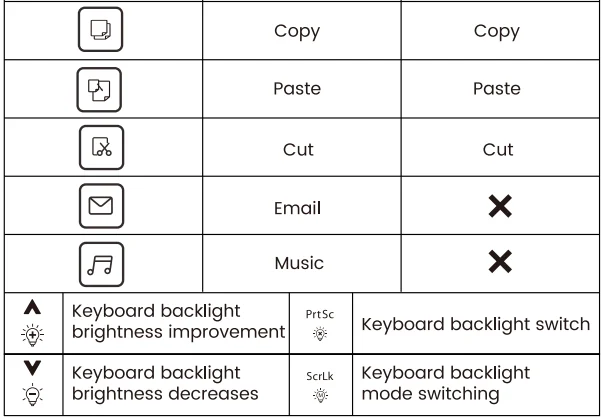
Individual shortcut keys
Keyboard lighting function
 Num Lock: The Num Lock indicator will turn red when Num Lock is activated.
 Caps Lock: The Caps Lock indicator will turn red when Caps Lock is activated.
 Win: Fn+Q, Switch to the function of the WIN system, and the red light stays on.
- Mac: Fn+W, Switch to the function of the Mac system, and the green light stays on.
 Charging light: The red light remains on constantly when charging.
 Num Lock: The Num Lock indicator will turn red when Num Lock is activated.
 Caps Lock: The Caps Lock indicator will turn red when Caps Lock is activated.
 Win: Fn+Q, Switch to the function of the WIN system, and the red light stays on.
 Charging light: The red light remains on constantly when charging.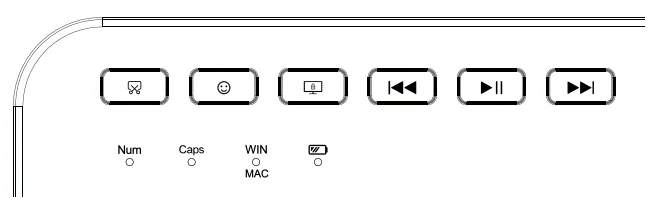
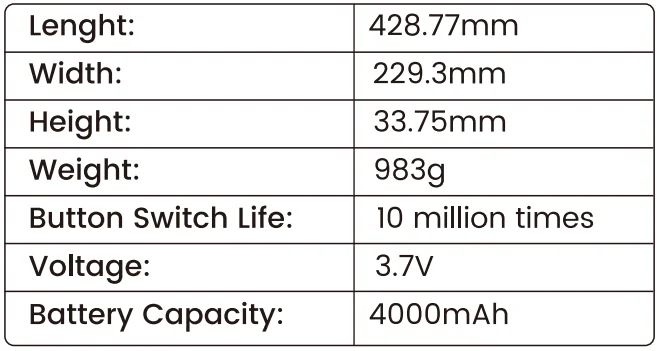
Keyboard specifications.
Keyboard:
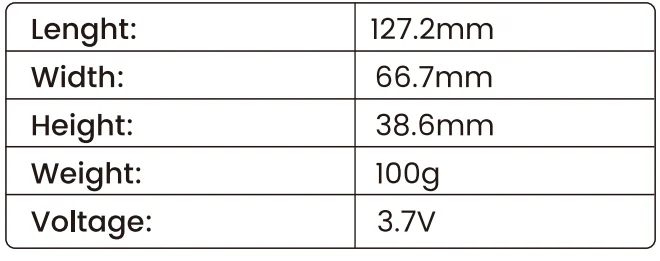
Mouse:
FAQ
Q1: How to fix keyboard delay or sticking?
A1:
- Check for 2.4GHz devices (e.g., router) nearby.
- Ensure the keyboard is fully charged.
- Remove any full-metal casing blocking the signal.
Q2: What to do if the keyboard/mouse won’t charge?
A2:
- Check the charging port connection; replace the cable.
- Try a different USB port. Contact us if the issue persists.
Q3: Backlight not working?
A3:
- Charge for 30 mins, then re-insert the USB receiver.
- Restart the keyboard and mouse.
Q4: Where’s the USB receiver?
A4:
- It’s under the mouse. The keyboard and mouse share one receiver.
Q5: How long do the keyboard and mouse last on a single charge?
A5:
- The keyboard can last about 50 hours with the backlight on, which is roughly one week of use, and up to four months without the backlight.
- The mouse lasts about 30 hours with the backlight on and around 100 hours without the backlight.
Customer service
Buy on SABLUTE, You will get:
 30-Day Money-Back Guarantee
- 90-Day Free Replacement
- Hassle-Free Warranty Without Returning
- Lifetime Customer Support
 30-Day Money-Back Guarantee
Contact us
For FAQs and more information, please visit: sablute.com/pages/contact, [email protected].
FCC Statement
This equipment has been tested and complies with the limits for Class B digital devices under Part 15 of the FCC rules, designed to protect residential environments from harmful interference. The device emits radio frequency energy during use, and improper installation as per instructions may cause interference with wireless communications. If interference is detected (testable by power cycling), please take the following actions:
- Adjust the position of the receiving antenna.
- Increase the distance between the device and the receiver.
- Connect the device to a different circuit outlet than the receiver.
- Consult a technician or dealer for assistance.
Modifications not approved by the compliance responsible party will void the authority to operate the equipment. The operation is subject to two conditions:
- The device must not cause harmful interference.
- The device must accept any interference received, including that affecting normal operation.
After-Sales
Email: [email protected]
Website URL: sablute.com.
For More Manuals By Sablute, Visit ManualsLibraryy.
Sablute KM25Pro Wireless Keyboard Combo-FAQs
What are the key features of the Sablute KM25Pro Wireless Keyboard Combo?
The Sablute KM25Pro offers a full-size wireless keyboard and mouse combo with a 4000mAh rechargeable battery, ergonomic wrist rest, and built-in phone holder. It includes backlit keys with multiple color options and uses a 2.4GHz USB receiver for stable, lag-free connectivity.
Is the Sablute KM25Pro suitable for long working hours?
Yes, the KM25Pro is designed for comfort during extended use, featuring a large palm rest, ergonomic tilt angles, and quiet scissor-switch keys. These elements help reduce wrist strain and fatigue, making it suitable for office work, remote jobs, and prolonged typing sessions.
How long does the battery last on the Sablute KM25Pro combo?
The keyboard includes a 4000mAh rechargeable battery that can last several weeks on a single charge, depending on usage and lighting settings. The mouse also has a rechargeable battery, offering extended runtime with auto-sleep features to conserve power.
Does the Sablute KM25Pro support multiple devices or Bluetooth?
The KM25Pro primarily uses a 2.4GHz USB receiver for connectivity and does not rely on Bluetooth pairing. This ensures a stable connection across compatible devices, including laptops, desktops, tablets, and some mobile systems with USB support.
Is the keyboard noisy while typing?
No, the Sablute KM25Pro is designed with quiet scissor-switch keys that provide a smooth and silent typing experience. This makes it ideal for shared workspaces, offices, or home environments where minimal noise is preferred during long typing sessions.
What devices are compatible with the Sablute KM25Pro?
The combo works with a wide range of operating systems, including Windows, macOS, Chrome OS, Linux, Android, and tablets. Its plug-and-play USB receiver makes it easy to connect without installing additional drivers or software.
Does the Sablute KM25Pro include backlighting?
Yes, the keyboard features multi-color backlighting with several brightness levels, allowing users to type comfortably in low-light environments. The key legends are designed to resist fading, ensuring long-term visibility and consistent lighting performance over time.
What comes in the box with the Sablute KM25Pro combo?
The package typically includes the wireless keyboard, mouse, USB receiver, USB-C charging cable, and sometimes a USB adapter. This complete setup ensures users can start using the combo immediately without needing additional accessories.
How durable is the Sablute KM25Pro keyboard?
The keyboard is built to handle up to 10 million keystrokes, offering strong durability compared to standard models. Its high-quality keycaps and construction make it suitable for daily use, reducing the need for frequent replacements over time.
Is the Sablute KM25Pro good for gaming or just office use?
The KM25Pro is best suited for office work, productivity, and general use rather than competitive gaming. While it provides stable wireless performance, its focus on quiet typing and ergonomics makes it more ideal for professional and everyday computing tasks.