
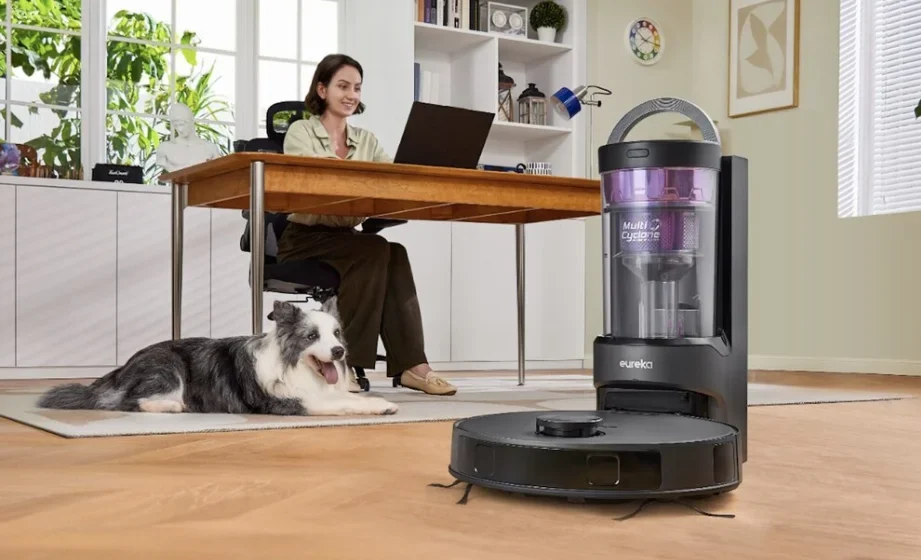

Eureka E20 Plus Robot Vacuum Cleaner
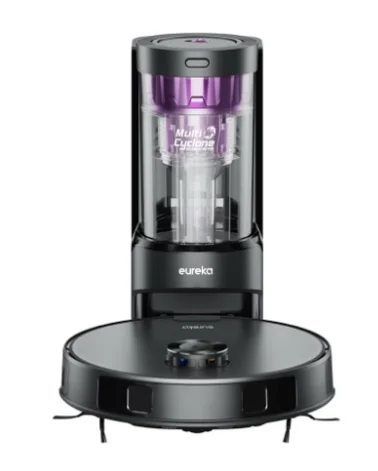
SAFETY INSTRUCTIONS
When using an electrical appliance, basic precautions should always be followed, including the following:
READ ALL INSTRUCTIONS BEFORE USING THIS VACUUM CLEANER
WARNING:
Failure to follow the warnings and instructions may result in electric shock, fire, and/or serious injury. This vacuum should not be used by children under the age of eight or those with reduced physical, sensory or mental capabilities without supervision.
- Before using, clear the area of power cables, pull cables for curtains or blinds, clothing and fragile items.
- Do not operate in a room where a child or infant is sleeping.
- Do not pour or spray any liquids on or in your robotic vacuum.
- If you live in an area that is prone to electrical storms, we recommend using a surge protector.
- Do not operate the robotic vacuum in a room that has lit candles or r lit fireplace.
- Do not allow children to sit on a vacuum.
- Do not use the self-emptying base if it is damaged.
- Do not operate in areas with exposed electrical outlets on the floor.
- Be aware that the robotic vacuum moves around on its own. Take care when walking in the area when it is in operation.
- Do not place the robotic vacuum on any unstable surfaces. Carrying the appliance with your finger on the switch or energizing an appliance that has the switch on invites accidents.
- Danger. Do not touch it when the vacuum cleaner is on.
- Do not put any object into openings. Do not use with any openings blocked; keep free of dust, lint, hair, and anything that may reduce air flow.
- Do not use outdoors or on wet surfaces.
- Do not use with a damaged cord or plug.
- Do not operate the vacuum cleaner or self-emptying base if it has been damaged in any way. If the vacuum cleaner is not working as it should, has been dropped, damaged, left outdoors, or dropped into water or other liquid, call the Eureka Customer Service HELP-LINE at 1-800-282-2886 (US) 1-888-365-2230 (CA).
- To avoid excessive heat and damage to the unit or battery, the vacuum cleaner will not operate while charging.
- Do not allow it to be used as a toy. Close attention is necessary when used by or near children, pets or plants.
- Use only as described in this manual. Use only the manufacturer’s recommended attachments.
- Recharge only with the base specified by the manufacturer. A base that is suitable for one type of battery pack may create a risk of fire when used with another battery pack.
- Do not pull or carry the base by cable, use cable as a handle, close a door on cable, or pull cable around sharp edges or corners. Do not run an appliance over a cable. Keep the cord away from heated surfaces.
- This base is not intended for use by travelers.
- Do not use extension cords or outlets with inadequate current-carrying capacity for the base.
- Do not unplug by pulling on the cord. To unplug, grasp the plug, not the cord.
- Do not handle the plug, base, or vacuum cleaner with wet hands.
- Use appliances only with specifically designated battery packs. Use of any other battery packs may create a risk of injury and fire.
- DO NOT MUTILATE OR INCINERATE BATTERIES. THEY BECOME DANGEROUS AT HIGH TEMPERATURES.
- Liquid ejected from the battery may cause irritation or burns. If the liquid gets on the skin, (1) seek medical attention, (2) wash quickly with soap and water, and (3) neutralize with a mild acid such as lemon juice or vinegar. If the liquid gets into the eyes, flush them immediately with clean water for a minimum of 10 minutes.
- When the battery pack is not in use, keep it away from other metal objects, like paper clips, coins, keys, nails, screws, or other small metal objects, that can make a connection from one terminal to another. Shorting the battery terminals together may cause burns or a fire.
- This product is functioning within a temperature range of 40°F – 104°F.
- Do not use a battery pack or appliance that is damaged or modified. Damaged or modified batteries may exhibit unpredictable behavior,, resulting in fire, explosion, or risk of injury.
- Do not expose a battery pack or appliance to fire or excessive temperature. Exposure to fire or temperature above 266°F may cause an explosion.
- Follow all charging instructions and do not charge the battery pack or appliance outside of the temperature range specified in the instructions. Charging improperly or at temperatures outside of the specified range may damage the battery and increase the risk of fire.
- Have servicing performed by a qualified repair person using only identical replacement parts. This will ensure that the safety of the product is maintained.
- Do not modify or attempt to repair the appliance or the battery pack except as indicated in the instructions for use and care.
- The terminals on both the vacuum cleaner and battery should be kept free and clear of objects. Do not insert metal objects inside the terminals.
- Place the cables from other appliances out of the area to be cleaned.
- WARNING: This product can expose you to chemicals including Di(2-ethylhexyl)phthalate (DEHP), which is known to the State of California to cause cancer and to cause birth defects or other reproductive harm. For more information, go to www.P65Warnings.ca.gov.
- Do not use the vacuum on a wet surface.
- Unplug the self-emptying base frthe om outlet when not in use and before servicing.
CAUTION:
RISK OF INJURY. BRUSH MAY START UNEXPECTEDLY. REMOVE MAIN BRUSH BEFORE CLEANING OR SERVICING.
WARNING FOR BATTERY
- The product must be powered off before removing the battery.
- Do not disassemble the battery by yourself.
- If you need to replace it, please contact the after-sales service center.
- Please dispose of the used battery according to local laws and regulations.
- Do not dismantle, open or shred the battery.
- Do not expose batteries to heat or fire. Avoid storing or keeping the robotic vacuum in direct sunlight.
- Do not short-circuit a battery.
- Do not store batteries haphazardly in a box or drawer where they may short-circuit each other or be short-circuited by other metal objects.
- Do not subject batteries to mechanical shock.
- In the event of a leak, do not allow the liquid to come in contact with the skin or eyes. If contact has been made, wash the affected area with a copious amount of water and seek medical advice.
- Do not use any charger other than that specifically provided for use with the equipment.
- Do not use any battery that is not designed for use with the equipment.
- Seek medical advice immediately if the battery has been swallowed.
FCC Compliance Statement
CAUTION:
Please read the instruction sheet carefully before use
Changes or modifications not expressly approved by the party responsible for compliance could void the user’s authority to operate the equipment.
This equipment has been tested and found to comply with the limits for a Class B digital device, pursuant to part 15 of the FCC Rules. These limits are designed to provide reasonable protection against harmful interference in a residential installation. This equipment generates uses and can radiate radio frequency energy and, if not installed and used in accordance with the instructions, may cause harmful interference to radio communications. However, there is no guarantee that interference will not occur in a particular installation. If this equipment does cause harmful interference to radio or television reception, which can be determined by turning the equipment on and on, the user is encouraged to try to correct the interference by one or more of the following measures:
- Reorient or relocate the receiving antenna.
- Increase the separation between the equipment and receiver.
- Connect the equipment into an outlet on a circuit different from that to which the receiver is connected.
- Consult the dealer or an experienced radio/TV technician for help.
MPE Reminding
To satisfy FCC / IC RF exposure requirements, a separation distance of 20 cm or more should be maintained between the antenna of this device and persons during device operation. To ensure compliance, operations at closer than this distance are not recommended.
SAVE THESE INSTRUCTIONS
Household use only
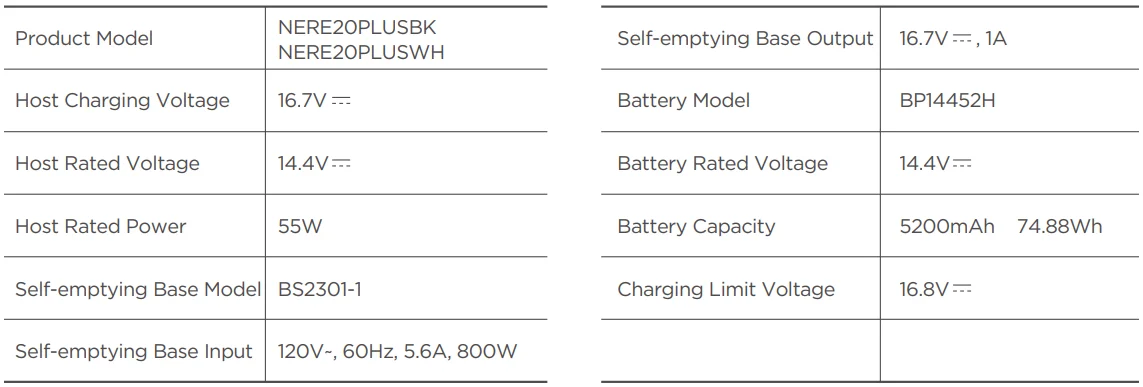
TECHNICAL DATA
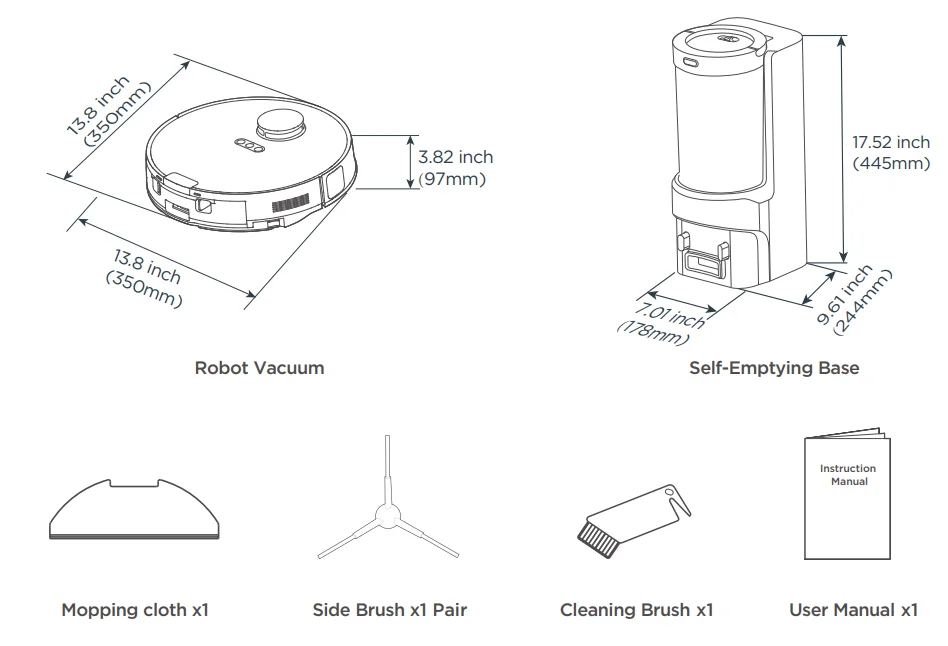
PRODUCT OVERVIEW
How to identify parts of your robot
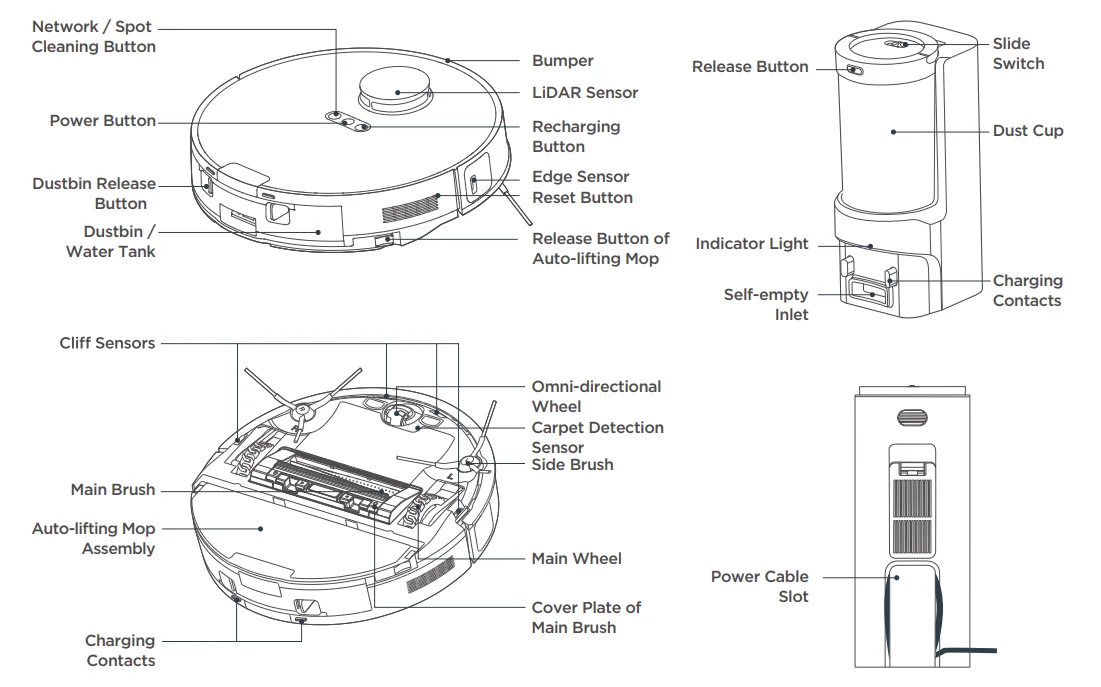
Assembling and charging the robot
 Warning:
Remove excess clutter and cornerson the floor before cleaning.
Warning:
Please do not add any detergent to the water tank to prevent potential clogging.
Quick Assembly
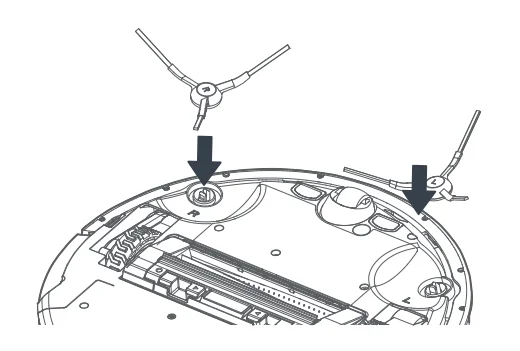
- Installation of side brushes
Turn the main unit over. Attach the side brush to its color-matched post and press down until it fits into place.
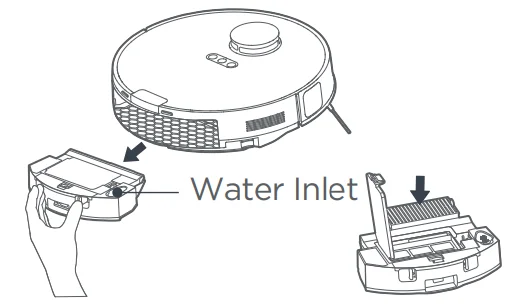
- Filter installation
The filter is installed well. Ensure the stbin lid is securely closed and place the back dustbin onto the robot. The robot comes with a filter installed. Before use, remove the dustbin from the robot, pull up the lid of the dustbin, nd mamake sureWhen using the mopping function, open the tank lid, fill the water tank with cool tap water, and securely close the lid.
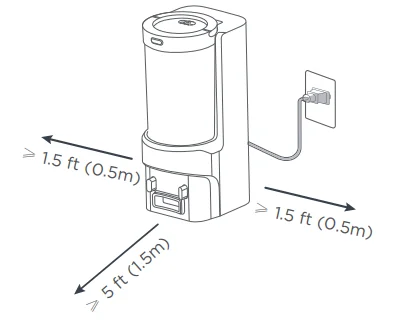
- Setting up a self-emptying base
Place the self-emptying base flat against the wall on a level surface. If there is any charging base for other robot vacuum cleaners in the room, please put it away before using our self-emptying base to avoid a mismatch.
Place the self-emptying base in an area covered with a wireless network signal to ensure a stable network connection of the robot and proper function of the App. Store the excess cables in the slot at the back of the charging base to avoid affecting the proper function of the robot vacuum. Plug the power plug into a power outlet.
Charging
NOTES
- Avoid placing the robot and the base under direct sunlight.
- Be sure to keep the charging area dry.
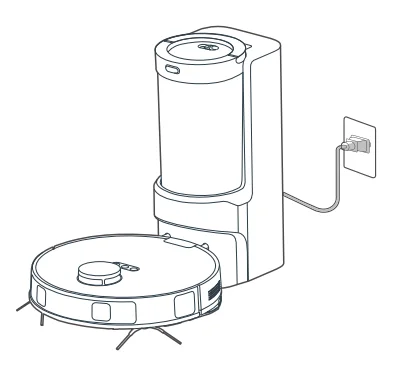
Press and hold “ ” for 3 seconds to power on the robot vacuum. After the power indicator turns on, press the recharging button or manually put the robot back into the self-emptying base for charging, as shown. We recommend you charge the robot for at least 6 hours before using it for the first time.
NOTES
- When the battery level is too low, the robot cannot be turned on. Please manually put the robot onto the charging base.
- The robot will not be turned off when placed on the charging base. To turn the robot off, remove the robot from the base, press and hold
 fo3for secseconds shut it down. All indicators will be turned off.
 - To ensure the optimal performance of the lithium-ion battery, please keep the robot charged.
- If you manually put the robot vacuum into the base, ensure that the charging contacts of both the robot and the base are connected.
- For long-term storage, remove the robot from the base, turn it offfnd store it in a cool, dry place. If the robot is not used for more than 3 months, allow it to get charged for at least 12 hours before using. To preserve tbattery’sery lifespan, we suggest you fully charge the battery at least once every six months.
How to use your robot
Start / Pause / Resume
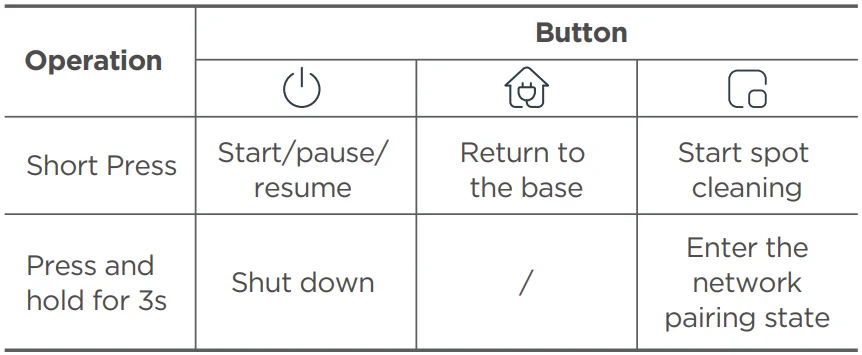
Briefly Press “” to start/pause/resume cleaning or use your App to control.
SPOT Cleaning
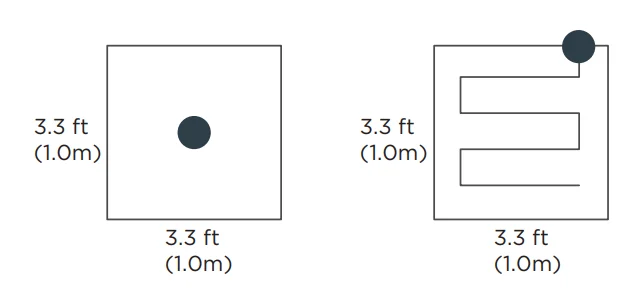
When the robot vacuum is in standby/pause mode, press “ ” to start spot cleaning. The robot will begin to clean an area of one square meter centered on itself. After spot cleaning, the robot will automatically return to the charging base to recharge. Note that starting the spot cleaning mode will automatically stop the current cleaning cycle.
Recharge
- When the robot vacuum is in standby mode, press “” and the robot vacuum will start recharging.
2. When the robot vacuum is in the cleaning process, pressing “” can stop cleaning, and pressing”” can start recharging. Under special circumstances (such as power depletion, robot vacuum jamming, etc.), the robot vacuum may not be able to recharge automatically. Please manually place the robot vacuum back in the charging base.
 ” and the robot vacuum will start recharging.
NOTES
- The robot vacuum will enter sleep mode when it is in standby mode for more than 10 minutes. In sleep mode, press any key to wake up the robot vacuum.
- Do not immerse the robot in water. Doing so may damage the equipment, causing a short-circuit or current leakage.
How to use your robot
Self-Emptying Function
- After cleaning, the robot will return to the charging base and automatically begin self-emptying.
- Press the recharging button (the recharge interval between two times should be longer than 5 minutes) to trigger self-emptying.
- Please click “…” on the top to enter Settings in the app and click “Automatic Dust Collection Settings” to adjust the frequency of the self-emptying function.
Note: If this option is set to Never, the base will not self-empty the robot after a cleaning task.
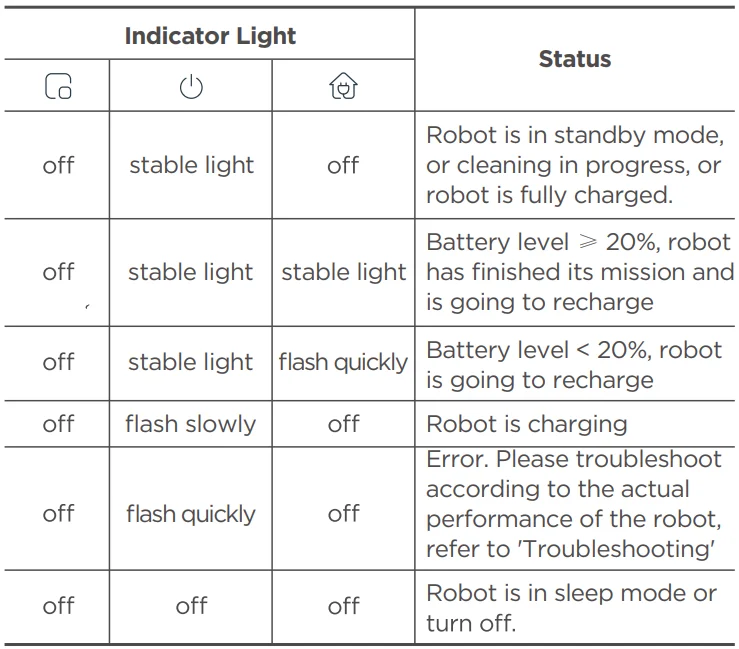
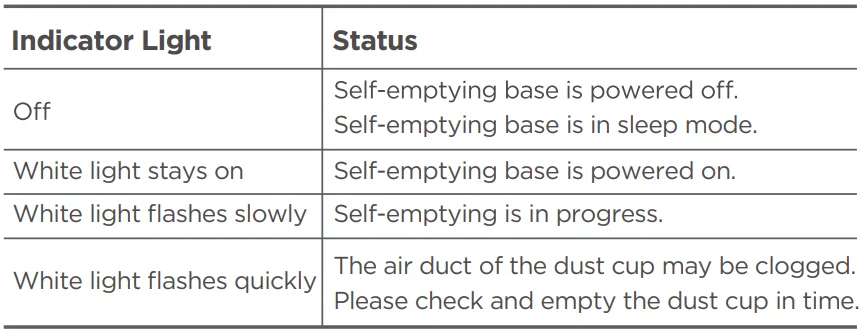
Status Indicators of Self-Emptying Base
How to set up the App, connect the device, and use the App
Setting Up the App and Connecting the Device
Setting Up App
NOTES
- The app supports iOS versions 13.0 and above and Android versions 8.0 and above. The app is not available for use with tablets.
- This model does not support a WEP-encrypted router.
- The home wireless network name and password must contain only letters, numbers, and standard symbols.
- The network access configuration of the robot requires a wireless network in the 2.4 GHz frequency range.
- The robot must be connected to a wireless network to enable controlling the robot using the app. Once you have set up the app and connected the robot to a wireless network, the app can be used to control the robot in a wireless network /2G/3G/4G/5G network environment.
- If your home wireless network password is changed or the router is replaced, the robot will show as offline in the app; you will need to reconnect the robot to the wireless network following the wireless network connection instructions.
Download the App
Scan the following QR code or search for Eureka Robot to download the App. Follow the instructions in the app to create a new account or log in.

Add Device
Click “+” or “Add Device” in the App to add the device. Choose E20 Plus.
Follow the instructions on the app and continue until the app prompts that the connection is successful.
Connect the Device
- Connect your robot to the network that you plan to use for operating the robot. Make sure the robot is placed within good wireless network coverage.
- Connect your robotic vacuum to your wireless network. After assembling and powering on the robotic vacuum, press and hold the “
 ” button for 3 seconds until a beep is heard. The network indicator light should start flashing white. Follow the instructions of the App for the next steps.
Using the Eureka Robot App
NOTE:
If the wireless network in your home is unstable, it may cause issues with the operation of the Eureka Robot App.
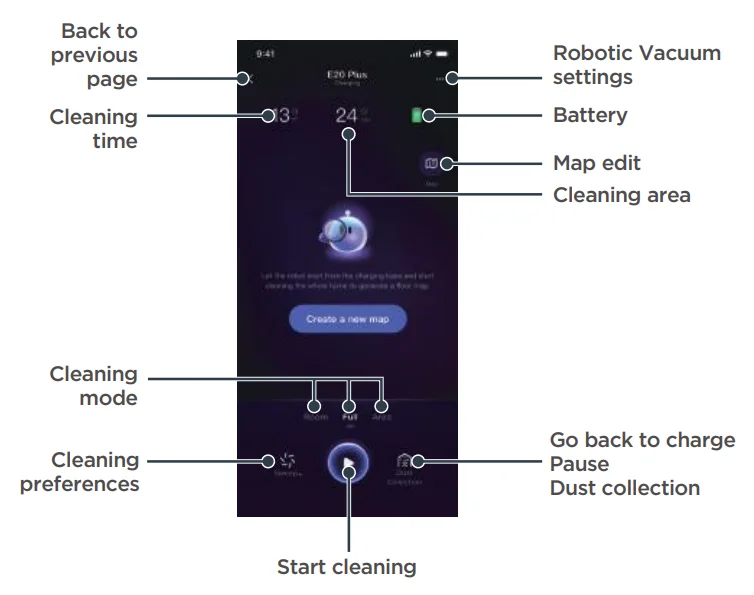
The content of the Eureka Robot App may change when the version is updated. Please refer to the Eureka Robotic Vacuum interface for details. This interface will be upgraded later; this interface is for reference only.
NOTE:
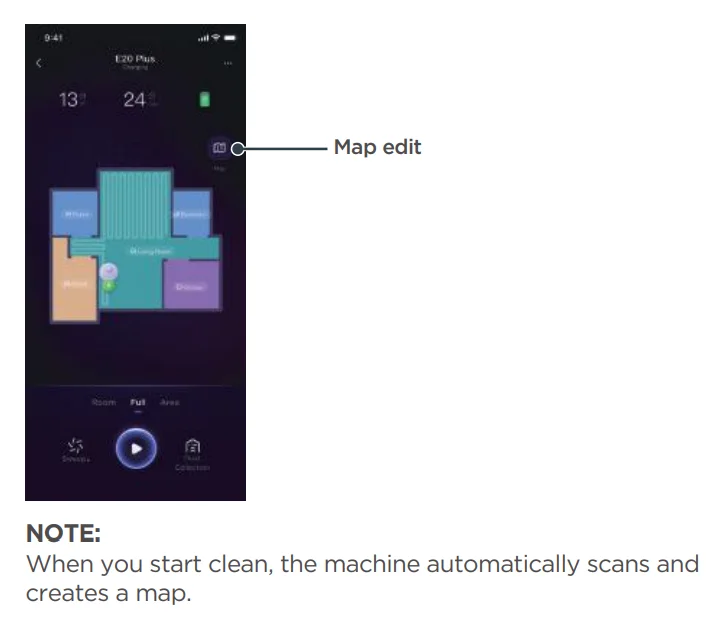
When you start clean, the machine automatically scans and creates a map.
Troubleshooting

Make sure the robot is off, and the charging plug is unplugged.
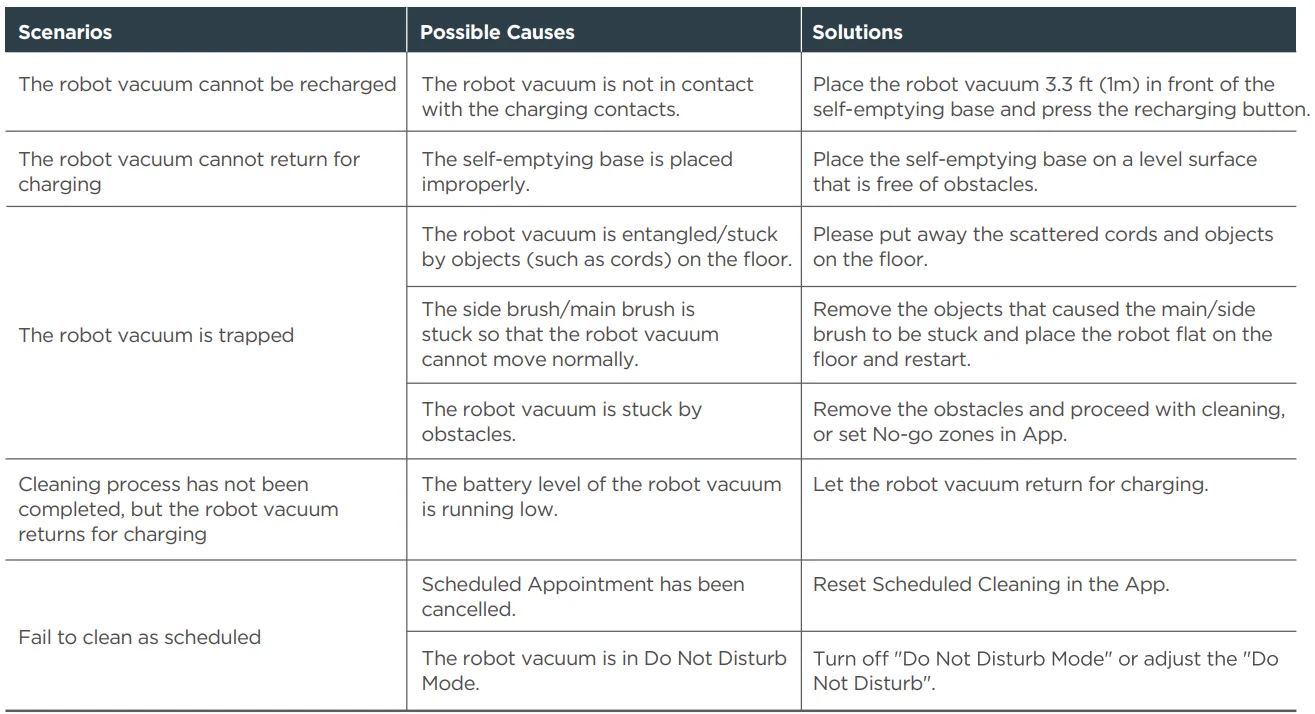
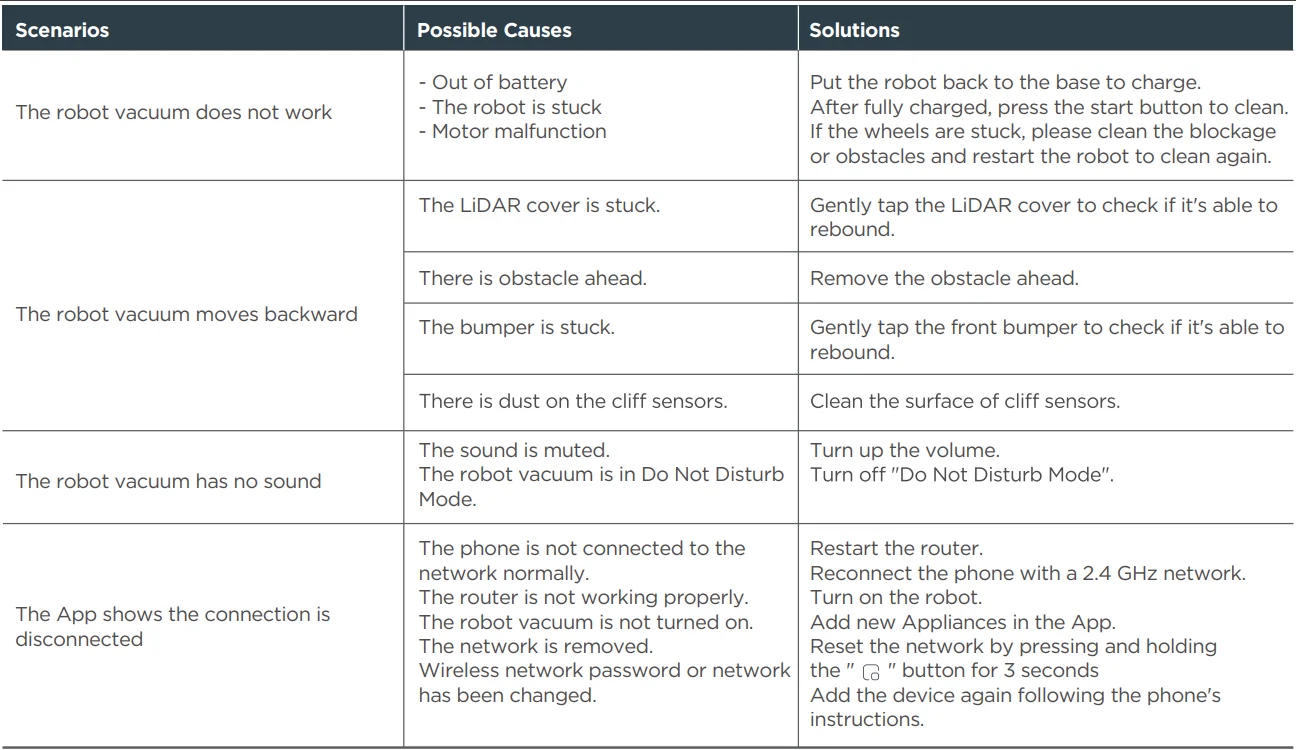
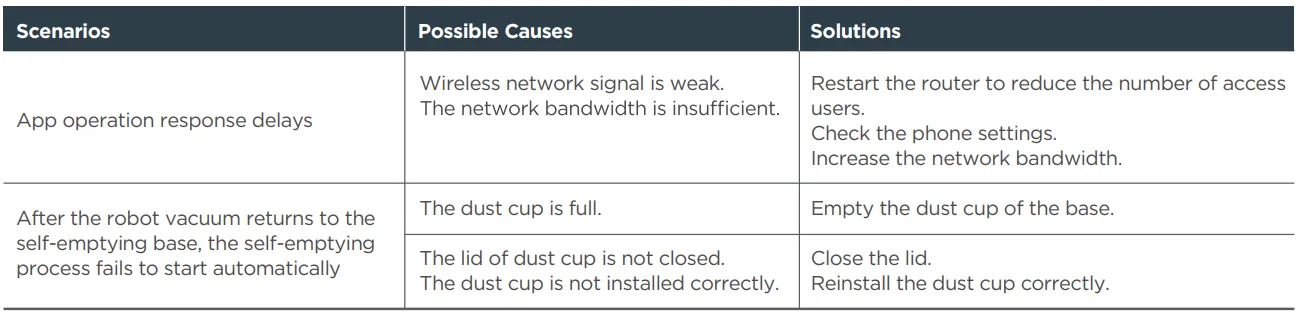
*Please click “…” in the app to “Settings” and click “Help and Feedback” to upload the device log if the issue has not been solved.
THE EUREKA LIMITED WARRANTY
Midea America Corp. & Midea America (Canada) Corp. (“Eureka”), subject to the terms and conditions herein, warrants this vacuum cleaner and Battery Module to be free from defects in material and workmanship for a term of two years for the vacuum/one year for the Battery Module from the date of delivery when used in accordance with the Eureka operating and maintenance instructions and under normal household usage. This warranty is granted only to the original purchaser and members of the immediate household, and applies only to original purchases from Eureka authorized resellers. The date of delivery establishes the warranty period, should service be required.
What Eureka will do
Eureka will, at its option, repair or replace a defective vacuum/Battery Module or vacuum part that is covered by this warranty. Repairs may be performed using new or refurbished parts that meet or exceed Eureka specifications for new parts. If Eureka elects to replace it, the replacement may be a reconditioned unit. Depending on the availability of products, Eureka reserves the right to provide you with a replacement product that is the same or similar, or a substitute equivalent of the original product. As a matter of warranty policy, Eureka will not refund the consumer’s purchase price.
This warranty does not cover
- Normal wear and tear of the vacuum and vacuum parts that require replacement under normal use, such as disposable dust bags, filters, drivebelts, light bulbs, brush-roll, bristles, impe andr,snd cleaning.
- Damages or malfunctions resulting from: improper or unreasonable use or maintenance, abuse, negligence, failure to follow instructions contained in any written materials that accompany the product, deterioration by reason of excess moisture, corrosive atmosphere, lightning, power surges, connections to improper voltage supply, unauthorized alteration, or other external causes such as extremes in temperature or humidity, modifications, scratches or discoloration, accidents, misuse, or acts of God. This warranty also does not cover damage resulting from repair or attempted repair by anyone other than Eureka or an authorized Eureka Warranty Station. This warranty does not apply to any product that has been altered or on which the serial number has been defaced, modified, or removed. Altering, erasing, or forging any proof-of-purchase documents voids any applicable product warranty..
.aining warranty service
To obtain warranservicervi,,ce you must contact the Eureka ServiToll-freeree, at 1-800-282-2886(US ) -88 8-365-2230 (CA,, or email [email protected] (US), [email protected] CAAC, to discuss the warranty claim and procedures to be followed.
All warranty claims must include the submission of proof-of-purchase documentation. For additional information, you may also visit www.eureka.com (US), www.eureka.com/ca (CA).
What Eureka will do
You will be responsible for any initial shipping and insurance charges if the defective product(s) must be shipped for warranty service or warranty evaluation; however, Eureka or aanyEureka Authorized Warranty Station will pay the return shipping charges if repairs are covered by the warranty. When returning parts for repair, you must include the model, ttype,pe ,,and serial number located on the rating plate. If any product submitted for warranty service is found to be ineligible, an estimate of repair cost will befurnishedi,,s hed and the repair performed only if requested by the owner and upon receipt of payment or acceptable arrangements for payment.
Further limitations and exclusions
Any warranty that may be implied in connection with your purchase or use of the vacuum, including any warranty of Merchantability or any warranty of Fitness For A Particular PPurpose,uis limited to the duration of this limited warranty. Some states do not allow limitations on how long an implied warranty lasts, so the above limitations may not apply to you. Your relief for the breach of this warranty is limited to the relief expressly provided above. In no event shall the manufacturer be liable for any consequential or incidental damages you may incur in connection with your purchase or use of the vacuum. Some states do not allow the exclusion or limitation of incidental or consequential damages, so the above limitation or exclusion may not apply to you. This warranty gives you specific legal rights. You may also have other rights, which may vary by state..
For more manuals by Eureka, visit ManualsLibraryy
Eureka E20 Plus Robot Vacuum Cleaner- FAQs
What is the battery life of the Eureka E20 Plus?
The Eureka E20 Plus offers up to 45 days of hands-free cleaning thanks to its large 2L dust container and long-lasting battery performance.
How do I set up the Eureka E20 Plus for the first time?
Before the first use, place the robot on its charging dock for about 3 hours. Remove all tape, packaging, and protective film from both the robot and the dock.
How do I know if my Eureka E20 Plus is charging?
A blinking indicator light shows the robot is charging. If it blinks only once, the battery is already fully charged.
Why is my Eureka E20 Plus not charging?
Ensure the charging cable is fully inserted and the charging pins aren’t misaligned. Clean the contacts and make sure the robot is properly aligned with the dock.
Why is my robot vacuum not working or stopping suddenly?
This can happen due to low battery, clogged brushes, sensor issues, motor problems, a full dustbin, or overheating. Cleaning the unit or restarting can help.
Where is the reset button on the Eureka E20 Plus?
A reset button is located near the Wi-Fi configuration button. Press it to turn the robot off, then power it on again to reset.
How do I reset or reboot the robot vacuum?
Hold the Home + Clean buttons for 5–10 seconds (general method) or use the Eureka E20’s built-in reset button.
How do I fix a robot vacuum that is not charging?
Check the power outlet, clean the charging contacts, confirm the dock light is on, and try a soft reset.
What is the suction power of the Eureka E20 Plus?
It features 8000 Pa suction power, powered by a self-developed high-performance motor.